
1. Informació important de seguretat
Please read all instructions carefully before using the Eumspo G3 Bluetooth Headset. Keep this manual for future reference.
- Do not expose the headset or charging case to extreme temperatures, moisture, or corrosive materials.
- Eviteu deixar caure o sotmetre el dispositiu a forts impactes.
- Do not attempt to disassemble or modify the headset or charging case. This may void the warranty and cause damage.
- Mantenir fora de l'abast dels nens i mascotes.
- Feu servir només el cable de càrrega proporcionat i un adaptador de corrent certificat.
- L'exposició prolongada a sons forts pot causar danys auditius. Ajusteu el volum a un nivell segur.
2. Producte acabatview
The Eumspo G3 Bluetooth Headset is designed for clear communication and extended use. It features Bluetooth 5.0 connectivity, dual-mic noise cancellation, and a portable charging case.

Figure 2.1: Eumspo G3 Bluetooth Headset and Charging Case.

Figure 2.2: Headset components and controls, including the Multi-Function Button (MFB), Power On/Off, Dual-Mic Noise Cancelling, and Volume controls.
3. Què hi ha a la caixa
El paquet normalment inclou:
- Eumspo G3 Bluetooth Headset
- Estoig de càrrega
- Cable de càrrega USB
- Manual d'usuari
- Ear tips/ear hooks
4. Configuració
4.1 Charging the Headset and Case
Before first use, fully charge the headset and its charging case.
- Place the headset into the charging case. Ensure it is properly seated.
- Connecteu la funda de càrrega a una font d'alimentació mitjançant el cable USB proporcionat.
- The LED indicator on the charging case will show the charging status. A full charge is indicated when the display shows 100.

Figure 4.1: The charging case provides power to the headset and displays the charge level.
4.2 Vinculació amb un dispositiu
Follow these steps to pair your Eumspo G3 headset with your smartphone or other Bluetooth-enabled device:
- Take the headset out of the charging case. It will automatically enter pairing mode.
- On your device, enable Bluetooth.
- Cerca available Bluetooth devices and select "G3" to connect.
- Un cop connectats, els auriculars indicaran que l'emparellament s'ha realitzat correctament.
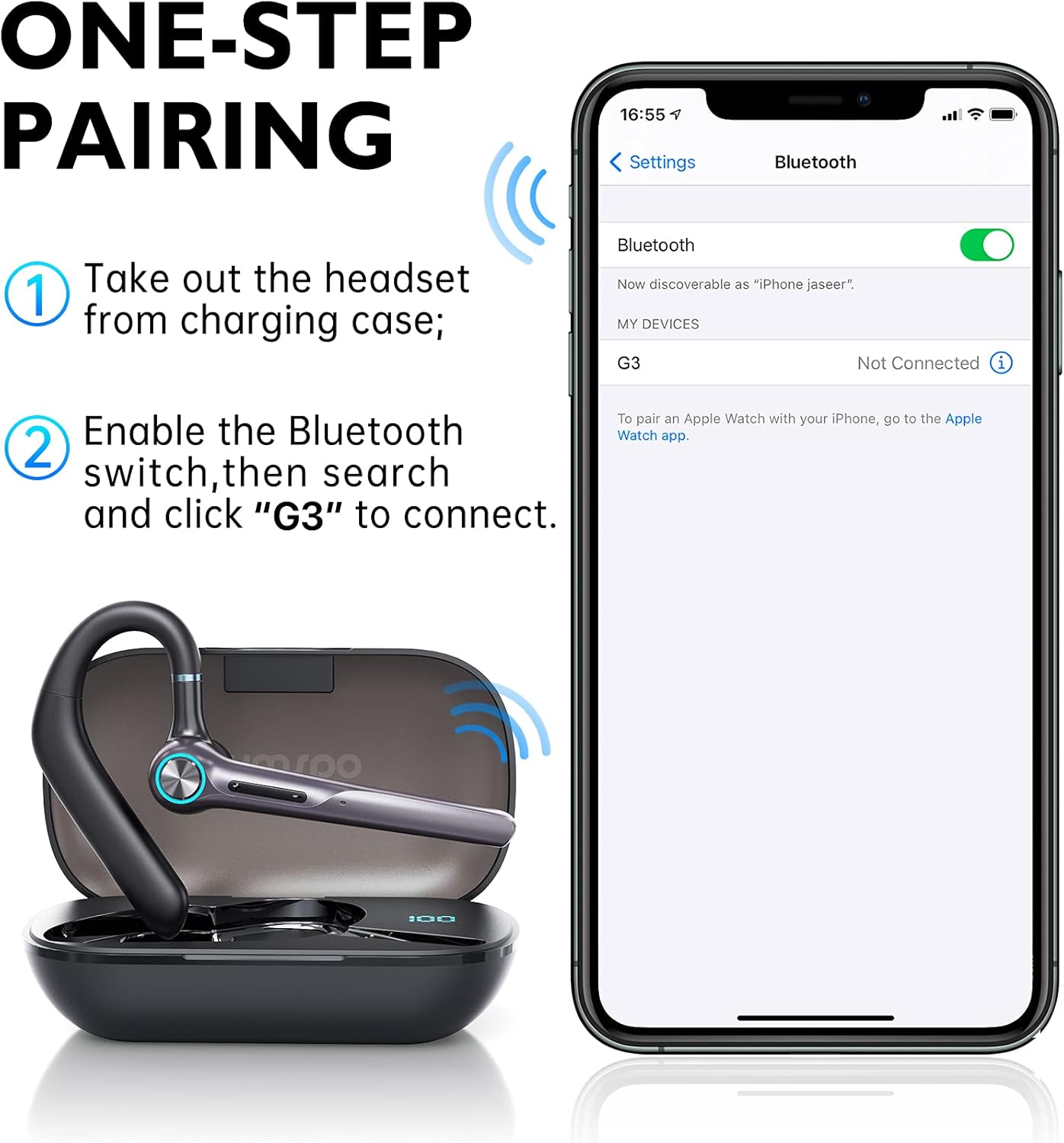
Figure 4.2: Visual guide for one-step pairing with a mobile device.
Vídeo 4.1: Un overview of the Eumspo G3 Bluetooth Noise-Cancelling Headset, demonstrating key features and usage.
5. Instruccions de funcionament
5.1 Com portar els auriculars
The Eumspo G3 headset is designed for comfortable wear on either ear.
- Adjust the ear hook to fit securely over your ear.
- The headset can rotate 180 degrees to switch between the right and left ear.
- The earpiece can also rotate 270 degrees for optimal positioning and comfort.

Figure 5.1: The headset can be worn on either the right or left ear and adjusted for fit.
5.2 Basic Functions (Calls & Music)
The Multi-Function Button (MFB) and volume buttons control various headset operations.
- Encès/apagat: Press and hold the Power On/Off button.
- Respondre/Finalitzar la trucada: Feu clic al botó MFB una vegada.
- Rebutja la trucada: Premeu llargament el botó MFB durant 3 segons.
- Torna a marcar l'últim número: Click the MFB button twice.
- Reproduir/pausar música: Feu clic al botó MFB una vegada.
- Pujar el volum: Click the "+" button once.
- Baixar el volum: Click the "-" button once.
- Pista següent: Premeu llargament el botó "+".
- Pista anterior: Premeu llargament el botó "-".
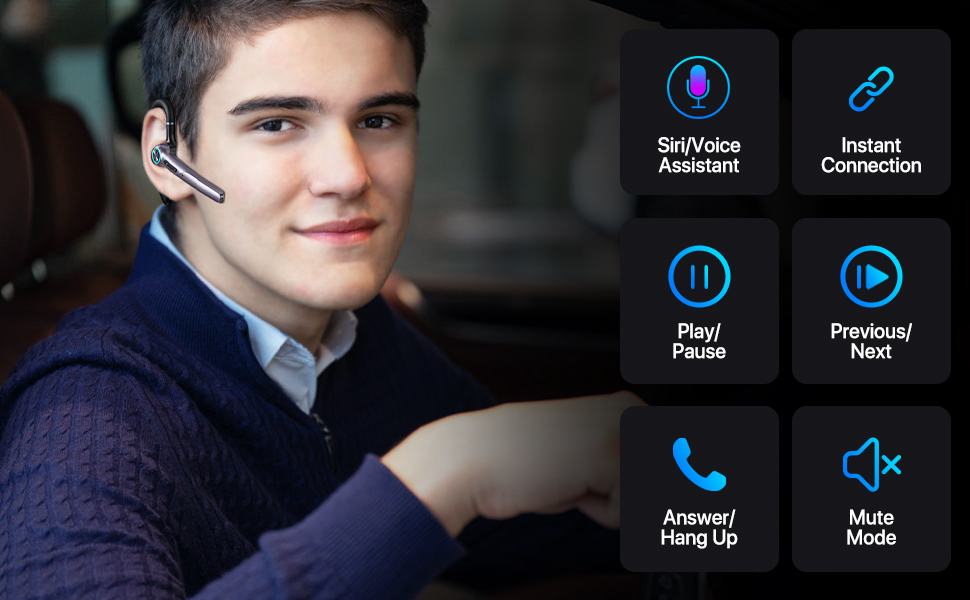
Figura 5.2: Detallada view of headset controls for various functions.
6. Manteniment
6.1 Neteja
Una neteja regular ajuda a mantenir el rendiment i la higiene dels auriculars.
- Wipe the headset and charging case with a soft, dry, lint-free cloth.
- No utilitzeu netejadors abrasius, alcohol ni dissolvents químics.
- Netegeu les puntes de les orelles regularment amb anunciamp drap i deixeu-les assecar completament abans de tornar-les a enganxar.
6.2 Emmagatzematge
When not in use, store the headset in its charging case to protect it from dust and damage.
- Emmagatzemar en un lloc fresc i sec, lluny de la llum solar directa.
- If storing for an extended period, charge the headset and case periodically to maintain battery health.
7. Solució De Problemes
If you encounter issues with your Eumspo G3 headset, refer to the following common solutions:
| Problema | Solució |
|---|---|
| Els auriculars no s'encén. | Ensure the headset is charged. Place it in the charging case and connect the case to power. |
| No es pot emparellar amb el dispositiu. | Make sure Bluetooth is enabled on your device. Ensure the headset is in pairing mode (taken out of the case). Forget previous pairings on your device and try again. Move closer to the device. |
| No hi ha so o hi ha mala qualitat de so. | Check the volume levels on both the headset and your connected device. Ensure the headset is properly seated in your ear. Re-pair the headset with your device. |
| L'estoig de càrrega no es carrega. | Verify the charging cable and power adapter are working correctly. Ensure the cable is securely connected to both the case and the power source. |
| MFB button unresponsive. | Some users have reported intermittent issues with the MFB button. Try resetting the headset by placing it back in the charging case and taking it out again. If the issue persists, contact customer support. |
8. Especificacions
| Característica | Detall |
|---|---|
| Marca | Eumspo |
| Número de model | G3 |
| Tecnologia de connectivitat | Bluetooth v5.0, Wireless |
| Col·locació de l'orella | A l'orella |
| Control de soroll | Cancel·lació activa del soroll |
| Durada mitjana de la bateria | 48 hores (amb estoig de càrrega) |
| Capacitat de la caixa de càrrega | 400 mAh |
| Dispositius compatibles | Android and iOS Smartphones, Laptops, Tablets |
| Nivell de resistència a l'aigua | Impermeable |
| Material | Plàstic |
| Dimensions | 5.67 x 3.07 x 1.54 polzades |
| Pes | 4.97 unces |
9. Informació de la garantia
Eumspo products typically come with a limited warranty. Please refer to the product packaging or the official Eumspo website for specific warranty terms and conditions. Keep your proof of purchase for warranty claims.
10. Suport
For further assistance, technical support, or customer service, please contact Eumspo through their official support channels. Details can usually be found on the product packaging or their weblloc.