
1. Introducció
Aquest manual proporciona instruccions completes per a la configuració, el funcionament i el manteniment del vostre ratolí sense fil recarregable Cherry MW 9100. L'MW 9100 és un ratolí compacte i versàtil que ofereix dues opcions de connectivitat (Bluetooth o receptor USB de 2.4 GHz) i una bateria recarregable pràctica.
Les característiques clau inclouen:
- Disseny compacte amb funcionalitat de càrrega.
- Funcionament flexible: s'utilitza mentre es carrega mitjançant un cable USB-C.
- Doble connectivitat: Bluetooth o receptor USB de 2.4 GHz.
- Emmagatzematge magnètic per al receptor USB, ideal per viatjar.
- Configuració de DPI ajustable per a un ús variat.
2. Contingut del paquet
Verifiqueu que tots els elements siguin presents al paquet:
- Ratolí sense fil recarregable Cherry MW 9100
- Cable de càrrega USB-C
- Receptor USB de 2.4 GHz
- Bossa protectora
- Manual d'instruccions (aquest document)
3. Configuració
3.1 Càrrega del ratolí
El ratolí Cherry MW 9100 té una bateria recarregable integrada. Abans del primer ús, o quan la bateria estigui baixa, connecteu el cable USB-C inclòs al ratolí i a una font d'alimentació USB (per exemple, un port USB de l'ordinador, un adaptador de paret USB). El ratolí es pot utilitzar normalment mentre es carrega.

Imatge 3.1: A dalt view del ratolí Cherry MW 9100, mostrant el llum indicador de càrrega.
3.2 Connexió del ratolí
L'MW 9100 ofereix dos mètodes de connexió: sense fil de 2.4 GHz mitjançant un receptor USB o Bluetooth.
3.2.1 Connexió sense fil de 2.4 GHz
- Localitza el receptor USB. Està guardat magnèticament en un compartiment a la part inferior del ratolí.
- Inseriu el receptor USB en un port USB disponible de l'ordinador.
- A la part inferior del ratolí, feu lliscar l'interruptor a la posició "RF".
- El ratolí s'hauria de connectar automàticament a l'ordinador.
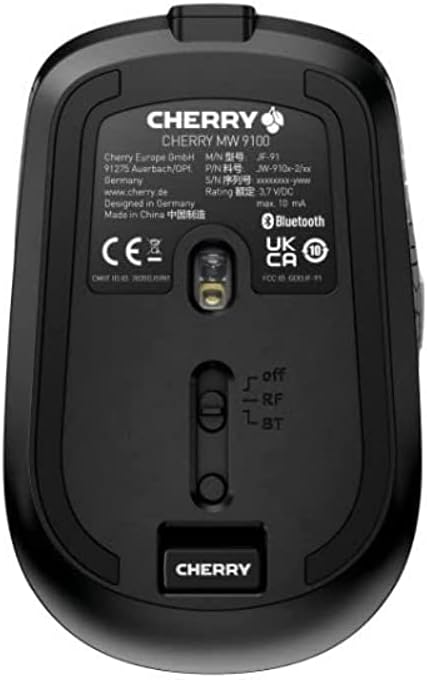
Imatge 3.2: Part inferior del ratolí Cherry MW 9100, on es destaca l'emmagatzematge del receptor USB i el commutador de mode de connexió.
3.2.2 Connexió Bluetooth
- A la part inferior del ratolí, feu lliscar l'interruptor a la posició "BT" (Bluetooth).
- Premeu i manteniu premut el petit botó d'emparellament situat a prop de l'interruptor de connexió a la part inferior del ratolí fins que l'indicador LED del ratolí comenci a parpellejar, indicant el mode d'emparellament.
- A l'ordinador o dispositiu, obriu la configuració de Bluetooth i cerqueu dispositius nous.
- Seleccioneu "Cherry MW 9100" de la llista de dispositius disponibles per completar el procés d'emparellament.
4. Instruccions de funcionament
4.1 Funcions bàsiques
El ratolí Cherry MW 9100 inclou botons de clic esquerre i dret estàndard, una roda de desplaçament (que també funciona com a botó de clic central) i dos botons laterals per a la navegació (normalment endavant/enrere).
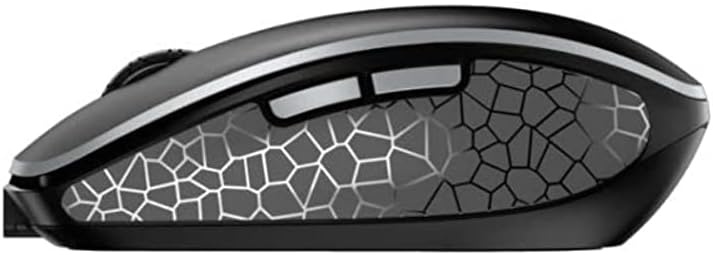
Imatge 4.1: lateral view del ratolí Cherry MW 9100, que il·lustra el disseny ergonòmic i els botons laterals.
4.2 Ajust de DPI
El ratolí inclou un botó DPI (punts per polzada), normalment situat a prop de la roda de desplaçament, que permet ajustar la sensibilitat del cursor. Premeu aquest botó per canviar per les diferents configuracions de DPI per adaptar-les a les vostres preferències o requisits de la tasca.

Imatge 4.2: Una mà que demostra la comoditat d'agafada del ratolí Cherry MW 9100 durant l'ús.
5. Manteniment
Per garantir un rendiment i una longevitat òptims del vostre ratolí Cherry MW 9100:
- Neteja: Feu servir un drap suau i sec per netejar la superfície del ratolí. Per a la brutícia persistent, feu un drap lleugerament sec.amp es pot fer servir un drap, però assegureu-vos que no entri humitat al dispositiu. Eviteu productes químics agressius o materials abrasius.
- Emmagatzematge: Quan no l'utilitzeu, especialment durant els viatges, guardeu el ratolí a la funda protectora proporcionada per evitar ratllades i danys.
- Cura de la bateria: Eviteu descarregar completament la bateria amb freqüència. Torneu a carregar el ratolí quan aparegui l'indicador de bateria baixa.
6. Solució De Problemes
| Problema | Causa possible | Solució |
|---|---|---|
| El ratolí no respon | Bateria baixa, mode de connexió incorrecte, receptor USB no connectat, Bluetooth no emparellat. |
|
| Connexió intermitent (Bluetooth) | Interferències, problemes amb el controlador del dispositiu, distància del dispositiu. |
|
| El moviment del cursor és erràtic o lent | Sensor òptic brut, bateria baixa, configuració de DPI incorrecta. |
|
7. Especificacions
| Característica | Detall |
|---|---|
| Marca | Cirera |
| Número de model | JW-9100US-2 |
| Tecnologia de connectivitat | Bluetooth, USB sense fil de 2.4 GHz |
| Detecció de moviment | Òptic |
| Característiques especials | Lleuger, portàtil, recarregable |
| Dimensions del producte | 4 x 3 x 2 polzades |
| Pes de l'article | 6.4 unces |
| Color | Negre |
8. Garantia i Suport
Per obtenir informació sobre la garantia i assistència tècnica, consulteu la pàgina oficial de Cherry. weblloc web o contacteu directament amb el servei d'atenció al client de Cherry. Conserveu el comprovant de compra per a reclamacions de garantia.
Fabricant: CIRERERA
Weblloc: www.cherry.de