
Cuifati CUIFATIywqr0emxu88079
HRD-700 Portable Shortwave Radio User Manual
Model: CUIFATIywqr0emxu88079 | Brand: Cuifati
1. Introducció
The HRD-700 Portable Shortwave Radio is a versatile and compact device designed for comprehensive radio reception and music playback. It supports multiple frequency bands including FM, MW, SW, WB (NOAA Weather Band), and features Bluetooth 5.0 connectivity and memory card playback. Its portable design makes it ideal for various indoor and outdoor activities.

Imatge 1.1: Frontal view of the HRD-700 Portable Shortwave Radio with its telescopic antenna extended.
Característiques principals:
- Recepció de banda completa: Capable of receiving FM, MW, SW, and WB (NOAA Weather Band) frequencies.
- Connectivitat Bluetooth 5.0: Seamlessly connect to Bluetooth-enabled devices for audio streaming.
- Suport de targeta de memòria: Reprodueix àudio files directly from a memory card (TF card).
- Cerca i emmagatzematge automàtics: Features coding pulley switch tuning with automatic station search and storage.
- Bateria de llarga durada: Equipat amb una bateria de 1000 mAh per a un ús prolongat.
- Temporitzador de son: Customizable sleep timer function (10-70 minutes).
- Àudio potent: Features a 3W diaphragm horn for clear and loud sound output.
- Disseny portàtil: Compact and lightweight, designed for easy carrying.
2. Components del producte
Before using your HRD-700 radio, please ensure all components are present in the packaging.
Què hi ha a la caixa:
- HRD-700 Portable Shortwave Radio Unit
- USB Type-C Charging Cable (Power Cord)
- Bossa de transport
- Manual d'usuari (aquest document)
3. Controls i Funcions
Familiarize yourself with the various parts and controls of your HRD-700 radio for optimal operation.

Image 3.1: Detailed diagram of the HRD-700 radio highlighting key components and their functions.
| Component | Funció |
|---|---|
| Antena de tirants | Extend for improved FM, SW, and WB reception. |
| Rotating Tuning Button | Used for manual tuning of radio frequencies. |
| Mostra | Mostra la freqüència, el mode, l'estat de la bateria i altra informació. |
| FM Road Pulley | Another control for tuning, possibly for fine-tuning FM. |
| Altaveus Externs | Audio output for listening to radio or music. |
| Port de càrrega tipus C | Connect the USB Type-C cable for charging the internal battery. |
| Forat del cordó | Attachment point for a lanyard or wrist strap for portability. |
| Jack de targeta TF | Insert a TF (microSD) card for playing stored audio files. |
| Tapa de la bateria | Access point for the internal battery. |
| Interruptor de selecció de mode | Switch between Radio (Channel Reception), BT (Bluetooth Reception), and M.Play (TF Card Mode). |
4. Configuració
4.1 Càrrega de la bateria
The HRD-700 radio comes with a built-in 1000mAh rechargeable lithium battery. Before first use, it is recommended to fully charge the battery.
- Locate the Type C Charging Port on the radio.
- Connect one end of the provided USB Type-C charging cable to the radio's charging port.
- Connecteu l'altre extrem del cable USB a un adaptador de corrent USB estàndard (no inclòs) o al port USB d'un ordinador.
- The display will indicate charging status. Once fully charged, the indicator will change or turn off.

Image 4.1: The HRD-700 radio with an illustration of its high-capacity 1000mAh lithium battery, emphasizing improved battery life.
4.2 Inserting a Memory Card (Optional)
If you wish to play audio files from a memory card, follow these steps:
- Locate the TF Card Jack on the side or back of the radio.
- Gently insert a compatible TF (microSD) card into the slot until it clicks into place. Ensure the card is inserted in the correct orientation.
- To remove, gently push the card inwards until it springs out.
5. Instruccions de funcionament
5.1 Engegada/Apagada i Control de Volum
- To power on the radio, locate the power button/switch and press/slide it to the ON position.
- To power off, press/slide the power button/switch to the OFF position.
- Adjust the volume using the dedicated volume control knob or buttons. The radio features a 3W speaker capable of over 120 decibels.
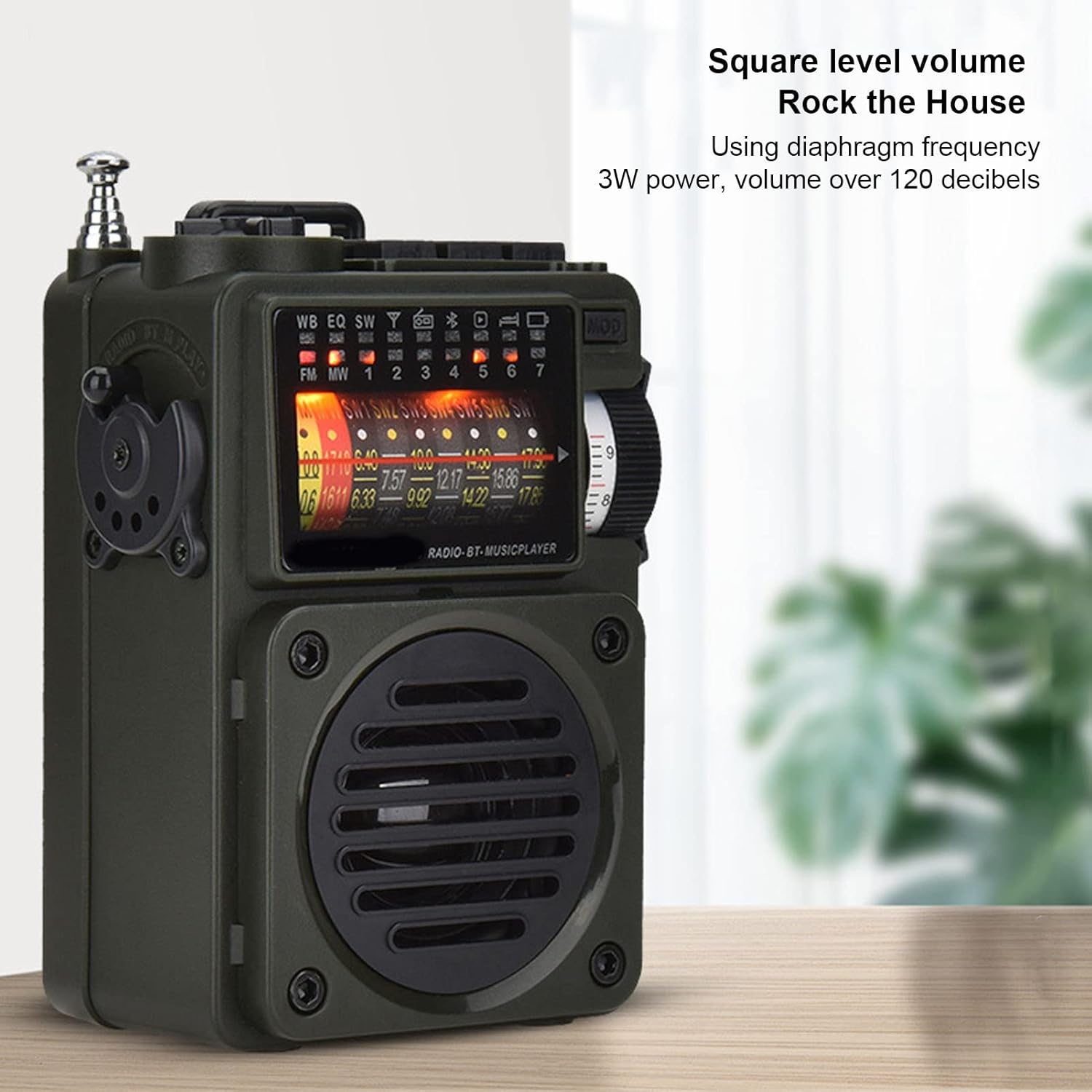
Image 5.1: The HRD-700 radio demonstrating its powerful sound output, suitable for filling a room.
5.2 Radio Reception (FM/MW/SW/WB)
The HRD-700 supports a wide range of radio bands.
- Seleccioneu el mode: Use the Mode Selection Switch to select "Radio" mode.
- Amplia l'antena: For optimal reception on FM, SW, and WB bands, fully extend the Tie Rod Antenna.
- tuning:
- Sintonització manual: Use the Rotating Tuning Button or FM Road Pulley to manually scan for stations.
- Cerca automàtica: Press the designated button (refer to display icons for "Auto Search") to automatically scan and store available stations.
- Station Recall: After automatic search, use the tuning controls to cycle through stored stations.

Image 5.2: The HRD-700 radio's display showing various frequency bands (FM, MW, SW, WB) and tuning indicators.
5.3 Reproducció de música per Bluetooth
Connect your smartphone or other Bluetooth devices to the HRD-700 for wireless audio streaming.
- Seleccioneu el mode: Use the Mode Selection Switch to select "BT" (Bluetooth) mode. The radio will enter pairing mode, indicated by a flashing Bluetooth icon on the display.
- Activa el Bluetooth: On your device (e.g., smartphone), enable Bluetooth and search for available devices.
- Parella: Select "HRD-700" from the list of found devices. Once connected, the Bluetooth icon on the radio's display will become solid.
- Reproduir música: Start playing music on your connected device. Audio will now play through the HRD-700 radio.

Image 5.3: The HRD-700 radio demonstrating its wireless Bluetooth connectivity with a smartphone, offering a stable connection up to 10 meters.
5.4 Memory Card (TF Card) Playback
Play your favorite audio filedirectament des d'una targeta TF.
- Insereix la targeta: Ensure a TF card with audio files is properly inserted into the TF Card Jack (refer to Section 4.2).
- Seleccioneu el mode: Use the Mode Selection Switch to select "M.Play" (Memory Play) mode.
- Reproducció: La ràdio començarà a reproduir àudio automàticament files from the TF card. Use the radio's controls (e.g., next/previous track buttons, if available) to navigate your music.
5.5 Funció de temporitzador de son
The sleep timer allows you to set a duration after which the radio will automatically turn off.
- Access the sleep timer setting through the radio's menu or a dedicated button (refer to display icons or specific buttons).
- Adjust the sleep timer duration between 10 and 70 minutes.
- Confirm your selection. The radio will power off automatically after the set time.
6. Manteniment
6.1 Neteja
- Netegeu l'exterior de la ràdio amb un drap suau i sec.
- No utilitzeu netejadors abrasius, ceres o dissolvents, ja que poden danyar l'acabat.
- Eviteu que entri humitat a cap obertura.
6.2 Emmagatzematge
- Quan no la feu servir durant períodes prolongats, guardeu la ràdio en un lloc fresc i sec, allunyat de la llum solar directa i de temperatures extremes.
- It is advisable to partially charge the battery before long-term storage and recharge it every few months to maintain battery health.
- Use the provided carrying pouch to protect the radio from dust and scratches.
7. Solució De Problemes
If you encounter issues with your HRD-700 radio, please refer to the following common problems and solutions.
| Problema | Causa possible | Solució |
|---|---|---|
| La ràdio no s'encén. | La bateria està esgotada. | Charge the radio using the provided USB Type-C cable. |
| Mala recepció de ràdio. | Antena no estesa; zona de senyal feble; interferències. | Fully extend the telescopic antenna. Move to an area with better signal. Avoid sources of electronic interference. |
| El Bluetooth no es connecta. | Radio not in BT mode; device Bluetooth off; too far from radio. | Ensure radio is in "BT" mode. Turn on Bluetooth on your device. Keep devices within 10 meters (32.8 feet). Try re-pairing. |
| No sound from memory card. | Card not inserted correctly; radio not in M.Play mode; unsupported file format. | Re-insert the TF card. Switch to "M.Play" mode. Ensure audio files estan en un format compatible. |
| La pantalla està en blanc o parpelleja. | Bateria baixa; problema intern. | Charge the radio. If the problem persists, contact customer support. |
8. Especificacions
| Característica | Detall |
|---|---|
| Marca | Cuifati |
| Número de model | CUIFATIywqr0emxu88079 |
| Tecnologia de connectivitat | Bluetooth |
| Versió Bluetooth | 5.0 (up to 10m/32.8ft stable connection range) |
| Tecnologia del sintonitzador | FM, AM |
| Bandes de ràdio compatibles | SW, FM, AM, WB (NOAA Weather Band) |
| Font d'alimentació | Battery Powered (1000mAh internal battery) |
| Sortida de l'altaveu | 3W (over 120 decibels) |
| Tecnologia de visualització | LCD |
| Característica especial | Portable, Memory Card Playback, Sleep Timer |
| Pes de l'article | 7.7 unces |
| Dimensions del paquet | 5.47 x 5 x 2.05 polzades |
| País d'origen | Xina |
9. Garantia i Suport
Cuifati products are manufactured to high-quality standards. For any questions, technical support, or warranty inquiries, please contact the seller or manufacturer directly through your purchase platform.
Si us plau, conserveu el comprovant de compra per a qualsevol reclamació de garantia.
Per a més informació, podeu visitar el Cuifati Store on Amazon.
Ask a question about this manual
Ask about setup, troubleshooting, compatibility, parts, safety, or missing instructions. Manuals+ will review the question and use this page’s manual context to help answer it.