
FLEXISPOT EC5S-FR+PR1808-Black
FLEXISPOT Enhanced Standing Desk
Manual d'usuari
Model: EC5S-FR+PR1808-Black
Producte acabatview
The FLEXISPOT Enhanced Standing Desk is an electric, motorized, height-adjustable desk designed to promote a healthy work-life balance. It features a robust dual-motor system and a three-section leg design, offering a wide height adjustment range from 62 cm to 127 cm. This desk is suitable for users ranging from 110 cm to 203 cm in height.
Les característiques clau inclouen:
- Wide Height Adjustment: From 62 cm to 127 cm, accommodating various user heights.
- Powerful Dual Motor System: Ensures smooth and quick height transitions with a lifting speed of 3.5 cm/s.
- Alta capacitat de càrrega: Supports up to 160 kg, ideal for multiple monitors and heavy equipment.
- Panell de control intel·ligent: Features three programmable memory height presets and a timed reminder function for regular movement.
- Sistema anticol·lisió: Automatically stops and retracts when an obstacle is detected, preventing damage and injury.
- Durable and Certified Materials: FSC-certified desktop meeting E0 environmental standards, ensuring safety and sustainability.

Figure 1: FLEXISPOT Enhanced Standing Desk, highlighting its robust design and 160kg load capacity.
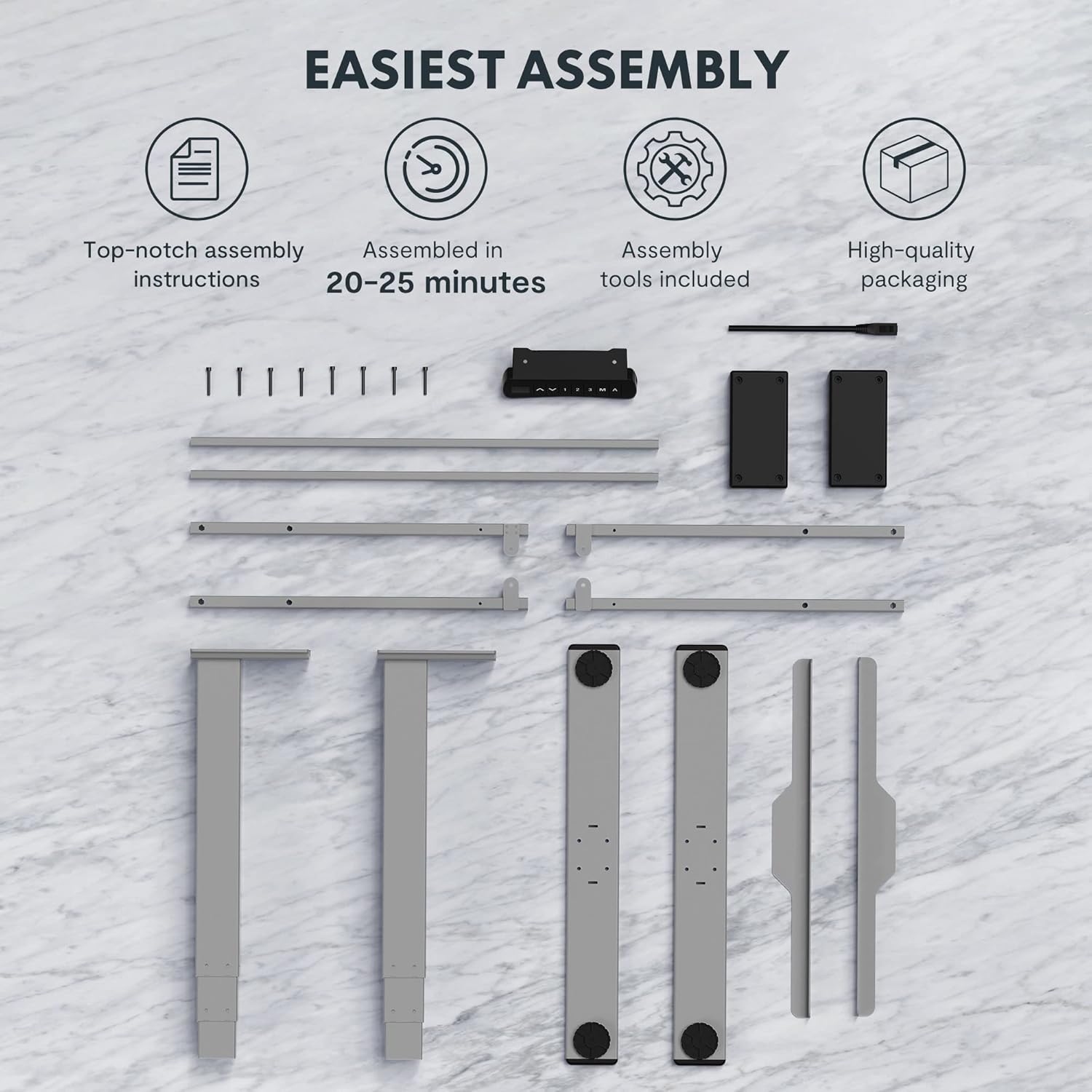
Figure 2: Available desktop options and material certifications, including FSC-certified wood.
Advertències de seguretat
Please read and understand all safety warnings before operating the desk to prevent injury or damage to the product.
- Protecció contra col·lisions: The desk is equipped with an anti-collision system. If an obstacle is detected during movement, the tabletop will stop and retract slightly. Do not intentionally obstruct the desk's movement.
- Avís de sobrecàrrega: Do not exceed the maximum load capacity of 160 kg. Overloading can damage the motor and frame.
- Nens i animals de companyia: Keep children and pets away from the desk during operation. Moving parts can cause injury.
- Font d'alimentació: Ensure the power cord is properly connected and not damaged. Do not operate the desk with a damaged cord or plug.
- Superfície de nivell: Always operate the desk on a stable and level surface to prevent tipping.
- Liquidació: Ensure there is adequate clearance around the desk when adjusting height to avoid pinching or crushing objects or body parts.
Muntatge i muntatge
The FLEXISPOT Enhanced Standing Desk is designed for easy assembly. All necessary tools and detailed instructions are included in the packaging. Typical assembly time is approximately 20-25 minutes.
- Desempaquetar components: Carefully remove all parts from the packaging. Verify that all components listed in the assembly instructions are present.
- Muntatge del marc: Follow the step-by-step instructions to assemble the desk frame, including the three-section lifting columns and crossbars.
- Adjunta l'escriptori: Securely attach the desktop to the assembled frame using the provided screws.
- Connect Control Panel and Power: Connect the control panel and power supply according to the wiring diagram in the instructions.
- Gestió de cables: Use the included cable management accessories to organize and secure all cables.

Figure 3: Desk components laid out for assembly, illustrating the ease of setup with included tools and clear instructions.

Figure 4: Illustration of the desk's stable and durable design, featuring three lifting columns and a wide height adjustment range.
Instruccions de funcionament
The smart control panel allows for easy and precise height adjustments and includes convenient memory functions.

Figure 5: The smart control panel, featuring a digital display, height adjustment buttons, and memory presets.
- Ajust de l'alçada: Utilitza el Amunt (▲) i Avall (▼) arrow buttons on the control panel to raise or lower the desk to your desired height. The current height will be displayed on the digital screen.
- Configuració de preajustos de memòria:
- Adjust the desk to your preferred height (e.g., sitting height).
- Premeu el botó "M" botó. La pantalla mostrarà "S-".
- Premeu un dels botons de memòria numerats ("1", "2", o "3") within 3 seconds. The height is now saved to that preset.
- Recuperació de preajustos de memòria: Press the desired numbered memory button ("1", "2", o "3"). L'escriptori es mourà automàticament a l'alçada desada.
- Timed Reminder Function: The control panel includes a reminder function to prompt you to change positions. Refer to the detailed assembly manual for instructions on how to activate and set the reminder interval.
- Funció anticol·lisió: The desk will automatically stop and reverse slightly if it encounters an obstruction during height adjustment. This feature is designed for safety and cannot be disabled.
Manteniment
Regular maintenance ensures the longevity and optimal performance of your FLEXISPOT standing desk.
- Neteja: Netegeu la superfície i el marc de l'escriptori amb un drap suau iamp drap. Eviteu utilitzar productes químics agressius o netejadors abrasius que puguin danyar l'acabat.
- Gestió de cables: Periodically check that all cables are securely routed and not pinched or tangled.
- Elements de fixació: De tant en tant, comproveu tots els cargols i perns per assegurar-vos que estiguin ben ajustats. Torneu-los a apretar si cal.
- Motor and Frame: Keep the motor and lifting columns free from dust and debris. Do not lubricate the lifting columns unless specifically instructed by FLEXISPOT support.
Resolució de problemes
Si teniu algun problema amb el vostre escriptori, consulteu els passos habituals següents per a la resolució de problemes:
| Problema | Causa possible | Solució |
|---|---|---|
| L'escriptori no es mou. | Power cord disconnected, motor error, or overload. | Check power connection. Unplug and replug the desk. Reduce weight on the desk. Refer to the full manual for error codes. |
| L'escriptori es mou de manera desigual. | Uneven load, loose connections, or calibration issue. | Distribute weight evenly. Check all frame connections. Perform a reset/calibration as per the detailed manual. |
| Anti-collision activates frequently. | Obstruction in path, or sensitivity setting. | Ensure clear path for desk movement. Check the detailed manual for anti-collision sensitivity adjustment (if available). |
For more complex issues or error codes not listed, please consult the comprehensive user manual provided with your product or contact FLEXISPOT customer support.
Especificacions
Detailed technical specifications for the FLEXISPOT Enhanced Standing Desk (Model: EC5S-FR+PR1808-Black).
| Característica | Detall |
|---|---|
| Marca | FLEXISPOT |
| Número de model | EC5S-FR+PR1808-Black |
| Color | Gris + Negre |
| Material | Metal (Frame), Engineered Wood (Top) |
| Disseny d'escriptori | Escriptori |
| Forma | Rectangular |
| Interval d'ajust d'altura | 62 cm - 127 cm |
| Columnes d'elevació | 3 Seccions |
| Tipus de motor | Motor dual |
| Capacitat de càrrega màxima | 160 kg |
| Velocitat d'elevació | 3.5 cm/s |
| Característiques especials | Electric, Adjustable, Memory Presets, Reminder Function, Anti-Collision |
| Certificacions | IGR, CE, TÜV, FSC (for desktop) |
| Frame Width Compatibility | 110-170 cm |
| Tabletop Compatibility (Width x Depth) | 120-200 cm x 60-80 cm |

Figure 6: Adjustable frame range and compatible tabletop dimensions.

Figure 7: Illustration of the upgraded load capacity, now supporting up to 160 kg.
Garantia i Suport
FLEXISPOT is committed to providing high-quality products. This desk has undergone extensive testing, including over 20,000 stress tests, and holds European certifications such as IGR, CE, and TÜV, ensuring its safety and durability.
For warranty information, technical support, or any inquiries, please contact FLEXISPOT customer service through their official website or the retailer where you purchased the product. Please have your model number (EC5S-FR+PR1808-Black) and purchase details ready when contacting support.
Documents relacionats - EC5S-FR+PR1808-Black
 |
Guia d'instal·lació i informació sobre la garantia de FlexiSpot EC5B/EC5W/EC5S Guia d'instal·lació completa, instruccions del telèfon, consells per a la resolució de problemes i detalls de la garantia limitada per als bastidors d'escriptori elèctrics ajustables en alçada FlexiSpot EC5B, EC5W i EC5S. |
 |
Manual d'usuari de l'escriptori elèctric regulable en alçada FlexiSpot EC5B/EC5W/EC5S-EUV2 Manual d'usuari complet per als bastidors d'escriptori elèctrics ajustables en alçada FlexiSpot EC5B, EC5W i EC5S-EUV2. Inclou especificacions, llista de peces, instruccions de muntatge, guia d'operació, resolució de problemes i informació de seguretat. |
 |
FlexiSpot EH1-EU Electric Standing Desk Frame User Manual Comprehensive user manual for the FlexiSpot EH1-EU electric standing desk frame, detailing specifications, assembly instructions, wiring, operation, and troubleshooting for optimal use. |
 |
FlexiSpot EC1 Electric Height Adjustable Standing Desk Assembly Guide This assembly guide provides step-by-step instructions for setting up the FlexiSpot EC1 electric height-adjustable standing desk. It includes specifications, parts list, assembly procedures, keypad operation, troubleshooting tips, and warranty information. |
 |
FlexiSpot EG1B Electric Standing Desk Assembly Instructions Detailed assembly instructions for the FlexiSpot EG1B electric standing desk, covering all steps from unboxing to final setup. Includes technical specifications, parts list, and troubleshooting tips. |
 |
FlexiSpot E7-PRO Electric Adjustable Standing Desk: Installation Guide and Specifications Detailed installation guide and specifications for the FlexiSpot E7-PRO electric adjustable standing desk. Learn how to assemble, operate, and troubleshoot your height-adjustable desk. |