Introducció
This user manual provides comprehensive instructions for the setup, operation, and maintenance of your Hisense 43A4G Series Full HD Smart Android LED TV. Please read this manual thoroughly before operating the television and retain it for future reference.
The Hisense 43A4G is a 108 cm (43 inches) Full HD Smart Certified Android LED TV, featuring Android TV 11, a 60Hz refresh rate, and a 178-degree wide viewing angle. It offers versatile connectivity options including HDMI, USB, Bluetooth, and built-in Chromecast. Enjoy powerful sound with 20 Watts output, DTS Virtual X, DTS Studio Sound, and Dolby Audio. The display boasts an Ultra Vivid High Contrast Panel, Natural Color Enhancer, and Noise Reduction for a superior viewexperiència.
Contingut del paquet
En desempaquetar, comproveu que tots els elements que s'enumeren a continuació hi siguin presents i estiguin en bon estat:
- 1 x Hisense LED TV (Model: 43A4G)
- 1 x comandament a distància
- 1 x Suport de taula
- 1 x suport de muntatge a la paret
- 1 x cable d'alimentació
- 2 piles AAA (per al comandament a distància)
- 1 x Manual d'usuari (aquest document)
- 1 x Targeta de garantia

Imatge: Frontal view of the Hisense 43A4G Smart TV, highlighting features like Natural Colour Enhancer, DTS X, and Ok Google integration.
Guia de configuració
1. Instal·lació del suport o del muntatge a la paret
Your Hisense TV comes with options for table-top placement or wall mounting. Choose the method that best suits your environment.
Table Top Stand Installation:
- Col·loqueu amb cura el televisor cap per avall sobre una superfície suau i plana per evitar que es faci malbé la pantalla.
- Align the stand bases with the corresponding screw holes on the bottom of the TV.
- Fixeu els suports amb els cargols proporcionats. Assegureu-vos que estiguin ben ajustats.
Instal·lació de muntatge a la paret:
For wall mounting, it is highly recommended to use the included wall mount bracket and consult a professional for installation to ensure safety and proper alignment. Refer to the separate wall mount installation guide for detailed instructions.

Image: Hisense TV placed on a modern wooden TV stand, demonstrating a typical setup.
2. Connexió de perifèrics
The Hisense 43A4G TV offers various ports for connecting external devices.
- Ports HDMI: Connect set-top boxes, gaming consoles, Blu-ray players, etc. The TV has 2 HDMI ports, with ARC support on one.
- Ports USB: Connecteu unitats USB per a la reproducció multimèdia. El televisor té 2 ports USB.
- Port Ethernet (LAN): Per a connexió a Internet per cable.
- Entrada d'antena/cable: Per connectar una antena o un senyal de televisió per cable.
- Sortida d'àudio: Per connectar sistemes d'àudio externs.
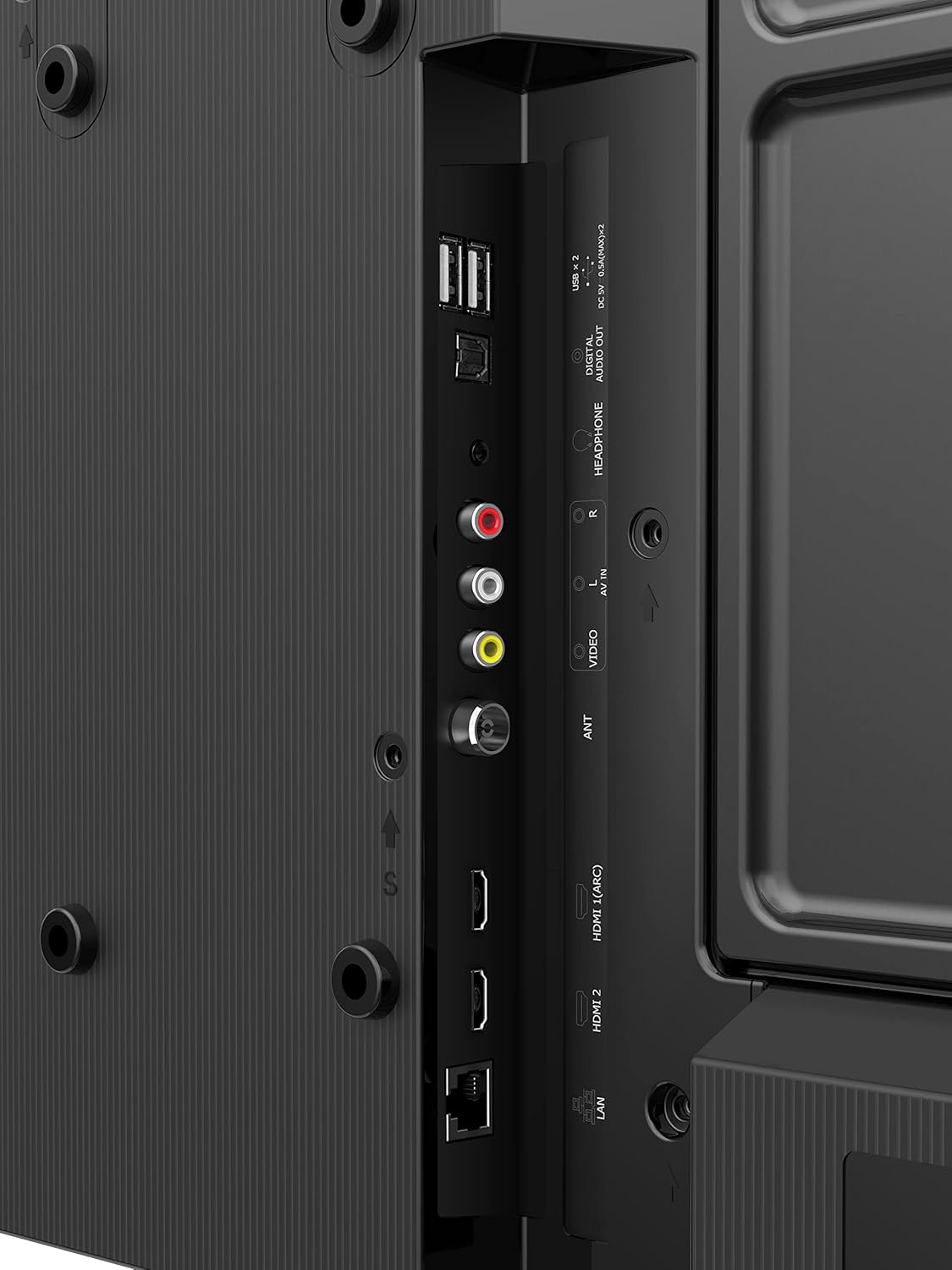
Imatge: Detallada view of the Hisense TV's rear panel, showing various input and output ports including HDMI, USB, LAN, and audio connections.
3. Connexió d'alimentació
Connect the power cable to the TV's power input and then plug it into a suitable electrical outlet. The TV will enter standby mode.
Instruccions de funcionament
1. Assistent de configuració inicial
The first time you power on the TV, an initial setup wizard will guide you through essential configurations:
- Selecció d'idioma: Trieu el vostre idioma preferit.
- Connexió de xarxa: Connect to your Wi-Fi network or use a wired Ethernet connection. The TV supports Dual Band Wi-Fi.
- Inici de sessió al compte de Google: Sign in with your Google account to access the Google Play Store and other Android TV features.
- Escaneig de canals: Scan for available TV channels if you are using an antenna or cable connection.
- Time Zone and Date: Estableix la zona horària i la data correctes.

Image: Screenshot of the Android TV home screen, displaying popular streaming applications like Netflix, YouTube, Prime Video, and Disney+ Hotstar.
2. Ús del comandament a distància
The smart remote control provides quick access to various functions and streaming services.
- Botó d'encesa: Encén/apaga el televisor o el posa en mode d'espera.
- Botons de navegació (amunt/avall/esquerra/dreta/d'acord): Navegar pels menús i confirmar les seleccions.
- Volum +/-: Ajusta el nivell de volum.
- Canal +/-: Canvia els canals de televisió.
- Botó de l'Assistent de Google: Activates voice control for search and commands.
- Botons d'aplicació dedicats: Quick access to Netflix, Prime Video, YouTube, and Google Play.
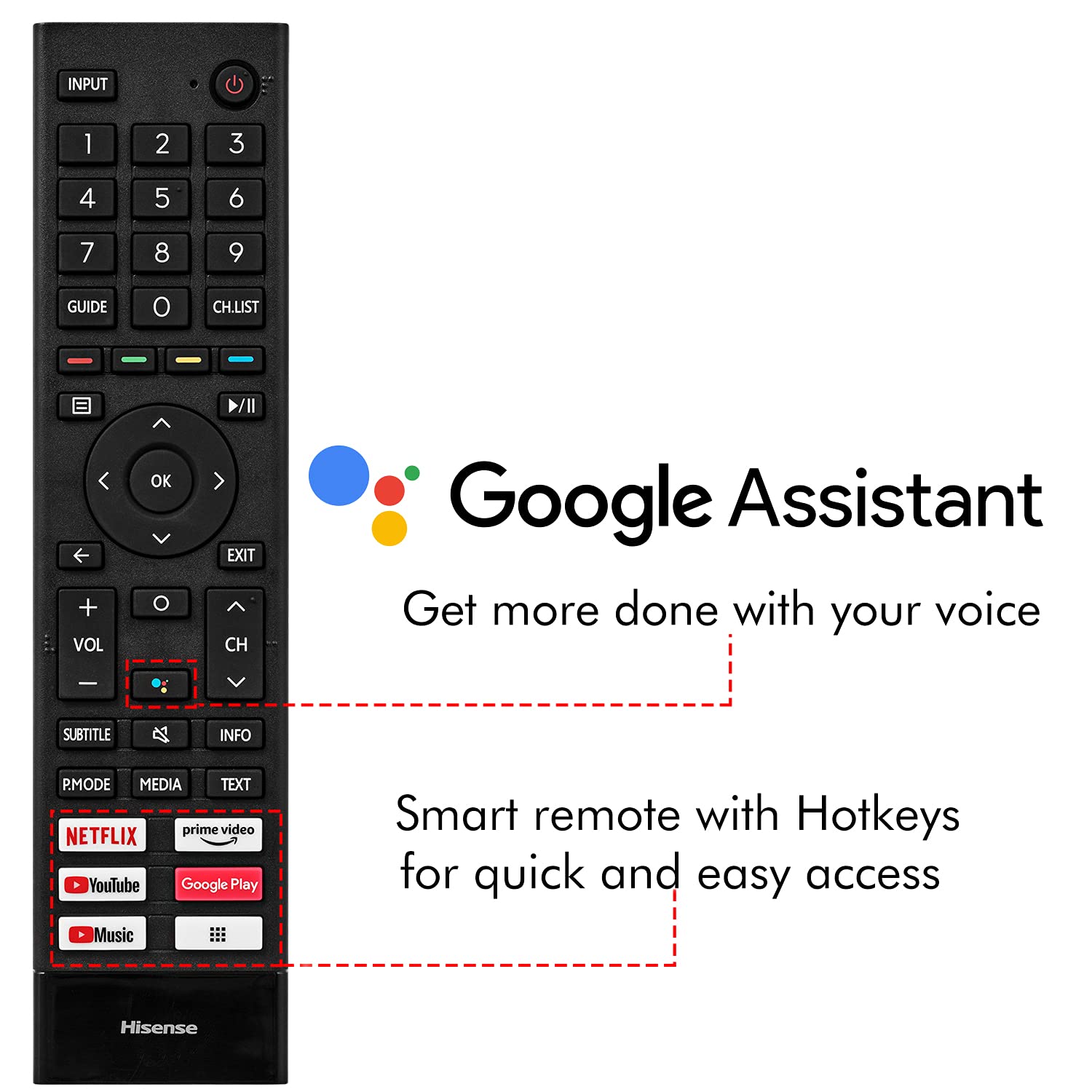
Image: The Hisense smart remote control, highlighting the Google Assistant button and dedicated hotkeys for popular streaming services.
3. Funcions de Smart TV (Android TV 11)
- Chromecast integrat: Emet contingut des del teu telèfon intel·ligent o tauleta directament al televisor.
- Google Play Store: Download and install a wide range of apps, games, and streaming services.
- Assistent de veu: Use the built-in Google Assistant to search for content, control smart home devices, and get information.
- Connectivitat Bluetooth: Connect Bluetooth headphones, soundbars, or game controllers.

Image: A person interacting with the Hisense TV using voice commands via Google Assistant, demonstrating smart TV functionality.
Manteniment
Un manteniment adequat garanteix la longevitat i el rendiment òptim del teu televisor Hisense.
- Neteja de pantalla: Gently wipe the screen with a soft, lint-free cloth. For stubborn marks, use a screen-specific cleaning solution applied to the cloth, not directly to the screen. Avoid harsh chemicals.
- Neteja d'armaris: Netegeu el moble del televisor amb un drap suau i sec.
- Ventilació: Assegureu-vos que hi hagi un flux d'aire adequat al voltant del televisor. No bloquegeu les obertures de ventilació.
- Cable d'alimentació: Reviseu regularment el cable d'alimentació per si hi ha algun dany.
- Actualitzacions de programari: Keep your TV's software updated to ensure the latest features and security patches. The TV will usually prompt you for updates.
Resolució de problemes
This section addresses common issues you might encounter with your Hisense TV.
| Problema | Causa possible | Solució |
|---|---|---|
| Sense poder | Cable d'alimentació no connectat; presa de corrent no funciona. | Assegureu-vos que el cable d'alimentació estigui ben connectat; proveu la presa de corrent amb un altre dispositiu. |
| No hi ha imatge, però hi ha so | Font d'entrada incorrecta seleccionada; problema de retroiluminació. | Press the 'Input' button on the remote to select the correct source; Contact customer support if the issue persists. |
| No hi ha so, però hi ha imatge | Volume is muted or too low; External audio device issue. | Unmute the TV or increase volume; Check connections to external audio devices. |
| El comandament a distància no funciona | Les piles estan gastades o mal inserides; Obstrucció entre el comandament a distància i el televisor. | Replace batteries; Ensure clear line of sight to the TV's IR sensor. |
| Slow Smart TV performance | Too many apps running in background; Network congestion. | Close unused apps; Restart the TV and your router; Consider a wired network connection. |
Especificacions
| Característica | Detall |
|---|---|
| Marca | Hisense |
| Model | 43A4G |
| Mida de la pantalla | 43 polzades (108 cm) |
| Resolució | Full HD (1920x1080) |
| Freqüència d'actualització | 60 Hz |
| Viewangle ing | 178 graus |
| Sistema operatiu | Official Android TV 11(R) |
| RAM | 1 GB |
| ROM (emmagatzematge) | 8 GB |
| Processador | Quad Core |
| Ports HDMI | 2 (ARC supported) |
| Ports USB | 2 |
| Connectivitat | Wi-Fi (Dual Band), Bluetooth, Ethernet |
| Sortida de so | 20 watts |
| Tecnologia d'àudio | DTS Virtual X, DTS Studio Sound, Dolby Audio |
| Característiques especials | Built-in Assistant, Chromecast Built-in, Ultra Vivid High Contrast Panel, Natural Color Enhancer, Noise Reduction, Near Bezel-Less screen |
| Dimensions del producte (LxWxH) | 95.5 x 8.7 x 55.8 cm |
| Pes de l'article | 6.5 kg |
| Consum d'energia (mode encès) | 75 watts |

Image: Diagram showing the physical dimensions of the Hisense 43-inch TV, including width, height, and depth.
Garantia i Suport
Your Hisense 43A4G TV comes with a 2 any de garantia provided by the manufacturer from the date of purchase.
For technical assistance, service requests, or warranty claims, please contact Hisense customer support using the information provided on your warranty card or visit the official Hisense weblloc.
Contacte de l'importador: Hisense, 18002661969