
1. Introducció
This manual provides essential information for the proper use and maintenance of your Headwolf FPad 1 Android Tablet. Please read this guide thoroughly before operating the device to ensure optimal performance and longevity. The Headwolf FPad 1 is an 8-inch tablet designed for everyday use, featuring a responsive display and the Android 12 operating system.
2. Contingut del paquet
Upon unboxing your Headwolf FPad 1 tablet, please verify that all the following items are included:
- Headwolf FPad 1 Tablet
- Guia de l'usuari (aquest document)
- Power Adapter (USB-A wall charger)
- Cable de càrrega USB-A a USB-C
Note: The tablet may come with a pre-applied screen protector for immediate use.
3. Device Layout and Overview
Familiarize yourself with the physical components and ports of your Headwolf FPad 1 tablet.

Figura 3.1: Davant i darrere view of the Headwolf FPad 1 Tablet.
3.1. Panell posterior
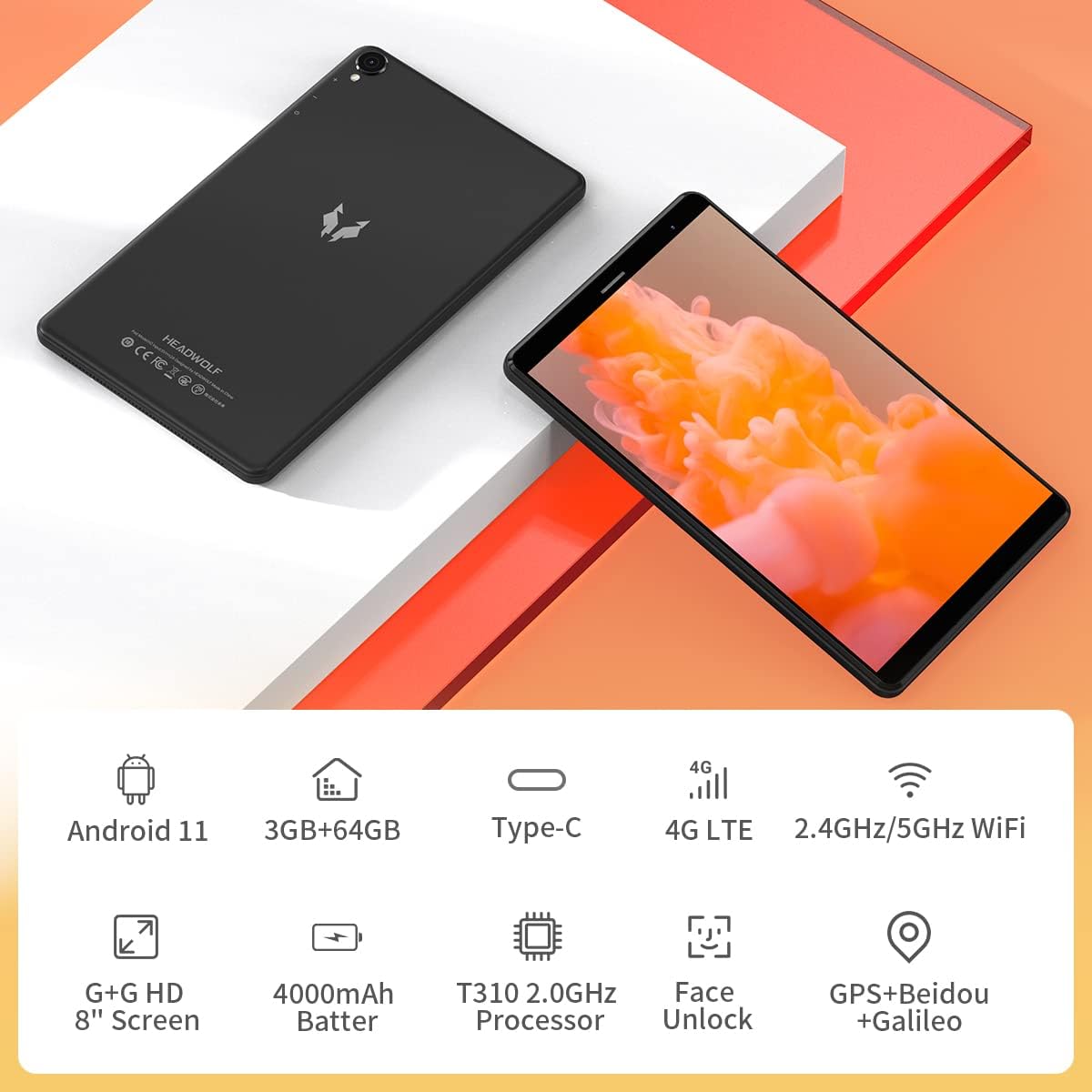
Figure 3.2: The back panel features the Headwolf logo, regulatory markings, and the rear camera module.
3.2. Tauler frontal

Figure 3.3: The front of the tablet displays the 8-inch screen, the front-facing camera, and an earpiece for calls.
3.3. Lateral Views i Ports

Figure 3.4: The side of the tablet includes the power button, volume rocker, 3.5mm headphone jack, SIM card slot, MicroSD card slot, and USB-C charging port.
- Botó d'encesa: Located on the right side, used to power on/off or wake/sleep the device.
- Regulador de volum: Adjacent to the power button, controls audio volume.
- Càmera posterior: 5MP camera with LED flash, located on the back panel.
- Càmera frontal: 5MP camera, located on the front bezel above the screen.
- Port USB-C: For charging and data transfer, located on the top edge.
- Presa d'auriculars de 3.5 mm: For connecting wired headphones, located on the top edge.
- Ranura per a targeta SIM: Supports 4G LTE connectivity (check regional compatibility), located on the top edge.
- Ranura per a targeta MicroSD: For expandable storage, located on the top edge.
- Ponents: Located on the bottom edge.
4. Configuració
4.1. Engegada inicial
- Press and hold the Power Button on the right side of the tablet until the Headwolf logo appears on the screen.
- The tablet will boot up, displaying the Android welcome screen.
4.2. Selecció d'idioma i regió
Follow the on-screen prompts to select your preferred language and region. This will configure the tablet's default settings.
4.3. Connexió a la xarxa
Connect your tablet to a Wi-Fi network to access the internet and complete the setup process. You may also insert a 4G LTE SIM card for mobile data connectivity (if supported in your region).
4.4. Configuració del compte de Google
Sign in with your Google account or create a new one. This is necessary to download apps from the Google Play Store and access Google services.
5. Instruccions de funcionament
5.1. Navegació bàsica
- Gestos de la pantalla tàctil: Toca per seleccionar, llisca per desplaçar-te, pessiga per ampliar.
- Pantalla d'inici: Accedeix a les teves aplicacions i widgets. Fes lliscar el dit cap a l'esquerra o cap a la dreta per navegar entre pantalles.
- Panell de notificacions: Llisca cap avall des de la part superior de la pantalla per accedir a les notificacions i a la configuració ràpida.
5.2. Connectivitat
- Wi-Fi: Go to Settings > Network & Internet > Wi-Fi to connect to available networks. The tablet supports 2.4GHz and 5GHz Wi-Fi.
- Bluetooth: Go to Settings > Connected devices > Bluetooth to pair with Bluetooth accessories (e.g., headphones, speakers). The tablet supports Bluetooth 5.0.
- 4G LTE: If a compatible SIM card is inserted, mobile data can be enabled via Settings > Network & Internet > Mobile network.
- GPS: The tablet has built-in GPS for navigation and location services.
5.3. Càmeres
The Headwolf FPad 1 features 5MP front and rear cameras.

Figure 5.1: The tablet is equipped with dual 5MP cameras and supports face unlock.
- Fent fotos: Open the Camera app, select photo mode, and tap the shutter button.
- Gravació de vídeos: In the Camera app, switch to video mode and tap the record button. Video recording is supported up to 1080p.
- Configuració de la càmera: Adjust settings like filters, white balance, and composition lines within the Camera app.
5.4. Consum de mitjans de comunicació
Enjoy videos, music, and e-books on your tablet's HD display.

Figure 5.2: The 8-inch HD IPS display provides a clear viewexperiència per a diversos mitjans.
- Reproducció de vídeo: Use pre-installed apps like YouTube or download others from the Play Store.
- Àudio: The tablet features stereo speakers. For a more immersive experience, connect headphones via the 3.5mm jack or Bluetooth.
5.5. Jocs
The UNISOC T310 Quad-Core processor allows for smooth performance in most casual games. For graphically intensive games, performance may vary, and lower settings might be required for optimal gameplay.

Figure 5.3: The tablet's processor is capable of handling various gaming applications.
6. Manteniment
- Neteja: Feu servir un drap suau i sense borrissol per netejar la pantalla i la carcassa. Eviteu productes químics agressius.
- Cura de la bateria: Per allargar la durada de la bateria, eviteu temperatures extremes i descarregueu-la completament amb freqüència.
- Actualitzacions de programari: Comproveu i instal·leu regularment si hi ha actualitzacions del sistema per garantir un rendiment i una seguretat òptims.
- Gestió d'emmagatzematge: Netegeu periòdicament els innecessaris files and apps to free up internal storage. Consider using a MicroSD card for additional storage.
7. Solució De Problemes
This section addresses common issues you might encounter with your Headwolf FPad 1 tablet.
7.1. El dispositiu no s'encén
- Ensure the battery is charged. Connect the tablet to the power adapter and wait a few minutes before attempting to power it on again.
- Press and hold the Power Button for at least 10-15 seconds to perform a forced restart.
7.2. Slow Performance/Freezing
- Tanca les aplicacions que no s'utilitzen i que s'executen en segon pla.
- Esborra les dades de la memòria cau de les aplicacions i del sistema.
- Reinicieu la tauleta.
- Assegureu-vos que hi hagi prou espai d'emmagatzematge lliure.
7.3. Problemes de connectivitat Wi-Fi
- Toggle Wi-Fi off and on in Quick Settings or Settings.
- Reinicieu el vostre encaminador Wi-Fi.
- Oblida't de la xarxa i torna a connectar-te.
7.4. Camera Quality
The 5MP cameras are designed for basic photography and video calls. For optimal results, ensure good lighting conditions. Camera performance may not be comparable to high-end smartphone cameras.
8. Especificacions
| Característica | Especificació |
|---|---|
| Marca | Cap de llop |
| Nom del model / Sèrie | FPad 1 / F1 |
| Número de model de l'article | F2 |
| Sistema operatiu | Android 12 (some marketing may refer to Android 11) |
| Mida de la pantalla | 8 polzades |
| Resolució de visualització | IPS HD de 1280 x 800 |
| Processador | UNISOC T310 Quad-Core A75 (2 GHz) |
| RAM | 3 GB |
| Emmagatzematge intern | 64 GB |
| Emmagatzematge ampliable | MicroSD up to 512GB (some sources indicate up to 2TB) |
| Càmera posterior | 5 MP |
| Càmera frontal | 5 MP |
| Capacitat de la bateria | 4000mAh (up to 7-8 hours usage) |
| Port de càrrega | USB tipus C |
| Connectivitat sense fil | 5G WiFi, Bluetooth 5.0, 4G LTE |
| Navegació | GPS, Beidou, Galileo |
| Dimensions (LxWxH) | 8.31 x 0.38 x 4.97 polzades |
| Pes de l'article | 11.4 unces (aprox. 320 g) |
| Color | Purple (as listed in specifications, though product images show black/grey) |
9. Garantia i Suport
For warranty information and technical support, please refer to the documentation included with your purchase or visit the official Headwolf weblloc web. Conserveu el comprovant de compra per a qualsevol reclamació de garantia.