
eKids LY-157
EKids LY-157 Buzz Disney Pixar Lightyear Steering Wheel
Manual d'instruccions
Introducció
Welcome to the instruction manual for the EKids LY-157 Buzz Disney Pixar Lightyear Steering Wheel. This interactive toy is designed to immerse young fans in the world of Disney Pixar's Lightyear, allowing them to embark on exciting space missions with Buzz Lightyear. Featuring kid-friendly controls, authentic sound effects, and a vibrant light-up display, this device provides an engaging and imaginative play experience.
Què hi ha a la caixa
Upon opening your package, please ensure all components are present:
- Starship mission controller
Si falta algun element o està malmès, poseu-vos en contacte amb l'atenció al client.
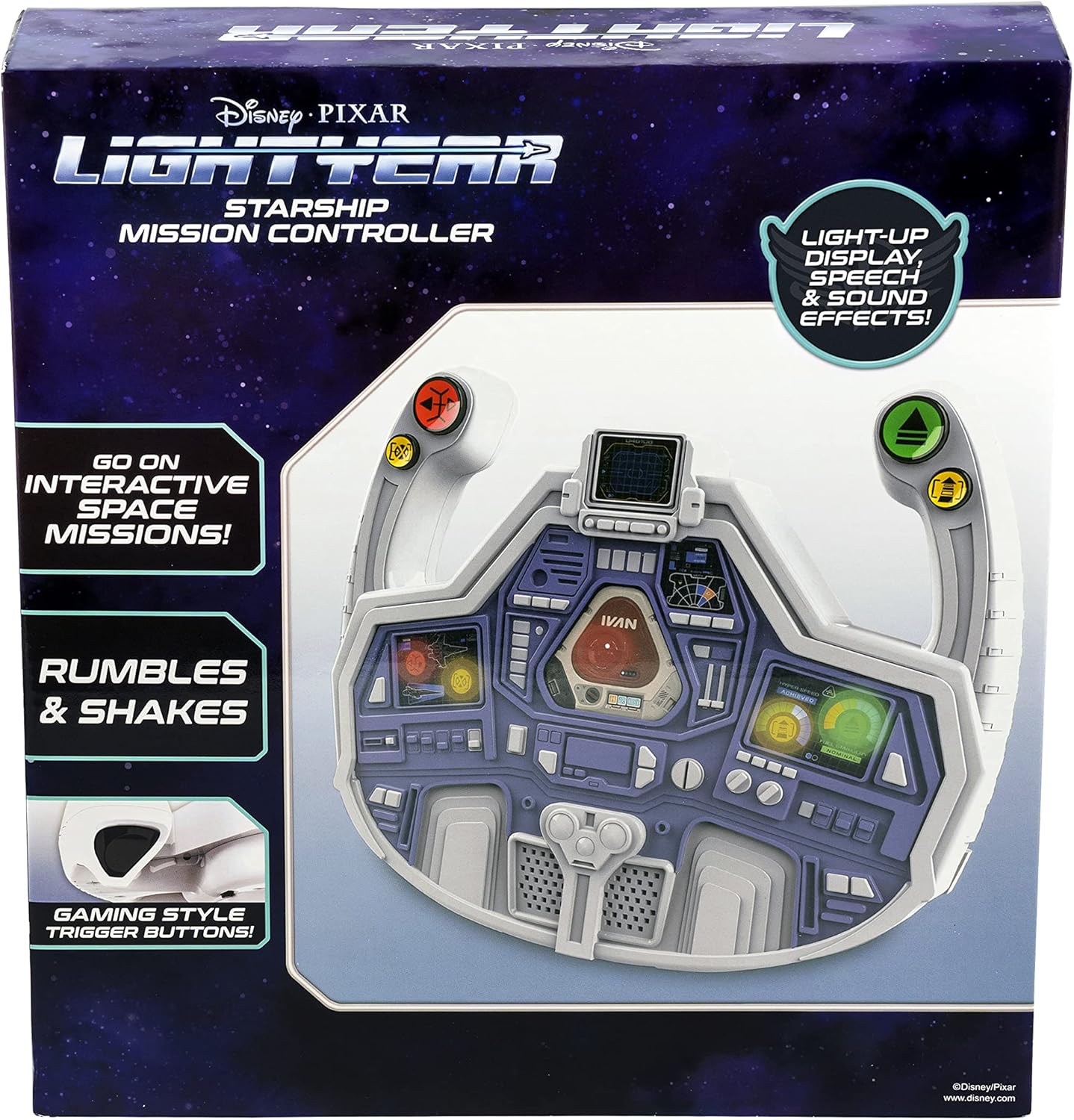
Image: The EKids LY-157 Buzz Lightyear Steering Wheel as packaged in its retail box.
Característiques
The EKids LY-157 Buzz Disney Pixar Lightyear Steering Wheel is equipped with several features designed for an interactive play experience:
- Steering Wheel Toy: Ready for lift-off, this controller allows for interactive space missions with Buzz Lightyear using kid-friendly, easy-to-use controls and gaming-style trigger buttons.
- Light Up Display: Enjoy hours of pretend play as you follow prompts from the colorful light-up 'dashboard'. The Starship Mission Controller reacts to your movements with vibration feedback as you navigate missions.
- Efectes de so integrats: Press buttons on the dashboard to activate a variety of action-packed sound effects while you play!
- Buzz Lightyear Design: The cool Lightyear design is sure to please any fan of the popular character. Durable and lightweight, this toy is ideal for car seats for toddlers aged 4 and up.
- Official Disney Pixar Lightyear Licensed Product: Garanteix autenticitat i qualitat.

Image: A visual representation of the steering wheel highlighting its key features, including the light-up display, gaming-style trigger buttons, and shaking action.
Configuració
Before beginning your space missions, ensure the steering wheel is properly set up.
Instal·lació de la bateria
The EKids LY-157 Buzz Disney Pixar Lightyear Steering Wheel requires 3 AA batteries, which are included with the product. To install or replace batteries:
- Localitzeu el compartiment de la bateria a la part posterior de la unitat.
- Amb un tornavís Phillips, obriu amb cura la tapa del compartiment de la bateria.
- Introduïu 3 piles AA, assegurant-vos que els terminals positiu (+) i negatiu (-) estiguin alineats amb els indicadors de l'interior del compartiment.
- Substituïu la tapa del compartiment de la bateria i fixeu-la amb el cargol.
For optimal performance, use new alkaline batteries. Do not mix old and new batteries, or different types of batteries.

Imatge: Una imatge detallada view of the steering wheel, showing the location of the battery compartment, power/volume switches, and various control buttons.
Instruccions de funcionament
Once batteries are installed, you are ready to begin your mission!
Encès / apagat i control de volum
- Locate the 'Demo/Off/On' slide switch, typically found on the top or back of the unit. Slide it to the 'On' position to power on the device.
- To adjust the sound volume, use the 'Hi/Med/Low' slide switch. Select 'Hi' for maximum volume, 'Med' for moderate, or 'Low' for quieter play.
Joc interactiu
- The steering wheel features a light-up dashboard that provides visual prompts for various missions and actions. Follow these prompts to engage in interactive space missions.
- The controller reacts to your movements and mission progress with vibration feedback, enhancing the immersive experience.
Funcions del botó
Utilize the various buttons on the steering wheel to control your mission:
- 'Stop' Button (Red): Used to halt actions or missions.
- 'Repair' Button (Yellow): Activates repair sequences or fixes issues during a mission.
- 'Go' Button (Green): Initiates movement or mission progression.
- 'Boost' Button (Yellow): Provides a temporary speed or power boost for critical moments.
- Press the gaming-style trigger buttons (located on the handles) for additional action-packed sound effects and interactive responses.

Image: A child demonstrating the use of the steering wheel, highlighting its interactive nature.
Manteniment
Proper care will ensure the longevity of your EKids LY-157 Buzz Disney Pixar Lightyear Steering Wheel.
Neteja
- Wipe the surface of the steering wheel with a soft, dry cloth.
- Do not use abrasive cleaners, solvents, or harsh chemicals, as these may damage the plastic or electronic components.
- Avoid submerging the unit in water or exposing it to excessive moisture.
Emmagatzematge
- When not in use for extended periods, store the steering wheel in a cool, dry place, away from direct sunlight and extreme temperatures.
- Remove batteries if the unit will not be used for several weeks or months to prevent battery leakage and potential damage.
Resolució de problemes
If you encounter any issues with your EKids LY-157 Buzz Disney Pixar Lightyear Steering Wheel, please refer to the following common solutions:
| Problema | Causa possible | Solució |
|---|---|---|
| No power, lights, or sound. | Batteries are depleted or incorrectly installed. Power switch is off. | Ensure batteries are correctly installed with proper polarity. Replace with fresh AA batteries. Check that the 'Demo/Off/On' switch is in the 'On' position. |
| Sound is too low or absent. | Volume switch is set to 'Low' or 'Off'. | Adjust the 'Hi/Med/Low' slide switch to 'Hi' or 'Med'. |
| Limited or no vibration feedback. | Potència de bateria baixa. | Replace batteries with fresh ones. Ensure the toy is being used on a stable surface. |
| Els botons no responen. | Temporary electronic glitch. Debris obstructing buttons. | Turn the unit off and then on again to reset. Check for any foreign objects obstructing the buttons and carefully remove them. |
Especificacions
| Atribut | Detall |
|---|---|
| Dimensions del producte | 7 x 26.3 x 27.9 cm; 581 g |
| Piles necessàries | 3 piles AA (incloses) |
| Edat recomanada pel fabricant | 3 anys i més |
| Número de model de l'article | LY-157 |
| Objectius educatius | Literacy |
| Nombre de jugadors | 1 |
| Muntatge obligatori | No |
| Tipus de material | Plàstic |
| Color | Blanc |
| ASIN | B09XZCQT73 |
| Data de primera disponibilitat | 23 d'abril de 2022 |
Garantia i Suport
For product support, warranty information, or to inquire about replacement parts, please refer to the contact information provided on the product packaging or visit the official eKids weblloc web. Conserveu el rebut de compra com a comprovant de compra per a qualsevol reclamació de garantia.
Ask a question about this manual
Ask about setup, troubleshooting, compatibility, parts, safety, or missing instructions. Manuals+ will review the question and use this page’s manual context to help answer it.