
1. Introducció
Thank you for choosing the Eumspo i17 Wireless Headset. This manual provides essential information for the safe and efficient use of your new device. Please read it thoroughly before operation and retain it for future reference.
2. Informació de seguretat
- No desmunteu ni modifiqueu els auriculars.
- Manteniu el dispositiu allunyat de l'aigua, la humitat i les temperatures extremes.
- Eviteu l'exposició prolongada a nivells de volum elevats per evitar danys auditius.
- Feu servir només el cable de càrrega proporcionat o un equivalent certificat.
- Desfeu-vos del dispositiu i de la bateria de manera responsable d'acord amb la normativa local.
3. Contingut del paquet
Assegureu-vos que tots els elements estiguin presents al vostre paquet:
- Eumspo i17 Wireless Earbuds (2)
- Estoig de càrrega (1)
- Cable de càrrega USB-C (1)
- Manual d'usuari (1)
- Puntes d'orella addicionals (diverses mides)
4. Producte acabatview
Familiarize yourself with the components of your Eumspo i17 Wireless Headset.

4.1. Característiques clau
- True Wireless Stereo: Enjoy high-quality audio without cables.
- Control tàctil: Manage music and calls with simple taps.
- Bluetooth 5.1: Proporciona una connexió sense fil estable i ràpida.
- Dual-Mic: Ensures clear phone calls.
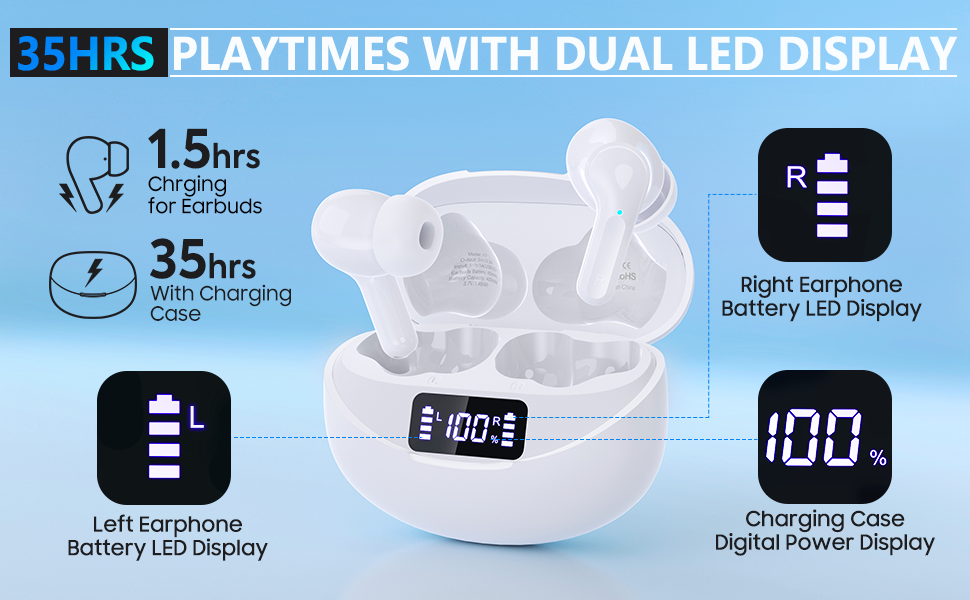
- Pantalla de potència digital: Shows battery levels for earbuds and case.
- Temps de joc llarg: Fins a 35 hores amb l'estoig de càrrega.
- Càrrega ràpida tipus C: Quick and convenient charging.
5. Configuració
5.1. Càrrega dels auriculars
Abans del primer ús, carregueu completament l'estoig de càrrega i els auriculars.
- Connect the provided USB-C charging cable to the charging port on the case and a compatible USB power adapter (not included).
- La pantalla LED de la caixa de càrrega mostrarà el percentatge de bateriatage.
- Place the earbuds into the charging case. The display will indicate individual earbud charge levels.
- Charging time for earbuds is approximately 1.5 hours, and for the case, it provides up to 35 hours of additional playtime.
5.2. Emparellament Bluetooth
The earbuds support both Dual Ear Mode and Single Ear Mode.
5.2.1. Dual Ear Mode
- Take both earbuds out of the charging case. They will automatically power on and pair with each other. The indicator light will flash quickly.
- Activa el Bluetooth al teu dispositiu (telèfon intel·ligent, tauleta, etc.).
- Cerca "i17" in the Bluetooth device list and select it to connect.
- Once successfully paired, a voice prompt "Connected" will be heard, and the indicator light will turn off.
5.2.2. Single Ear Mode
- Take one earbud out of the charging case. It will automatically power on.
- Activa el Bluetooth al teu dispositiu.
- Cerca "i17" in the Bluetooth device list and select it to connect.
- A voice prompt "Connected" will confirm the connection.

6. Instruccions de funcionament
6.1. Encendre/apagar
- Encès: Take the earbuds out of the charging case. They will automatically power on. Alternatively, press and hold the touch button on both earbuds for 3-5 seconds until the blue indicator light flashes.
- Apagar: Place the earbuds back into the charging case. They will automatically switch off. Alternatively, press and hold the touch button on either earbud for 3-5 seconds until the blue indicator flashes once with a voice prompt "power off".
6.2. Toqueu Controls
The Eumspo i17 earbuds feature smart touch controls for easy operation:
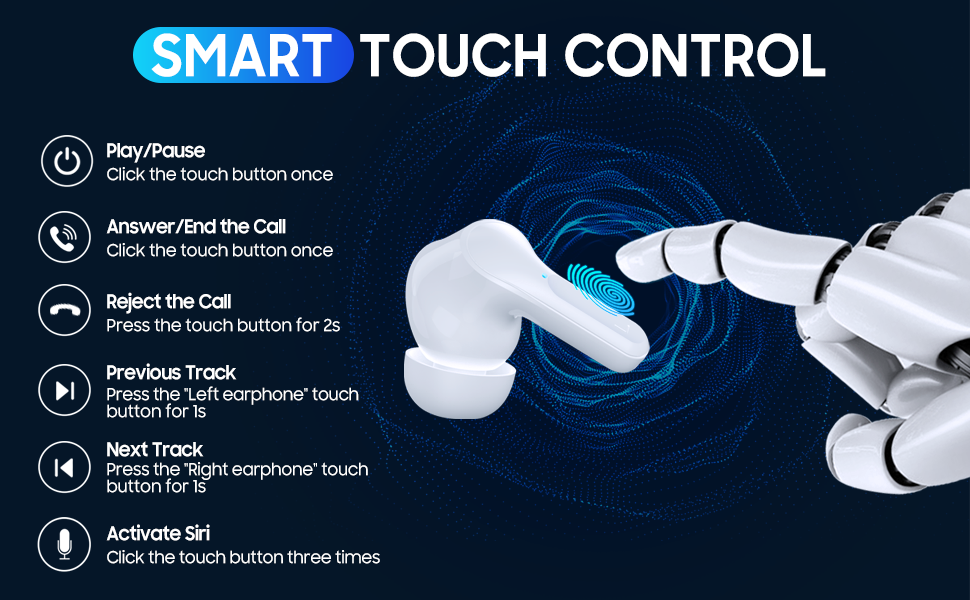
- Reproduir/pausa: Click the touch button once on either earbud.
- Respondre/Finalitzar la trucada: Click the touch button once on either earbud.
- Rebutja la trucada: Press the touch button for 2 seconds on either earbud.
- Pista anterior: Press the left earbud's touch button for 1 second.
- Pista següent: Press the right earbud's touch button for 1 second.
- Volum -: Click the left earbud's touch button twice.
- Volum +: Click the right earbud's touch button twice.
- Activa l'assistent de veu (Siri/Assistent de Google): Click the touch button three times on either earbud.
7. Manteniment
- Neteja: Feu servir un drap suau i sec per netejar els auriculars i l'estoig de càrrega. No utilitzeu líquids ni productes de neteja abrasius.
- Emmagatzematge: Quan no els utilitzeu, guardeu els auriculars a la seva funda de càrrega per protegir-los i mantenir-los carregats. Guardeu-los en un lloc fresc i sec.
- Puntes d'orelles: Regularly check and clean the eartips to ensure optimal sound quality and hygiene. Replace if damaged.
8. Solució De Problemes
| Problema | Solució |
|---|---|
| Els auriculars no s'encenen | Ensure earbuds are charged. Place them in the charging case for a few minutes, then try again. |
| Els auriculars no es combinen amb el dispositiu | Make sure Bluetooth is enabled on your device. Forget "i17" from your device's Bluetooth list and try pairing again. Ensure earbuds are close to the device. |
| Només funciona un auricular | Ensure both earbuds are charged. Place both earbuds back into the charging case, close the lid, then open it and take them out together to re-establish stereo pairing. |
| Mala qualitat del so | Check earbud fit and try different sized eartips. Ensure earbuds are clean. Move closer to your device to avoid interference. |
| La funda de càrrega no es carrega | Comprova el cable USB-C i l'adaptador de corrent. Prova un cable o adaptador diferent. |
9. Especificacions
- Marca: Eumspo
- Número de model: i17
- Color: Blanc
- Col·locació de les orelles: A l'orella
- Factor de forma: A l'orella
- Control de soroll: Cancel·lació activa del soroll
- Tecnologia de connectivitat: Bluetooth 5.1, Sense fil
- Auriculars Jack: USB (per a la caixa de càrrega)
- Nivell de resistència a l'aigua: Impermeable
- Característiques addicionals: Android, Microphone Included, Noise Cancellation, USB connectivity, iOS, sports-and-exercise, water-resistant, wireless
- Usos específics per al producte: Esports i Exercici
10. Garantia i Suport
For warranty information and customer support, please refer to the documentation included with your purchase or visit the official Eumspo weblloc web. Conserveu el comprovant de compra per a qualsevol reclamació de garantia.