
Introducció
Welcome to the user manual for your Awei T36 TWS Wireless Earbuds. This manual provides essential information for setting up, operating, and maintaining your earbuds to ensure optimal performance and longevity. Please read this manual thoroughly before using the product.
Informació de seguretat
- No exposeu els auriculars ni l'estoig de càrrega a temperatures extremes (superiors a 45 °C o inferiors a 0 °C).
- Keep away from water, moisture, and corrosive liquids.
- Do not disassemble, modify, or attempt to repair the product yourself. This will void the warranty.
- Use only approved charging cables and adapters to prevent damage.
- Avoid prolonged listening at high volumes to prevent potential hearing damage.
- Mantenir fora de l'abast dels nens i mascotes.
Contingut del paquet
- Awei T36 TWS Wireless Earbuds (Left and Right)
- Estoig de càrrega
- Cable de càrrega USB
- Manual d'usuari
Producte acabatview
Familiarize yourself with the components and design features of your Awei T36 earbuds.
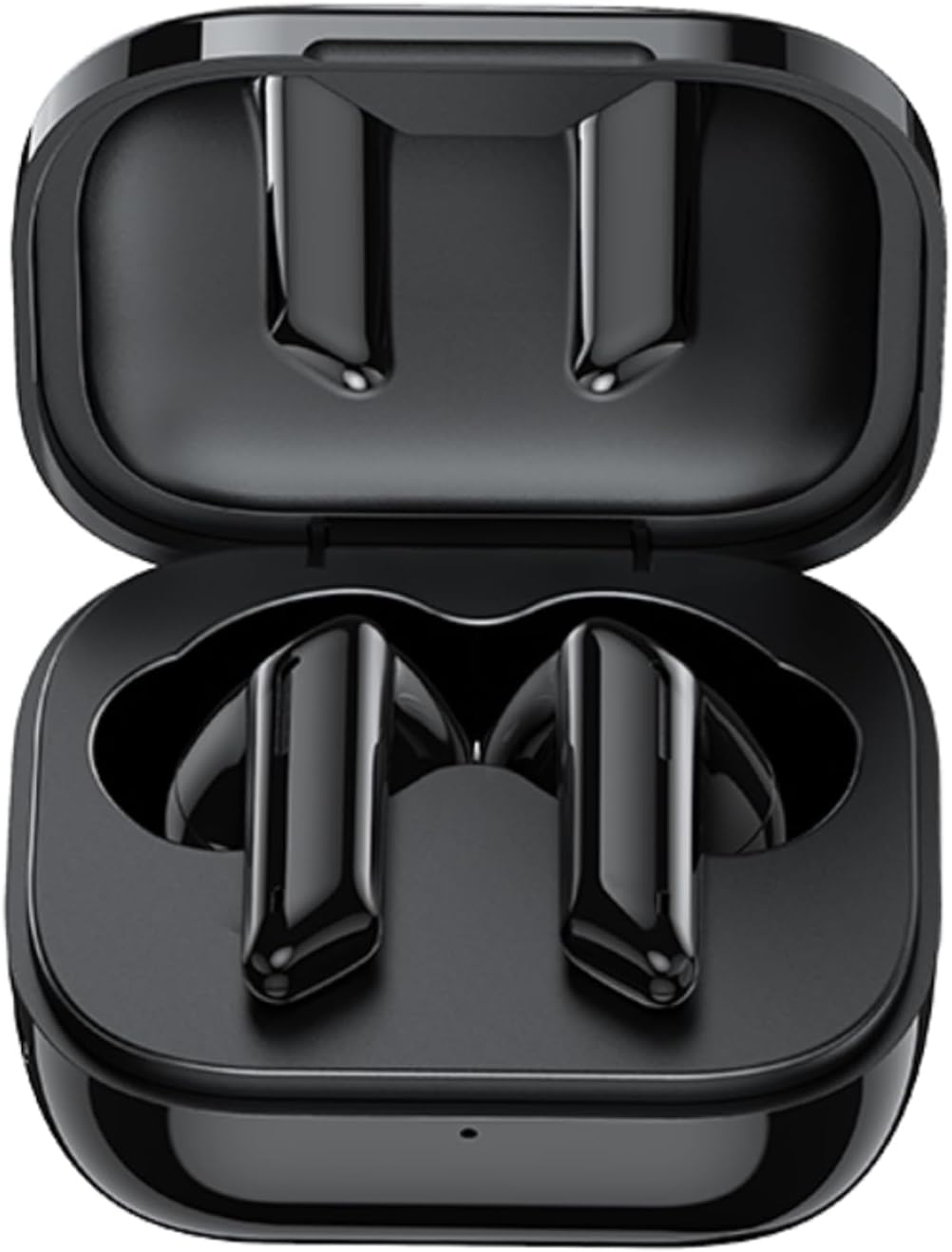
The image displays the Awei T36 TWS Wireless Earbuds securely placed within their open charging case. Both earbuds are black, sleek, and fit perfectly into their designated slots, indicating they are ready for charging or storage.

This image highlights the aesthetic design of the Awei T36 earbuds, showing them in various colors (black, white, purple, blue, green) alongside their respective charging cases. The design emphasizes portability and style.

This image illustrates the Bluetooth 5.1 capability of the Awei T36 earbuds, promising a faster and more stable connection. The earbuds and case are shown next to a smartphone, suggesting seamless integration.
Configuració
Càrrega dels auriculars i la funda
Before first use, it is recommended to fully charge the earbuds and charging case.
- Col·loca els auriculars a l'estoig de càrrega, assegurant-te que estiguin correctament col·locats.
- Connect the USB charging cable to the charging port on the case and then to a power source (e.g., USB wall adapter, computer USB port).
- The indicator lights on the case will illuminate to show the charging status. Once fully charged, the lights may change or turn off.

This image illustrates the charging capabilities and battery life of the Awei T36 earbuds. It shows the earbuds and case on a wireless charging pad, with text indicating a 210-hour standby time, 320mAh charging case capacity, 4-5 hours of play time, and 1.5 hours for a full charge.
Vinculació amb un dispositiu
The earbuds automatically enter pairing mode when removed from the case.
- Obre l'estoig de càrrega i treu els dos auriculars. S'encendran automàticament i entraran en mode d'emparellament.
- Al dispositiu (telèfon intel·ligent, tauleta, etc.), activeu el Bluetooth.
- Cerca "Awei T36" in the list of available Bluetooth devices.
- Select "Awei T36" to connect. Once connected, a voice prompt will confirm the successful pairing.

This image demonstrates the 'Both Earbuds are Hosts' feature, indicating that either earbud can be used independently. It highlights the 'Instant Fetch and Connect' when the case is opened and 'Close Auto OFF' when the case is closed, simplifying the user experience.
This video demonstrates the process of taking the Awei T36 earbuds out of their charging case, placing them into the ears, and interacting with their touch controls for music and calls. It showcases the product's design and ease of use.
Instruccions de funcionament
Controls tàctils
The Awei T36 earbuds feature intuitive touch controls for managing audio playback and calls.

A visual guide detailing the touch controls for the Awei T36 earbuds. It shows how to pause/play, skip tracks, answer/reject calls, and activate voice assistant with simple taps on the earbud's touch sensitive area.
| Acció | Auricular esquerre | Auricular dret |
|---|---|---|
| Reproduir/Pausa | Toc breu | Toc breu |
| Pista següent | N/A | Fes doble toc |
| Pista anterior | Fes doble toc | N/A |
| Respondre/Finalitzar la trucada | Toc breu | Toc breu |
| Rebutja la trucada | Toqueu durant 2 segons | Toqueu durant 2 segons |
| Activa l'assistent de veu (Siri/Assistent de Google) | Triple toc | Triple toc |
Calling Noise Cancellation
The Awei T36 earbuds are equipped with calling noise cancellation technology to ensure clearer conversations by reducing ambient noise during calls.

This image shows a user wearing the Awei T36 earbuds, emphasizing the calling noise cancellation feature for improved call clarity in various environments.
Manteniment
- Netegeu els auriculars i l'estoig de càrrega regularment amb un drap suau, sec i sense borrissol.
- No utilitzeu netejadors abrasius, dissolvents ni productes químics forts.
- Ensure the charging contacts on both the earbuds and the case are clean and free of dust or debris.
- Guardeu els auriculars a la funda de càrrega quan no els feu servir per protegir-los i mantenir-los carregats.
- Avoid exposing the product to extreme temperatures or direct sunlight for extended periods.
Resolució de problemes
Els auriculars no s'emparellan ni es connecten
- Assegureu-vos que els dos auriculars estiguin prou carregats.
- Place both earbuds back into the charging case, close the lid, wait a few seconds, then open it again and remove them to reset.
- Desactiva i després activa el Bluetooth al dispositiu.
- If the issue persists, forget or unpair "Awei T36" from your device's Bluetooth list and then attempt to re-pair.
No hi ha so d'un auricular
- Assegureu-vos que els dos auriculars estiguin carregats.
- Place both earbuds back in the case and take them out again to re-establish the connection between them.
- Torneu a vincular els auriculars amb el vostre dispositiu.
Volum baix
- Adjust the volume on both your connected device and, if applicable, via the earbud's touch controls.
- Assegureu-vos que els auriculars estiguin correctament col·locats a les orelles per a una reproducció òptima del so.
Especificacions
| Característica | Detall |
|---|---|
| Nom de marca | Awei |
| Nom del model | Awei T36 |
| Tecnologia de connectivitat | Sense fil |
| Col·locació de les orelles dels auriculars | A l'orella |
| Factor de forma dels auriculars | A l'orella |
| Impedància | 3.5E+2 Ohm |
| Control de soroll | Cap |
| Sensibilitat | 96 dB |
| Conector d'auriculars | 3.5 mm Jack |
| Color | Negre |
| Dimensions del producte | 4 x 11 x 9 cm; 120 g |
| Fabricant | Awei |
| ASIN | B09YQL95X6 |
| Número de model de l'article | T36 |
| País d'origen | Samoa (Independent) |
| Data de primera disponibilitat | 23 d'abril de 2022 |
Garantia i Suport
For warranty information, technical support, or any product-related inquiries, please refer to the manufacturer's official weblloc web o contacteu directament amb el seu servei d'atenció al client.
Fabricant: Awei
Please refer to your product packaging or the official Awei website for specific warranty terms, contact details, and support resources.