Introducció
Thank you for choosing the iJoy Ultra Wireless Over-Ear Bluetooth Headphones. These headphones are designed to provide a versatile audio experience with multiple connectivity options and comfortable wear. This manual will guide you through the features, setup, and operation of your new headphones.

Image: iJoy Ultra Wireless Over-Ear Bluetooth Headphones, showcasing the sleek design and over-ear cushions.
Què hi ha a la caixa
Si us plau, assegureu-vos que tots els articles estiguin presents al vostre paquet:
- iJoy Ultra Wireless Over-Ear Bluetooth Headphones
- Cable de càrrega USB tipus C.
- Cable auxiliar (3.5 mm)
Producte acabatview
Familiaritzeu-vos amb els controls i els ports dels auriculars:

Imatge: Lateral view of the headphone ear cup, highlighting the control buttons for volume, track skipping, and power/play/pause/call management.
- Volume + / Skip Song: Hold for Volume Up, Press for Next Song.
- Power / Play / Pause / Answer/Reject Calls: Press to Play/Pause or Answer/Reject Calls. Hold to Power On/Off.
- Volum - / Cançó anterior: Hold for Volume Down, Press for Previous Song.
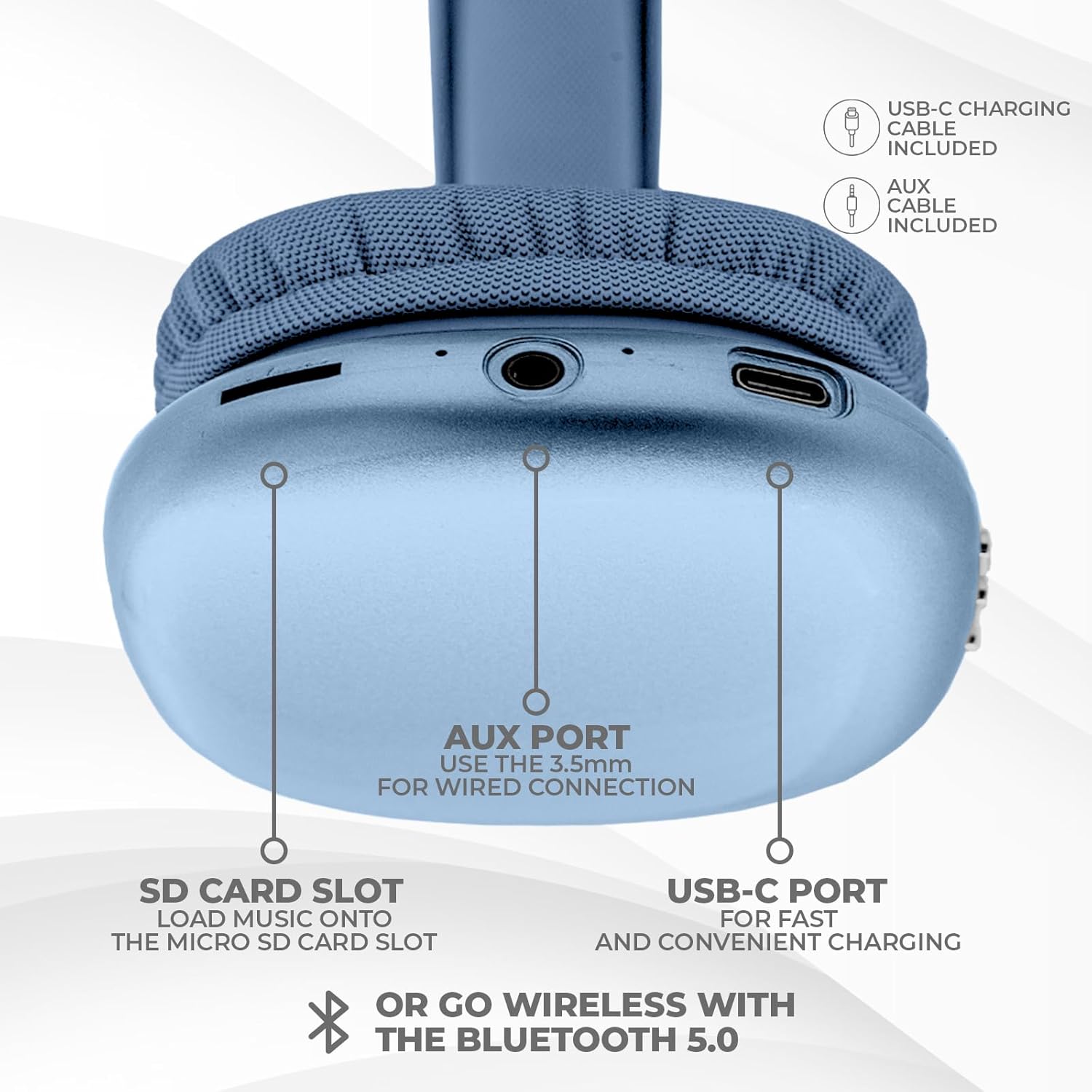
Imatge: Part inferior view of the headphone ear cup, showing the USB-C charging port, AUX port, and SD card slot.
- Port USB-C: Per carregar els auriculars.
- Port AUX (3.5 mm): Per a connexió d'àudio amb cable.
- Ranura per a targeta SD: For direct audio playback from a Micro SD card.
Configuració
1. Càrrega dels auriculars
Abans del primer ús, carregueu completament els auriculars. Una càrrega completa triga aproximadament 2 hores.
- Connect the provided USB Type C charging cable to the USB-C port on the headphone.
- Connecteu l'altre extrem del cable USB a una font d'alimentació USB compatible (per exemple, un adaptador de paret, un port USB de l'ordinador).
- L'indicador LED mostrarà l'estat de càrrega i s'apagarà o canviarà de color quan estigui completament carregat.
2. Emparellament Bluetooth
Per connectar els auriculars sense fil:
- Assegureu-vos que els auriculars estiguin carregats i apagats.
- Premeu i manteniu premut el botó d'engegada fins que l'indicador LED parpellegi, cosa que indica el mode d'emparellament.
- Al dispositiu (telèfon intel·ligent, tauleta, ordinador portàtil), activeu el Bluetooth i cerqueu els dispositius disponibles.
- Select "iJoy Ultra" from the list of devices.
- Once connected, the LED indicator will typically show a solid light or slow flash.
Note: The Bluetooth range is approximately 10 meters (33 feet).
3. Connexió amb cable (AUX)
For a non-wireless connection or when the battery is low:
- Connect one end of the provided 3.5mm AUX cable to the AUX port on the headphone.
- Connecteu l'altre extrem del cable AUX al connector d'àudio de 3.5 mm del dispositiu.
- Els auriculars canviaran automàticament al mode amb cable.
4. Reproducció de la targeta SD
Per reproduir música directament des d'una targeta Micro SD:
- Inseriu una targeta Micro SD (amb música) files) into the SD card slot on the headphone.
- The headphones will automatically detect the card and begin playing music.
- Use the track control buttons to navigate your music.
Instruccions de funcionament
Encès/Apagat
- Encès: Premeu i manteniu premut el botó d'engegada durant aproximadament 3 segons.
- Apagar: Premeu i manteniu premut el botó d'engegada durant aproximadament 3 segons.
Reproducció de música
- Reproduir/pausa: Premeu el botó d'engegada una vegada.
- Pista següent: Press the Volume + button once.
- Pista anterior: Press the Volume - button once.
- Pujar el volum: Hold the Volume + button.
- Baixar el volum: Hold the Volume - button.
Gestió de trucades
When connected via Bluetooth:
- Respon a la trucada: Premeu el botó d'engegada una vegada.
- Finalitzar la trucada: Premeu el botó d'engegada una vegada durant una trucada.
- Rebutja la trucada: Premeu i manteniu premut el botó d'engegada durant aproximadament 2 segons.
Durada de la bateria
The headphones offer up to 10 hours of wireless playtime on a single charge.

Image: Visual representation of the headphones' battery life, indicating up to 10 hours of wireless playtime.
Manteniment
To ensure the longevity and optimal performance of your iJoy Ultra headphones:
- Netegeu els auriculars regularment amb un drap suau i sec.
- Eviteu exposar els auriculars a temperatures extremes, humitat o llum solar directa.
- No utilitzeu netejadors abrasius ni dissolvents.
- Guardeu els auriculars en un lloc fresc i sec quan no els feu servir.
- Eviteu deixar caure els auriculars ni sotmetre'ls a impactes forts.
Resolució de problemes
Si teniu problemes amb els auriculars, consulteu les solucions habituals següents:
| Problema | Solució |
|---|---|
| Els auriculars no s'engeguen. | Assegureu-vos que els auriculars estiguin completament carregats. Connecteu-los a una font d'alimentació amb el cable USB-C. |
| No es pot emparellar per Bluetooth. | Make sure the headphones are in pairing mode (flashing LED). Turn off and on Bluetooth on your device. Ensure no other devices are currently connected to the headphones. Try 'forgetting' the device on your phone and re-pairing. |
| No sound or choppy audio. | Check volume levels on both headphones and your device. Ensure Bluetooth connection is stable or try a wired AUX connection. If using an SD card, ensure it is properly inserted and the files són compatibles. |
| Headphones are uncomfortable or too tight. | Adjust the headband for a better fit. The over-ear cushions are designed for comfort, but individual fit may vary. |
| Cannot connect to multiple devices simultaneously. | These headphones typically support connection to one device at a time. Disconnect from the current device before attempting to connect to another. |
Especificacions
| Característica | Detall |
|---|---|
| Nom del model | Ultra |
| Número de model de l'article | IJHP21 |
| Tecnologia de connectivitat | Sense fil (Bluetooth), amb cable (AUX de 3.5 mm) |
| Tecnologia de comunicació sense fils | Bluetooth |
| Interval Bluetooth | 10 metres (33 peus) |
| Conector d'auriculars | 3.5 mm Jack |
| Característiques especials | SD Card Slot, Soft Cushion Padding, USB Type C |
| Durada de la bateria | Fins a 10 hores |
| Temps de càrrega | 2 hores |
| Tipus de control | Volume Control, Track Management, Call Management |
| Col·locació de l'orella | Sobre l'orella |
| Material | Plàstic |
| Pes de l'article | 8 unces |
| Dimensions del producte | 7 x 3 x 8 polzades |
| UPC | 842700193053 |
Vídeo oficial del producte
Video: An official product video from iJoy Electronics showcasing the features and design of the iJoy Ultra Bluetooth Over-Ear Headphones.
Garantia i Suport
For warranty information or technical support, please refer to the documentation included with your product or contact iJoy customer service directly. Keep your proof of purchase for any warranty claims.