
Introducció
This manual provides detailed instructions for the safe installation, operation, and maintenance of your bimar Wi-Fi Ceiling Fan, Model 1 (Ø 132). Please read this manual thoroughly before using the product and retain it for future reference.
Ús previst: This high-performance ceiling fan is designed for ventilation in indoor domestic environments. Any other use is considered improper and potentially hazardous. The manufacturer cannot be held responsible for any damages resulting from improper use or repairs performed by unqualified personnel.
Instruccions importants de seguretat
Per reduir el risc d'incendi, descàrrega elèctrica o lesions a les persones, observeu el següent:
- Llegiu totes les instruccions abans d'instal·lar el ventilador.
- La instal·lació ha de ser realitzada per un electricista qualificat d'acord amb tots els codis elèctrics locals i nacionals.
- Ensure the installation site can support the fan's weight (approximately 6.2 kg).
- Desconnecteu sempre l'alimentació a l'interruptor principal abans de la instal·lació o el manteniment.
- No feu funcionar el ventilador amb un cable d'alimentació o un endoll danyats.
- Keep hands, hair, and clothing away from moving blades.
- No introduïu cap objecte a les aspes del ventilador mentre estigui en funcionament.
- Aquest aparell no està pensat per ser utilitzat per persones (inclosos nens) amb capacitats físiques, sensorials o mentals reduïdes, o amb manca d'experiència i coneixements, tret que hagin rebut la supervisió o instruccions sobre l'ús de l'aparell per una persona responsable de la seva seguretat.
- Els nens han de ser supervisats per assegurar-se que no juguin amb l'aparell.
Què hi ha a la caixa
Your bimar Wi-Fi Ceiling Fan package includes the following components:
- bimar Wi-Fi Ceiling Fan unit (with 3 blades)
- Control remot
- Mounting hardware (screws, brackets, etc.)
- Manual d'instruccions (aquest document)

Image: The bimar Wi-Fi Ceiling Fan, featuring three light-colored wooden blades and a brushed metal motor housing and downrod.
Configuració i instal·lació
1. Instal·lació del ventilador
Es recomana fermament una instal·lació professional per part d'un electricista qualificat. Ensure the ceiling structure can safely support the fan's weight and that all wiring complies with local electrical codes.
- Prepareu la ubicació de muntatge: Turn off power at the circuit breaker. Securely attach the mounting bracket to a ceiling joist or a fan-rated outlet box.
- Muntar la vareta de subjecció i el motor: Connecteu la vareta a la carcassa del motor del ventilador.
- Penja el ventilador: Aixequeu amb cura el conjunt del ventilador i pengeu-lo del suport de muntatge.
- Connecteu el ventilador: Connect the electrical wires (live, neutral, ground) from the ceiling to the fan's wiring, following the wiring diagram provided in the separate installation guide (if applicable).
- Enganxeu les fulles: Securely fasten the three blades to the motor housing.
- Assegureu-vos el dosser: Raise the canopy to cover the wiring and mounting bracket, securing it in place.

Imatge: Lateral view of the bimar ceiling fan, illustrating the angle of the light wood blades and the connection to the downrod.
2. Connexió Wi-Fi i d'aplicacions
The bimar Wi-Fi Ceiling Fan is compatible with the Bimar Live Smart app for advanced control and scheduling.
- Descarrega l'aplicació: Cerca "Bimar Live Smart" in your smartphone's app store (iOS or Android) and install it.
- Crea un compte: Obriu l'aplicació i seguiu les instruccions que apareixen a la pantalla per crear un compte d'usuari nou o iniciar la sessió si ja en teniu un.
- Afegeix un dispositiu: Power on the ceiling fan. In the Bimar Live Smart app, tap "Add Device" or the "+" icon. Select "Ceiling Fan" or the appropriate device type.
- Connecta't a Wi-Fi: Follow the app's instructions to put the fan into pairing mode (usually by pressing a button on the fan or remote for a few seconds). Connect the fan to your home 2.4GHz Wi-Fi network.
- Name the Device: Once connected, you can name your fan for easy identification within the app.

Image: A modern living room featuring the bimar ceiling fan installed, with a smartphone displaying the Bimar Live Smart app interface, indicating Wi-Fi and voice control capabilities.
Instruccions de funcionament
Your bimar Wi-Fi Ceiling Fan offers multiple control options for convenience.
1. Operació de control remot
The included remote control allows direct access to all fan functions.
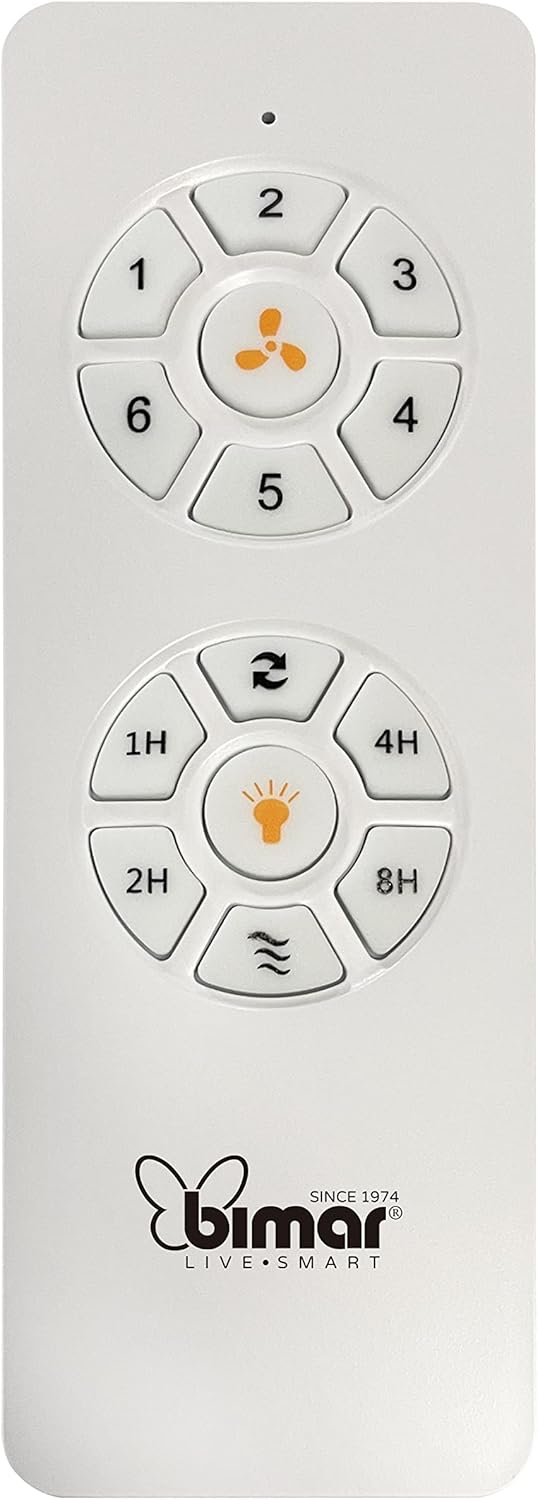
Image: The white remote control for the bimar ceiling fan, showing buttons for fan speed (1-6), fan on/off, timer (1H, 2H, 4H, 8H), mode selection, and reverse function.
- Encès/apagat: Press the fan icon button to turn the fan on or off.
- Ajust de velocitat: Use buttons 1-6 to select one of the six available fan speeds.
- Funció de temporitzador: Press 1H, 2H, 4H, or 8H to set the fan to automatically turn off after the selected duration.
- Selecció del mode: Use the mode button (often represented by waves or arrows) to cycle through Normal, Natural, Sleep, and Breeze modes.
- Mode estiu/hivern: The reverse button (often two arrows forming a circle) changes the blade rotation direction.
2. App Control (Bimar Live Smart)
Once connected to the Bimar Live Smart app, you can access enhanced features:
- Funcionament remot: Control all fan functions from anywhere with an internet connection.
- Programació: Program daily and weekly on/off times for automated operation.
- Temporitzador: Adjust the timer from 1 to 8 hours.
- Mode and Speed Selection: Easily switch between the 6 speeds and 4 operating modes.
3. Control per veu
The bimar Wi-Fi Ceiling Fan is compatible with popular voice assistants like Amazon Alexa and Google Assistant. After connecting the fan to the Bimar Live Smart app, link your Bimar account to your voice assistant app (e.g., Alexa app or Google Home app).
ExampComandes de veu:
- "Alexa, turn on the ceiling fan."
- "Hey Google, set ceiling fan speed to 3."
- "Alexa, turn off the ceiling fan in 1 hour."
4. Operating Modes and Speeds
- 6 Ventilation Speeds: Adjust the airflow intensity to your preference.
- Mode normal: Flux d'aire consistent a la velocitat seleccionada.
- Mode natural: Simulates natural breezes by varying fan speed.
- Mode de repòs: Funciona a una velocitat més baixa i silenciosa per a un descans sense interrupcions.
- Mode brisa: Provides a gentle, intermittent airflow.
5. Summer/Winter Function
The reversible blade function allows for year-round use:
- Mode d'estiu (rotació en sentit antihorari): Crea un flux d'aire descendent, generant una brisa refrescant.
- Mode hivern (rotació en sentit horari): Creates an upward airflow, circulating warm air trapped near the ceiling, improving heating efficiency.

Image: A diagram illustrating the airflow patterns for summer (indirect ventilation, pushing air upwards) and winter (direct ventilation, pulling air downwards) modes of a ceiling fan.
Manteniment
Un manteniment regular garanteix un rendiment òptim i una llarga vida útil del ventilador de sostre.
- Neteja: Before cleaning, ensure the fan is turned off and power is disconnected at the circuit breaker. Use a soft, damp cloth to wipe down the blades and motor housing. Do not use abrasive cleaners or solvents.
- Inspecció de la fulla: Periodically check the blades for any signs of damage or warping. Ensure all blade screws are tight.
- Lubricació del motor: The fan's DC motor is designed for maintenance-free operation and does not require lubrication.
- Apretar els elements de fixació: Amb el temps, alguns elements de fixació es poden afluixar. Reviseu i estrenyeu tots els cargols i connexions anualment.

Imatge: Un primer pla view of the bimar ceiling fan's brushed metal motor housing and the attachment points for the light wood blades, highlighting areas for cleaning and inspection.
Resolució de problemes
| Problema | Causa possible | Solució |
|---|---|---|
| El ventilador no arrenca | Sense subministrament d'alimentació; Pila del comandament a distància baixa; Cablejat incorrecte. | Check circuit breaker and wall switch. Replace remote batteries. Verify wiring connections (consult electrician). |
| El ventilador trontolla | Fulles o accessoris de muntatge solts; Fulles desequilibrades. | Ensure all blade screws and mounting screws are tight. Use a balancing kit (not included) if necessary. |
| El comandament a distància no funciona | Low battery; Obstruction between remote and receiver; Remote not paired. | Replace remote batteries. Ensure clear line of sight. Refer to pairing instructions in the full manual. |
| Problemes de connexió Wi-Fi | Contrasenya Wi-Fi incorrecta; encaminador massa lluny; xarxa de 5 GHz seleccionada. | Verify Wi-Fi password. Move router closer or use a Wi-Fi extender. Ensure you are connecting to a 2.4GHz network. Reset fan and re-attempt pairing. |
| El ventilador fa soroll | Loose screws; Blades hitting an obstruction; Motor issue. | Check and tighten all screws. Ensure nothing is obstructing the blades. If noise persists, contact customer support. |
Especificacions
| Característica | Detall |
|---|---|
| Marca | bimar |
| Número de model | 1 |
| Dimensions del producte | 132 x 132 x 27.5 cm (Diàmetre x Diàmetre x Alçada) |
| Pes | 6.2 kg |
| Nombre de fulles | 3 |
| Material | Fusta |
| Color | Black (Note: Blades are light wood finish as shown in images) |
| Tipus de motor | DC (Brushless, energy-saving) |
| Consum d'energia | 35W |
| Mètodes de control | Remote Control, Bimar Live Smart App, Voice Control (Amazon Alexa, Google Assistant) |
| Velocitats del ventilador | 6 |
| Modes de funcionament | Normal, Natural, Sleep, Breeze |
| Temporitzador | De 1 a 8 hores |
| Característiques addicionals | Silent operation, Summer/Winter mode (reversible blades) |
| Font d'alimentació | Elèctric |
| Tipus d'instal·lació | Muntatge al sostre |

Image: The three light wood fan blades, detached and laid flat, showcasing el seu disseny i textura.


Imatge: Dos views of the bimar ceiling fan, illustrating different downrod lengths: one with a 25 cm downrod and another with a 13 cm downrod, affecting the overall height of the fan.
Garantia i Suport
For warranty information, technical support, or service inquiries, please refer to the warranty card included with your product or visit the official bimar weblloc web. Conserveu el comprovant de compra per a reclamacions de garantia.
Fabricant: Bimar S.r.l.
Contacte: Si us plau, visiteu the bimar store on Amazon or the official bimar weblloc per obtenir dades de contacte.