
1. Introducció
Gràcies per la compraasing the Blaupunkt PB10DB Bluetooth Karaoke Speaker. This manual provides essential information for the safe and efficient operation of your device. Please read it thoroughly before use and keep it for future reference. The PB10DB is a portable party speaker designed for high-quality audio playback and karaoke, featuring Bluetooth connectivity, USB, and AUX inputs.
2. Informació de seguretat
Per garantir un funcionament segur i evitar danys, observeu les precaucions següents:
- No exposeu el dispositiu a temperatures extremes, llum solar directa ni humitat elevada.
- Keep the speaker away from water and other liquids. The product is indicated as waterproof, but avoid submerging it.
- Do not attempt to disassemble or modify the speaker. Repairs should only be performed by qualified personnel.
- Feu servir només els accessoris de càrrega especificats.
- Assegureu-vos que hi hagi una ventilació adequada al voltant de l'altaveu durant l'ús.
- Eviteu escoltar a volums excessivament alts durant períodes prolongats per evitar danys auditius.
3. Contingut del paquet
Si us plau, comproveu que tots els elements siguin presents al paquet:
- Blaupunkt PB10DB Bluetooth Karaoke Speaker
- Adaptador de corrent/cable de càrrega
- Manual d'usuari (aquest document)
- Microphone (if included in your specific package)
4. Producte acabatview
Familiarize yourself with the various parts of your Blaupunkt PB10DB speaker.
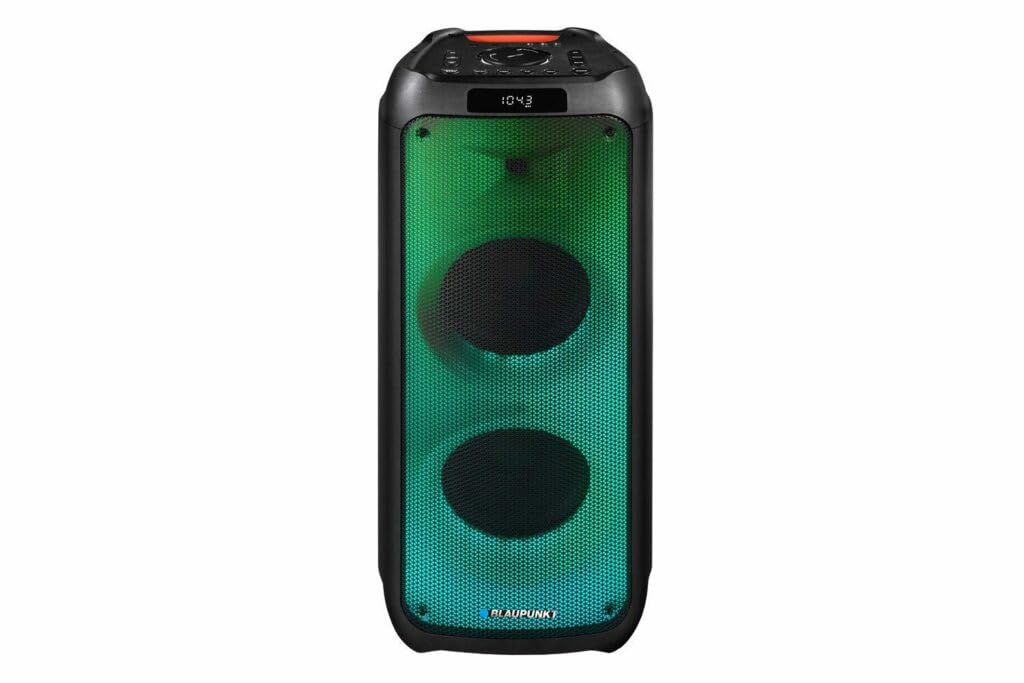
Figura 1: Davant view of the Blaupunkt PB10DB speaker, showcasing the dual speaker grilles and dynamic LED lighting. The top panel features a display and control buttons.

Figura 2: En angle view of the Blaupunkt PB10DB speaker, highlighting its portable design and the side profile.
Controls i ports (disposició típica)
- Botó d'encesa: Encén/apaga l'altaveu.
- Botó de mode: Switches between Bluetooth, USB, AUX, and FM radio modes.
- Control de volum: Ajusta el volum mestre.
- Botó Reproduir/Pausa: Controla la reproducció de suports.
- Botons de pista anterior/següent: Navega per les pistes.
- Entrada de micròfon (MIC IN): For connecting a wired microphone for karaoke.
- Port USB: Per reproduir música des d'una unitat USB o carregar dispositius externs.
- Entrada AUX (3.5 mm): Per connectar dispositius d'àudio externs mitjançant un cable d'àudio.
- Port de càrrega: For connecting the power adapter to charge the speaker.
5. Configuració
5.1 Càrrega de l'altaveu
- Connecteu l'adaptador de corrent proporcionat al port de càrrega de l'altaveu.
- Connecteu l'adaptador a una presa de corrent adequada.
- El llum indicador de càrrega s'il·luminarà (el color pot variar) per indicar que l'altaveu s'està carregant.
- Un cop completament carregat, l'indicador lluminós pot canviar de color o apagar-se. Desconnecteu el carregador.
A full charge typically takes several hours and provides approximately 8 hours of playback time.
5.2 Engegada/apagada
- Per encendre: Press and hold the Power button for a few seconds until the display lights up and you hear an audible prompt.
- Per apagar: Press and hold the Power button again for a few seconds until the display turns off and you hear an audible prompt.
6. Instruccions de funcionament
6.1 Vinculació Bluetooth
- Ensure the speaker is powered on and in Bluetooth mode. If not, press the Mode button until "Bluetooth" or a similar indicator appears on the display. The speaker will enter pairing mode, indicated by a flashing Bluetooth icon or LED.
- Al dispositiu mòbil (telèfon intel·ligent, tauleta, etc.), activeu el Bluetooth i cerqueu els dispositius disponibles.
- Select "Blaupunkt PB10DB" from the list of found devices.
- Once paired, the speaker will emit an audible confirmation, and the Bluetooth indicator will stop flashing.
- Ara pots reproduir àudio des del teu dispositiu a través de l'altaveu.
L'altaveu intentarà tornar a connectar-se automàticament amb l'últim dispositiu emparellat quan s'engegui.
6.2 Funció de karaoke
- Connect a wired microphone (not always included) to the MIC IN port on the speaker.
- Ensure the microphone is switched on (if it has a power switch).
- Play your desired karaoke track via Bluetooth, USB, or AUX.
- Adjust the microphone volume and echo effects (if available on the speaker) using the dedicated controls.
Reproducció USB 6.3
- Inseriu una unitat flash USB que contingui àudio MP3 files al port USB.
- Press the Mode button to switch to USB mode. The speaker will automatically begin playing music from the USB drive.
- Feu servir els botons Reproduir/Pausa i Pista anterior/següent per controlar la reproducció.
6.4 Entrada AUX
- Connecteu un extrem d'un cable d'àudio de 3.5 mm (no inclòs) al port AUX IN de l'altaveu.
- Connecteu l'altre extrem del cable a la presa d'auriculars o a la sortida d'àudio del dispositiu d'àudio extern.
- Premeu el botó Mode per canviar al mode AUX.
- Controla la reproducció i el volum des del teu dispositiu d'àudio extern.
7. Manteniment
7.1 Neteja
- Always power off the speaker and disconnect it from the power source before cleaning.
- Feu servir un drap suau i sec per netejar l'exterior de l'altaveu.
- No utilitzeu netejadors abrasius, ceres ni dissolvents, ja que poden danyar l'acabat.
7.2 Emmagatzematge
- Guardeu l'altaveu en un lloc fresc i sec, allunyat de la llum solar directa i de temperatures extremes.
- If storing for an extended period, charge the battery periodically (e.g., every 3 months) to maintain battery health.
8. Solució De Problemes
| Problema | Causa possible | Solució |
|---|---|---|
| L'altaveu no s'encén. | La bateria està esgotada. | Carregueu l'altaveu amb l'adaptador de corrent proporcionat. |
| No hi ha so de l'altaveu. | El volum és massa baix o silenciat. Mode d'entrada incorrecte. | Increase volume. Press the Mode button to select the correct input (Bluetooth, USB, AUX). |
| L'aparellament de Bluetooth falla. | L'altaveu no està en mode d'emparellament. El dispositiu és massa lluny. Interferències. | Assegureu-vos que l'altaveu estigui en mode d'emparellament Bluetooth. Acosteu el dispositiu a l'altaveu. Desactiveu els altres dispositius Bluetooth. |
| El micròfon no funciona. | Microphone not connected properly or switched off. Microphone volume too low. | Check microphone connection. Ensure microphone is powered on. Adjust microphone volume. |
| La reproducció per USB no funciona. | La unitat USB no està formatada correctament o no és compatible file tipus. | Assegureu-vos que la unitat USB estigui formatada en FAT32 i que contingui fitxers MP3. files. Prova una altra unitat USB. |
9. Especificacions
| Nom del model: | PB10DB |
| Marca: | BLAUPUNKT |
| Tecnologia de connectivitat: | Auxiliar, Bluetooth, USB |
| Potència màxima de sortida dels altaveus: | 1000 watts |
| Mode de sortida d'àudio: | estèreo |
| Tipus de muntatge: | Muntatge de taula |
| Material: | Metall i plàstic |
| Tipus d'altaveu: | Tweeter |
| Característica especial: | Música |
| Usos recomanats: | For music player |
| Color: | Blau |
| Impermeable: | És cert |
| Mètode de control: | Toca |
| Diàmetre del Tweeter: | 4 centímetres |
| Durada mitjana de la bateria: | 8 hores |
| Dispositius compatibles: | Portàtil, Smartphone |
| Font d'alimentació: | Funciona amb bateria |
| Pes de l'article: | 105 grams |
| Dimensions del producte (L x A x A): | 24 x 69 x 2.5 cm |
10. Garantia i Suport
Blaupunkt products are designed and manufactured to the highest quality standards. For detailed warranty information, please refer to the warranty card included with your product or visit the official Blaupunkt weblloc.
For technical support, troubleshooting assistance, or service inquiries, please contact Blaupunkt customer support through their official channels.
- Oficial Weblloc: www.blaupunkt.com
- Atenció al client: Refer to your regional Blaupunkt weblloc per obtenir dades de contacte.