
Introducció
This manual provides detailed instructions for the safe and efficient operation of your Max Power MPD816 PA Speaker. Please read this manual thoroughly before using the product and retain it for future reference.
The Max Power MPD816 is a portable PA speaker system designed for both indoor and outdoor use, featuring Bluetooth connectivity, LED lights, a rechargeable battery, and inputs for a microphone and auxiliary devices.
Contingut del paquet
Verifiqueu que tots els elements siguin presents al paquet:
- Max Power MPD816 PA Speaker
- Micròfon per cable
- Control remot
- Cable de càrrega tipus C.
- Manual d'usuari (aquest document)

Figure 1: Max Power MPD816 PA Speaker with included wired microphone, remote control, and charging cable.
Configuració
1. Carregant l’altaveu
Before initial use, fully charge the speaker's built-in lithium-ion battery. The speaker comes with a Type-C charging cable for fast charging.
- Connect the Type-C charging cable to the charging port on the speaker.
- Connect the other end of the charging cable to a compatible AC power adapter (not included) or a USB power source.
- The charging indicator light will illuminate. Once fully charged, the indicator light may change color or turn off, depending on the model.
- Una càrrega completa proporciona aproximadament 6 hores de reproducció.
Note: Use only the provided charging cable or a certified Type-C cable to prevent damage to the device.
2. Encès / apagat
Locate the power switch on the control panel of the speaker.
- To power on: Press and hold the power button until the display illuminates.
- Per apagar: premeu i manteniu premut el botó d'engegada fins que la pantalla s'apagui.
3. Connexió del micròfon
The wired microphone can be connected for karaoke or public address functions.
- Locate the microphone input jack on the speaker's control panel.
- Insert the microphone cable into the microphone input jack.
- Adjust the microphone volume using the dedicated knob on the control panel or the remote control.

Figure 2: Speaker control panel with various inputs and controls.
Instruccions de funcionament
1. Connectivitat Bluetooth
Connect your smartphone, tablet, or other Bluetooth-enabled device wirelessly to the speaker.
- Power on the speaker. The speaker will automatically enter Bluetooth pairing mode, indicated by a flashing Bluetooth icon on the display or an audible prompt.
- Al dispositiu, activa el Bluetooth i cerca els dispositius disponibles.
- Select "Max Power MPD816" (or similar name) from the list of devices.
- Once paired, the speaker will emit a confirmation sound, and the Bluetooth icon will stop flashing.
- Ara pots reproduir àudio des del teu dispositiu a través de l'altaveu.
Note: The effective Bluetooth range is typically 5-10 meters. Obstacles may reduce this range.
2. Mode de ràdio FM
Listen to your favorite radio stations using the built-in FM tuner.
- Press the "Mode" button on the speaker or remote control until "FM" is displayed.
- Press the "Play/Pause" button to automatically scan and save available FM stations.
- Feu servir els botons "Anterior" i "Següent" per navegar entre les estacions desades.
3. Reproducció de targetes USB/TF
Reprodueix àudio files directly from a USB flash drive or TF (MicroSD) card.
- Inseriu una unitat flaix USB al port USB o una targeta TF a la ranura per a targetes TF.
- L'altaveu canviarà automàticament al mode USB o targeta TF i començarà a reproduir àudio files. If not, press the "Mode" button to select the correct input.
- Feu servir els botons "Reprodueix/Pausa", "Anterior" i "Següent" per controlar la reproducció.
4. Mode d'entrada AUX
Connect external audio devices using an auxiliary cable.
- Connecteu un extrem d'un cable d'àudio de 3.5 mm (no inclòs) al port d'entrada AUX de l'altaveu.
- Connecteu l'altre extrem a la presa d'auriculars o a la sortida d'àudio del vostre dispositiu extern (per exemple, reproductor MP3, ordinador portàtil).
- Press the "Mode" button on the speaker or remote control until "AUX" is displayed.
- Controla la reproducció i el volum des del teu dispositiu extern.
5. LED Lights Control
The speaker features multi-color LED lights that can be turned on or off.
- Locate the dedicated LED light button on the control panel or remote control.
- Press the button to cycle through light modes or to turn the lights on/off.
6. Ús del comandament a distància
El comandament a distància inclòs proporciona un accés còmode a diverses funcions des de la distància.
- Potència: Enceneu/apaga l'altaveu.
- Mode: Switch between Bluetooth, FM, USB/TF, and AUX modes.
- Volum +/-: Ajusteu el volum mestre.
- Reproduir/pausa: Reprodueix o pausa la reproducció d'àudio.
- Anterior/Següent: Skip tracks or navigate FM stations.
- EQ: Seleccioneu els preajustos de l'equalitzador (si n'hi ha).
- Silenciar: Silencia la sortida d'àudio.
- Bloc numèric: Direct track selection in USB/TF mode.
Manteniment
- Neteja: Feu servir un drap suau i sec per netejar l'exterior de l'altaveu. No utilitzeu netejadors abrasius, ceres ni dissolvents.
- Emmagatzematge: Quan no l'utilitzeu durant períodes prolongats, guardeu l'altaveu en un lloc fresc i sec, allunyat de la llum solar directa i de temperatures extremes.
- Cura de la bateria: Per allargar la durada de la bateria, eviteu descarregar-la completament amb freqüència. Torneu a carregar l'altaveu regularment, fins i tot si no l'esteu fent servir, per mantenir la bateria en bon estat.
- Exposició a l'aigua: This speaker is not waterproof. Avoid exposing it to rain, splashes, or high humidity.
Resolució de problemes
| Problema | Causa possible | Solució |
|---|---|---|
| L'altaveu no s'encén. | La bateria està descarregada. | Connect the speaker to a power source using the Type-C charging cable and allow it to charge. |
| No hi ha so de l’altaveu. | El volum és massa baix o silenciat. S'ha seleccionat un mode d'entrada incorrecte. El dispositiu no està connectat correctament. | Increase the volume on the speaker and your connected device. Ensure the speaker is not muted. Press the "Mode" button to select the correct input (Bluetooth, AUX, USB/TF). Re-establish Bluetooth connection or re-insert AUX/USB/TF. |
| El dispositiu Bluetooth no es pot emparellar. | Speaker is not in pairing mode. Device is out of range. Another device is already connected. | Ensure the speaker is in Bluetooth mode and flashing. Move your device closer to the speaker. Disconnect any previously paired devices from the speaker or your device. |
| El micròfon no funciona. | Microphone not properly connected. Microphone volume is too low. | Ensure the microphone cable is fully inserted into the microphone input. Adjust the microphone volume knob on the speaker. |
| El comandament a distància no funciona. | Battery in remote is dead. Obstruction between remote and speaker. | Replace the battery in the remote control. Ensure there is a clear line of sight between the remote and the speaker's IR receiver. |
Especificacions
| Número de model | MPD816 |
| Marca | Potència màxima |
| Font d'alimentació | AC (for charging) |
| Tipus de bateria | 1 ió de liti (inclòs) |
| Durada de la bateria | Aproximadament 6 hores |
| Tecnologia de connectivitat | Bluetooth, USB |
| Entrades d'àudio | AUX (3.5mm), Microphone, USB, TF Card |
| Material | Plàstic |
| Dimensions (A x A x P) | 26.11 x 12.2 x 11.2 inches (approximate package dimensions, actual product dimensions are similar) |
| Pes de l'article | 9.08 lliures |
| UPC | 761062716826 |
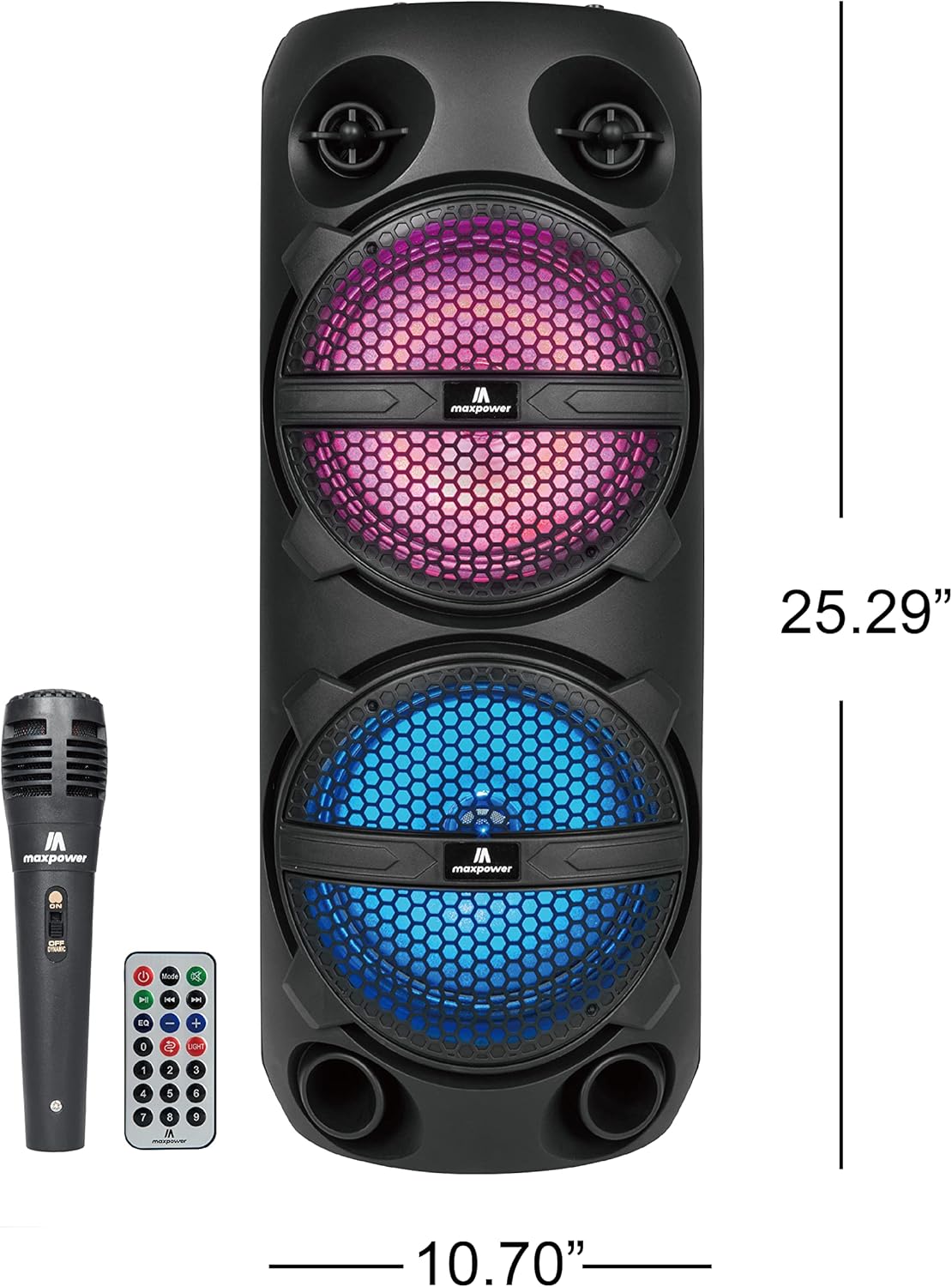
Figure 3: Max Power MPD816 PA Speaker with approximate dimensions.
Informació de seguretat
Instruccions importants de seguretat:
- Llegiu atentament aquestes instruccions.
- Conserveu aquestes instruccions per a referència futura.
- Compte amb totes les advertències.
- Seguiu totes les instruccions.
- No utilitzeu aquest aparell prop de l'aigua.
- Netegeu només amb un drap sec.
- No bloquegeu cap obertura de ventilació. Instal·leu-ho d'acord amb les instruccions del fabricant.
- No instal·leu a prop de cap font de calor com ara radiadors, registres de calor, estufes o altres aparells (inclosos amplificadors) que produeixen calor.
- Eviteu que el cable d'alimentació sigui trepitjat o pessigat, especialment als endolls, els endolls i el punt on surten de l'aparell.
- Utilitzeu només accessoris/accessoris especificats pel fabricant.
- Desendolleu aquest aparell durant les tempestes amb llamps o quan no l'utilitzeu durant llargs períodes de temps.
- Demaneu tot el servei a personal de servei qualificat. El manteniment és necessari quan l'aparell s'ha fet malbé d'alguna manera, com ara el cable d'alimentació o l'endoll està danyat, s'ha vessat líquid o han caigut objectes a l'aparell, l'aparell ha estat exposat a la pluja o la humitat, no funciona amb normalitat. , o s'ha deixat caure.