
1. Introducció
The SteelSeries Arctis Nova 1X Gaming Headset delivers an immersive audio experience across multiple platforms. Designed for comfort and clarity, it features the Signature Arctis Sound and a ClearCast Gen 2 Microphone, making it ideal for Xbox Series X|S, PC, PlayStation, Switch, and mobile gaming.
This manual provides detailed instructions for setting up, operating, and maintaining your Arctis Nova 1X headset to ensure optimal performance and longevity.
2. Què hi ha a la caixa
Upon unboxing your SteelSeries Arctis Nova 1X Gaming Headset, you should find the following components:
- Auriculars Arctis Nova 1X
- Main Headset Cable (3.5mm)
- Headband (pre-installed or separate, as per packaging)
- Guia d'informació del producte

Imatge: Frontal view of the SteelSeries Arctis Nova 1X Gaming Headset, showcasing its sleek design and microphone.
3. Configuració
3.1 Connexió dels auriculars
The Arctis Nova 1X is a wired headset designed for universal compatibility. To connect your headset:
- Locate the 3.5mm main headset cable.
- Plug one end of the 3.5mm cable into the audio jack on the left earcup of your Arctis Nova 1X headset.
- Plug the other end of the 3.5mm cable into the corresponding audio port on your gaming device (Xbox Series X|S controller, PC, PlayStation controller, Nintendo Switch, or mobile device).
Note: Ensure the cable is securely connected to both the headset and your device for optimal audio and microphone performance.

Image: Diagram illustrating the multi-platform compatibility of the Arctis Nova 1X headset, showing connections to various gaming devices.
4. Funcionament dels auriculars
4.1 Control de volum
Adjust the audio volume directly from the headset:
- Locate the volume wheel on the left earcup.
- Roll the wheel up to increase the volume or down to decrease it.
4.2 Silenciament del micròfon
To mute or unmute your microphone:
- Find the microphone mute button on the left earcup, adjacent to the volume wheel.
- Press the button to toggle the microphone on or off. A red indicator will typically show when the microphone is muted.
4.3 Retractable ClearCast Gen 2 Microphone
The ClearCast Gen 2 microphone is retractable for convenience:
- To use the microphone, gently pull it out from the left earcup until it reaches your desired position.
- To store the microphone, push it back into the earcup until it is fully retracted.
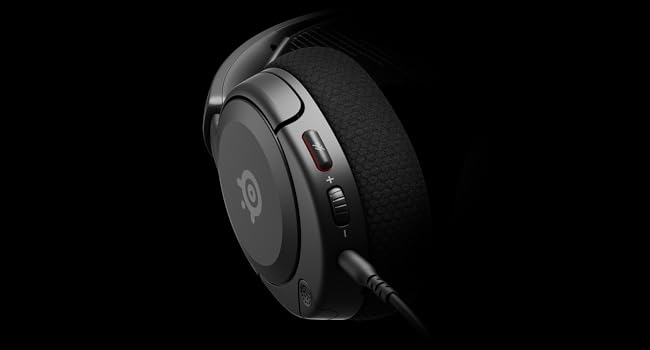
Imatge: Primer pla view of the left earcup of the Arctis Nova 1X, highlighting the volume wheel and microphone mute button for easy access during gameplay.
Video: Official SteelSeries video demonstrating the features of the Arctis Nova 1 headset, including its audio capabilities and microphone design.
5. Comfort and Fit
The Arctis Nova 1X is designed for extended gaming sessions with its ComfortMAX System:
- Disseny ultralleuger: Weighing only 236g, the headset minimizes pressure during long use.
- Height-Adjustable Earcups: The earcups can be adjusted vertically to fit various head sizes comfortably.
- Flexible Suspension Headband: The elastic headband conforms to your head for a secure yet gentle fit.

Image: The Arctis Nova 1X headset highlighting its ultra-lightweight and slim profile, designed for comfort.

Image: The Arctis Nova 1X headset demonstrating its height-adjustable earcups for a personalized and comfortable fit.
6. Funcions d'àudio
Experience superior sound with the Arctis Nova 1X:
- Àudio Totpoderós: The Nova Acoustic System with High Fidelity Drivers delivers crystal-clear highs, precise mids, and deep bass.
- Àudio espacial de 360°: Immerse yourself in the game with surround sound that allows you to pinpoint enemy positions and environmental cues.
- Pro-grade Parametric EQ: Customize your sound profile with the SteelSeries Sonar Audio Software Suite for a competitive edge.

Image: The Arctis Nova 1X headset highlighting its "Almighty Audio" capabilities for a rich sound experience.
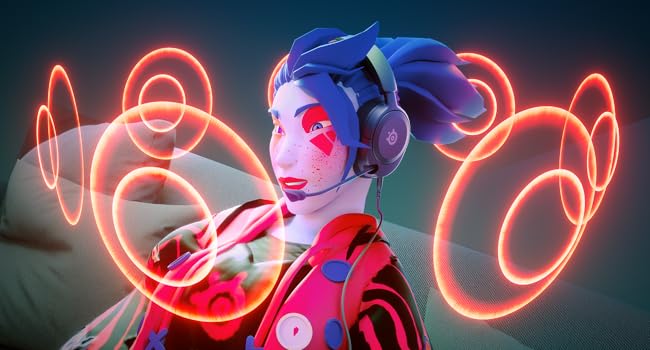
Image: Visual representation of 360° Spatial Audio, showing sound waves surrounding a gamer wearing the Arctis Nova 1X headset.
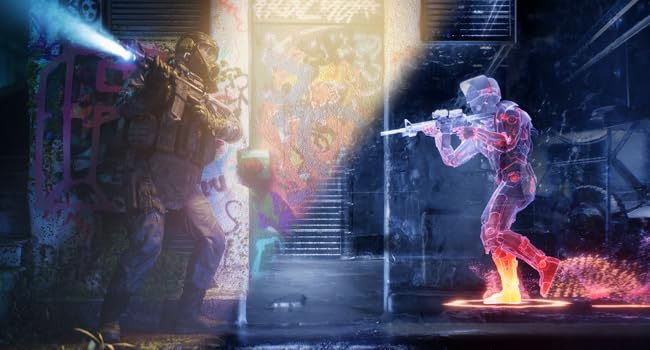
Image: Graphic illustrating the Pro-grade Parametric EQ, suggesting advanced audio customization options available with the headset.
7. Microphone Features
The ClearCast Gen 2 Mic ensures clear communication:
- AI Noise Cancelling: Advanced AI algorithms filter out background noise, ensuring your voice is heard clearly by teammates.
- Disseny retràctil: The microphone can be fully retracted into the earcup when not in use, maintaining a sleek profile.

Image: The Nova 1 AI Microphone, emphasizing its noise-cancelling capabilities for clear voice communication.
8. Manteniment
To ensure the longevity and optimal performance of your Arctis Nova 1X headset, follow these maintenance guidelines:
- Neteja: Feu servir un drap suau i sec per netejar els auriculars i la diadema. Per a una neteja més profunda, netegeu lleugeramentamp cloth with mild soap can be used, ensuring no moisture enters the speaker grilles or ports.
- Cura del cable: Avoid sharp bends or excessive pulling on the headset cable to prevent internal damage. Store the cable neatly when not in use.
- Emmagatzematge: Guardeu els auriculars en un lloc fresc i sec, allunyat de la llum solar directa i de temperatures extremes.
- Consells per als auriculars: If applicable, ensure earbud tips (if using with mobile) fit snugly. Replace worn-out earbud tips to maintain sound quality and comfort.
9. Solució De Problemes
If you encounter issues with your Arctis Nova 1X headset, try the following solutions:
- Sense àudio/Volum baix:
- Ensure the 3.5mm cable is fully inserted into both the headset and your device.
- Check the volume wheel on the headset and your device's system volume.
- Prova els auriculars amb un altre dispositiu per descartar problemes específics del dispositiu.
- El micròfon no funciona:
- Ensure the microphone mute button is not activated (red indicator off).
- Verify the microphone is fully extended and positioned correctly.
- Check your device's audio settings to ensure the correct microphone input is selected and its volume is not muted.
- Qualitat de so baixa:
- Ensure the 3.5mm cable is not damaged and is securely connected.
- Adjust your device's audio settings or equalizer settings.
10. Especificacions
| Característica | Detall |
|---|---|
| Marca | SteelSeries |
| Nom del model | Arctis Nova 1X |
| Número de model | 61616 |
| Tecnologia de connectivitat | Cablejat (connector de 3.5 mm) |
| Col·locació de l'orella | Sobre l'orella |
| Control de soroll | Cancel·lació activa de soroll (micròfon) |
| Tipus de controlador d'àudio | Conductor dinàmic |
| Interval de freqüència | 20 Hz - 20,000 Hz |
| Micròfon | ClearCast Gen 2 (Retractable, AI Noise Cancelling) |
| Dispositius compatibles | Xbox Series X|S, PC, PlayStation, Switch, Mobile |
| Pes de l'article | 1.1 lliures (aprox. 500 g) |
| Color | Negre |
| UPC | 850014119737 |
Vídeo: 360 graus view of the SteelSeries Arctis Nova 1X headset in black, showcasinel seu disseny des de tots els angles.
11. Garantia i assistència
11.1 Informació de la garantia
The SteelSeries Arctis Nova 1X Gaming Headset comes with a 1 anys de garantia limitada des de la data de compra. Aquesta garantia cobreix els defectes de fabricació i garanteix que el producte funcioni tal com està previst en condicions d'ús normal. Conserveu el comprovant de compra per a reclamacions de garantia.
For detailed warranty terms and conditions, please refer to the official SteelSeries website or the warranty card included in your product packaging.
11.2 Atenció al client
For further assistance, technical support, or warranty claims, please contact SteelSeries customer support through their official weblloc:
Visita el servei d'assistència de SteelSeries
You may also find additional resources, FAQs, and software downloads on their support page.