
ALLIMITY RC2000E01
ALLIMITY RC2000E01 Replacement Remote Control
Model: RC2000E01 | Marca: ALLIMITAT
Introducció
This manual provides instructions for the ALLIMITY RC2000E01 Replacement Remote Control, designed for a wide range of TCL and Thomson television models. This remote is a direct replacement, offering full functionality without the need for complex programming. Simply insert batteries, and it is ready for use.
The RC2000E01 is compatible with numerous models, ensuring seamless operation with your existing television. Please refer to the 'Specifications' section for a detailed list of compatible devices.

En angle view of the ALLIMITY RC2000E01 remote control, showing its ergonomic design.
Configuració
To begin using your ALLIMITY RC2000E01 remote control, follow these simple steps for battery installation:
- Pas 1: obriu el compartiment de la bateria
Locate the battery compartment cover on the back of the remote control. Gently slide or press the latch to open the cover. - Pas 2: Inseriu les bateries
Insert two AAA alkaline batteries (not included) into the compartment. Ensure the positive (+) and negative (-) terminals of the batteries align correctly with the markings inside the compartment. - Pas 3: Tanqueu el compartiment de la bateria
Torneu a col·locar la tapa del compartiment de la bateria fent-la lliscar fins que faci clic de manera segura. - Pas 4: prova de funcionalitat
Point the remote control towards your television and press the Power button. The television should respond. If not, verify battery orientation and ensure the batteries are fresh.
Instruccions de funcionament
The ALLIMITY RC2000E01 remote control provides access to all standard functions of your TCL or Thomson television. Below is a guide to the main buttons and their uses.
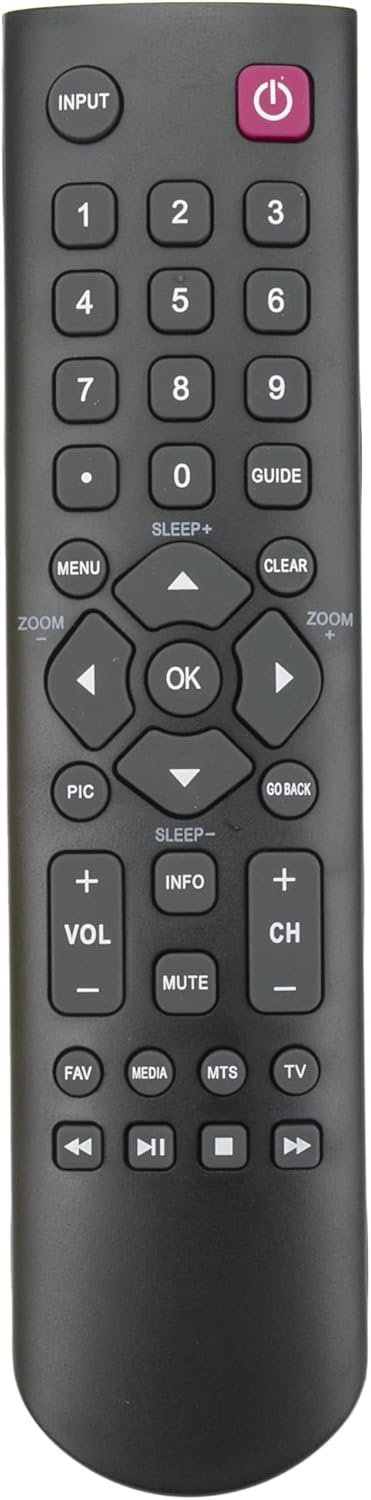
Davant view of the ALLIMITY RC2000E01 remote control, highlighting all functional buttons.
- Power Button (Red, Top Right): Encén o apaga el televisor.
- INPUT Button (Top Left): Passa ciclísticament per les fonts d'entrada disponibles (HDMI, AV, etc.).
- Botons numèrics (0-9): Seleccioneu directament els canals o introduïu valors numèrics.
- GUIDE Button: Accesses the electronic program guide (if supported by your TV).
- Botó MENÚ: Opens the television's main menu for settings adjustments.
- Botó ESBORRA: Esborra les visualitzacions en pantalla o cancel·la les seleccions.
- Teclat de navegació (amunt, avall, esquerra, dreta, OK): S'utilitza per navegar pels menús i confirmar seleccions.
- PIC Button: Ajusta la configuració de la imatge (per exemple, la brillantor, el contrast).
- GO BACK Button: Torna al menú o canal anterior.
- Botons VOL +/-: Ajusta el nivell de volum.
- CH +/- Buttons: Canvia el canal de televisió.
- Botó MUTE: Silencia o activa el so de la televisió.
- Botó INFO: Mostra informació sobre el programa o l'entrada actual.
- Botó FAV: Accedeix a la llista de canals preferits.
- MEDIA Button: Opens the media player or smart TV functions.
- MTS Button: Selects Multi-channel Television Sound options (e.g., stereo, SAP).
- Botó de TV: Canvia al mode de televisió.
- Playback Controls (Rewind, Play/Pause, Stop, Fast Forward): Controls media playback for compatible media sources.
Manteniment
- Substitució de la bateria: Replace batteries when the remote's range decreases or it becomes unresponsive. Always replace both batteries at the same time with new alkaline batteries.
- Neteja: Wipe the remote control with a soft, dry cloth. Do not use liquid cleaners or abrasive materials, as these can damage the remote's surface or internal components.
- Emmagatzematge: Guardeu el comandament a distància en un lloc fresc i sec, allunyat de la llum solar directa i de temperatures extremes quan no l'utilitzeu durant períodes prolongats.
Resolució de problemes
- El comandament a distància no respon:
- Check battery orientation. Ensure positive (+) and negative (-) terminals are correctly aligned.
- Replace old batteries with new ones. Weak batteries are a common cause of remote control issues.
- Ensure there is a clear line of sight between the remote control and the television's infrared sensor. Obstructions can block the signal.
- Botons específics que no funcionen:
- Clean the remote control, especially around the unresponsive buttons, to remove any dirt or debris that might be interfering with button presses.
- If only certain buttons are not working, and battery replacement does not help, the remote may be damaged and require replacement.
- Television Not Turning On/Off:
- Confirm the remote is compatible with your specific TV model. Refer to the compatibility list in this manual.
- Try manually turning the TV on/off using its physical buttons to ensure the TV itself is functioning correctly.
Especificacions
| Atribut | Detall |
| Marca | ALLIMITAT |
| Nom del model | RC2000E01 |
| Tecnologia de connectivitat | Infrarojos (IR) |
| Nombre de botons | 40 |
| Interval màxim | 10 metres (aproximadament 33 peus) |
| Descripció de la bateria | Alkaline (2 x AAA, not included) |
| Dispositius compatibles | D2900, 40D2900F, 28D2900F, 22D2900F, 32D2900F, L32B2600, 04TCLPDM0323, 19HT4253, RC2000E01, 24FS4246CW, 24FT5253, 26HU5253, 28HA3203, 32HA3103, 32HS5246C, 32HZ5233, 32HS5246, 32HW3323, 32HW3324, 39FU3253, 40FT4253, 40FS3246, 40FW3323, 48FU4243, 55FU4243, 55FA3203, 55FZ3234, 22FS5246C, 24HU5253, 24FW4325, 26HS3246, 32FS3246C, 32HS2246C, 32HT4253, 32HS2040C, 32HU2253, 32hu3253c, 39HZ4233, 40FW3253, 40FU3253, 42FU4253, 48FZ3234, 55FT5643, L24E4105F, 19HS5246C, 24FT4253, 24FU5253C-G, 26HU5253W, 32FA3103, 32HS2244, 32HT2253, 32FS5246, 32HT5453, 32HW3325G, 39FU3253C, 40FT5453, 40FS5246, 42FS4246C, 48FU4243C, 55FA3205, 55FZ3235, 22HS4246CW, 24FS4246C, 26HS4246CW, 26HS6246, 32FZ5233, 32HS4246CW, 32HU5253, 32HS4244, 32HU5244, 32HU5253, 43C, 40FT2253, 40FA3205, 40FU3255-G, 46FT5453, 22HS4246-C, 24HU5253W, 26HS4246C, 26HS4244, 32FU5253, 32HS4246C, 32HU3253, 32HS3246, 32HU5243, 39FU5253W, 40FS5246C, 40FA3113, 40FU3253C, 42FU2253, 50FU3253, 55FZ3233, L32D3300 |
Garantia i Suport
As a replacement remote control, this product typically does not come with an extended manufacturer's warranty. Please refer to your retailer or point of purchase for any specific return policies or limited warranties offered by the seller.
For technical support or further assistance, please contact the seller directly through your purchase platform. Ensure you have your order details available for faster service.
Ask a question about this manual
Ask about setup, troubleshooting, compatibility, parts, safety, or missing instructions. Manuals+ will review the question and use this page’s manual context to help answer it.