
Escali PR500S
Escali Pico PR500S Precision Kitchen Food Scale User Manual
Model: PR500S
Introducció
This manual provides comprehensive instructions for the proper use and maintenance of your Escali Pico PR500S Precision Kitchen Food Scale. Please read this manual thoroughly before operating the device to ensure accurate measurements and extend product longevity.

Image: The Escali Pico PR500S Precision Kitchen Food Scale, a compact gray digital scale with an LCD display and control buttons.
Contingut del paquet
Verifiqueu que hi hagi tots els elements en desempaquetar:
- Escali Pico PR500S Precision Kitchen Food Scale
- 1 bateria de ions de liti (inclosa)
- Manual d'usuari (aquest document)
Característiques del producte
The Escali Pico PR500S scale is designed for precision and convenience:
- Disseny compacte: Ultra-compact for easy storage and portability.
- Alta precisió: Measures up to 500 grams with 0.1 gram readability.
- Retenció de la pantalla: Freezes weight measurements on screen for large items.
- Parts Counting: Counts quantities of small items.
- Característica de la tara: Resets the scale to zero to measure multiple items or subtract container weight.
- Apagat automàtic: Conserves battery life by turning off after five minutes of inactivity.
- Pantalla digital LCD: Pantalla clara i fàcil de llegir.

Image: Diagram illustrating the key features of the Escali Pico PR500S scale, including its pocket-sized design, parts counting, unit selection, easy-to-read display, tare feature, and audio control buttons.
Configuració
Instal·lació de la bateria
- Localitzeu el compartiment de la bateria a la part inferior de la bàscula.
- Obriu la tapa del compartiment de la bateria.
- Inseriu la bateria de ions de liti inclosa, assegurant-vos de la polaritat correcta (+/-).
- Tanqueu bé la tapa del compartiment de la bateria.
L’escala ja està llesta per al seu ús.
Instruccions de funcionament
Encès/Apagat
- Per girar l'escala ON, premeu ON/ZERO botó.
- Per girar l'escala OFF, manteniu premut el botó ON/ZERO botó durant uns segons fins que la pantalla s'apagui.
Selecció d'unitats
The scale can measure in grams (g), ounces (oz), pounds (lb), and pounds + ounces (lb oz).
- Amb la bàscula engegada, premeu el botó UNITAT botó.
- Each press will cycle through the available units. Stop when your desired unit is displayed.
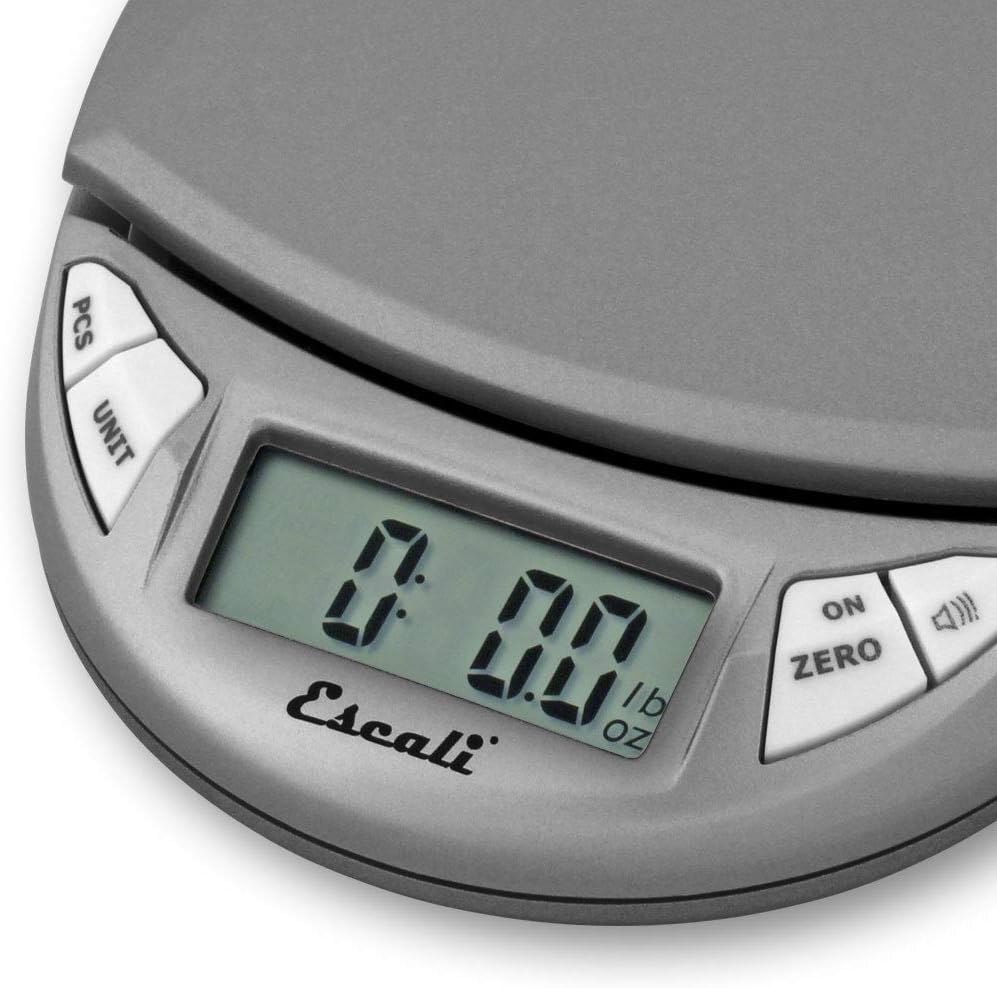
Image: Close-up of the scale's LCD display showing "0.00 lb oz", indicating the unit selection feature.
Funció Tara
The Tare function allows you to subtract the weight of a container or to measure multiple ingredients consecutively.
- Col·loqueu un recipient buit a la plataforma de la bàscula.
- Premeu el botó ON/ZERO botó. La pantalla es reiniciarà a zero.
- Add the item(s) to be weighed into the container. The display will show only the net weight of the item(s).
- Repeat step 2 to tare additional ingredients.
Parts Counting (PCS)
This feature allows you to count a large number of small, uniformly weighted items.
- Place a known quantity of items (e.g., 10, 20, 50, or 100 pieces) on the scale.
- Manteniu premut el botó PCS button until a number (e.g., "10", "20") flashes on the display.
- Premeu el botó UNITAT botó per seleccionar la sample size that matches the number of items you placed on the scale.
- Premeu el botó PCS button again to confirm. The display will now show the count of items.
- You can now add more items, and the scale will display the total count.
- To exit parts counting mode, press the PCS botó.
Mantenir la pantalla
The Display Hold feature allows you to view the weight of large items even if they obstruct the display.
- Weigh an item.
- Premeu el botó ON/ZERO button (or the button with the speaker icon, depending on model variation) briefly to activate the hold function. The display will show "HOLD" or a similar indicator.
- Remove the item. The weight will remain on the display.
- Press the button again to clear the held reading.

Image: The Escali Pico PR500S scale accurately weighing a bowl of powdered ingredients, surrounded by other bowls of spices.
Cura i Manteniment
- Neteja: Netegeu l'escala amb una damp tela. No submergiu la bàscula en aigua ni utilitzeu netejadors abrasius.
- Emmagatzematge: Store the scale in a cool, dry place. Avoid extreme temperatures and humidity.
- Bateria: Remove the battery if the scale will not be used for an extended period to prevent leakage.
- Manipulació: Handle the scale with care. Avoid dropping or subjecting it to strong impacts, as this can affect accuracy.
Resolució de problemes
| Problema | Causa possible | Solució |
|---|---|---|
| L'escala no s'encén | Bateria morta o instal·lada incorrectament. | Comproveu la polaritat de la bateria. Substituïu la bateria si cal. |
| Lectures inexactes | Uneven surface, overload, or damage. | Place scale on a flat, stable surface. Do not exceed maximum capacity (500g). Avoid dropping the scale. |
| Display shows "EEEE" or "O_Ld" | L'escala està sobrecarregada. | Remove excess weight immediately. The maximum capacity is 500 grams. |
| La pantalla mostra "Lo" | Bateria baixa. | Substituïu la bateria. |
Especificacions
- Model: PR500S
- Capacitat: 500 grams (17.6 oz)
- Llegibilitat: 0.1 grams (0.005 oz)
- Unitats: Grams (g), Ounces (oz), Pounds (lb), Pounds + Ounces (lb oz)
- Visualització: LCD
- Potència: 1 bateria de ions de liti (inclosa)
- Dimensions: Aproximadament 4.5 x 3.75 x 1 polzades
- Material: Plàstic
- Color: Metallic (Gray)
Garantia i Suport
The Escali Pico PR500S Precision Kitchen Food Scale comes with a Garantia limitada de per vida. For detailed warranty information, product support, or service inquiries, please contact Escali customer service.
Visit the official Escali weblloc web per obtenir dades de contacte i més ajuda: www.escali.com
Vídeos de productes
No relevant official product videos from the seller were found for embedding based on the provided criteria.
Ask a question about this manual
Ask about setup, troubleshooting, compatibility, parts, safety, or missing instructions. Manuals+ will review the question and use this page’s manual context to help answer it.