
Hotmoon HMNL02-RGB-1-US
Hotmoon White Noise Machine User Manual
Model: HMNL02-RGB-1-US
Informació important de seguretat
Precaució: Use only with the recommended voltage. Do not use this device as a toy. Improper handling may lead to electric shock. Excessive use of this noise machine may lead to potential noise exposure risks. Always follow safe usage guidelines. This product is CE & FCC Certified for safety.
Producte acabatview
The Hotmoon White Noise Machine is designed to provide a soothing environment for sleep and relaxation for babies, kids, and adults. It combines sound therapy with customizable lighting features, all controllable via a dedicated mobile application.

Image: Hotmoon White Noise Machine with its mobile application interface.
Guia de configuració
1. Desembalatge i col·locació
- Traieu amb cura el dispositiu del seu embalatge.
- Place the device on a stable, flat surface, away from water or excessive heat sources.
- Ensure the power cable is securely connected to the device and a suitable power outlet.
2. Instal·lació i connexió de l'aplicació
- Download the official Hotmoon companion application from your device's app store.
- Open the application and follow the on-screen instructions to pair your device. This typically involves ensuring Bluetooth is enabled on your mobile device and the Hotmoon machine is powered on.
- Once paired, the app will provide full control over the machine's functions.

Image: The mobile application interface for controlling the Hotmoon White Noise Machine.
Instruccions de funcionament
Basic Operation (Device Controls)
- A gentle tap on the top of the device can activate or change the light and music settings.
- Double-tapping the top can cycle through different colors and sounds.
Video: Demonstration of the Hotmoon White Noise Machine's features and app control.
Funcions de control d'aplicacions
- Selecció de so: Choose from a variety of natural sounds, white noise, and lullabies.
- Ajust de volum: Control the sound volume precisely using the app's slider.
- Control de brillantor: Adjust the light brightness with stepless dimming from 5% to 100%.
- Personalització del color: Select from 16 million RGB color options or tune white light from 3000K to 6500K.
- Configuració del temporitzador: Set timers for automatic shut-off.
- Scheduled Routines (Sleep Trainer): Create customized schedules for sound and light combinations to act as sleep-wake hints, promoting healthy habits.
- Red Night Light: Utilize the built-in red LED bead to emit a dim, soothing red glow, which may stimulate melatonin production and help promote sleeping quality.
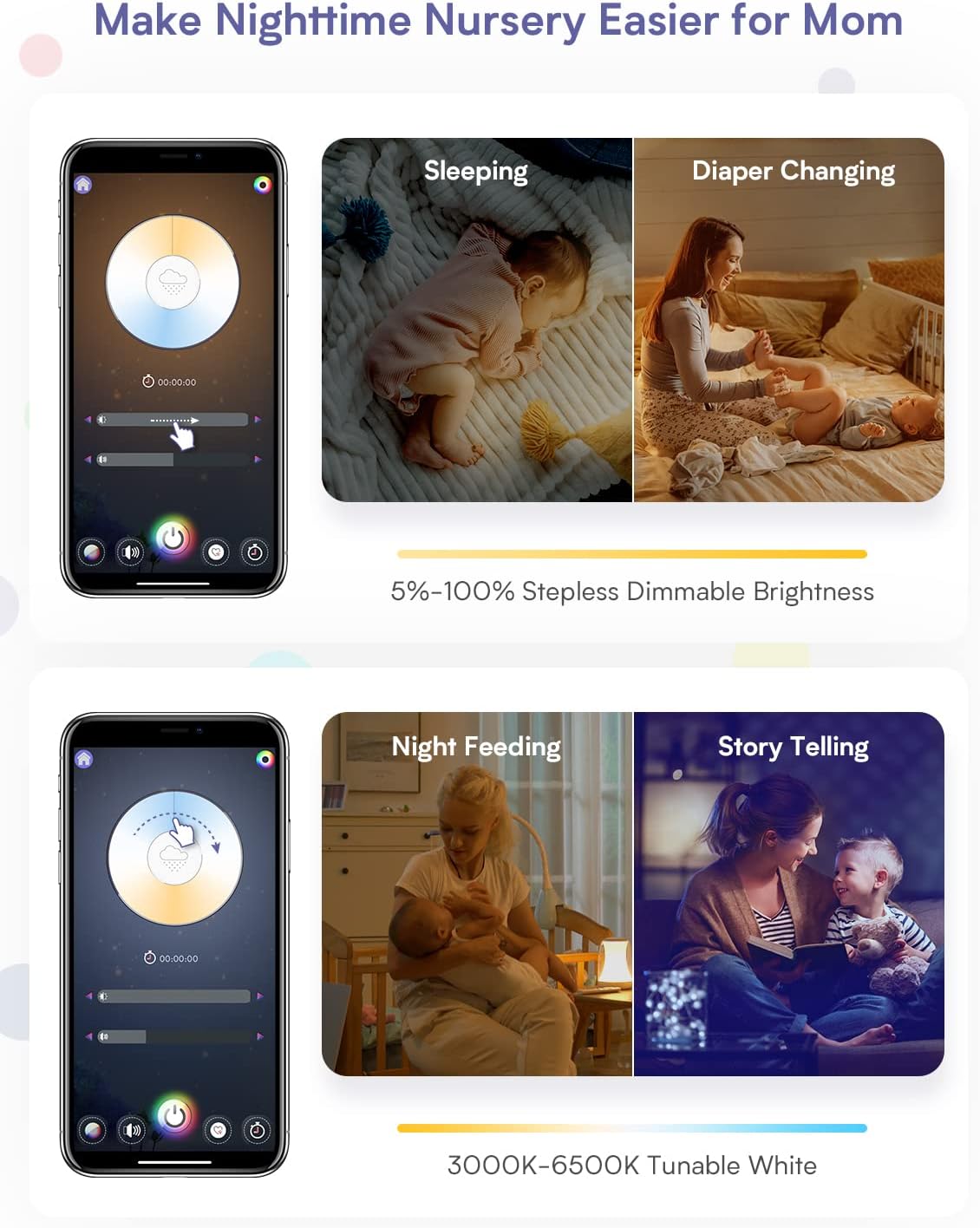
Image: App interface showing dimmable brightness settings for various nursery activities.

Image: App interface displaying options for nature sounds, white noise, and lullabies.

Image: App interface for setting custom schedules and timers for daily routines.

Image: App interface showing the color selection wheel for 16 million RGB options.

Image: The device emitting a red light, highlighting its sleep aid feature.
Manteniment
- To clean the device, wipe it with a soft, dry cloth.
- No utilitzeu productes de neteja abrasius ni submergiu el dispositiu en aigua.
- Assegureu-vos que el dispositiu estigui desconnectat abans de netejar-lo.
Resolució de problemes
| Problema | Possible causa/solució |
|---|---|
| Device not producing sound. |
|
| App control is unresponsive or "funky". |
|
| Device needs frequent resets (unplugging). |
|
| Cannot connect to multiple devices. |
|
Especificacions
- Model: HMNL02-RGB-1-US
- Marca: Hotmoon
- Color: Blanc
- Material: Acrilonitril butadiè estirè (ABS)
- Pes de l'article: 1.25 lliures
- Dimensions del producte: 4 x 4 x 6 polzades
- Font d'alimentació: Battery Powered (Note: The device is primarily powered via an external adapter, as shown in product images, despite being listed as 'Battery Powered' in some specifications.)
- Estil de canvi: Control d'aplicacions
- Característiques especials: Dimmable, App Control, Sound Machine, Night Light, Time-to-Rise Sleep Trainer
- Fabricant: Shenzhen ZhiLong Electronic Technology Co., Ltd
- Primer disponible: 19 de maig de 2022
Garantia i Suport
For warranty information or technical support, please refer to the official Hotmoon weblloc web o contacteu directament amb el seu servei d'atenció al client. Les dades de contacte solen estar disponibles a l'embalatge del producte o al fabricant. weblloc.
Ask a question about this manual
Ask about setup, troubleshooting, compatibility, parts, safety, or missing instructions. Manuals+ will review the question and use this page’s manual context to help answer it.