
Introducció
This manual provides detailed instructions for the setup, operation, and maintenance of your leQuiven Wireless Charging Station (Model XF-C01). This 3-in-1 charging station is designed to simultaneously charge compatible Samsung Galaxy phones, Galaxy Watches, and Galaxy Buds, offering a streamlined charging experience.
Contingut del paquet
Si us plau, verifiqueu que tots els elements que s'enumeren a continuació estiguin inclosos al vostre paquet:
- 1 x leQuiven Wireless Charging Station
- 1 x Charging Brick (Power Adapter)
- 1 x cable USB-C
- 1 x Manual d'usuari (Aquest document)

Figure 1: Contents of the leQuiven Wireless Charging Station package.
Producte acabatview
The leQuiven XF-C01 is a compact and efficient charging solution. It features dedicated charging areas for a smartphone, a smartwatch, and wireless earbuds, along with an integrated digital clock.

Figura 2: Frontal view of the leQuiven Wireless Charging Station with devices.
Característiques principals:
- Càrrega sense fil 3 en 1: Simultaneously charges a compatible smartphone, Galaxy Watch, and Galaxy Buds.
- Adjustable Digital Clock: Features a digital time display with adjustable brightness levels, including an off option.
- Disseny adequat per a casos: Supports charging through phone cases up to 5mm (0.2 inches) thick.
- Sistema de protecció múltiple: Inclou overvoltage, overload, undervoltage, static, over-temperature, foreign object detection, and overcurrent protection.
- Horizontal and Vertical Charging: The phone charging pad supports both horizontal and vertical device placement.
Instruccions de configuració
- Connecteu l'adaptador de corrent: Insert the USB-C end of the provided cable into the charging station's input port. Connect the USB-A end to the included charging brick.
- Connectar-se a l'alimentació: Plug the charging brick into a standard wall outlet. The digital clock on the charging station will illuminate, indicating it is powered on.
- Col·locació: Col·loqueu l'estació de càrrega sobre una superfície plana i estable, com ara un escriptori o una tauleta de nit.
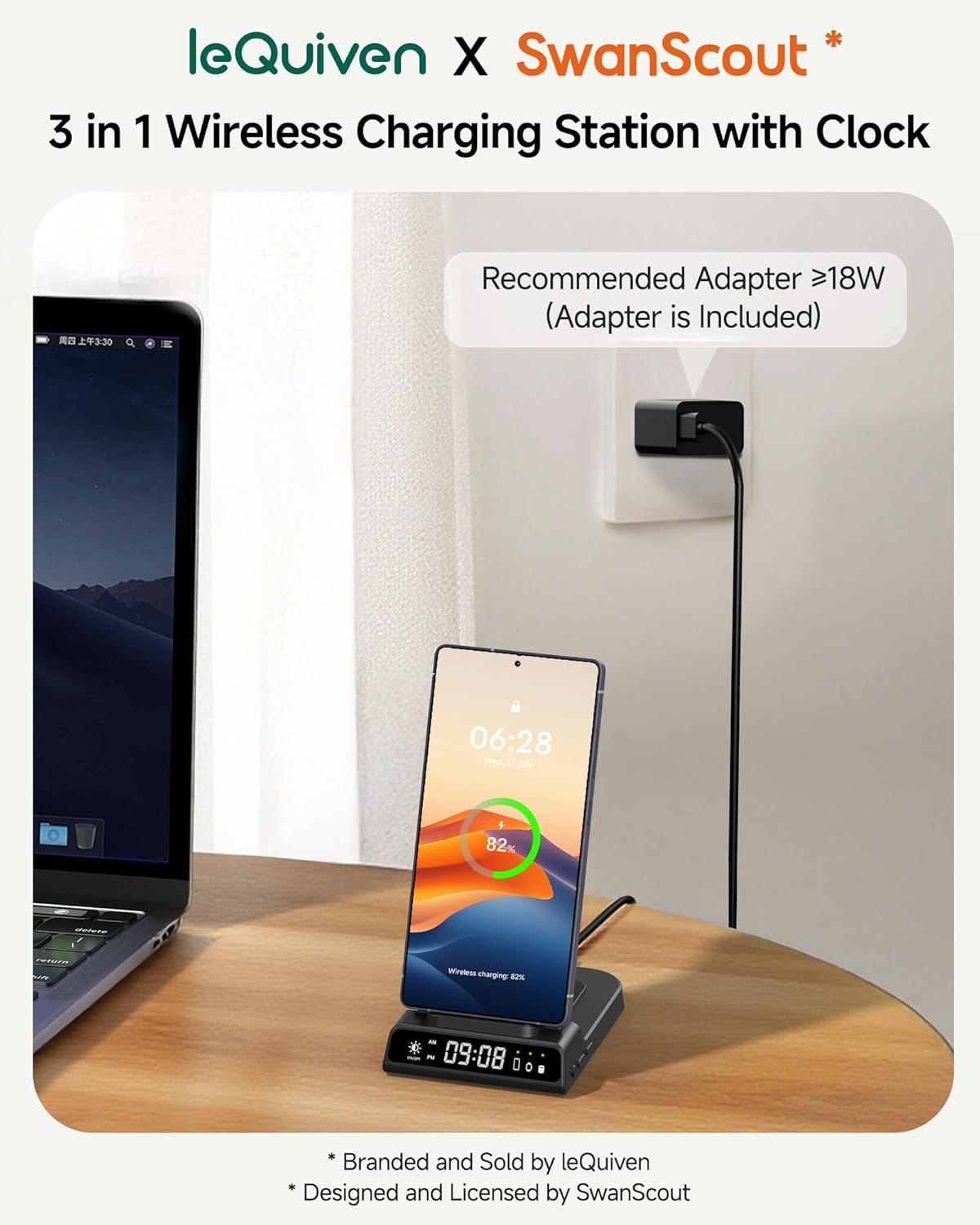
Figure 3: Connecting the charging station to power.
Instruccions de funcionament
1. Dispositius de càrrega
The charging station features three distinct wireless charging areas:
- Smartphone Charging Pad: Located on the upright stand. Place your compatible smartphone vertically or horizontally on this pad.
- Smartwatch Charging Pad: Located on the top arm of the stand. Place your compatible Galaxy Watch onto this magnetic pad.
- Earbuds Charging Pad: Located on the base of the station, behind the phone charging pad. Place your compatible wireless earbuds case on this flat pad.
A small green LED indicator on the station's base will light up next to the corresponding device icon when a device is successfully charging.
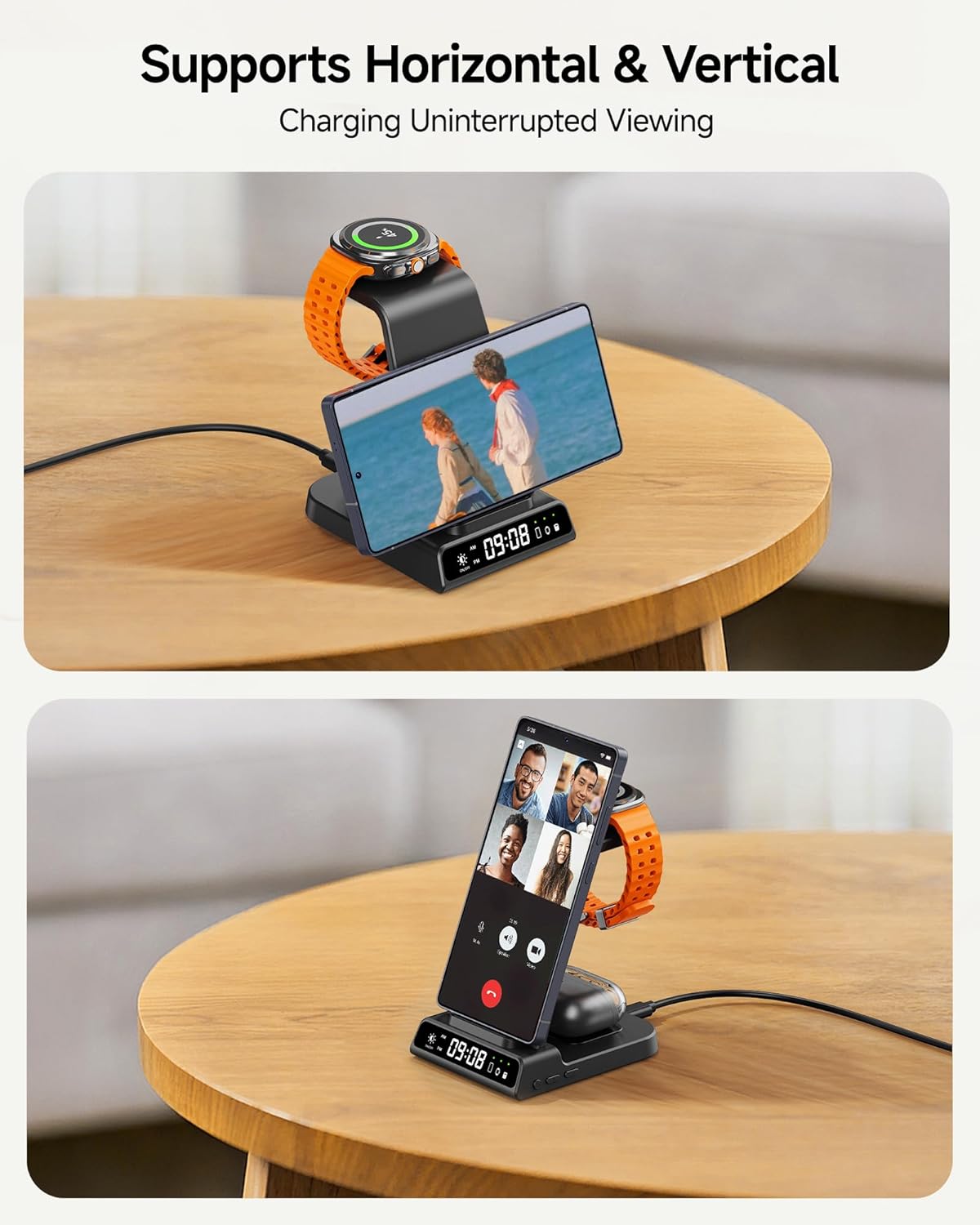
Figure 4: Supports both horizontal and vertical phone charging.
2. Setting the Digital Clock
The digital clock on the charging station can be adjusted using the buttons on the side of the unit.
- 12/24H System Switch: Short press the designated button once to toggle between 12-hour and 24-hour time formats.
- Introduïu la configuració de l'hora: Long press the time setting button (usually marked with a clock icon or similar) for 3 seconds to enter the hour adjustment mode.
- Adjust Hours/Minutes: While in time setting mode, short press the '+' or '-' buttons to adjust the hour. Short press the time setting button again to switch to minute adjustment, then use '+' or '-' to set minutes.
- Exit Time Setting: Long press the time setting button for 3 seconds to save and exit the time setting mode.

Figure 5: Clock setting buttons and functions.
3. Adjusting Clock Brightness
The digital clock's brightness can be adjusted to suit your environment, especially for nighttime use.
- Brightness Touch Button: Locate the touch-sensitive button on the front of the charging station, typically near the digital clock display.
- Brillantor del cicle: Tap this button to cycle through different brightness levels (100%, 50%, 20%) and an 'Off' setting.
Nota: The charging station does not include an alarm clock function; it is for time display only.

Figure 6: Adjusting the digital clock brightness.
Compatibilitat
The leQuiven Wireless Charging Station is compatible with a wide range of devices. Ensure your device supports wireless charging (Qi standard) for optimal performance.
Telèfons compatibles:
- Samsung galaxy: Z Flip7/6/5/4/3, Z Fold6/5/4/3, S25 Ultra/+/S25/Edge, S24 Ultra/+/S24/FE, S23 Ultra/+/S23/FE, S22 Ultra/+/S22, S21 Ultra/+/S21/FE, S20 Ultra/+/S20, S10/+/e, Note 20/10/9/8.
- iPhone: 16/15/14/13/12/11 Series, SE, XS MAX/X/XR, 8/8 Plus.
- Google Pixel: 8 Pro/8, 7 Pro/7, 6 Pro/6, 5, 4/3 (XL).
- Other Qi-enabled smartphones.
Nota: Not compatible with Samsung Galaxy A/M/J/Tab Series or phones without wireless charging capability.
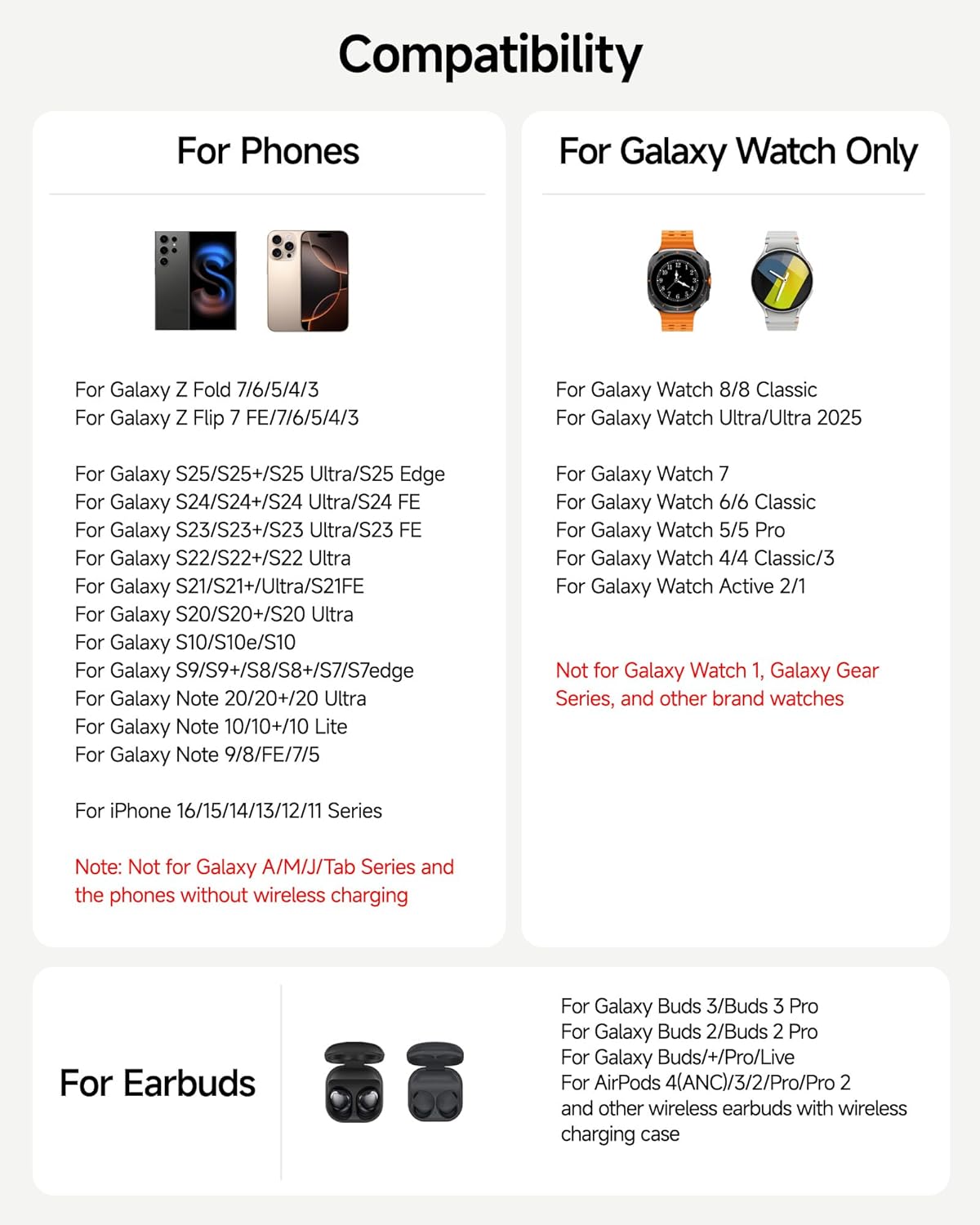
Figure 7: Phone compatibility list.
Compatible Smartwatches:
- Samsung Galaxy Watch: 8 Classic/8, 7, Ultra/Ultra 2025, 6 Classic/6, 5 Pro/5, 4 Classic/4, 3, Active 2/1.
Nota: Not compatible with Galaxy Watch 1, Galaxy Gear series, or other brand watches.
Compatible Earbuds:
- Samsung Galaxy Buds: 3 Pro/3, 2 Pro/2, Pro, Buds/+, Live.
- Apple AirPods: Pro 2, 3rd generation, 2, Pro.
- Other wireless earbuds with wireless charging cases.
Compatibilitat de casos:
The charging station supports phone cases with a thickness of less than 5mm (0.2 inches). Remove any magnetic pads, metal cases, credit cards, or metal rings from your phone case before charging, as these can interfere with wireless charging.

Figura 8: Pautes de compatibilitat de fundes per a telèfons.
Manteniment
To ensure the longevity and optimal performance of your charging station, follow these maintenance guidelines:
- Neteja: Disconnect the power before cleaning. Use a soft, dry cloth to wipe the surface of the charging station. Avoid using abrasive cleaners, solvents, or harsh chemicals.
- Emmagatzematge: Quan no l'utilitzeu durant períodes prolongats, guardeu l'estació de càrrega en un lloc fresc i sec, allunyat de la llum solar directa i de temperatures extremes.
- Manipulació: Manipuleu el dispositiu amb cura. Eviteu deixar-lo caure ni sotmetre'l a impactes forts.
Resolució de problemes
If you encounter issues with your leQuiven Wireless Charging Station, refer to the following common problems and solutions:
| Problema | Causa possible | Solució |
|---|---|---|
| El dispositiu no es carrega | 1. Dispositiu no alineat correctament. 2. Phone case too thick or contains metal. 3. Dispositiu no compatible. 4. Power adapter not connected or faulty. | 1. Re-position the device on the charging pad. 2. Remove the phone case or use a thinner, non-metallic case. 3. Verify device compatibility (refer to 'Compatibility' section). 4. Ensure the power adapter is securely connected and functioning. Try a different outlet. |
| La càrrega és lenta | 1. Using a non-recommended power adapter. 2. Multiple devices charging simultaneously. 3. Device misalignment. | 1. Use the provided 18W (or higher) charging brick. 2. Charging speed may be reduced when charging multiple devices. 3. Ensure devices are centered on their respective charging pads. |
| Digital clock not displaying or incorrect | 1. Clock brightness set to 'Off'. 2. Time not set correctly. | 1. Tap the brightness touch button to increase brightness. 2. Follow the 'Setting the Digital Clock' instructions to adjust the time. |
| Indicador LED parpellejant | S'ha detectat un objecte estrany (FOD). | Remove any metal objects, keys, coins, or cards from the charging area. |
Si el problema persisteix després d'intentar aquestes solucions, poseu-vos en contacte amb l'atenció al client.
Especificacions
| Característica | Detall |
|---|---|
| Número de model | XF-C01 |
| Marca | leQuiven |
| Dimensions del producte | 3.94 x 1.97 x 3.94 polzades |
| Entrada Voltage | 9 Volts |
| Entrada Ampedat | 2.1 Amps |
| Tipus de connector | USB tipus C |
| Ports USB totals | 1 (for power input) |
| Sortida de càrrega sense fils | Up to 18W total (requires >18W adapter) |
| Característiques especials | Built-in Digital Clock, Short Circuit Protection, Foreign Object Detection, Temperature Control, Overvoltage Protection, Overload Protection, Undervoltage Protection, Static Protection, Overcurrent Protection. |
| Fabricant | Shenzhen Xuanfeng Innovations Technology Co., Ltd. |
Garantia i Suport
The leQuiven Wireless Charging Station comes with a standard manufacturer's warranty. Please refer to the warranty card included in your package for specific terms and conditions.
For technical support, troubleshooting assistance, or warranty claims, please contact leQuiven customer service through the retailer where the product was purchased or visit the official leQuiven weblloc.
Nota: No official product videos were provided with relevant seller information for embedding in this manual.