
OMOTON WK003
OMOTON 2.4GHz Wireless AZERTY Keyboard Instruction Manual
Model: WK003
Marca: OMOTON
1. Introducció
Thank you for choosing the OMOTON 2.4GHz Wireless AZERTY Keyboard. This ultra-slim, silent keyboard is designed for comfortable and efficient typing across various Windows operating systems. This manual provides detailed instructions for setting up, operating, maintaining, and troubleshooting your new keyboard to ensure optimal performance.
2. Contingut del paquet
Please check the package contents carefully. If any items are missing or damaged, please contact OMOTON customer support.
- 1 x OMOTON 2.4GHz Wireless AZERTY Keyboard
- 1 x Receptor USB
- 1 x Manual d'usuari
3. Guia de configuració
Follow these steps to set up your OMOTON wireless keyboard:
- Instal·leu les bateries: Open the battery compartment on the back of the keyboard. Insert two AAA batteries (not included), ensuring correct polarity. Close the compartment.
- Inseriu el receptor USB: Locate the USB receiver, which is magnetically stored in the battery compartment. Plug the USB receiver into an available USB port on your computer.

Image: Battery compartment with USB receiver and AAA batteries.
- Encès: Slide the ON/OFF switch located on the top right side of the keyboard to the "ON" position.
- Connectar: Your computer should automatically detect and install the necessary drivers for the keyboard. No additional software is required.

Image: Plug & Play setup with USB receiver.
El teclat ja està llest per utilitzar-lo.
4. Instruccions de funcionament
4.1 Mecanografia bàsica
Simply begin typing. The keyboard features a standard AZERTY layout for familiar use.
4.2 Fn Lock Function
The keyboard includes a convenient Fn Lock function. By default, the F1-F12 keys perform their standard function. To access the multimedia shortcuts directly without pressing the Fn key, activate the Fn Lock.
- Activate/Deactivate Fn Lock: Premeu Fn + Échap simultaneously. When activated, the multimedia functions (e.g., volume control, home page) will be directly accessible by pressing F1-F12. When deactivated, F1-F12 will perform their standard functions, and multimedia actions will require pressing Fn + Fx.

Image: Fn Lock function and multimedia keys.
4.3 Dreceres multimèdia
The keyboard provides 12 multimedia shortcuts for quick access to common functions. These can be used directly when Fn Lock is active, or by pressing Fn in combination with the respective F-key when Fn Lock is inactive.
| clau | Funció |
|---|---|
| F1 | Silenciar |
| F2 | Baixa el volum |
| F3 | Puja el volum |
| F4 | Pista anterior |
| F5 | Reproduir/Pausa |
| F6 | Pista següent |
| F7 | Brightness Down (System Dependent) |
| F8 | Brightness Up (System Dependent) |
| F9 | Cerca |
| F10 | Pàgina d'inici |
| F11 | Còpia |
| F12 | Enganxa |
4.4 Compatibilitat
This keyboard is compatible with Windows 11, 10, 8, 7, XP, and Vista, making it suitable for a wide range of desktop and laptop computers.
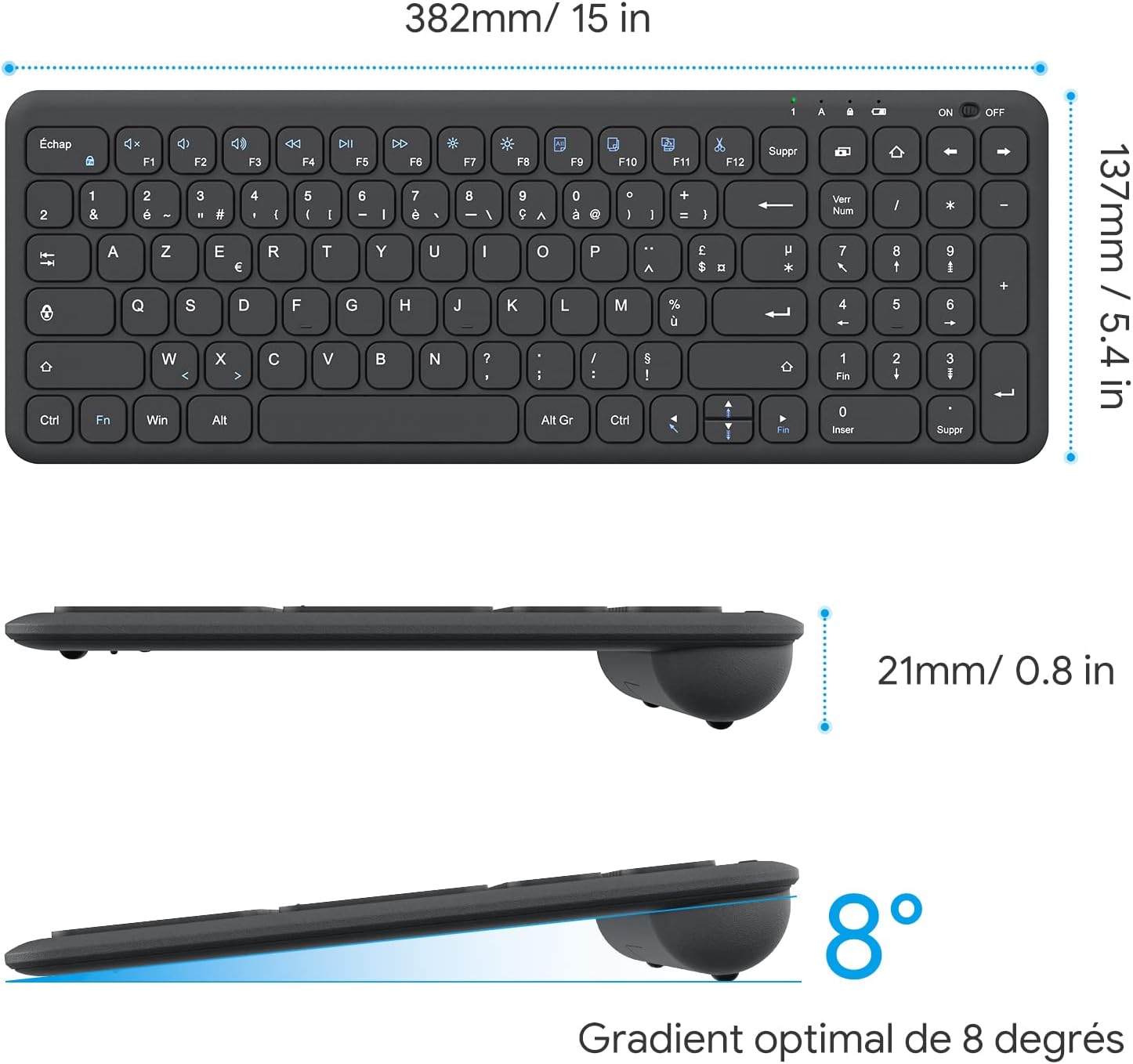
Image: Keyboard compatibility with Windows systems.
5. Manteniment
5.1 Substitució de la bateria
When the keyboard's performance degrades or the indicator light flashes, it's time to replace the batteries. Open the battery compartment on the back and replace the two AAA batteries with new ones, observing polarity.
5.2 Neteja
Per netejar el teclat, netegeu suaument la superfície amb un drap suau iamp cloth. Avoid using harsh chemicals or abrasive materials. Ensure the keyboard is turned off before cleaning.
5.3 USB Receiver Storage
For convenience and to prevent loss, the USB receiver can be magnetically stored inside the keyboard's battery compartment when not in use or during transport.
6. Solució De Problemes
Si teniu problemes amb el teclat, consulteu les solucions habituals següents:
- El teclat no respon:
- Assegureu-vos que el teclat estigui encès.
- Comproveu si les piles estan correctament instal·lades i tenen prou càrrega. Substituïu-les si cal.
- Verifiqueu que el receptor USB estigui ben connectat a un port USB que funcioni de l'ordinador. Proveu-ho amb un altre port USB.
- Reinicieu l'ordinador.
- Lagging or intermittent input:
- Ensure the keyboard is within the effective operating range (up to 10 meters) of the USB receiver.
- Reduce potential interference by moving the keyboard closer to the receiver or away from other wireless devices (e.g., Wi-Fi routers, cordless phones).
- Check battery level. Low batteries can affect wireless performance.
- Tecles específiques que no funcionen:
- Netegeu suaument el voltant de la tecla afectada per eliminar qualsevol residu.
- If the issue persists, contact OMOTON customer support for further assistance.
7. Especificacions
Detailed technical specifications for the OMOTON Wireless AZERTY Keyboard:
| Característica | Detall |
|---|---|
| Marca | OMOTON |
| Model | WK003 |
| Tecnologia de connectivitat | Sense fil de 2.4 GHz (receptor USB) |
| Disposició del teclat | AZERTY |
| Dispositius compatibles | PC, Desktop, Laptop |
| Sistemes operatius compatibles | Windows 11/10/8/7/XP/Vista |
| Característiques especials | 12 Multimedia Shortcuts, Fn Lock, Silent Keys, Ultra-Slim Design, Magnetic USB Receiver Storage |
| Color | Negre |
| Font d'alimentació | 2 piles AAA (no incloses) |
| Dimensions (L x A x A) | 38.1 x 13.7 x 2 cm (15 x 5.4 x 0.8 polzades) |
| Nombre de claus | 99 |
| Tipus d'interruptor de clau | Tactile (Scissor-mechanism) |
| Optimal Gradient | 8 graus |

Image: Keyboard dimensions and ergonomic design.

Image: Scissor-mechanism key design.
8. Informació de la garantia
OMOTON products typically come with a manufacturer's warranty. Please refer to the warranty card included with your product or visit the official OMOTON weblloc web per obtenir informació detallada sobre els termes i condicions de la garantia. Conserveu el rebut de compra com a comprovant de compra per a qualsevol reclamació de garantia.
9. Atenció al client
If you have any questions, require technical assistance, or experience issues not covered in this manual, please do not hesitate to contact OMOTON customer support. You can usually find contact information on the OMOTON official weblloc web o a través del venedor on vau comprar el producte.
Ask a question about this manual
Ask about setup, troubleshooting, compatibility, parts, safety, or missing instructions. Manuals+ will review the question and use this page’s manual context to help answer it.