
1. Introducció
Thank you for choosing the ASHATA 95 Keys Wired Mechanical Gaming Keyboard. This compact and versatile keyboard is designed for both gaming and office use, offering a comfortable typing experience with its durable mechanical switches and plug-and-play functionality. This manual provides essential information for setting up, operating, and maintaining your new keyboard.
2. Característiques del producte
- Disposició de 95 tecles: Compact design with a full set of essential keys, available with English and Arabic keycaps.
- Connectivitat per cable: Reliable USB-A connection for stable performance.
- Interruptors mecànics: Provides tactile feedback and durability for an enhanced typing and gaming experience.
- Plug and Play: No complex driver installation required; simply connect and use.
- Disseny durador: Features legible, fade-resistant key printing for long-lasting use.
- Mecanografia còmoda: Ergonomically designed for extended use in office or home environments.
- Ultra-compact Design: Approximately 60% size of a standard keyboard, saving desk space.
- Alta durabilitat: Rated for over 10 million keystrokes life.
- Fins i portàtils: With a thickness of approximately 1 cm, it is easy to transport.
- Disseny silenciós: Equipped with quality silicone keys for a quiet typing environment.
- Independent Multimedia Buttons: Dedicated buttons for quick access to media controls.

Imatge: Més deview of the ASHATA Wired Keyboard highlighting its features.

Imatge: Primer pla view of the comfortable 95-key layout.

Imatge: Side profile illustrating the thin and portable design.

Image: Detail of a keycap, demonstrating the silent design feature.
3. Contingut del paquet
Assegureu-vos que tots els elements siguin presents al paquet:
- 1 x Teclat amb cable
4. Instruccions de configuració
The ASHATA 95 Keys Wired Mechanical Gaming Keyboard is designed for simple plug-and-play operation.
- Descomprimir el teclat: Traieu amb cura el teclat del seu embalatge.
- Connecteu-vos al vostre dispositiu: Locate an available USB-A port on your computer (desktop, laptop, etc.). Insert the USB connector of the keyboard cable into the USB-A port.
- Reconeixement automàtic: Your operating system (e.g., Windows) will automatically detect and install the necessary drivers. This process usually takes a few seconds.
- Començar a utilitzar: Once recognized, the keyboard is ready for immediate use.

Image: The keyboard with its integrated USB cable, approximately 1.5m long.

Image: USB interface for plug and play functionality, with cable length of 1.5m.

Image: Keyboard connected and ready for use with a desktop computer.
5. Instruccions de funcionament
This keyboard functions like a standard QWERTY keyboard with additional multimedia controls.
5.1 Mecanografia bàsica
Simply press the desired keys to input characters. The keyboard supports both English and Arabic characters, depending on the specific model and your operating system's language settings.
5.2 Tecles multimèdia
The keyboard features dedicated multimedia buttons located above the function keys (F1-F12) for quick access to media controls. These buttons allow you to:
- Adjust Volume (Volume Up, Volume Down, Mute)
- Control Media Playback (Play/Pause, Previous Track, Next Track)
- Open Default Media Player
- Open Default Web Navegador
- Obre el client de correu electrònic
- Funció de cerca

Image: Detail of the independent multimedia buttons for quick access to functions.
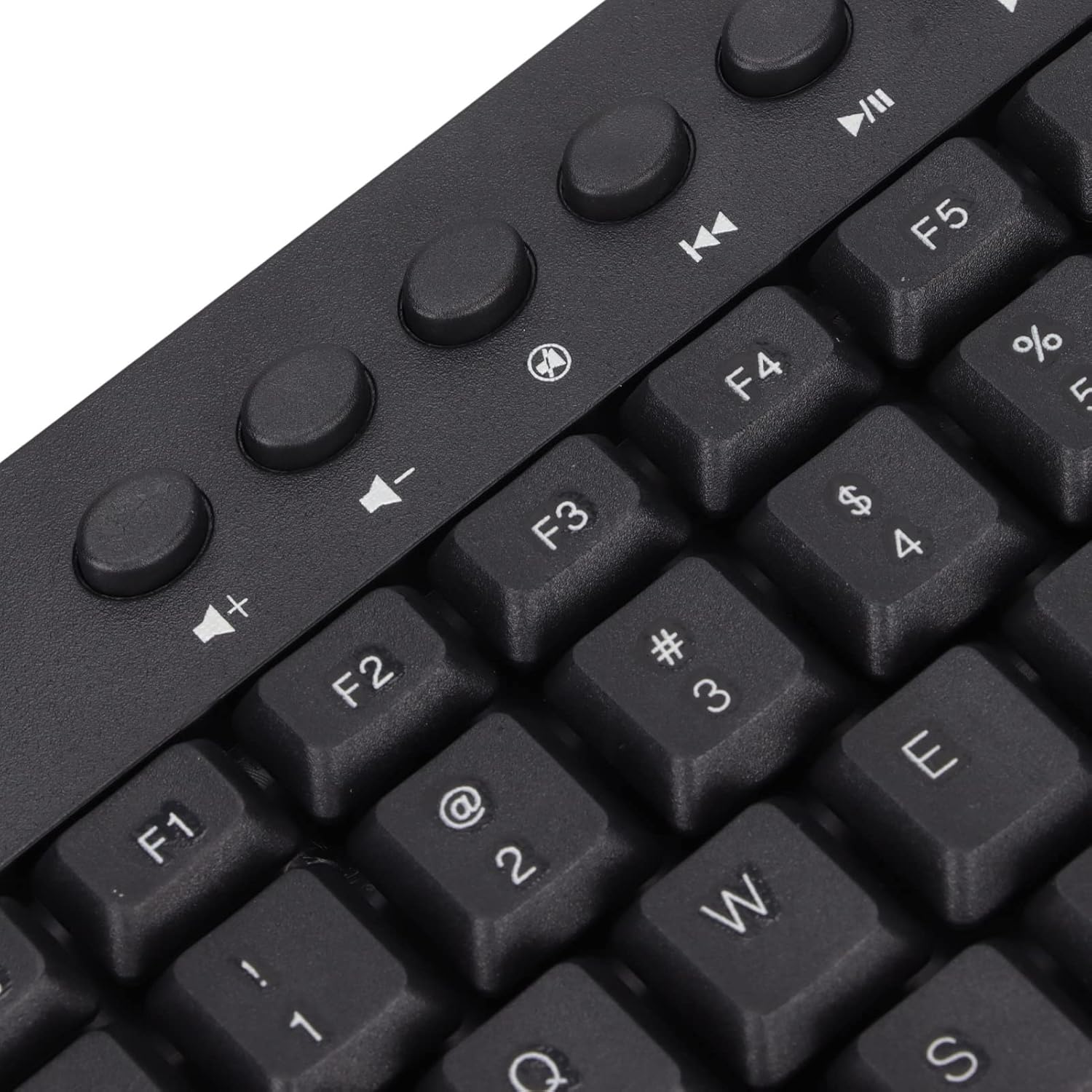
Imatge: Primer pla view of the dedicated multimedia control keys.

Image: Detail of the right-side keys, including navigation and control keys.
6. Manteniment
To ensure the longevity and optimal performance of your ASHATA keyboard, follow these maintenance guidelines:
- Neteja: Use a soft, dry cloth to wipe the surface of the keyboard. For deeper cleaning, you may use a slightly damp cloth with a mild cleaning solution, ensuring no liquid enters the key switches or internal components.
- Eliminació de pols: Feu servir aire comprimit per eliminar la pols i les restes que hi ha entre les tecles.
- Eviteu líquids: No vessiu líquids sobre el teclat. Si es produeix un vessament, desconnecteu immediatament el teclat de l'ordinador i deixeu-lo assecar completament abans de tornar-lo a connectar.
- Emmagatzematge: Guardeu el teclat en un lloc fresc i sec, allunyat de la llum solar directa i de temperatures extremes.
7. Solució De Problemes
Si teniu problemes amb el teclat, consulteu els problemes i solucions més comuns següents:
7.1 El teclat no respon
- Comprova la connexió USB: Ensure the USB cable is securely plugged into a working USB-A port on your computer. Try a different USB port.
- Reinicieu l'ordinador: Sometimes, a simple computer restart can resolve connectivity issues.
- Prova en un altre dispositiu: Connect the keyboard to another computer to determine if the issue is with the keyboard or your original device.
7.2 Les tecles no funcionen correctament
- Claus netes: Check for any debris or foreign objects lodged under the non-functioning keys. Use compressed air to clear them.
- Conflicte de programari: Ensure no conflicting software or drivers are installed that might interfere with keyboard input.
7.3 Multimedia Keys Not Working
- Operating System Settings: Verify that your operating system's media key settings are configured correctly.
- Compatibilitat d'aplicacions: Some applications may not fully support universal multimedia keys.
Si aquests passos no resolen el problema, poseu-vos en contacte amb l'atenció al client per obtenir més ajuda.
8. Especificacions
| Característica | Detall |
|---|---|
| Marca | ASHATA |
| Número de model | ASHATA8x4ni917wp552-12 |
| Tecnologia de connectivitat | USB-A (amb cable) |
| Nombre de claus | 95 |
| Tipus de canvi | Mecànica |
| Material | Plàstic |
| Color | Black (Arabic layout) |
| Dispositius compatibles | PC (Desktop, Laptop) |
| Família de sistemes operatius compatibles | Windows |
| Longitud del cable | Approx. 1.5m / 1.6yd |
| Característica especial | Botons multimèdia independents |

Imatge: Part inferior view of the keyboard, displaying regulatory information and adjustable feet.
9. Garantia i Suport
Per obtenir informació sobre la garantia i assistència al client, consulteu la documentació inclosa amb la compra o poseu-vos en contacte directament amb el distribuïdor/fabricant. Conserveu el comprovant de compra per a qualsevol reclamació de garantia.