
1. Introducció
Welcome to the HyperX Armada 25 Gaming Monitor user manual. This document provides essential information for setting up, operating, maintaining, and troubleshooting your new monitor. The HyperX Armada 25 is designed for competitive gaming, featuring a 24.5-inch Full HD (1920x1080) IPS panel, a 240Hz refresh rate, and a 1ms response time, ensuring smooth and responsive visuals. It also includes NVIDIA G-SYNC compatibility to eliminate screen tearing and minimize input latency. A desk mount is included for convenient setup and to maximize desk space.
Característiques principals:
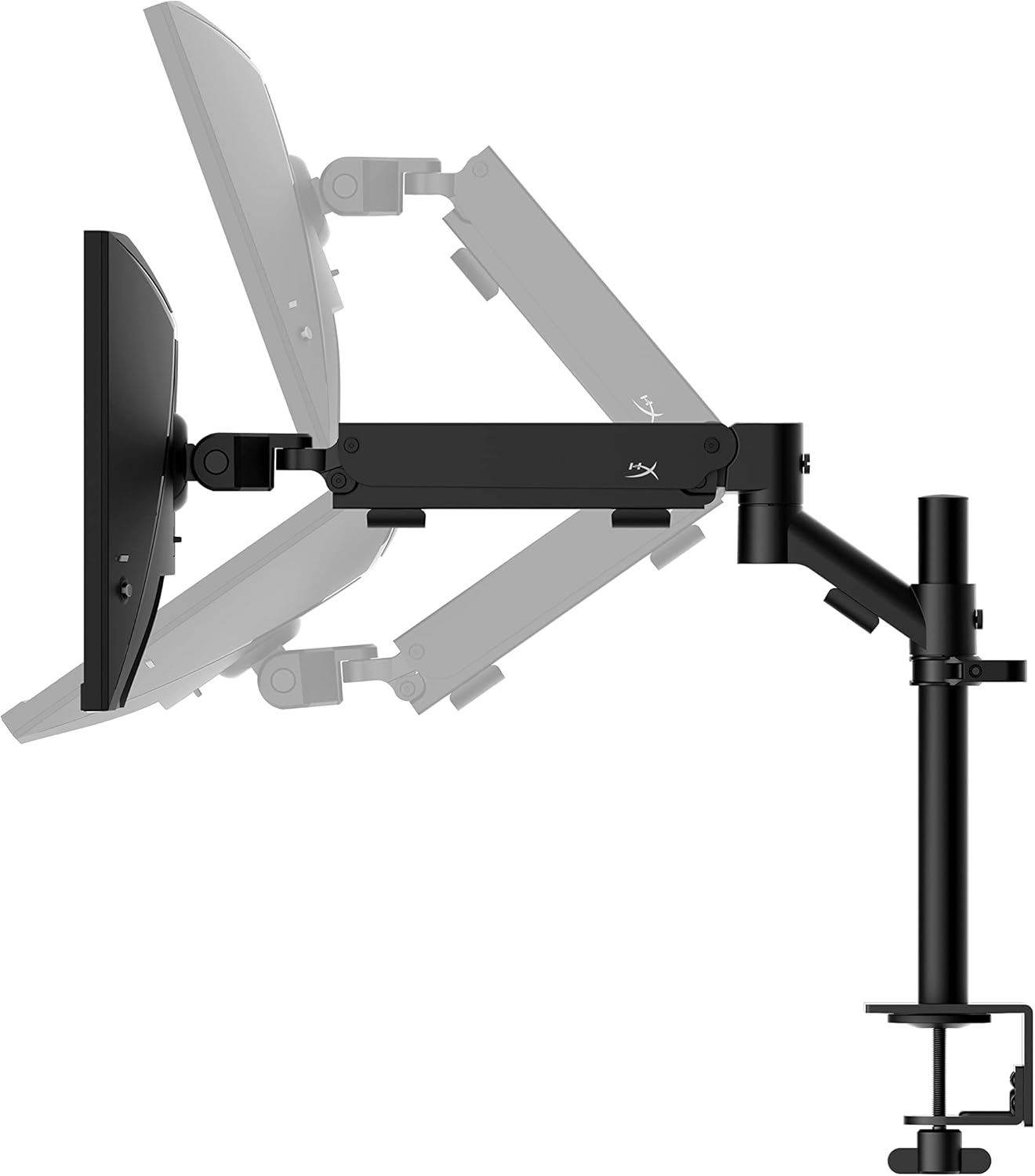
- Paquet tot en un: Includes an ergonomic arm and desk mount for easy setup and space-saving.
- Alta taxa d'actualització i temps de resposta: 240Hz refresh rate and 1ms response time for ultra-smooth gaming.
- Vibrant IPS Panel: 24.5-inch Full HD (1920x1080) IPS panel delivers stunning visuals with accurate colors and wide viewangles d'ajust.
- Compatible amb NVIDIA G-SYNC: Eliminates screen tearing and reduces stuttering for a fluid gaming experience.

Vídeo oficial del producte:
2. Configuració
This section guides you through the initial setup of your HyperX Armada 25 Gaming Monitor, including assembly and connection to your computer.
2.1. Assembling the Desk Mount
The HyperX Armada 25 comes with an integrated ergonomic desk mount. Follow the instructions provided in the separate quick start guide for detailed assembly steps. The monitor head easily snaps into the arm, allowing for quick and secure installation.

2.2. Connexió del monitor
Connect the monitor to your computer using the appropriate cables. The HyperX Armada 25 supports both HDMI and DisplayPort connections.
- Connecteu un extrem del cable HDMI o DisplayPort al port corresponent de la targeta gràfica de l'ordinador.
- Connect the other end of the cable to an available HDMI 2.0 or DisplayPort 1.4 port on the back of your monitor.
- Connecteu el cable d'alimentació al monitor i després a una presa de corrent.
- Premeu el botó d'engegada del monitor per encendre-lo.

3. Funcionament del monitor
This section covers basic operation and navigation of the monitor's On-Screen Display (OSD) menu.
3.1. Navegació en pantalla (OSD)
The OSD menu is controlled using a joystick located on the back of the monitor. This joystick allows you to power on/off the monitor and navigate through various settings.
- Premeu el joystick: Per obrir el menú OSD o confirmar una selecció.
- Move the joystick Up/Down/Left/Right: To navigate through menu options and adjust settings.
- Hold the joystick: To power off the monitor.

3.2. Ajust de la posició del monitor
The ergonomic desk mount allows for flexible positioning of your monitor. You can adjust the height, tilt, swivel, and pivot to find your optimal viewangle de ing.

4. Manteniment
Proper maintenance ensures the longevity and optimal performance of your HyperX Armada 25 Gaming Monitor.
- Neteja de la pantalla: Utilitzeu un drap suau i sense pelusa dampened with water or a specialized screen cleaner. Avoid using harsh chemicals, abrasive materials, or direct spraying onto the screen.
- Neteja de la Casing: Netegeu el monitor casinamb un drap suau i sec.
- Ventilació: Assegureu-vos que les obertures de ventilació del monitor no estiguin bloquejades per evitar el sobreescalfament.
- Apagueu quan no estigui en ús: Apagueu el monitor quan no l'utilitzeu durant períodes prolongats per estalviar energia i allargar-ne la vida útil.
5. Solució De Problemes
If you encounter issues with your monitor, refer to the following common troubleshooting steps.
- Sense energia:
- Comproveu si el cable d'alimentació està ben connectat tant al monitor com a la presa de corrent.
- Assegureu-vos que la presa de corrent funcioni correctament.
- Premeu el botó d'engegada del monitor.
- Sense senyal:
- Verify that the HDMI or DisplayPort cable is securely connected to both the monitor and your computer.
- Assegureu-vos que l'ordinador estigui encès i que no estigui en mode de repòs.
- Seleccioneu la font d'entrada correcta mitjançant el menú OSD.
- Flickering Screen or Image Issues:
- Check the display cable for damage or loose connections.
- Assegureu-vos que els controladors de la vostra targeta gràfica estiguin actualitzats.
- Ajusta la freqüència d'actualització a la configuració de la pantalla de l'ordinador.
- If G-SYNC is enabled, try disabling it temporarily to see if the issue persists.
- Buttons Not Responding (OSD Joystick):
- Assegureu-vos que el monitor estigui encès.
- Try restarting the monitor by unplugging and replugging the power cable.
- Clean around the joystick to ensure no debris is obstructing its movement.
6. Especificacions
Detailed technical specifications for the HyperX Armada 25 Gaming Monitor.
| Característica | Detall |
|---|---|
| Dimensions del producte | 21.94 x 25.79 x 31.12 polzades; 16.98 lliures |
| Número de model de l'article | HyperX Armada 25 |
| Data de primera disponibilitat | 24 d'agost de 2022 |
| Fabricant | HP Inc. |
| ASIN | B0B2C1G356 |
| Mida de la pantalla | Diagonal de 24.5 polzades |
| Resolució | Full HD (1920 x 1080) |
| Freqüència d'actualització | 240 Hz |
| Tipus de panell | Panell IPS |
| Temps de resposta | 1 ms |
| Tecnologia de sincronització | Compatible amb NVIDIA® G-SYNC® |
| Included Mount | Desk Mount Included |
| Connectivitat | HDMI and Display Port |
7. Garantia i Suport
For warranty information, technical support, or to access additional resources, please visit the official HyperX weblloc o poseu-vos en contacte amb el seu servei d'atenció al client.
- HyperX oficial Weblloc: www.hyperx.com
- Pàgina d'assistència del producte: Refer to the support section on the HyperX weblloc web per al vostre model específic.