
Fenge B0B2JGPRNH
Fenge 48x24 Inch Electric Height Adjustable Standing Desk with LED Strips Instruction Manual
Model: B0B2JGPRNH
1. Introducció
Thank you for choosing the Fenge 48x24 Inch Electric Height Adjustable Standing Desk. This manual provides detailed instructions for assembly, operation, maintenance, and troubleshooting to ensure optimal performance and longevity of your desk. Please read this manual thoroughly before use and retain it for future reference.
2. Informació de seguretat
- Assegureu-vos que tots els components siguin presents i no estiguin danyats abans del muntatge. No utilitzeu el producte si hi falta alguna peça o si està trencada.
- Mantingueu els nens i les mascotes allunyats de l'escriptori durant el funcionament per evitar lesions.
- No sobrecarregueu l'escriptori. Consulteu les especificacions per conèixer la capacitat màxima de pes.
- Ensure the power cord is not pinched or damaged. Use only the provided power adapter.
- Eviteu col·locar líquids directament sobre el tauler de control o a prop de components elèctrics.
- Do not attempt to disassemble or repair the motor or control system yourself. Contact customer service for assistance.
- Place the desk on a level surface to ensure stability.
3. Contingut del paquet
Verifiqueu que tots els components següents estiguin inclosos al paquet:
- Desktop sections (pre-drilled)
- Desk legs and frame components
- Electric motor and control box
- Control panel with USB charging port
- Adaptador d'alimentació i cable
- Assembly hardware (screws, washers, Allen wrench)
- Desk hook
- Manual d'instruccions
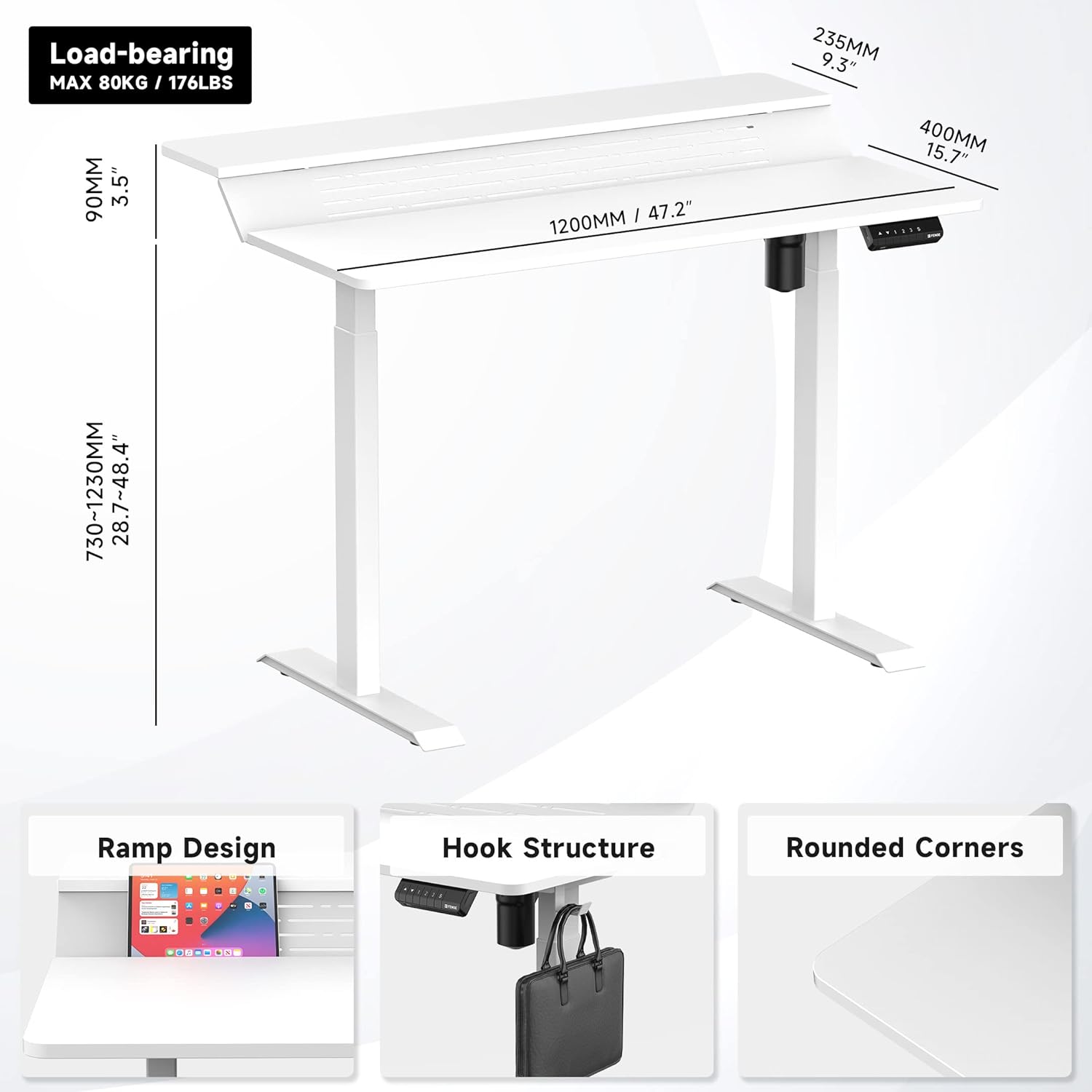
Figura 1: Mésview of desk components and key dimensions.
4. Muntatge i muntatge
The Fenge Standing Desk is designed for simplified assembly. All parts are letter-coded, and the tabletop is pre-drilled. An Allen wrench is included; no additional power tools are required.
4.1 Passos de muntatge
- Uneix els peus a les cames: Secure the feet to the bottom of each desk leg using the provided screws.
- Connecta la barra transversal: Attach the crossbar between the two legs. Ensure the hexagonal rod is fully inserted into the motor and the limit ring is no longer visible.
- Instal·leu els suports laterals: Fasten the side brackets to the top of the legs.
- Mount Desktop Sections: Carefully place the pre-drilled desktop sections onto the assembled frame and secure them with screws.
- Install Control Panel and Power: Attach the control panel to the underside of the desk. Connect the power adapter to the control box and then to a power outlet.
- Attach Desk Hook: Install the desk hook on either side of the desk as desired.
Video 1: Detailed installation guide for the Fenge Standing Desk. This video demonstrates each step of the assembly process, from attaching the legs to connecting the electrical components and securing the desktop.
Vídeo 2: Una repetició ràpidaview of the Fenge Standing Desk assembly process. This video highlights the ease of putting the desk together, showcasing the main steps involved in a concise format.
5. Instruccions de funcionament
Your Fenge Standing Desk features an electric height adjustment system with memory presets and a convenient USB charging port.
5.1 Ajust d'alçada
- Utilitza el Amunt (▲) i Avall (▼) arrow buttons on the control panel to manually adjust the desk height.
- The desk height can be adjusted from 28.7 inches to 48.4 inches.
5.2 Preajustos de memòria
El tauler de control us permet desar fins a tres configuracions d'alçada preferides:
- Ajusteu l'escriptori a l'alçada desitjada amb les fletxes amunt/avall.
- Premeu el botó "S" button (Save).
- Premeu immediatament un dels botons numèrics ("1", "2", o "3") per desar l'alçada actual a aquesta configuració predefinida.
- Per recuperar una alçada desada, només cal que premeu el botó numèric corresponent. L'escriptori es mourà automàticament a la posició desada.
5.3 port de càrrega USB
The control panel includes a USB charging port to conveniently power your devices.

Figure 2: Close-up of the multifunction control panel, showing height adjustment buttons, memory presets (1, 2, 3, S), and the integrated USB charging port.

Figure 3: A closer look at the USB charging port located on the control panel, providing convenient power for your devices.
6. Característiques
The Fenge Standing Desk is designed with several features to enhance your workspace:
- 2-Tier Design with 135° Ramp: The unique two-tier desktop with a 135° ramp design provides an ergonomic setup, allowing for optimal monitor placement and increased workspace.
- Cintes LED: Integrated LED strips offer customizable lighting to suit your mood or task.
- Gestió de cables: Strategically placed holes and a metal cable management tray (optional, may require separate purchase) help keep your cables organized and out of sight.
- Desk Hook: A convenient hook is included for hanging headphones, bags, or other accessories.
- Funcionament silenciós: The electric motor operates at less than 49 dB, ensuring a quiet adjustment experience.
- Funció anticol·lisió: The desk is equipped with a rebound-on-resistance safety feature, stopping movement if an obstruction is detected.

Figure 4: The 135-degree ramp design of the desk, providing an elevated surface for monitors or other items, promoting ergonomic posture.

Figure 5: The Fenge Standing Desk in an ergonomic workspace setup, showcasing the integrated LED strips and ample space for dual monitors and a laptop.
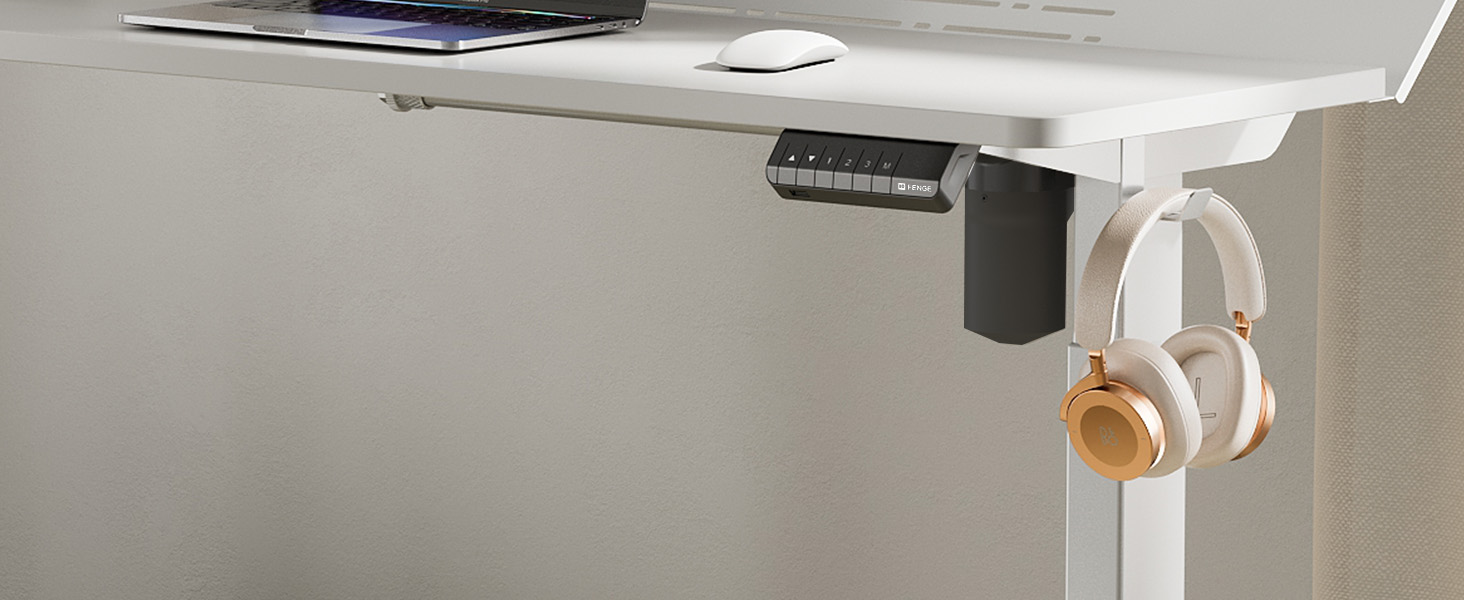
Figure 6: A close-up of the convenient desk hook, ideal for hanging headphones or other personal items, keeping your workspace tidy.
7. Manteniment
- Neteja: Netegeu la superfície de l'escriptori amb un damp drap. Eviteu productes químics agressius o netejadors abrasius.
- Inspecció: Reviseu periòdicament tots els cargols i connexions per assegurar-vos que estiguin ben ajustats. Torneu a apretar-los si cal.
- Gestió de cables: Regularly organize cables to prevent tangles and damage.
8. Solució De Problemes
If you encounter any issues with your Fenge Standing Desk, please refer to the following common problems and solutions:
| Problema | Causa possible | Solució |
|---|---|---|
| L'escriptori no es mou | Power cable disconnected; motor error; overload. | Check power connections. Unplug and replug the power for 10 seconds. Reduce weight on the desk. |
| Ajust d'alçada desigual | Legs not properly aligned; obstruction. | Ensure all screws are tightened. Check for any obstructions under the desk. Perform a reset (refer to control panel instructions if available). |
| Soroll durant el funcionament | Loose screws; motor issue. | Tighten all assembly screws. If noise persists and is unusual, contact customer service. |
| Els preajustaments de memòria no funcionen | Procediment de desament incorrecte. | Follow the memory preset saving instructions carefully (Section 5.2). |
If the problem persists after trying these solutions, please contact Fenge customer service.
9. Especificacions
| Característica | Detall |
|---|---|
| Marca | Fenge |
| Model | B0B2JGPRNH |
| Dimensions del producte | 24 "P x 48" W x 51.9" H |
| Altura mínima | 28.7 polzades |
| Altura màxima | 48.4 polzades |
| Recomanació de pes màxim | 264 lliures (120 kg) |
| Tipus de material | Aluminum alloy (Base), Metal (Top) |
| Mecanisme d'elevació | Elèctric |
| Nivell de soroll | Menys de 49 dB |
| Muntatge obligatori | Sí (eines incloses) |
| Característiques especials | LED Strips, 2-Tier Design, Memory Presets, USB Charging Port |
10. Garantia i Suport
Fenge provides the following warranty for your standing desk:
- Desk Frame: 3 any de garantia
- Motor: 5 any de garantia
This electric desk has obtained TUV, UL, CE, SGS, and other global certifications, ensuring high quality and safety standards.
For any product issues, questions, or warranty claims, please contact Fenge customer service. We are committed to providing prompt responses and practical solutions.
Visit the official Fenge Store for more information and products: Fenge Store on Amazon
Ask a question about this manual
Ask about setup, troubleshooting, compatibility, parts, safety, or missing instructions. Manuals+ will review the question and use this page’s manual context to help answer it.