
Pard NV008S 850nm
Manual d'usuari del telescopi de visió nocturna Pard NV008S
Model: NV008S 850nm
Marca: Pard
Introducció
Aquest manual d'usuari proporciona instruccions completes per al funcionament, manteniment i resolució de problemes del vostre visor de visió nocturna Pard NV008S. Dissenyat per a la caça i l'observació a l'aire lliure, aquest dispositiu integra capacitats avançades de visió nocturna amb una calculadora balística i funcions de gravació de vídeo. Llegiu atentament aquest manual abans d'utilitzar el dispositiu per garantir-ne el funcionament i la seguretat adequats.
Informació de seguretat
- No mireu directament al sol ni a cap font de llum intensa a través del telescopi, ja que això podria causar lesions oculars permanents.
- Mantingueu el dispositiu allunyat de temperatures extremes, humitat i llum solar directa.
- Manipuleu el dispositiu amb cura per evitar caigudes o impactes.
- No intenteu desmuntar ni modificar el dispositiu. Això anul·larà la garantia i pot causar danys.
- Assegureu-vos que el dispositiu estigui ben muntat abans d'utilitzar-lo per evitar que es desprengui accidentalment.
- Utilitzeu només les bateries i els carregadors recomanats.
Contingut del paquet
Verifiqueu que tots els elements que s'enumeren a continuació siguin presents al vostre paquet:
- Telescopi de visió nocturna Pard NV008S
- Muntanya del teixidor
- Cable de càrrega tipus C.
- Manual d'usuari
- Corretja per al coll
- Bossa de vellut
- Caixa interior
- Accessoris (peces petites específiques)

Imatge: El visor nocturn Pard NV008S amb els seus diversos components i embalatge.

Imatge: Una imatge detallada view del telescopi de visió nocturna Pard NV008S i els seus accessoris, incloent-hi la caixa de colors, la funda interior, la funda de vellut, la corretja per al coll, el suport, el cable de càrrega tipus C i el manual d'usuari.
Producte acabatview i Funcions clau
Familiaritzeu-vos amb els components i controls principals del vostre visor NV008S.

Imatge: Diagrama que il·lustra les funcions clau i la disposició dels botons del Pard NV008S. Les etiquetes inclouen el botó OK/Enregistrament/LRF/Càlcul balístic, el botó IR/Commutador de mode/(-), el botó Menú/Punt vermell, el botó Zoom (+)/Reproducció i el botó Engegada/Repos.
- Botó d'encesa/repòs: S'utilitza per encendre/apagar el dispositiu i per entrar/sortir del mode de repòs.
- Botó OK/Enregistrament/LRF/Càlcul balístic: Confirma les seleccions, inicia/atura l'enregistrament de vídeo, activa el tel·metre làser (LRF) i inicia càlculs balístics.
- Interruptor IR/de mode/botó (-): Ajusta la intensitat de l'il·luminador d'infrarojos o canvia entre modes i navega pels menús cap avall.
- Menú/Botó de punt vermell: Accedeix al menú principal i activa/desactiva la retícula de punt vermell.
- Botó de zoom (+)/reproducció: Augmenta l'ampliació i, en mode de reproducció, reprodueix els vídeos gravats.
Configuració
1. Instal·lació de la bateria
L'NV008S utilitza una bateria recarregable (no especificada a l'entrada, se suposa que és del tipus estàndard). Obriu el compartiment de la bateria, inseriu-la segons els indicadors de polaritat i tanqueu el compartiment de manera segura.
2. Muntatge de l'abast
Fixeu la muntura Weaver proporcionada al sistema de rails del vostre rifle. Fixeu la mira telescòpica NV008S a la muntura amb els cargols adequats, assegurant-vos que estigui ben fixada i alineada. Consulteu el manual del vostre rifle per obtenir instruccions específiques de muntatge si cal.
3. Càrrega inicial
Abans del primer ús, carregueu completament el dispositiu amb el cable de càrrega tipus C proporcionat. Connecteu el cable al port de càrrega de l'endoscopi i a un adaptador d'alimentació USB adequat.
Instruccions de funcionament
Encès/Apagat
- Per engegar: premeu i manteniu premut el botó Botó d'encesa/repòs fins que la pantalla s'il·lumini.
- Per apagar: premeu i manteniu premut el botó Botó d'encesa/repòs fins que el dispositiu s'apaga.
- Mode de repòs: premeu breument el botó Botó d'encesa/repòs per entrar o sortir del mode de repòs, estalviant així la durada de la bateria.
Navegació pel menú
Premeu el botó Botó de menú/punt vermell per accedir al menú principal. Feu servir la tecla Interruptor de mode/IR/(-) i Zoom (+)/Reproducció botons per navegar per les opcions del menú. Premeu els botons Botó OK/Enregistrament/LRF/Càlcul balístic per confirmar les eleccions.
Il·luminador IR (850 nm / 940 nm)
L'NV008S compta amb un il·luminador d'infrarojos de 350M amb longituds d'ona seleccionables de 850nm o 940nm. L'opció de 850nm proporciona un rang de detecció més llarg amb alta sensibilitat, mentre que l'opció de 940nm ofereix una font de llum invisible, ideal per evitar la detecció dels animals.
- Per activar/ajustar IR: premeu el botó Interruptor IR/de mode/botó (-) per alternar entre els nivells d'intensitat d'infrarojos (tres nivells disponibles).
- Per canviar la longitud d'ona d'infrarojos: aquesta configuració es troba normalment al menú principal, a "Configuració d'infrarojos" o "Configuració del sistema".

Imatge: Representació visual de l'eficàcia de l'il·luminador d'infrarojos de 350 m, que mostra una visibilitat clara a distàncies de 150 m i 350 m en condicions de poca llum.
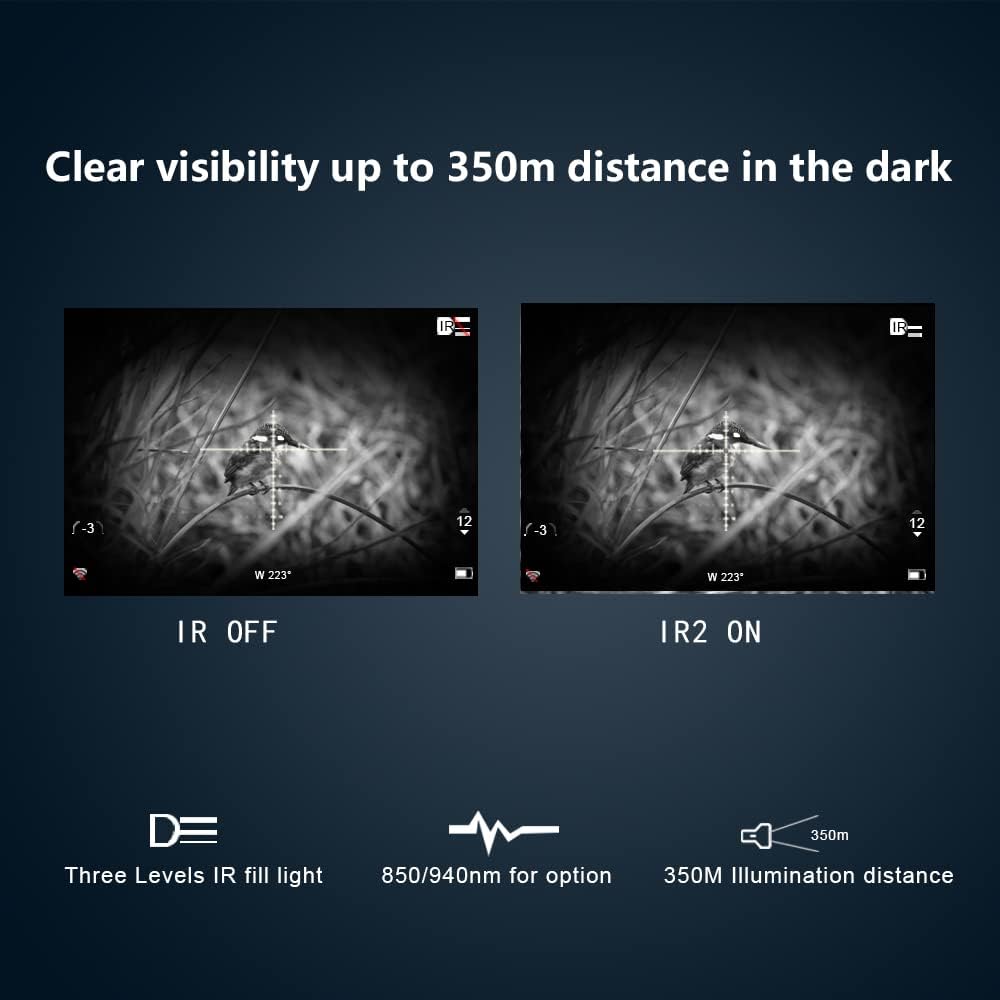
Imatge: Comparació en paral·lel que demostra la visibilitat millorada amb l'il·luminador d'infrarojos activat (IR2 ON) enfront de desactivat (IR OFF) en entorns foscos, destacant una visibilitat clara de fins a 350 m.
Calculadora balística
La calculadora balística integrada permet una col·locació precisa del tret tenint en compte diversos factors ambientals. Podeu configurar diversos professionals.files per a diferents tipus de munició o escenaris.
- Per utilitzar-lo: Accediu a la funció de calculadora balística a través de Botó OK/Enregistrament/LRF/Càlcul balístic o a través del menú principal. Introduïu paràmetres com ara l'abast, l'angle respecte a l'objectiu, la temperatura i la humitat. El visor proporcionarà aleshores un punt de mira ajustat.
Imatge: Una pantalla que mostra la funció de càlcul balístic, amb una diana de cérvol i una superposició que indica la trajectòria calculada per a un tret precís.
Gravació de vídeo activada per retrocés (RAV)
La funció RAV grava vídeo automàticament quan el visor detecta retrocés, garantint que captureu els moments crítics sense intervenció manual. Això estalvia espai d'emmagatzematge en registrar només els esdeveniments rellevants.
- Per activar/desactivar RAV: navegueu fins a "Configuració de vídeo" o "Configuració de gravació" al menú principal i activeu l'opció Vídeo activat per retrocés.
- Les gravacions es desen en una targeta SD inserida (no inclosa).

Imatge: Una captura de pantalla de la pantalla de l'endoscopi, que indica que la funció "Vídeo activat per retrocés" està habilitada, destacant les seves capacitats d'enregistrament intel·ligent, automàtic i que estalvia espai.
Un tret zero
Aquesta característica simplifica el procés de posada a zero. Després de disparar un tret, podeu ajustar la retícula al punt d'impacte amb un sol ajust.
- Per realitzar l'ajust de zero d'un sol tret: Dispara un tret a un objectiu. Accedeix a l'opció "Ajust de zero" o "Ajust de zero d'un sol tret" del menú. Ajusta la retícula a la pantalla perquè s'alineï amb el punt d'impacte de la bala. Confirma la configuració.
- Es recomana dur a terme aquest procediment quan configureu per primera vegada la mira telescòpica en un rifle nou.
Connexió Wi-Fi
Connecteu el vostre NV008S a un telèfon intel·ligent o tauleta mitjançant Wi-Fi per a control remot viewing, control i file transferència mitjançant l'aplicació dedicada Pard.
- Per connectar-vos: activeu el Wi-Fi a l'oscil·loscopi a través del menú principal. Al dispositiu mòbil, cerqueu la xarxa Wi-Fi de l'oscil·loscopi i connecteu-vos. Obriu l'aplicació Pard per establir la comunicació.

Imatge: Il·lustració que representa la capacitat de transmissió sense fil del Pard NV008S, que mostra l'endoscopi connectat a una tauleta mitjançant Wi-Fi per a la visualització remota. viewing.
Imatge en imatge (PIP)
La funció PIP mostra una imatge ampliada de l'àrea del reticle en una finestra més petita a la pantalla principal, cosa que permet apuntar amb precisió i mantenir la consciència situacional.
- Per activar PIP: aquesta opció es troba normalment a la configuració de la pantalla, dins del menú principal.

Imatge: Una captura de pantalla que mostra la funció "Imatge dins d'imatge", on s'amplia view de l'àrea del reticle es mostra a la part superior central del camp principal de view per a una precisió millorada.
Manteniment
Neteja
- Feu servir un drap suau i sense borrissol per netejar la lent i el cos del visor.
- Per a marques difícils a la lent, utilitzeu una solució netejadora de lents dissenyada específicament per a dispositius òptics.
- No utilitzeu materials abrasius ni productes químics agressius.
Emmagatzematge
- Guardeu l'endoscopi en un lloc fresc i sec, allunyat de la llum solar directa i de la humitat elevada.
- Si l'emmagatzemeu durant períodes prolongats, retireu la bateria per evitar fuites.
- Feu servir la funda de vellut i l'estoig interior proporcionats per a la protecció durant l'emmagatzematge i el transport.

Imatge: L'endoscopi Pard NV008S amb gotes d'aigua, que il·lustra la seva classificació de resistència a l'aigua IP67, que proporciona una forta protecció en entorns severs.
Resolució de problemes
| Problema | Causa possible | Solució |
|---|---|---|
| El dispositiu no s'encén. | Bateria baixa o gastada; bateria inserida incorrectament. | Carregueu la bateria; assegureu-vos que la bateria estigui inserida amb la polaritat correcta. |
| La imatge està borrosa o desenfocada. | Ajust incorrecte de l'enfocament; lent bruta. | Ajusteu l'anell d'enfocament; netegeu les lents de l'objectiu i de l'ocular. |
| L'il·luminador d'infrarojos no funciona. | L'infrarojos està apagat o configurat a la intensitat més baixa; l'emissor d'infrarojos està bloquejat. | Premeu el botó IR per canviar pels nivells d'intensitat; assegureu-vos que no hi hagi res que obstrueixi l'emissor d'infrarojos. |
| Problemes de connexió Wi-Fi. | Wi-Fi no activat a l'oscil·loscopi; configuració incorrecta de l'aplicació; interferències. | Activeu el Wi-Fi a la configuració de l'oscil·loscopi; reinicieu l'aplicació i l'oscil·loscopi; assegureu-vos que no hi hagi fonts d'interferència fortes a prop. |
| No s'està desant la gravació de vídeo. | No hi ha cap targeta SD inserida; la targeta SD està plena o malmesa; l'RAV no està habilitat. | Inseriu una targeta SD compatible; formateu o substituïu la targeta SD; activeu RAV a la configuració. |
Especificacions
| Característica | Detall |
|---|---|
| Nom del model | NV008S 850nm |
| Marca | Pard |
| Estil | IR850nm (també disponible en IR940nm) |
| Diàmetre de la lent objectiu | 70 mm |
| Ampliació mínima | 6.5x |
| Gamma d'il·luminadors IR | Fins a 350 m |
| Material | Alumini |
| Pes de l'article | 350 grams |
| Tipus de muntatge | Muntanya del teixidor |
| Resistència a l'aigua | IP67 |
| Dispositius compatibles | Pistola (Nota: Dissenyada principalment per a mires de rifle, però compatible amb pistoles segons les dades) |
Garantia i Suport
Els productes Pard es fabriquen amb estàndards d'alta qualitat. Per obtenir informació sobre la garantia, consulteu la targeta de garantia inclosa amb el producte o visiteu el lloc web oficial de Pard. weblloc web. Conserveu el comprovant de compra per a reclamacions de garantia.
Per a assistència tècnica, assistència per a la resolució de problemes o consultes de servei, poseu-vos en contacte amb el servei d'atenció al client de Pard. Normalment, podeu trobar les dades de contacte a la pàgina oficial de Pard. weblloc web o dins de l'embalatge del producte.
Fabricant: PARD
Visita el Botiga Pard a Amazon per a més informació i actualitzacions del producte.
Ask a question about this manual
Ask about setup, troubleshooting, compatibility, parts, safety, or missing instructions. Manuals+ will review the question and use this page’s manual context to help answer it.