
1. Introducció
Thank you for choosing the Mercury Elite 3000U Smart Uninterruptible Power Supply (UPS). This device is designed to provide reliable power backup and protection for your electronic equipment against power outages, surges, and fluctuations. Please read this manual thoroughly before installation and operation to ensure proper use and to maximize the lifespan of your UPS.
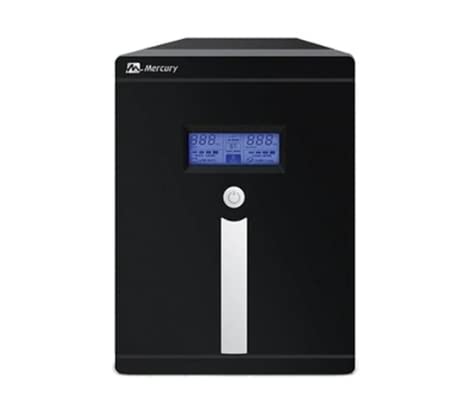
Imatge 1.1: Frontal view of the Mercury Elite 3000U Smart UPS, showing the LCD display and power outlets.
2. Informació de seguretat
Observe the following safety precautions to prevent injury and damage to the UPS or connected equipment:
- No obriu el SAI casing. No hi ha peces a l'interior que l'usuari pugui reparar. Demaneu totes les tasques de manteniment a personal de servei qualificat.
- No instal·leu el SAI a la llum solar directa, a prop de fonts de calor ni en ambients amb excessiva pols, humitat o substàncies corrosives.
- Assegureu-vos que el SAI estigui connectat a una presa de corrent amb connexió a terra.
- Do not connect appliances that draw high current, such as hair dryers or vacuum cleaners, to the UPS outlets.
- Battery replacement should only be performed by qualified personnel using the same type and number of batteries.
- In case of fire, use a dry chemical extinguisher. Water can cause electrical shock.
3. Contingut del paquet
Verifiqueu que tots els elements siguin presents al paquet:
- Mercury Elite 3000U Smart UPS Unit
- Manual d'usuari (aquest document)
- Cable d'entrada d'alimentació
- Cable de comunicació USB
- 4 x 9Ah Internal Batteries (pre-installed)
4. Característiques del producte
The Mercury Elite 3000U Smart UPS offers advanced features for optimal performance and protection:
- Reinici automàtic: The UPS automatically restarts when AC power is restored after a complete discharge.
- Protecció contra curtcircuits: Safeguards connected devices and the UPS from damage due to short circuits.
- Protecció de sobrecàrrega: Evita que la bateria es faci malbé per una càrrega excessiva.
- Disseny compacte: An elegant and space-saving form factor suitable for various environments.
- CPU Control: Advanced microprocessor control for enhanced reliability and performance.
- Overload Recovery: Easy recovery from overload conditions without the need for fuse replacement.
- Pantalla LCD: Provides real-time status updates and operational information.
- Port USB: For communication with a computer to monitor UPS status and manage shutdowns.
- Universal Sockets: Four universal power outlets for broad compatibility.
5. Configuració
Follow these steps to set up your UPS:
- Desembalatge: Traieu amb cura el SAI del seu embalatge. Inspeccioneu-lo per detectar qualsevol dany durant l'enviament.
- Col·locació: Place the UPS in a cool, dry, and well-ventilated area, away from direct sunlight and heat sources. Ensure adequate clearance around the unit for airflow.
- Càrrega inicial: Connect the UPS to a standard wall outlet using the provided power input cable. Allow the UPS to charge for at least 8 hours before connecting any equipment to ensure optimal battery performance. The UPS will charge whether it is turned on or off.
- Equip de connexió: After the initial charge, connect your electronic devices (e.g., computer, monitor, router) to the universal outlets on the back of the UPS. Do not overload the UPS beyond its rated capacity (1800W).
- Connexió USB (opcional): For advanced monitoring and automatic shutdown features, connect the USB cable from the UPS to your computer. Install the appropriate UPS monitoring software (usually available from the manufacturer's weblloc).
6. Instruccions de funcionament
Understanding how to operate your UPS is crucial for effective power management.
6.1 Engegar el SAI
Press and hold the power button on the front panel for approximately 3 seconds until you hear a beep and the LCD screen illuminates. The UPS will perform a self-test and then enter AC mode (if utility power is present) or Battery mode (if utility power is absent).
6.2 Apagada del SAI
To turn off the UPS, first ensure all connected equipment is safely shut down. Then, press and hold the power button for approximately 3 seconds until the UPS powers down. If the UPS is still connected to AC power, it will continue to charge its batteries.
6.3 Pantalla LCD
The LCD screen provides important operational status. Common indicators include:
- Entrada Voltage: Displays the current utility power voltage.
- Vol. De sortidatage: Mostra el voltage supplied by the UPS to connected devices.
- Nivell de bateria: Indica la càrrega restant de la bateria.
- Nivell de càrrega: Mostra el percentatgetage de la capacitat del SAI que utilitzen els dispositius connectats.
- Mode de funcionament: Indicates if the UPS is in AC mode, Battery mode, or Bypass mode.
7. Manteniment
Regular maintenance ensures the longevity and optimal performance of your UPS.
- Cura de la bateria: To prolong battery life, avoid frequent deep discharges. Perform a full discharge and recharge cycle every 3-6 months if the UPS is not frequently used on battery power.
- Neteja: Keep the UPS clean and free of dust. Use a soft, dry cloth to wipe the exterior. Do not use liquid cleaners or solvents. Ensure ventilation openings are clear of obstructions.
- Emmagatzematge: If storing the UPS for an extended period, ensure it is fully charged. Recharge the UPS every three months to prevent battery degradation. Store in a cool, dry place.
8. Solució De Problemes
Consulteu la taula següent per veure els problemes habituals i les seves solucions:
| Problema | Causa possible | Solució |
|---|---|---|
| El SAI no s'encén | No AC input power; Low battery; Power button not pressed correctly | Check power cord connection; Allow UPS to charge for 8 hours; Press and hold power button for 3 seconds. |
| El SAI emet un so continu | Overload; Low battery in battery mode | Reduce connected load; Allow UPS to recharge or shut down connected devices. |
| Temps de còpia de seguretat curt | Batteries not fully charged; Batteries reaching end of life | Allow UPS to charge for 8 hours; Consider battery replacement by qualified personnel. |
| UPS in Battery mode despite AC power | Vol d’entradatage out of range; Faulty AC input | Check utility power quality; Ensure proper AC input connection. |
Si el problema persisteix després d'intentar aquestes solucions, poseu-vos en contacte amb l'atenció al client.
9. Especificacions
Detailed technical specifications for the Mercury Elite 3000U Smart UPS:
- Marca: Mercuri
- Número de model: Elite 3000U Smart
- Entrada Voltage Range (220V): 140 V - 300 V
- Output Rating (VA): 3000 VA
- Potència de sortida (Watts): 1800 W
- Voltage: 220 V
- Freqüència nominal: 50 Hz
- Total de preses de corrent: 4 Universal Sockets
- Tipus de bateria: 4 x 9Ah (internal)
- Tipus de connector: IEC 320, USB
- Tipus d'endoll: Type C/EF Two-pin Plug (European/France-Denmark Hybrid)
- Color: Negre
- Factor de forma: Torre
- País fabricant: Xina
10. Garantia i Suport
El SAI intel·ligent Mercury Elite 3000U inclou un garantia d'un any from the date of purchase. This warranty covers manufacturing defects and faulty workmanship under normal operating conditions.
The warranty is provided by the authorized agent. Please retain your purchase receipt as proof of purchase for warranty claims.
For technical support, service, or warranty inquiries, please contact your local authorized Mercury service center or the retailer from whom you purchased the product. Do not attempt to repair the unit yourself, as this may void the warranty and pose safety risks.