
1. Producte acabatview
The Nutale AirPro Key Finder Tag (Model F11XD) is a Bluetooth-enabled item locator designed to help you find misplaced items such as keys, wallets, backpacks, and tablets. It integrates seamlessly with the Apple Find My app, leveraging the global Find My network for location tracking. This device is compatible exclusively with iOS devices.

Figure 1: Nutale AirPro Key Finder Tag features and Find My App integration.
2. Instruccions de configuració
2.1. Important iOS System Requirement
To ensure proper functionality and binding of the Nutale AirPro Key Finder Tag, your iOS device must be running iOS 18.0.1 o posterior. Please update your device's operating system if necessary before proceeding with the setup.

Figure 2: iOS system version requirement for tag enquadernació.
2.2. Encendre el dispositiu
- Locate the button on your Nutale AirPro Key Finder Tag.
- Manteniu premut el botó durant aproximadament 5 segons.
- The device will emit a beep sound and a light will flash, indicating it has powered on and is ready for pairing.
2.3. Pairing with the Apple Find My App
Follow these steps to pair your Nutale AirPro Key Finder Tag with your iOS device using the Find My app:
- Obriu el Troba la meva aplicació al teu iPhone o iPad.
- Navegueu fins a Elements pestanya.
- Toqueu + icon (Add Item).
- Seleccioneu Un altre element compatible de les opcions.
- The app will search for nearby devices. Once your Nutale AirPro Tag is detected (e.g., "NUTALE-F11X"), tap Connecta't.
- Seguiu les instruccions de la pantalla per Name your item and choose an emoji to represent it.
- Accepteu enllaçar el dispositiu al vostre ID d'Apple.
- Toqueu Acabar per completar el procés d'aparellament.
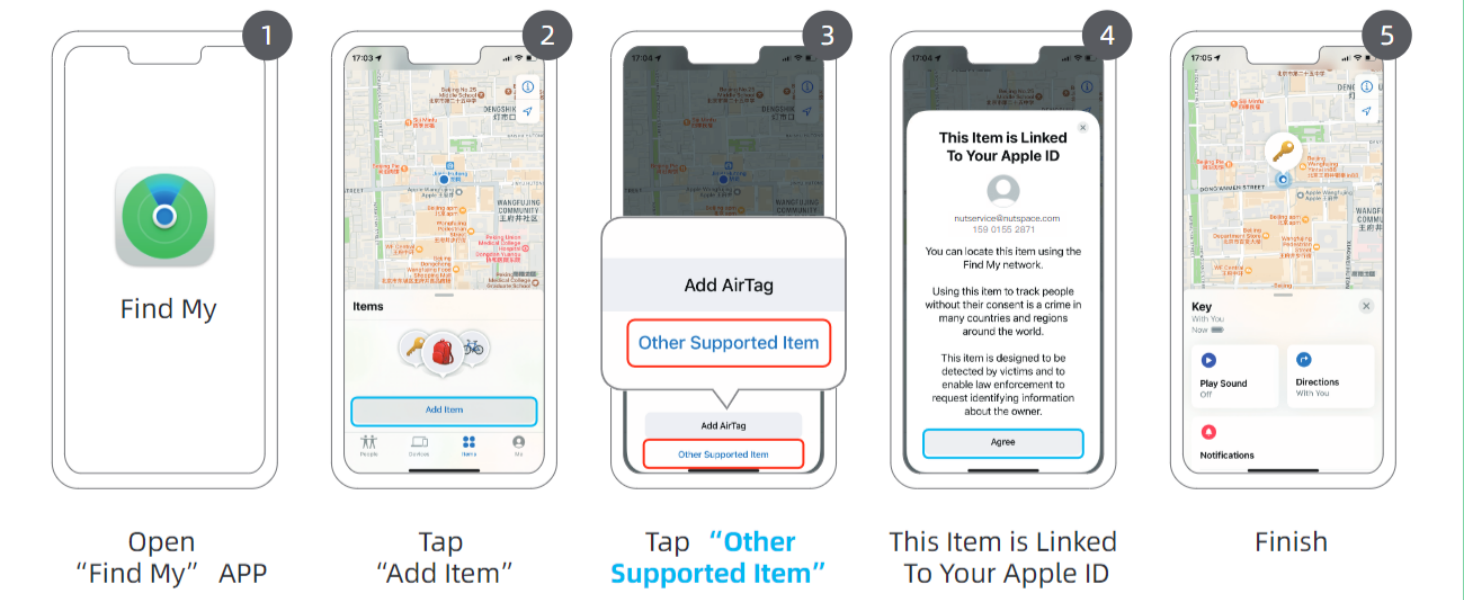
Figure 3: Visual guide for connecting your Nutale AirPro Tag a l'aplicació Troba la meva.
3. Instruccions de funcionament
3.1. Localització del vostre article
The Nutale AirPro Key Finder Tag utilizes the Apple Find My network to help you locate your items. This network consists of millions of Apple devices worldwide that can anonymously detect your tag and report its location to you.
- Long-Distance Locating: If your item is far away, the Find My app will display its last known location on a map, updated by the Find My network. You will receive notifications if your item is detected by other Apple devices.
- Nearby Locating (Play Sound): When your item is within Bluetooth range (approximately 20 to 50 meters), you can use the Find My app to play a sound on your Nutale AirPro Tag to pinpoint its exact location.

Figure 4: Global positioning and sound features via Find My App and Siri.
3.2. Ús de Siri
You can also ask Siri to help you find your item. Simply say, "Hey Siri, find my [item name]" (e.g., "Hey Siri, find my keys"), and your Nutale AirPro Tag reproduirà un so.
3.3. Left Behind Notifications
The Find My app can alert you if you leave your Nutale AirPro Tag behind at an unfamiliar location. You can customize these notifications within the app settings.
3.4. Lost Mode
If your item is lost, you can enable Lost Mode in the Find My app. This allows you to display a message and contact information to anyone who finds your tag. When someone finds your tag and scans it with an NFC-enabled smartphone, they will see your message and contact details.
Video 1: Official demonstration of Nutale AirPro Key Finder Tag setup and functionality with iOS Find My App.
4. Manteniment
4.1. Informació de la bateria
- The Nutale AirPro Key Finder Tag utilitza a Bateria mòbil CR2032.
- The battery life is approximately 10 mesos en condicions d'ús normals.
- El paquet del producte inclou 4 bateries CR2032 (one pre-installed, three spares).
4.2. Substitució de la bateria
Per substituir la bateria:
- Localitzeu el compartiment de la bateria a la part posterior del dispositiu tag.
- Obriu suaument la tapa de la bateria fent palanca.
- Traieu la bateria CR2032 antiga.
- Inseriu una nova bateria CR2032 amb el costat positiu (+) cap amunt.
- Tanqueu de manera segura la tapa de la bateria.

Figure 5: Independent battery compartment for easy replacement.
5. Solució De Problemes
- El dispositiu no s'està emparellant: Ensure your iOS device is updated to iOS 18.0.1 or later. Make sure Bluetooth is enabled on your device. Press and hold the tag's button for 5 seconds until it beeps to ensure it's in pairing mode.
- Sense so tag: Comproveu si el tag's battery needs replacement. Ensure the tag is within Bluetooth range of your iOS device.
- Ubicació incorrecta: Location accuracy depends on the density of Apple devices in the Find My network. In areas with fewer Apple devices, location updates may be less frequent or precise.
- El botó no respon: Apply firm pressure to the button. If the issue persists, try replacing the battery.
6. Especificacions
| Característica | Detall |
|---|---|
| Número de model | F11XD |
| Dimensions | 4.24 cm de llargada x 4.24 cm d'amplada x 0.79 cm de gruix |
| Pes de l'article | 3.2 unces (90.7 grams) |
| Material | Acrilonitril butadiè estirè (ABS), plàstic |
| Tipus de bateria | CR2032 (inclòs) |
| Nombre de bateries | 4 (1 pre-installed, 3 spares) |
| Durada de la bateria | Aproximadament 10 mesos |
| Compatibilitat | iOS devices only (iPhone, iPad) with Find My app |
7. Garantia i assistència
7.1. Garantia del producte
The Nutale AirPro Key Finder Tag ve amb a 1 any de garantia des de la data de compra. Aquesta garantia cobreix defectes de fabricació i avaries en condicions d'ús normal. Conserveu el comprovant de compra per a reclamacions de garantia.
7.2. Suport tècnic
Nutale offers lifetime technical support for the AirPro Key Finder Tag. If you encounter any issues or have questions regarding the product, please contact our customer care team. Contact information can typically be found on the product packaging or the official Nutale weblloc.