
1. Introducció
Thank you for choosing the YCCTEAM Wired Controller. This controller is designed to provide a reliable and responsive gaming experience on Xbox One, Xbox Series X/S, and PC (Windows 7/8/10). It features dual vibration motors for immersive feedback, a precise joystick, and an audio jack for headset connectivity. Please read this manual carefully to ensure proper setup and operation of your controller.
2. Contingut del paquet
- 1 x YCCTEAM Wired Controller (Model: YCC-9002W)
- 1 x Manual d'usuari
3. Disseny del controlador
Familiarize yourself with the various buttons and components of your YCCTEAM Wired Controller.
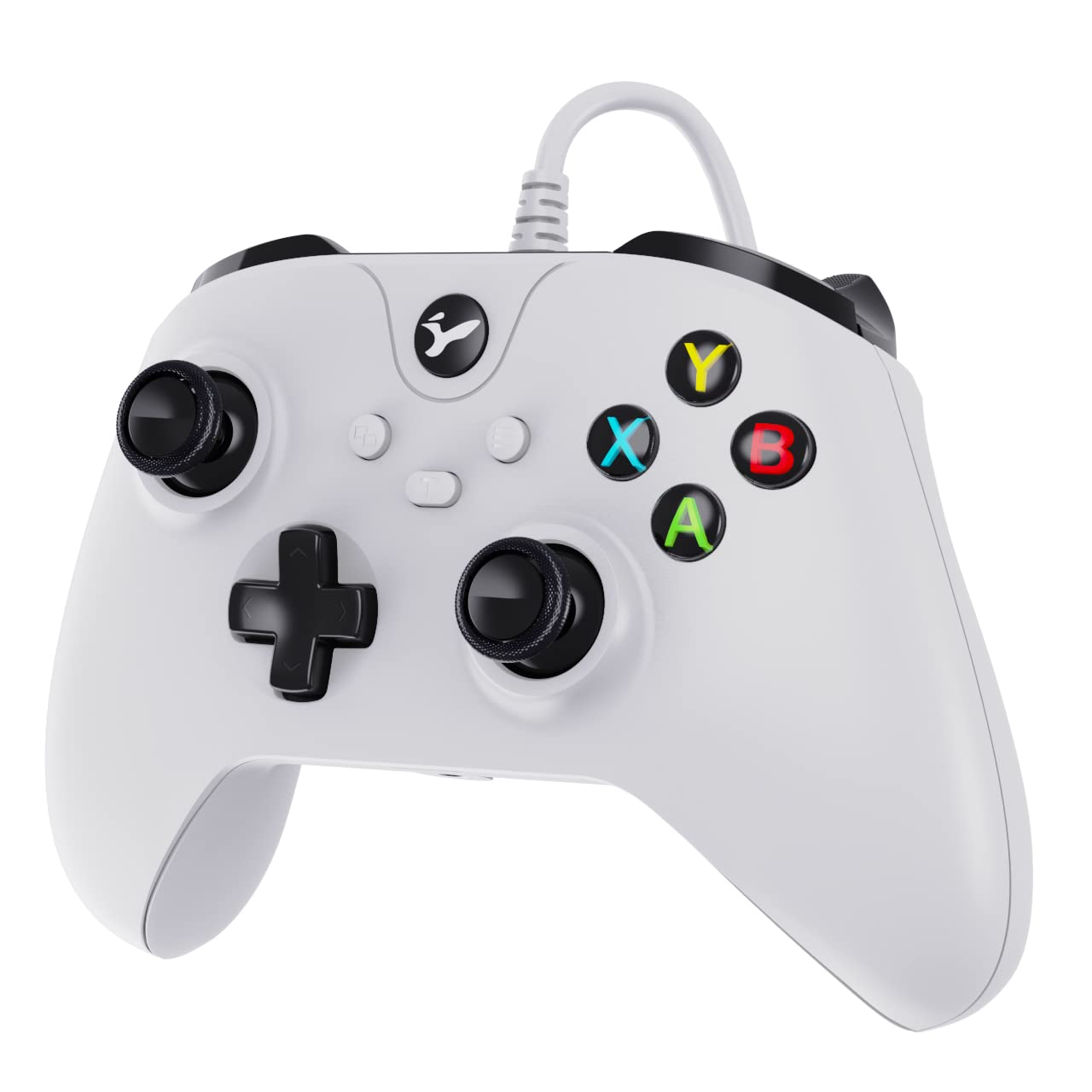
Figure 1: YCCTEAM Wired Controller Front View
This image displays the front of the YCCTEAM Wired Controller, highlighting its ergonomic design, dual analog sticks, D-pad, ABXY buttons, shoulder buttons, triggers, and central system buttons.
- Stick analògic esquerre: Per al moviment i el control de la càmera.
- Stick analògic dret: Per al control de la càmera i l'apuntament.
- D-Pad: Directional input for menus and specific game actions.
- Botons ABXY: Botons d'acció (A, B, X, Y).
- Left/Right Bumper (LB/RB): Botons a l'espatlla per a diverses accions del joc.
- Left/Right Trigger (LT/RT): Disparadors analògics per a una entrada precisa, com ara l'acceleració o el tret.
- View Botó: Access in-game maps or menus.
- Botó de menú: Access game menus or system options.
- Botó Xbox: Power on/off console, access guide.
- Conector d'àudio de 3.5 mm: Per connectar auriculars compatibles.
4. Configuració
4.1 Connecting to Xbox One / Xbox Series X/S
- Assegura't que la consola Xbox estigui engegada.
- Localitza un port USB disponible a la consola Xbox.
- Plug the USB connector of the YCCTEAM Wired Controller into the USB port.
- The controller should be automatically recognized by the console. The Xbox button on the controller will illuminate to indicate a successful connection.
4.2 Connecting to PC (Windows 7/8/10)
- Assegureu-vos que el vostre PC estigui encès.
- Localitza un port USB disponible al teu ordinador.
- Plug the USB connector of the YCCTEAM Wired Controller into the USB port.
- El Windows detectarà i instal·larà automàticament els controladors necessaris. Això pot trigar uns instants.
- Once the drivers are installed, the controller will be ready for use. You can verify its status in your PC's Device Manager or Game Controllers settings.

Figure 5: Compatibility Overview
This image illustrates the wide compatibility of the YCCTEAM Wired Controller, showing its connection to Xbox One, Xbox Series X/S, and PC setups.
5. Instruccions de funcionament
5.1 Funcionalitat bàsica
Once connected, the controller functions as a standard Xbox-compatible gamepad. All buttons, analog sticks, and triggers will respond to your inputs in supported games and applications.
5.2 Dual Vibration
The controller features dual vibration motors that provide haptic feedback during gameplay, enhancing immersion. The intensity and patterns of vibration are determined by the game you are playing.

Figure 4: Dual Motor Vibration System
This image visually represents the dual motor vibration system within the controller, indicating how it provides immersive feedback during gameplay.
5.3 Funció Turbo
The Turbo function allows for rapid, continuous input of a designated button with a single press. This can be useful for certain game mechanics.
- Per activar el Turbo: Press and hold the "Turbo" button (if present, or a designated button combination) and then press the button you wish to apply Turbo to (e.g., A, B, X, Y, LB, RB, LT, RT).
- Per desactivar el Turbo: Repeat the activation process for the same button, or press the "Clear" button (if present) to clear all Turbo settings.

Figure 2: Turbo Function Indicator
This image highlights the Turbo function, illustrating its rapid-fire capability for a designated button.
5.4 Audio Jack Usage
The integrated 3.5mm audio jack allows you to connect a compatible gaming headset directly to the controller for in-game audio and chat. Ensure your headset is fully plugged in for proper functionality.

Figure 3: Controller Components: Joysticks, Triggers, and D-Pad
Aquesta imatge ofereix un detall view of the controller's sensitive high-precision joysticks, 360-degree action triggers, and easily operable D-pad.
6. Manteniment
- Neteja: Feu servir un drap suau i sec per netejar la superfície del controlador. Per a la brutícia persistent, netegeu lleugerament.ampNetegeu el drap amb aigua. No utilitzeu productes químics agressius ni netejadors abrasius.
- Emmagatzematge: Store the controller in a cool, dry place away from direct sunlight and extreme temperatures. Avoid placing heavy objects on the controller.
- Cura del cable: Do not bend or crimp the controller cable excessively. Always unplug the controller by gripping the connector, not the cable itself.
7. Solució De Problemes
- El controlador no respon:
- Assegureu-vos que el cable USB estigui ben connectat tant al controlador com a la consola/PC.
- Prova de connectar el controlador a un port USB diferent.
- Reinicieu la consola o l'ordinador.
- If on PC, check Device Manager to see if the controller is recognized and if there are any driver issues.
- La vibració no funciona:
- Verifica que el joc al qual estàs jugant admeti la resposta per vibració.
- Revisa la configuració del joc per assegurar-te que la vibració estigui activada.
- Assegureu-vos que el controlador estigui connectat correctament.
- Audio Jack Issues:
- Assegureu-vos que els auriculars estiguin completament connectats al connector d'àudio de 3.5 mm.
- Test your headset with another device to confirm it is working correctly.
- Check audio settings on your console or PC to ensure the controller's audio output is selected.
- Controller Not Recognized by Xbox Series X/S:
- While the controller is designed for compatibility, some console updates or specific console configurations may affect recognition.
- Ensure your console's operating system is up to date.
- Try a hard reset of your console (hold power button for 10 seconds).
- If issues persist, contact YCCTEAM customer support for further assistance.
8. Especificacions
| Número de model | YCC-9002W |
| ASIN | B0B3CN7183 |
| Connectivitat | USB per cable |
| Compatibilitat | Xbox One, Xbox Series X/S, PC (Windows 7/8/10) |
| Característiques | Dual Vibration, 3.5mm Audio Jack, Turbo Function |
| Dimensions (L x A x A) | 16.41 x 12.4 x 7.59 cm (aprox. 6.46 x 4.88 x 2.99 polzades) |
| Pes | 322 grams (aprox. 0.71 lliures) |
9. Garantia i Suport
YCCTEAM products are designed for reliability and performance. For information regarding warranty coverage, technical support, or frequently asked questions, please refer to the warranty card included with your product or visit the official YCCTEAM weblloc web. Si us plau, conserveu el comprovant de compra per a reclamacions de garantia.
For direct support, you may contact YCCTEAM customer service through the contact information provided on their official weblloc.