
Newgoal NG8000007ew-RF
Newgoal 4 Channel Smart Switch (Ewelink AC/DC7V-32V) User Manual
Model: NG8000007ew-RF
1. Introducció
This manual provides detailed instructions for the installation, configuration, and operation of the Newgoal 4 Channel Smart Switch (Ewelink AC/DC7V-32V). This device is designed to integrate with your smart home system, allowing remote control of connected appliances via the eWeLink application, Bluetooth, and voice assistants like Alexa and Google Home.
2. Informació de seguretat
- Seguretat elèctrica: Installation should only be performed by qualified personnel or individuals with a thorough understanding of electrical wiring. Ensure power is disconnected before any wiring work.
- Voltage Compatibilitat: Comproveu que l'entrada voltage (USB 5V or AC/DC 7V-32V) matches your power source.
- Límits de càrrega: Do not exceed the maximum current of 10A per channel or a total of 16A for all 4 channels. The maximum total power is 3500W.
- Medi ambient: Operate the device within the specified temperature range of -20℃ to 70℃. Avoid exposure to moisture or extreme conditions.
- Sortida de relé: The relay provides a dry contact switch output. It does not supply power to the connected device.
3. Producte acabatview
The Newgoal 4 Channel Smart Switch is a versatile relay module designed for smart home automation. It features four independent channels, allowing control of multiple devices. The module supports Wi-Fi and Bluetooth connectivity for flexible control options.

Imatge 3.1: Davant view of the Newgoal 4 Channel Smart Switch module alongside a smartphone displaying the eWeLink application interface for controlling the switch.
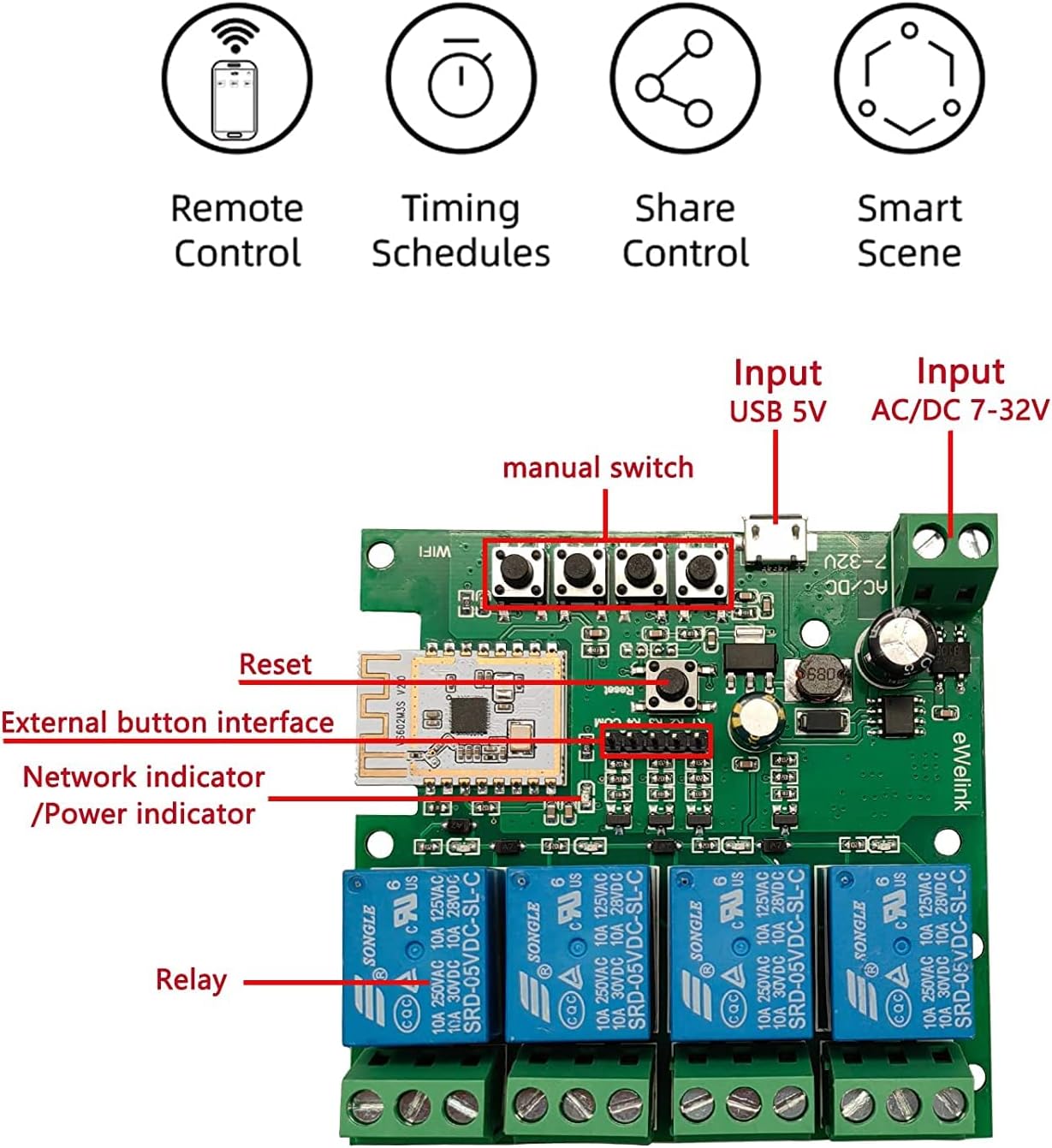
Imatge 3.2: Detallada view of the internal circuit board of the smart switch, highlighting key components such as manual switches (K1-K4), reset button, network/power indicators, and the four relays.
Característiques principals:
- Comandament a distància: Control devices from anywhere via the eWeLink app over a 2.4GHz Wi-Fi network.
- Control Bluetooth: Operate devices locally via Bluetooth, even without an internet connection.
- Control de veu: Compatible amb Amazon Alexa i Google Home per a un funcionament amb mans lliures.
- Múltiples modes de treball: Supports Locking/Self-locking, Jog/Momentary, and Interlock modes.
- Programació: Set timers and schedules for automated device operation.
- Compartició de dispositius: Share control of the switch with other users.
- DIY Smart Home Integration: Ideal for various smart home projects.
4. Especificacions
| Paràmetre | Valor |
|---|---|
| Entrada Voltage | USB 5V or AC/DC 7V-32V |
| Maximum Current (Single Channel) | 10A |
| Maximum Total Current (4 Channels) | 16A |
| Potència total | 3500W |
| Estàndard sense fils | Wi-Fi 2.4GHz b/g/n + Bluetooth |
| Freqüència de control remot | 2.4G |
| Temperatura de treball | -20 ℃ a 70 ℃ |
| Material del cos | ABS ignífug |
| Dimensions | 81 x 77 x 29 mm |
| Número de model | NG8000007ew-RF |
5. Configuració
5.1. eWeLink App Installation
- Baixeu l'aplicació eWeLink des de l'App Store (iOS) o Google Play Store (Android).
- Registra un compte nou o inicia la sessió amb un d'existent.
5.2. Cablejat del dispositiu
Important: Ensure all power is disconnected before performing any wiring. Incorrect wiring can damage the device or connected appliances.

Imatge 5.1: Wiring diagram for connecting the smart switch to AC 85V-250V power and controlling multiple light bulbs. The input power (L and N) is connected to the module, and the outputs (NC, COM, NO) are wired to the lights.

Imatge 5.2: Wiring diagram for controlling a 2-line motor using the smart switch with AC/DC 7V-32V input. This setup typically requires the interlock mode in the app.

Imatge 5.3: Wiring diagram for controlling a 3-line motor using the smart switch with AC 85V-250V input. This configuration also typically utilizes the interlock mode for proper motor operation.
5.3. Pairing and Network Connection
- Power on the smart switch. The network indicator LED will begin to flash.
- Open the eWeLink app and tap the '+' icon to add a device.
- Seleccioneu el mode d'emparellament adequat (per exemple, el mode d'emparellament ràpid).
- Segueix les instruccions que apareixen a la pantalla per connectar el dispositiu a la teva xarxa Wi-Fi de 2.4 GHz. Nota: The device does not support 5.0GHz Wi-Fi networks.
- Un cop s'hagi emparellat correctament, podeu canviar el nom del dispositiu i dels canals individuals dins de l'aplicació.
6. Modes de funcionament
The Newgoal Smart Switch supports three distinct working modes, configurable within the eWeLink app:
- Locking/Self-locking Mode: In this mode, each channel operates independently. Pressing the button (physical or in-app) turns the connected device ON, and pressing it again turns it OFF. This mode is suitable for controlling lights or other devices that require a persistent ON/OFF state.
- Jog/Momentary Mode: When activated, the relay will turn ON for a brief, adjustable duration (e.g., 1 second) and then automatically turn OFF. This mode is useful for applications like garage door openers or electric strikes that require a momentary pulse. You can configure the duration within the eWeLink app.
- Mode d'enclavament: (Supported on 2-channel and 4-channel versions) In this mode, only one channel can be ON at a time. If one channel is active and another is selected, the first channel will automatically turn OFF before the second one turns ON. This is ideal for controlling motors with forward/reverse functions or other applications where only one output should be active at any given time.

Imatge 6.1: Illustration depicting the various control methods for the smart switch, including mobile app control, remote control (with an optional 2.4G remote), and manual control via onboard buttons.
7. Funcions de l'aplicació
The eWeLink app provides comprehensive control and automation features for your smart switch:
- Comandament a distància: Turn connected devices ON or OFF from anywhere with an internet connection.
- Control Bluetooth: Control devices via Bluetooth when within range, even if Wi-Fi is unavailable.
- Horari/temporitzador: Set one-time, recurring, or countdown timers to automate device operation.
- Compartició de dispositius: Grant access to family members or other users to control the smart switch.
- Gestió de grups: Group multiple smart switches or other eWeLink devices to control them simultaneously.
- Escenes intel·ligents: Create custom automation rules based on conditions like time, device status, or sensor input.
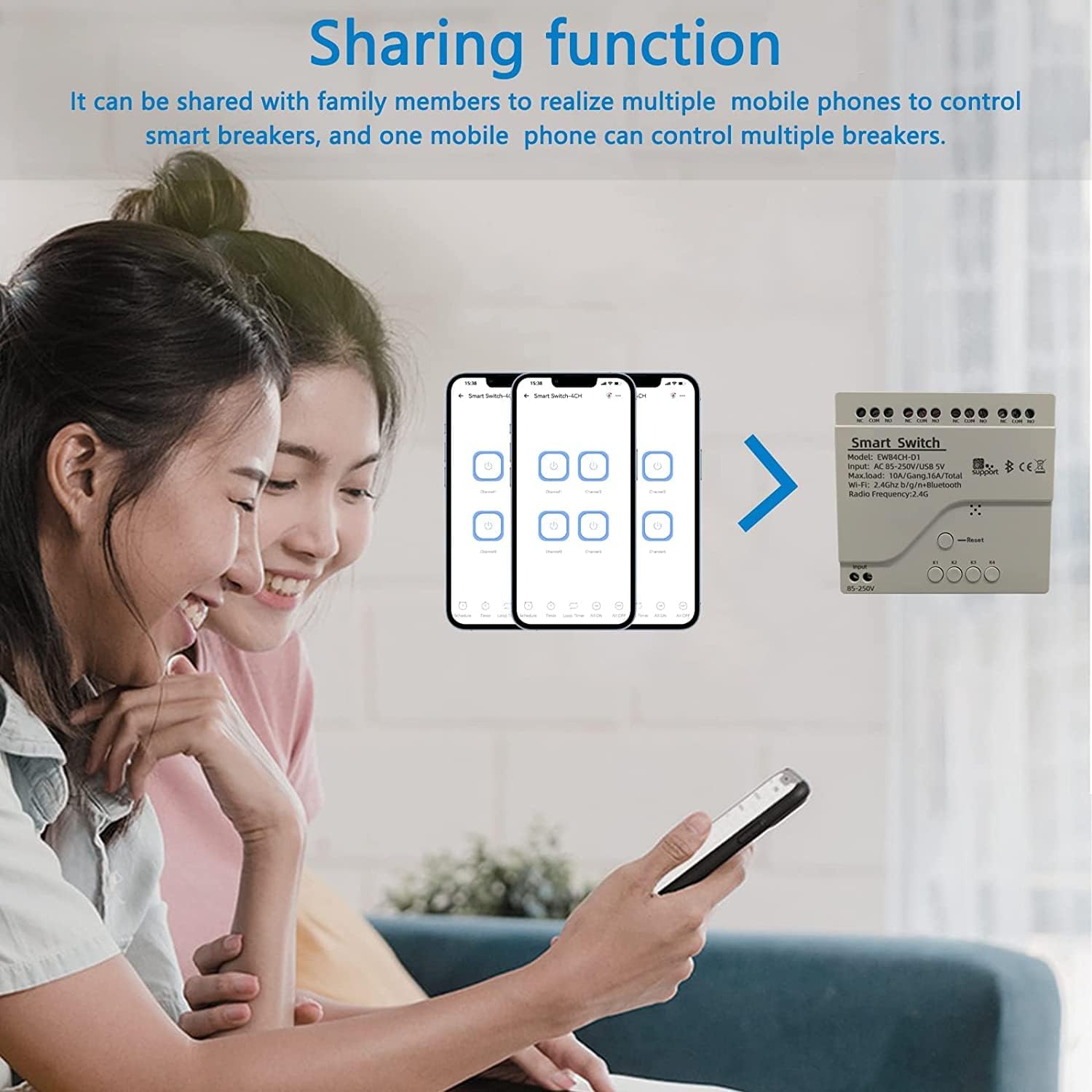
Imatge 7.1: Screenshot illustrating the device sharing function within the eWeLink app, showing how multiple users can control smart devices.
8. Integració del control per veu
The Newgoal Smart Switch is compatible with popular voice assistants:
- Amazon Alexa: Link your eWeLink account to Alexa through the Alexa app. Once linked, you can use voice commands like "Alexa, turn on Channel 1" or "Alexa, turn off the living room light" (if you've renamed the channel).
- Google Home: Connect your eWeLink account to Google Home via the Google Home app. Use commands such as "Hey Google, activate Channel 2" or "Hey Google, switch off the fan."
9. Manteniment
- Neteja: Use a dry, soft cloth to clean the device. Do not use liquid cleaners or solvents.
- Actualitzacions de firmware: Consulteu periòdicament l'aplicació eWeLink per veure si hi ha actualitzacions de firmware disponibles per garantir un rendiment i una seguretat òptims.
- Condicions ambientals: Ensure the device is not exposed to excessive heat, cold, or humidity, which can affect its lifespan and functionality.
10. Solució De Problemes
- El dispositiu no es connecta a la Wi-Fi:
- Assegura't que la teva xarxa Wi-Fi sigui de 2.4 GHz. El dispositiu no admet xarxes de 5 GHz.
- Check that the Wi-Fi password is entered correctly in the eWeLink app.
- Move the device closer to your Wi-Fi router to improve signal strength.
- Try resetting the device by pressing and holding the reset button until the LED indicator flashes rapidly, then attempt pairing again.
- Dispositiu fora de línia a l'aplicació:
- Verifiqueu que la xarxa Wi-Fi de casa vostra estigui activa i que tingui accés a Internet.
- Check the device's power supply.
- Reinicieu el vostre encaminador Wi-Fi i l'interruptor intel·ligent.
- El control per veu no funciona:
- Ensure your eWeLink account is correctly linked to your Alexa or Google Home account.
- Check that the device is online in the eWeLink app.
- Prova de tornar a descobrir dispositius a l'aplicació Alexa o Google Home.
- Relay Not Responding:
- Check the wiring connections for any loose or incorrect terminals.
- Verify that the connected appliance is functioning correctly.
- Ensure the load does not exceed the maximum current or power ratings.
11. Garantia i Suport
For warranty information or technical support, please refer to the contact details provided with your purchase or visit the official Newgoal website. Please have your model number (NG8000007ew-RF) and purchase date available when contacting support.
Ask a question about this manual
Ask about setup, troubleshooting, compatibility, parts, safety, or missing instructions. Manuals+ will review the question and use this page’s manual context to help answer it.