
CRONY AZ-4009
Crony AZ-4009 Auto Islamic Azan Clock User Manual
Model: AZ-4009 | Brand: CRONY
Introducció
The Crony AZ-4009 Auto Islamic Azan Clock is designed to display current time, prayer times, and Hijri date. It features automatic calculation of prayer times for various cities, a remote control for easy adjustments, and a clear digital display. This manual provides detailed instructions for setting up and operating your Azan clock.
Característiques principals
- Automatic calculation of Hijri date with adjustment capability.
- Display of Hijri month names and days of the week.
- Two different time modes: 12/24 hours (optional).
- Automatic and manual switching of Daylight Saving Time.
- Display of the five prayer times and the sunrise time (Ishraq).
- Audible and visible alerts at each prayer and Iqama time.
- Iqama setting in two modes: Relative & Fixed.
- Display of Iqama time (remaining time to Iqama) with adjustable settings for each prayer.
- Temperature display (range between 0 ~ 40°C).
- Easy control via remote control and local keypad.
- Power save mode (from Isha'a to Fajr).
- Enable/Disable key tones.
- Connects with PC via USB port to upload prayer times for any country or city (optional feature).

Image: A close-up of the product packaging highlighting the main features of the Crony AZ-4009 Azan Clock, including automatic Hijri date, prayer times, and remote control.
Contingut del paquet
Marqueu la casella per als elements següents:
- Crony AZ-4009 Auto Islamic Azan Clock Unit
- Control remot
- Adaptador d'alimentació
- Manual d'usuari (aquest document)

Image: The Crony AZ-4009 Azan Clock displayed with its included accessories: a remote control and a power adapter.
Configuració
1. Connexió d'alimentació
- Connect the power adapter to the DC input port located at the back of the clock.
- Plug the power adapter into a suitable electrical outlet (220-240V, 50/60Hz).
- The clock will power on and display default settings.

Imatge: La part posterior view of the Crony AZ-4009 Azan Clock, showing the power input port and product label with electrical specifications.
2. Initial Settings (Time, Date, City)
Upon first power-on or after a power interruption, you may need to set the current time, date, and your location (city) for accurate prayer time calculations. Use the provided remote control for easier navigation.
- Premeu el botó SET button on the remote control to enter the settings menu.
- Utilitza el Amunt/Avall arrows to navigate through options like Time, Date, City, Prayer Calculation Method.
- Utilitza el ESQUERRA/DRETA arrows or numerical keys to adjust values.
- Premeu OK to confirm selections and move to the next setting.
- Refer to the remote control diagram for button functions.
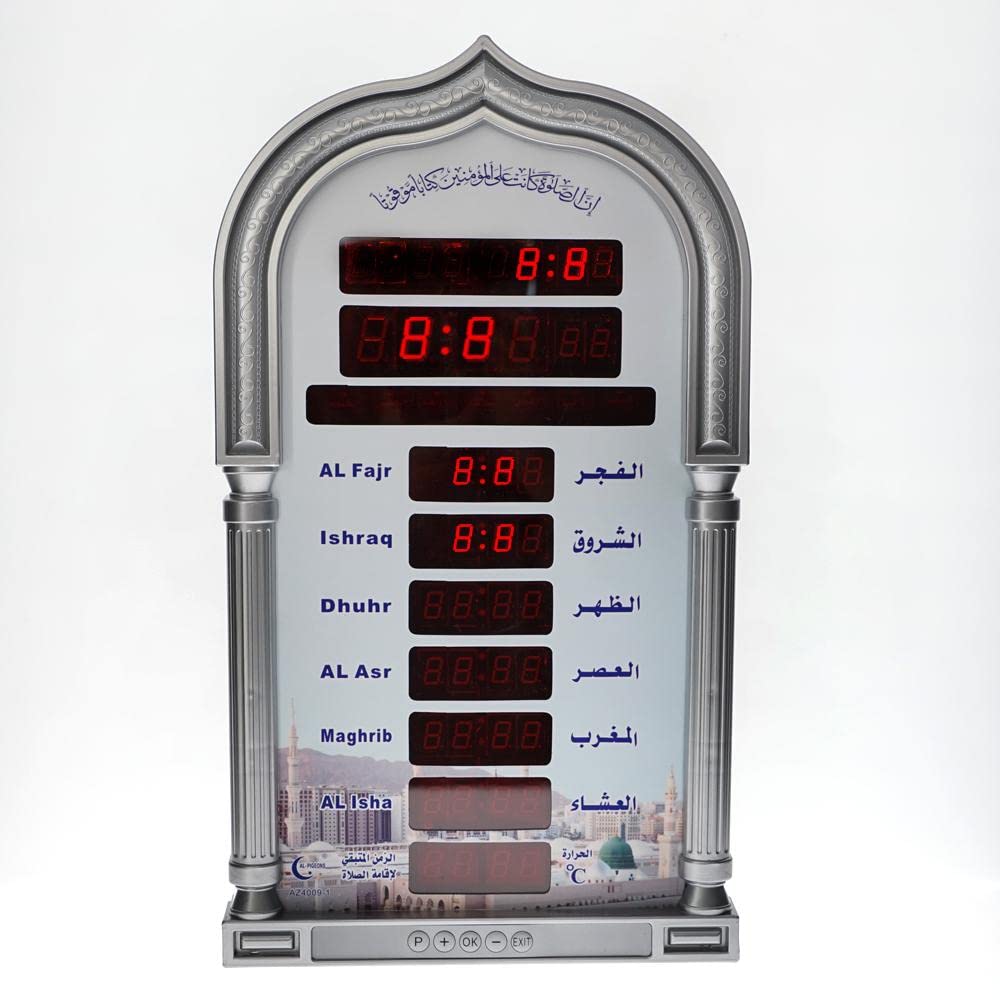
Image: The Crony AZ-4009 Azan Clock with its remote control and power adapter, illustrating the components used for setup and operation.
Instruccions de funcionament
Visualització del temps de pregària
The clock automatically displays the current time, date, and the five daily prayer times (Fajr, Dhuhr, Asr, Maghrib, Isha) along with Ishraq (sunrise). The current prayer time will typically be highlighted or indicated.
Adjusting Hijri Date
The clock automatically calculates the Hijri date. If an adjustment is needed due to local moon sighting, use the remote control:
- Premeu SET al comandament.
- Navigate to the Hijri Date setting.
- Ús Amunt/Avall or numerical keys to adjust the date.
- Premeu OK per salvar.
Horari d'estiu (DST)
The clock supports automatic and manual switching for Daylight Saving Time. Check your local DST schedule and adjust the setting in the menu if necessary.
- Premeu SET al comandament.
- Navigate to the DST setting.
- Seleccioneu Automàtic or Manual and adjust accordingly.
- Premeu OK per salvar.
Iqama Settings
You can set the Iqama time (remaining time to Iqama) for each prayer individually. The clock offers Relative and Fixed modes.
- Mode relatiu: Iqama time is set relative to the Azan time (e.g., 15 minutes after Azan).
- Mode fix: Iqama time is set to a specific time.
Per ajustar:
- Premeu SET al comandament.
- Navigate to the Iqama settings.
- Select the prayer you wish to adjust.
- Choose between Relative/Fixed mode and set the desired time/duration.
- Premeu OK per salvar.
Mode d'estalvi d'energia
The clock features a power save mode that can be activated from Isha'a to Fajr to conserve energy. This mode can be enabled or disabled in the settings menu.
- Premeu SET al comandament.
- Navigate to the Power Save Mode setting.
- Toggle the setting On or Off.
- Premeu OK per salvar.
Manteniment
- Netegeu la pantalla del rellotge i casinNetegeu amb un drap suau i sec. No utilitzeu productes de neteja abrasius ni dissolvents.
- Mantingueu el rellotge allunyat de la llum solar directa, de temperatures extremes i d'alta humitat.
- Ensure the power adapter cable is not damaged or kinked.
- If using batteries for the remote control, replace them when the remote's range decreases or it becomes unresponsive.
Resolució de problemes
| Problema | Causa possible | Solució |
|---|---|---|
| El rellotge no s'encén. | No hi ha font d'alimentació; adaptador defectuós. | Check power connection. Ensure adapter is plugged in correctly. Try a different outlet. |
| Incorrect prayer times. | Incorrect city/location settings; incorrect calculation method; incorrect date/time. | Verify city, date, and time settings. Adjust the prayer calculation method in the settings menu to match local requirements. |
| El comandament a distància no funciona. | Piles gastades; obstrucció; fora de l'abast. | Replace remote control batteries. Ensure no obstructions between remote and clock. Operate within effective range. |
| La pantalla està tènue o parpelleja. | Problema amb el subministrament d'energia; fallada interna. | Check power adapter. If problem persists, contact customer support. |
Especificacions
- Marca: CRONY
- Model: AZ-4009
- Color: Gris
- Material: PC
- Tipus de visualització: Digital
- Característiques especials: Alarm, Daylight Saving, Auto Azan
- Font d'alimentació: Corded Electric (220-240V, 50/60Hz)
- Pes de l'article: 1.13 quilos
- Dimensions del paquet: 43.9 x 25.5 x 6 cm
- Ús interior / exterior: Interior
Garantia i Suport
The Crony AZ-4009 Auto Islamic Azan Clock comes with a 1 any de garantia des de la data de compra. Aquesta garantia cobreix els defectes de fabricació en condicions d'ús normal.
For technical support, warranty claims, or further assistance, please contact your retailer or visit the official CRONY weblloc web. Conserveu el rebut de compra com a comprovant de compra per als serveis de garantia.

Image: The retail packaging of the Crony AZ-4009 Azan Clock, indicating a 1-year warranty and other product details.
Ask a question about this manual
Ask about setup, troubleshooting, compatibility, parts, safety, or missing instructions. Manuals+ will review the question and use this page’s manual context to help answer it.