
JOYROOM JR-ZS288
JOYROOM JR-ZS288 Motorcycle Phone Holder Instruction Manual
Model: JR-ZS288 | Brand: JOYROOM
Introducció
Thank you for choosing the JOYROOM JR-ZS288 Motorcycle Phone Holder. This manual provides detailed instructions for the safe and efficient installation, operation, and maintenance of your new phone holder. Please read this manual thoroughly before use and retain it for future reference.
Producte acabatview
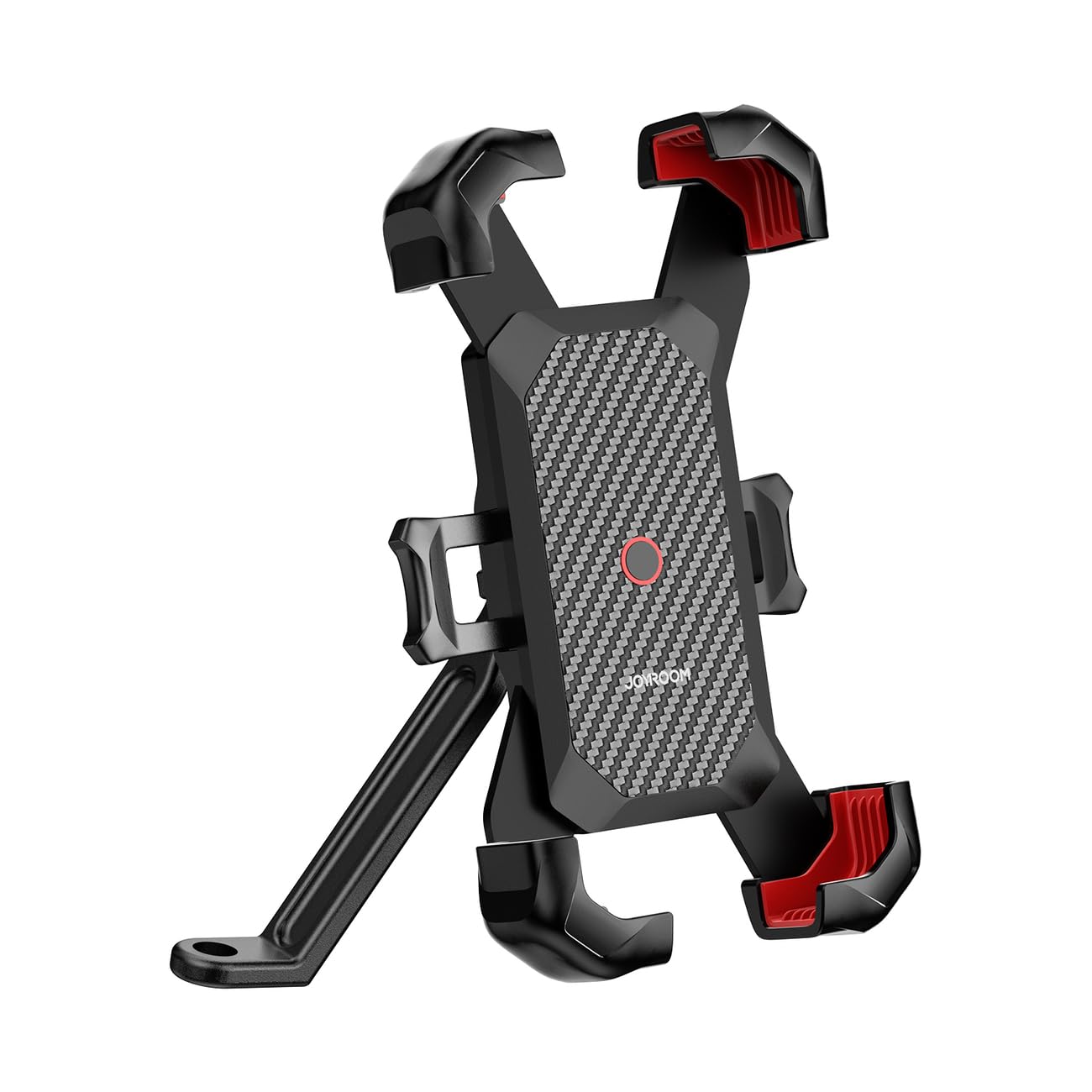
The JOYROOM JR-ZS288 is designed to securely hold your smartphone on your motorcycle's handlebar, providing easy access to navigation and other applications while riding. It features a robust design and a secure locking mechanism.

Imatge: Acabatview of the JOYROOM JR-ZS288 Motorcycle Phone Holder, showing its main parts.
Key features include a universal phone clamp, a handlebar mounting base, and a secure locking system to prevent accidental release.
Configuració i instal·lació
Follow these steps to properly install the phone holder on your motorcycle handlebar.
- Attach the Mount Base: Secure the handlebar mounting base to a suitable position on your motorcycle's handlebar. Ensure it is tightened firmly using the provided tools.
- Connect the Holder Arm: Attach the phone holder arm to the mounting base. Adjust the angle for optimal viewing before tightening the connection point.
- Verifica l'estabilitat: After installation, gently shake the mount to ensure it is stable and does not wobble. Re-tighten any loose connections if necessary.

Imatge: Visual guide demonstrating the installation process of the phone holder on a motorcycle handlebar, including securing the base and attaching the phone clamp.
Instruccions de funcionament
This section details how to use your phone holder effectively.
Inserting Your Phone:
- Unlock the Holder: Locate the release mechanism, typically a button or lever (often red), and press or slide it to open the phone clamps.
- Place Phone: Carefully place your smartphone into the holder. The clamps will automatically adjust to secure the phone.
- Assegura el pany: Ensure the phone is firmly held. Engage the locking mechanism (if applicable) to prevent accidental release during travel. This often involves a switch or button that locks the clamps al seu lloc.
Imatge: A hand demonstrating the insertion of a smartphone into the holder, showing the open clamps.

Imatge: Close-up of the red locking button and mechanism, illustrating its locked and unlocked positions.
Extracció del telèfon:
- Desbloquejar: Disengage the locking mechanism.
- Alliberament Clamps: Press the release button or lever to open the clamps.
- Remove Phone: Carefully remove your smartphone from the holder.

Imatge: A smartphone mounted on a motorcycle handlebar, showing its use for navigation.
Manteniment
To ensure the longevity and optimal performance of your JOYROOM JR-ZS288 phone holder, follow these maintenance guidelines:
- Neteja regular: Netegeu el suport amb un drap suauamp drap per eliminar la pols i la brutícia. Eviteu productes químics agressius o netejadors abrasius.
- Comprovació dels elements de fixació: Periodically inspect all screws and fasteners to ensure they are tight. Re-tighten if any looseness is detected.
- Inspeccionar per danys: Before each ride, check the holder for any signs of wear, cracks, or damage. Do not use the holder if it appears damaged.
- Lubricació: The moving parts of the clamping mechanism generally do not require lubrication. If movement becomes stiff, clean the area thoroughly.
Resolució de problemes
If you encounter issues with your phone holder, refer to the following common problems and solutions:
- Holder is Loose on Handlebar:
- Assegureu-vos que el manillar estigui ben tancatamp screws are fully tightened.
- Verify that the rubber inserts (if any) are correctly positioned to provide a snug fit.
- Phone is Not Securely Held:
- Check that the phone is centered in the holder and the clamps have fully engaged.
- Ensure the locking mechanism is activated after inserting the phone.
- Confirm your phone's dimensions are within the holder's compatible range.
- Clamping Mechanism is Stiff:
- Clean any dirt or debris from the moving parts of the clamps.
- Avoid forcing the mechanism; if it remains stiff after cleaning, contact customer support.
Especificacions
Detailed technical specifications for the JOYROOM JR-ZS288 Motorcycle Phone Holder:
| Marca | SALA DE JOIES |
| Número de model | JR-ZS288 |
| Color | Negre |
| Dispositius compatibles | Smartphone |
| Models de telèfon compatibles | Universal |
| Tipus de muntatge | Manillar |
| Característica especial | Funcionament amb mans lliures |
| Material | Plàstic |
| Tipus de servei del vehicle | Motocicleta |
| Pes de l'article | 200 g |
| Adjustable Phone Height | 118mm - 180mm (approximate, based on image) |

Imatge: Diagram illustrating the adjustable height range of the phone holder, from 118mm to 180mm.
Informació de seguretat
Si us plau, observeu les precaucions de seguretat següents:
- Always ensure the phone holder is securely mounted and the phone is firmly clamped before riding.
- Do not adjust the phone holder or interact with your phone while operating the motorcycle. Pull over to a safe location if adjustments are needed.
- Eviteu obstruir el vostre view of the road or motorcycle controls with the phone holder or phone.
- Regularly check the holder for any signs of wear or damage that could compromise its security.
- Operating a motorcycle requires full attention. Use navigation and communication features responsibly.
Garantia i Suport
For warranty information and customer support, please refer to the documentation provided with your purchase or contact the retailer where the product was acquired. You may also visit the official JOYROOM brand store for further assistance:
Documents relacionatsJR-ZS288

Ask a question about this manual
Ask about setup, troubleshooting, compatibility, parts, safety, or missing instructions. Manuals+ will review the question and use this page’s manual context to help answer it.