
Introducció
This manual provides comprehensive instructions for the setup, operation, maintenance, and troubleshooting of your T-WOLF X9 Bluetooth Mouse. Please read this manual carefully before using the product to ensure optimal performance and longevity.
Contingut del paquet
- 1 x T-WOLF X9 Bluetooth Mouse
- 1 x bateria AA
- 1 x Manual d'usuari (aquest document)
Producte acabatview

Imatge 1: A dalt view of the T-WOLF X9 Bluetooth Mouse, showing the left and right click buttons, scroll wheel, and DPI switch button. The T-WOLF logo and Bluetooth icon are visible.
The T-WOLF X9 is a portable Bluetooth mouse designed for convenience and performance. It features a sleek design, Bluetooth 5.2 connectivity, and a 10-meter operating range. The mouse includes four buttons: left-click, right-click, scroll wheel (which also functions as a button), and a dedicated DPI switch button for adjusting cursor sensitivity.
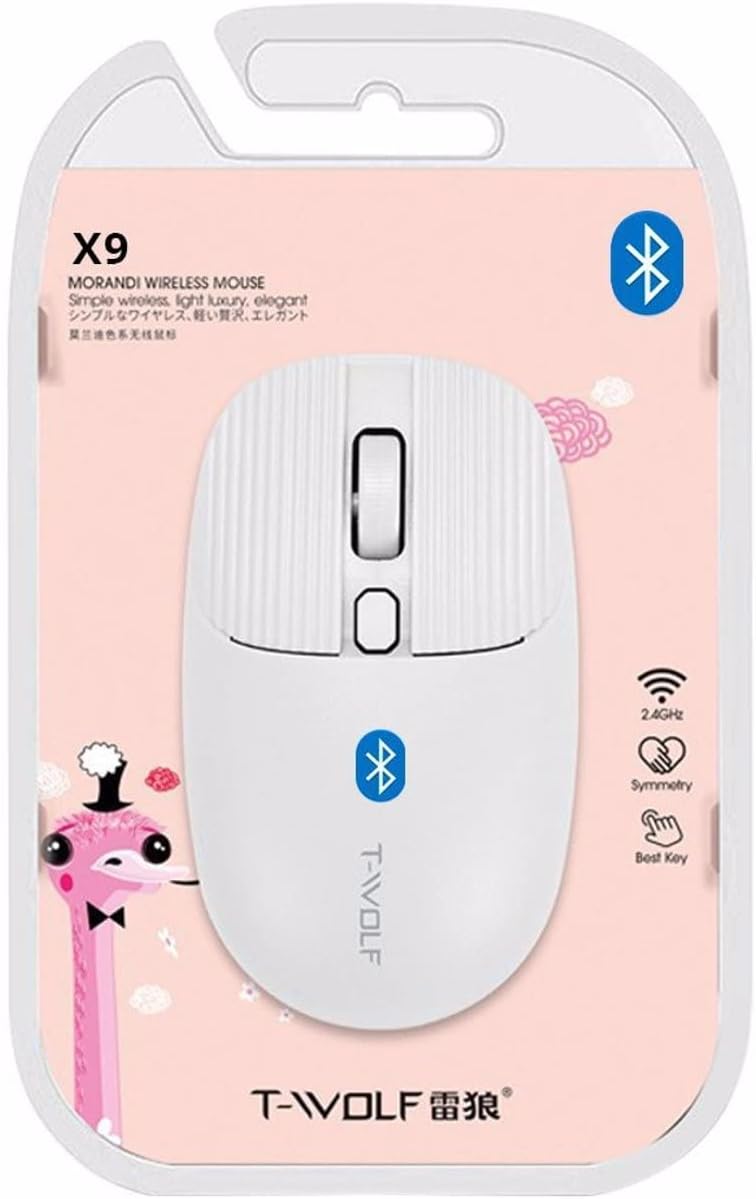
Imatge 2: Packaging of the T-WOLF X9 Bluetooth Mouse, highlighting key features such as 2.4GHz (though product is Bluetooth, this might be a generic packaging element), symmetry, and "Best Key".

Imatge 3: lateral view of the T-WOLF X9 Bluetooth Mouse, illustrating its ergonomic profile and non-slip roller design.
Configuració
1. Instal·lació de la bateria
- Localitzeu el compartiment de la bateria a la part inferior del ratolí.
- Obriu la tapa del compartiment de la bateria.
- Inseriu la pila AA inclosa, assegurant-vos de la polaritat correcta (+/-).
- Tanqueu bé la tapa del compartiment de la bateria.
2. Emparellament Bluetooth
- Ensure the mouse is powered on. There may be a power switch on the underside.
- Al vostre ordinador o dispositiu, aneu a la configuració de Bluetooth.
- Activa el Bluetooth i cerca dispositius nous.
- The mouse should appear as "T-WOLF X9" or similar. Select it to initiate pairing.
- Un cop emparellat, el ratolí està llest per al seu ús.
Instruccions de funcionament
1. DPI Switching
The T-WOLF X9 mouse features 3-gear DPI switching. Press the dedicated DPI button (located behind the scroll wheel) to cycle through the available DPI settings. Each press will change the cursor sensitivity, allowing you to adjust it to your preference for different tasks.
2. Funcions del botó
- Botó esquerre del clic: Selecció i interacció primàries.
- Botó del botó dret: Obre menús contextuals.
- Roda de desplaçament: Scrolls content vertically. Can also be pressed for middle-click functionality.
- Botó de commutació de DPI: Ajusta la sensibilitat del cursor (DPI).
Manteniment
- Neteja: Feu servir un drap suau i sec per netejar el ratolí. Per a la brutícia persistent, fregueu lleugerament.ampRenta el drap amb aigua. Evita utilitzar productes químics agressius o materials abrasius.
- Substitució de la bateria: Replace the AA battery when the mouse performance degrades or it stops responding.
- Emmagatzematge: Guardeu el ratolí en un lloc fresc i sec quan no l'utilitzeu durant períodes prolongats.
Resolució de problemes
| Problema | Solució |
|---|---|
| El ratolí no respon |
|
| El moviment del cursor és erràtic o lent |
|
| Cannot pair the mouse |
|
Especificacions
| Característica | Detall |
|---|---|
| Model | X9 |
| Connectivitat | Bluetooth 5.2 |
| Interval d'operació | Fins a 10 metres |
| Botons | 4 (Left, Right, Scroll Wheel/Middle, DPI Switch) |
| Configuració de DPI | 3-Gear Switching |
| Font d'alimentació | 1 x bateria AA |
| Orientació de la mà | Ambidextre |
| Dispositius compatibles | Ordinador portàtil, ordinador personal |
| Sistemes operatius | Linux, Windows 7, Windows XP (and newer OS with Bluetooth support) |
| Dimensions | 20 x 13 x 7.5 cm (Paquet) |
| Pes | 150 g (Package) |
Garantia i Suport
This product is covered by a standard manufacturer's warranty. For specific warranty details, please refer to the documentation provided at the time of purchase or contact your retailer. For technical support or further assistance, please reach out to the seller or manufacturer's customer service.