
Introducció
Thank you for choosing the ErGear EGESD6N Electric Standing Desk. This manual provides essential information for the safe and efficient assembly, operation, and maintenance of your new height-adjustable desk. Please read all instructions carefully before use and retain this manual for future reference.
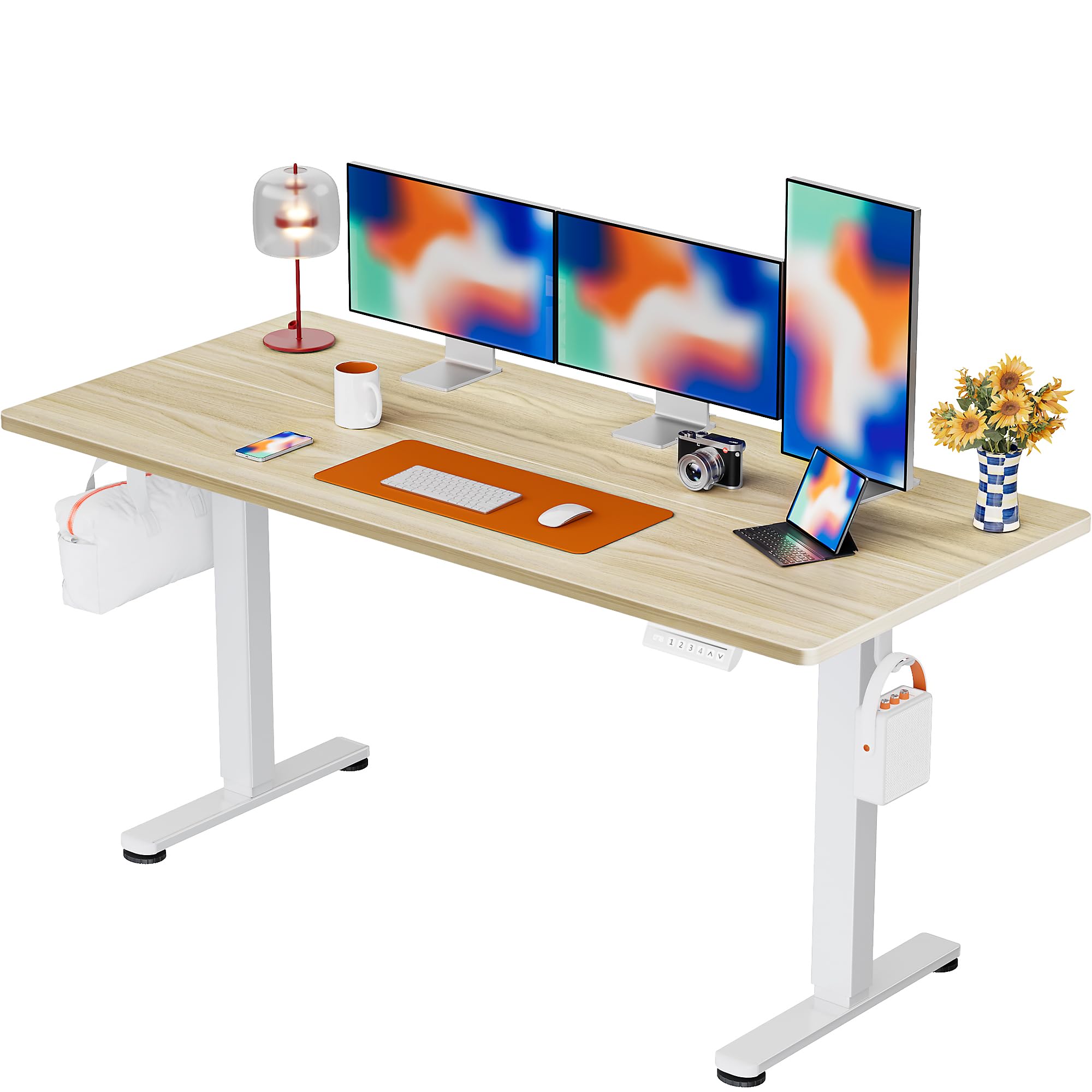
The ErGear EGESD6N Electric Standing Desk provides a versatile workspace.
Informació de seguretat
Per garantir un funcionament segur i evitar danys, si us plau, seguiu les següents pautes de seguretat:
- No supereu el pes màxim recomanat de 176 lliures (80 kg).
- Assegureu-vos que l'escriptori estigui col·locat sobre una superfície plana per mantenir l'estabilitat.
- Mantingueu els nens i les mascotes allunyats de l'escriptori durant l'ajust d'alçada.
- Avoid placing hands or objects near moving parts during operation.
- Reviseu regularment tots els cargols i connexions per assegurar-vos que estiguin ben fixats.
- No seure ni parar sobre el marc de l'escriptori.
- Use only the provided power adapter and avoid overloading electrical outlets.
- If any parts are damaged or missing, contact customer support before assembly or use.
Contingut del paquet
Verifiqueu que tots els components siguin presents al vostre paquet:
- Standing Desk Frame (Alloy Steel)
- Desktop (Particle Board, 55x28 Inch, Natural finish)
- Tauler de control amb preajustos de memòria
- Adaptador d'alimentació i cables
- Assembly Instructions with Diagram (1)
- Basic Assembly Tools (including spare parts)
- Storage Hook (2pcs)
Muntatge i muntatge
Assembly of the ErGear EGESD6N desk is designed to be straightforward. It is recommended that 1 persona perform the assembly. All necessary tools are included.
Simplified assembly process with clear instructions.
Passos de muntatge:
- Desembaleu tots els components i verifiqueu-los amb la llista de contingut del paquet.
- Attach the lifting columns to the desktop using the provided screws and tools.
- Secure the foot supports to the bottom of the lifting columns.
- Install the control panel and connect all necessary cables according to the diagram in the assembly instructions.
- Attach the storage hooks to the underside of the desktop as desired.
- Connect the power adapter to the desk and a suitable power outlet.
Refer to the included Assembly Instructions with Diagram for detailed visual guidance.
Instruccions de funcionament
Your ErGear Electric Standing Desk features smooth and quiet height adjustment with convenient memory presets.

Intuitive smart controls for easy height adjustment.
Ajust d'alçada:
- Utilitza el Amunt (^) i Avall (v) arrow buttons on the control panel to manually adjust the desk height.
- The desk can be adjusted from a minimum height of 28.35 polzades (72 cm) to a maximum height of 46.46 polzades (118 cm).
Preajustos de memòria:
Característiques de l'escriptori 3 programmable height positions for quick adjustments:
- Ajusteu l'escriptori a l'alçada desitjada amb els botons Amunt/Avall.
- Premeu el botó 'S' (Save) button, then immediately press one of the number buttons (1, 2 o 3) to save the current height to that position.
- To recall a saved height, simply press the corresponding number button (1, 2 o 3). L'escriptori es mourà automàticament a la posició desada.
Manteniment
Proper care will extend the life of your ErGear standing desk:
- Neteja: Clean the desktop and frame with a damp cloth. Avoid using abrasive or corrosive substances, as these can damage the finish.
- Inspeccions: Periodically inspect all connections and moving parts for any signs of wear or loosening. Tighten screws as needed.
- Gestió de cables: Utilize the integrated cable slots and storage hooks to keep cables organized and prevent them from interfering with desk movement.

Les funcions integrades de gestió de cables ajuden a mantenir l'espai de treball ordenat.
Resolució de problemes
If you encounter any issues with your ErGear standing desk, refer to the following common troubleshooting tips:
- L'escriptori no es mou: Check if the power cable is securely connected to both the desk and the power outlet. Ensure the outlet is functional.
- Moviment desigual: Verify that the desk is on a level surface and that all feet are properly adjusted. Check for any obstructions under the desk.
- Codis d'error: If the control panel displays an error code, consult the detailed troubleshooting section in the full assembly manual or contact customer support.
- Soroll durant el funcionament: A slight motor sound is normal. Excessive or unusual noise may indicate a loose connection or obstruction. Inspect the lifting columns and frame.
For persistent issues, please contact ErGear customer support.
Especificacions
Key specifications for the ErGear EGESD6N Electric Standing Desk:
| Característica | Detall |
|---|---|
| Número de model | EGESD6N |
| Marca | ErGear |
| Dimensions del producte (P x A x A) | 28 "P x 55" W x 28.35" H |
| Mida | 55 * 28 polzades |
| Color | Natural |
| Altura mínima | 28.35 polzades |
| Altura màxima | 46.46 polzades |
| Nombre de posicions d'alçada | 3 (programable) |
| Recomanació de pes màxim | 176 lliures |
| Tipus de material superior | Wood (Particle Board) |
| Material base | Acer d'aliatge |
| Mecanisme d'elevació | Elèctric |
| Muntatge requerit | Sí |
| Inclou totes les eines de muntatge | Sí |

Detailed dimensions of the ErGear EGESD6N desk.

The desk features a sturdy steel frame and aerospace-grade lifting system for enhanced stability.
Garantia i Suport
The ErGear EGESD6N Electric Standing Desk comes with a garantia limitada. For specific details regarding warranty coverage (parts, labor, duration), please refer to the warranty information provided with your product or contact ErGear customer support.
Atenció al client:
For any questions, technical assistance, or warranty claims, please contact ErGear customer support through the official channels provided in your product documentation or on the ErGear weblloc.