
Introducció
This manual provides detailed instructions for the safe and efficient use of your REMAX TWS-27 True Wireless Bluetooth Earphones. Please read this manual thoroughly before using the product and retain it for future reference.
The REMAX TWS-27 earphones offer a high-fidelity audio experience with the convenience of true wireless connectivity, designed for various activities including music listening, calls, workouts, and travel.
Contingut del paquet
Verifiqueu que tots els elements siguin presents al vostre paquet:
- REMAX TWS-27 True Wireless Earphones (Left and Right)
- Estoig de càrrega
- Cable de càrrega USB
- Manual d'usuari
- (Potentially) Multiple sizes of ear tips
Configuració
1. Càrrega inicial
Before first use, fully charge the earphones and the charging case. Connect the provided USB charging cable to the charging port on the case and a compatible USB power source. The LED indicator on the case will show charging status.
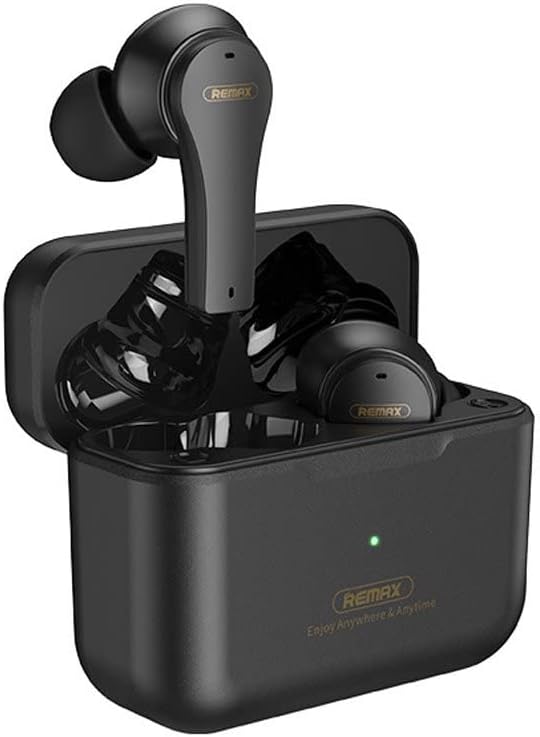
Descripció de la imatge: This image shows the REMAX TWS-27 True Wireless Earphones securely placed within their compact charging case. The case is open, revealing the earbuds and a small LED indicator light, typically showing charging status.
2. Vinculació amb un dispositiu Bluetooth
- Assegureu-vos que els auriculars estiguin carregats.
- Obre l'estoig de càrrega. Els auriculars s'encendran automàticament i entraran en mode d'emparellament.
- Al dispositiu (telèfon intel·ligent, tauleta, etc.), activeu el Bluetooth i cerqueu els dispositius disponibles.
- Select "REMAX TWS-27" from the list of found devices.
- Once connected, you will hear a confirmation tone, and the LED indicator on the earphones may change.
The earphones will automatically connect to the last paired device when removed from the case, provided Bluetooth is enabled on the device.

Descripció de la imatge: Un detallat view of the REMAX TWS-27 True Wireless Earphones, highlighting their ergonomic design and in-ear tips. The earbuds are black with subtle branding.
Instruccions de funcionament
Encès/Apagat
- Encès: Obre l'estoig de càrrega o mantén premut la zona tàctil dels dos auriculars durant uns segons.
- Apagar: Place the earbuds back into the charging case and close the lid, or long-press the touch area on both earbuds for a few seconds until they power off.
Controls tàctils
The REMAX TWS-27 earphones feature intuitive touch controls on each earbud. The specific functions may vary slightly, but common controls include:
- Reproduir/pausa: Un sol toc a qualsevol dels auriculars.
- Pista següent: Toqueu dues vegades l'auricular dret.
- Pista anterior: Toqueu dues vegades l'auricular esquerre.
- Respondre/Finalitzar la trucada: Toqueu un sol cop a qualsevol dels auriculars durant una trucada entrant o activa.
- Rebutja la trucada: Premeu llargament qualsevol dels auriculars durant una trucada entrant.
- Activa l'Assistent de veu: Toqueu tres vegades en qualsevol dels auriculars (per exemple, Siri, Google Assistant).
- Control de volum: Specific gestures for volume up/down may be available (refer to quick start guide for precise model-specific gestures if different).
Durada de la bateria i càrrega
The earphones provide up to 4 hours of continuous playback on a single charge. The charging case extends the total playback time to approximately 16 hours, allowing for up to 4 full charges of the earbuds.

Descripció de la imatge: An infographic illustrating the battery performance of the REMAX TWS-27 earphones. It shows 16 hours of total playback, 4 hours of earbud play time per charge, 1.5 hours charging time for the case, and the ability to get 4 full charges from the 320 mAh charging case.
- Auriculars de càrrega: Place them into the charging case. They will automatically begin charging.
- Estoig de càrrega: Connect the USB cable to the case and a power source. The charging time for the case is approximately 1.5 hours.
- Indicadors LED: Refer to the quick start guide for specific LED light patterns indicating battery levels and charging status for both earbuds and the case.
Manteniment
- Neteja: Feu servir un drap suau, sec i sense borrissol per netejar els auriculars i l'estoig de càrrega. No utilitzeu productes químics agressius ni materials abrasius.
- Resistència a l'aigua: The REMAX TWS-27 earphones are IPX4 rated, meaning they are resistant to splashing water from any direction. They are not designed for submersion in water. Avoid exposing them to excessive moisture.
- Emmagatzematge: Quan no els utilitzeu, guardeu els auriculars a la seva funda de càrrega per protegir-los i mantenir-los carregats. Guardeu-los en un lloc fresc i sec, allunyat de temperatures extremes.
Resolució de problemes
If you encounter issues with your REMAX TWS-27 earphones, refer to the following common solutions:
- Els auriculars no s'emparellan:
- Assegureu-vos que els dos auriculars estiguin carregats.
- Desactiva el Bluetooth del dispositiu i torna'l a activar.
- Delete "REMAX TWS-27" from your device's Bluetooth list and attempt to pair again.
- Try resetting the earphones (refer to quick start guide for specific reset procedure if available).
- No se sent cap so d'un auricular:
- Assegureu-vos que els dos auriculars estiguin carregats i connectats correctament.
- Torneu a col·locar els dos auriculars a l'estoig de càrrega, tanqueu la tapa, espereu uns segons i torneu-los a treure.
- Comproveu la configuració del balanç d'àudio del dispositiu.
- Problemes de càrrega:
- Assegureu-vos que el cable de càrrega estigui connectat correctament tant a la carcassa com a la font d'alimentació.
- Proveu un cable USB o un adaptador d'alimentació diferent.
- Netegeu els contactes de càrrega dels auriculars i de l'interior de la funda amb un bastonet de cotó sec.
- Mala qualitat del so:
- Assegureu-vos que els auriculars estiguin correctament col·locats a les orelles per a un bon segellat.
- Netegeu qualsevol residu dels broquets dels auriculars.
- Acosteu-vos més al dispositiu connectat per evitar interferències.
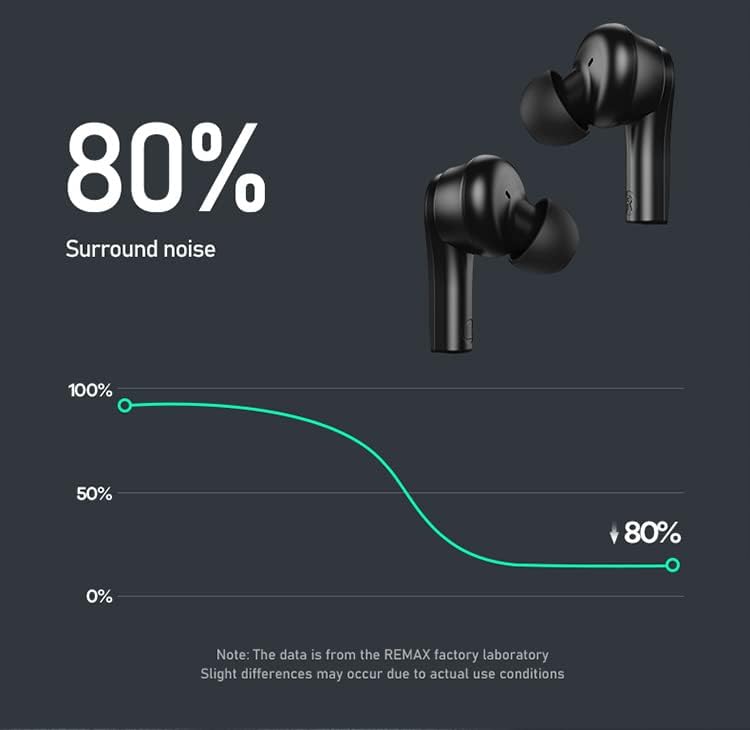
Descripció de la imatge: A graph illustrating the noise reduction capability of the REMAX TWS-27 earphones, indicating an 80% reduction in surround noise. A note states that data is from the REMAX factory laboratory and slight differences may occur due to actual use conditions.
Especificacions
| Nom de marca | Remax |
| Nom del model | TWS 27 |
| Referència del fabricant | TWS-27 |
| Fabricant | REMAX |
| Tecnologia de connectivitat | Sense fil |
| Tecnologia de comunicació sense fils | Bluetooth |
| Factor de forma dels auriculars | A l'orella |
| Control de soroll | Cancel·lació activa de soroll (ANC) |
| Tipus de control | Voice Control (and Touch) |
| Material | Plàstic |
| Color | Negre (poden estar disponibles altres colors) |
| Classificació IP | IPX4 (resistent a esquitxades) |
| Dimensions del paquet | 17.8 x 10.8 x 3.6 cm |
| Pes | 140 g |
| Data de primera disponibilitat | 6 de juliol de 2022 |

Descripció de la imatge: This image presents two sets of REMAX TWS-27 earphones and their charging cases, one in black and one in white, showcasing the available stylish color options.
Garantia i Suport
For warranty information and customer support, please refer to the warranty card included in your product packaging or visit the official Remax weblloc web. Conserveu el comprovant de compra per a reclamacions de garantia.