
Compatibilitat
The HOU F91 Keyboard Case is designed for specific iPad models. Please verify your iPad model number in [Settings > General > About] abans del seu ús.
- iPad Pro de 12.9 polzades: 3rd Generation (A1876 / A1983 / A1895 / A2014), 4th Generation (A2232 / A2233 / A2229 / A2069), 5th Generation (A2378 / A2379 / A2461 / A2462), 6th Generation (A2436 / A2764 / A2437 / A2766)
- iPad Air 13-inch: M2 2024 (A2898 / A2899 / A2900)
Note: This keyboard case is NOT compatible with iPad Pro 2024 M4 models.

Guia de configuració
1. Connectar el vostre iPad
The HOU F91 Keyboard Case features a strong magnetic design for secure attachment. Simply align your compatible iPad with the case, and the powerful magnets will firmly hold it in place. This allows for easy transformation of your iPad into a laptop-like device.

2. Powering On and Bluetooth Connection
To begin using your keyboard, locate the power switch on the side of the keyboard unit. Slide the switch to the 'ON' position. The keyboard will then enter pairing mode, indicated by a blinking light.
Al teu iPad, navega fins a Configuració > Bluetooth. Ensure Bluetooth is enabled. Look for 'F91 Magic' in the list of available devices and tap to connect. Once connected, the indicator light on the keyboard will become solid, and you can start using your keyboard and trackpad.
Instruccions de funcionament
1. Característiques del teclat
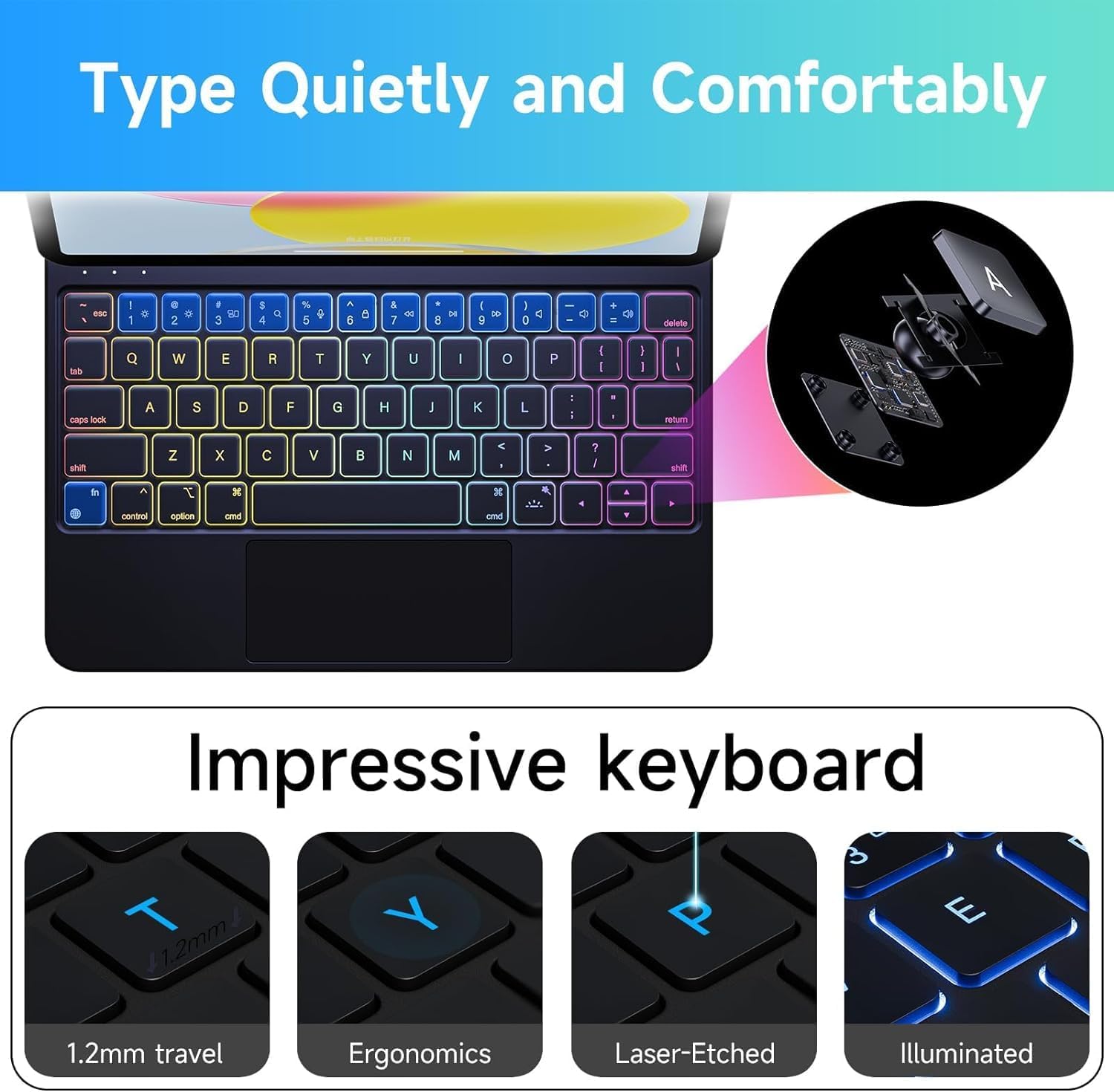
The HOU F91 Keyboard Case features a full-size keyboard with scissor-type (X-type) structural mechanical keys, providing a comfortable and responsive typing experience with powerful and easy rebound. It also includes 7-color backlighting with 3 brightness levels, allowing you to work efficiently in various lighting conditions.

2. Multi-Touch Trackpad Gestures
Enhance your iPad experience with the precise, full-area multi-touch trackpad. It features an AG glass panel for greater smoothness and comfort, and supports all iOS shortcut gestures for efficient navigation and multitasking.
- Toc amb un sol dit: Seleccioneu elements.
- Desplaçament de dos dits: Scroll through content.
- Pessigueu per ampliar: Apropar o allunyar el contingut.
- Lliscament cap amunt amb tres dits: Aneu a la pantalla d'inici.
- Llisca amb tres dits cap a l'esquerra/dreta: Canvia entre aplicacions obertes.
- Cmd + Space: Open Search.
- Cmd + Tab: Quickly switch between apps.
- Cmd + H: Go back to the Home page.

3. Ajustable ViewAngles
The keyboard case features a sturdy magnetic design with an adjustable hinge, allowing you to set your iPad at various viewing angles (90-130 degrees). This flexibility is ideal for typing, watching videos, reading documents, or engaging in office work, providing optimal comfort and productivity.
Manteniment
Cleaning the Keyboard Case
The keyboard case is made of semi-silicone PU fabric, which offers a silky and comfortable touch while being scratch-resistant and easy to clean. For general cleaning, simply wipe the surface with a damp cloth. For tougher stains, a mild cleaning solution can be used, then wipe dry with a clean cloth.
Resolució de problemes
Problemes de connectivitat
- El teclat no es connecta: Ensure the keyboard's power switch is ON and Bluetooth is enabled on your iPad. Forget the device in iPad Bluetooth settings and try pairing again.
- Lagging trackpad/keys: Ensure the keyboard is fully charged. If issues persist, try restarting both your iPad and the keyboard.
Problemes de càrrega
- El teclat no es carrega: Use the provided USB-C cable and a compatible power adapter. Ensure the cable is securely connected to both the keyboard and the power source.
Especificacions del producte
| Característica | Detall |
|---|---|
| Número de model | F91 |
| Dimensions del producte | 9.84 x 7.48 x 0.79 polzades |
| Pes de l'article | 2.06 lliures |
| Fabricant | HOU |
| Bateries | Necessites 1 piles de polímer de liti (incloses) |
| Tecnologia de connectivitat | Bluetooth, USB-C |
| Descripció del teclat | Multimèdia |
| Característica especial | Hotkeys and Media Keys |
| Suport de color de retroil·luminació del teclat | RGB (7-Color) |
| Estil | Contemporània |
Què hi ha a la caixa
- HOU F91 Keyboard Case (compatible with iPad Pro 12.9 inch 3rd-6th Gen and iPad Air 13 inch M2 2024)
- Cable USB
- Manual d'usuari
Garantia i Suport
For warranty information or technical support, please refer to the contact details provided in the included User Manual or visit the official HOU weblloc. Conserveu el rebut de compra per a reclamacions de garantia.


