
Introducció
The Topping A90 Discrete is a high-performance, fully discrete balanced headphone amplifier i preamplifier designed for audiophiles. It features a redesigned NFCA module with 39 transistors per module, providing exceptional audio fidelity and powerful output. This manual provides essential information for setting up, operating, maintaining, and troubleshooting your A90 Discrete.
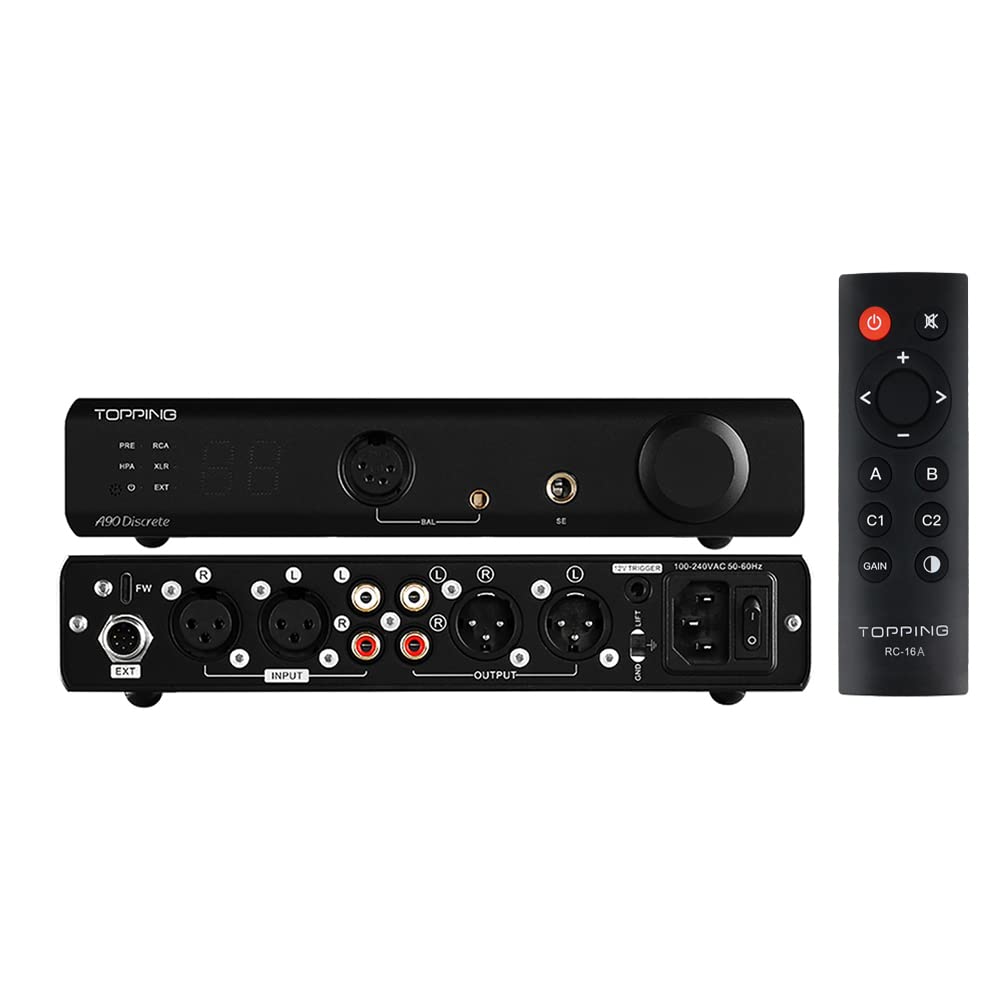
Figure 1: Topping A90 Discrete Headphone Amplifier and RC-16A Remote Control.
This image displays the Topping A90 Discrete unit from both front and rear perspectives, alongside its dedicated RC-16A remote control. The front panel shows the display, headphone outputs, and volume knob. The rear panel reveals various input and output connections, power input, and a ground lift switch. The remote control features power, volume, input selection, and gain buttons.
Configuració
1. Desembalatge i inspecció
Carefully remove all components from the packaging. Verify that all accessories are present and that the unit is free from any visible damage. Keep the original packaging for future transport or storage.
2. Connexions
Before connecting any cables, ensure the A90 Discrete is powered off. Refer to the diagram below for proper connection of audio sources and headphones.

Figure 2: Front and Rear Panel Connections.
This diagram illustrates the various ports and controls on the front and rear panels of the A90 Discrete. The front panel includes output channel indicators, remote control receiver, power indicator, input channel indicator, volume display, 4-PIN XLR headphone output jack, 4.4mm balanced headphone output jack, 6.35mm headphone output jack, and the volume knob/multi-function button. The rear panel features the firmware upgrade interface, extender input interface, balanced XLR input, single-ended RCA input, single-ended RCA output, balanced XLR output, trigger interface, ground lift switch, power input, and power switch.
- Entrades d'àudio: Connect your audio source (e.g., DAC, CD player) to the Balanced XLR inputs (2-3) or Single-ended RCA inputs (2-4).
- Sortides d'àudio:
- Sortides d'auriculars: Connect your headphones to the 4-PIN XLR (1-6), 4.4mm Balanced (1-7), or 6.35mm SE (1-8) jacks on the front panel.
- Preamp Sortides: Per connectar a l'alimentació amplifiers or active speakers, use the Single-ended RCA outputs (2-5) or Balanced XLR outputs (2-6) on the rear panel.
- Connexió d'alimentació: Connect the power cable to the Power Input (2-9) and then to a suitable AC power outlet (100-240V 50/60Hz).
- Ground Lift Switch (2-8): If you experience ground loop noise, switch this to 'LIFT'. For normal use, set it to 'GND'.
- Firmware Upgrade Interface (2-1): Used for updating the device firmware.
- Extender Input Interface (2-2): For connecting optional extension units like the EXT90.
Instruccions de funcionament
1. Encendre/apagar
Press the Power Switch (2-10) on the rear panel to turn the unit on or off. The power indicator (1-3) on the front panel will illuminate when the unit is on.
2. Selecció d'entrada
Use the remote control or the multi-function button (1-9) to cycle through available inputs (XLR, RCA, EXT). The selected input channel indicator (1-4) will show the active input.
3. Control de volum
Adjust the volume using the Volume Knob/Multi-function Button (1-9) on the front panel or the volume up/down buttons on the remote control. The volume level (1-5) will be displayed.
4. Auriculars Amp Mode and Preamp Mode
The A90 Discrete can function as a dedicated headphone amplifier or a preamplifier. It can also output from both simultaneously. Use the remote control to switch between these modes or enable simultaneous output.
- Auriculars Amp Mode: Audio is output only from the headphone jacks.
- Preamp Mode: Audio is output only from the RCA and XLR line outputs.
- Sortida simultània: Audio is output from both headphone jacks and line outputs.
5. Gain Settings
The A90 Discrete offers two gain settings to accommodate various headphones:
- Guany baix: Suitable for sensitive In-Ear Monitors (IEMs) to prevent noise and provide precise volume control.
- Guany alt: Ideal for driving full-sized, demanding over-ear headphones.
Switch between gain settings using the remote control's GAIN button.

Figure 3: RC-16A Remote Control Functions.
This image details the functions of the RC-16A remote control. Key buttons include: Standby (4-1), Volume Up (4-2), Switch to Previous Input (4-3), Output Channel Switching (4-4), User Setting 1 (4-5), Headphone Amp Gain (4-6), Mute (4-7), OK button (4-8), Switch to Next Input (4-9), Volume Down (4-10), Invalid Button (4-11), User Setting 2 (4-12), and Brightness Settings (4-13). Note: Press and hold C1/C2 for 3 seconds to save current program (input, output, volume, brightness).
Manteniment
1. Neteja
To clean the unit, use a soft, dry cloth. Do not use liquid cleaners or aerosols, as they may damage the finish or internal components. Ensure the unit is powered off and unplugged before cleaning.
2. Actualitzacions de firmware
Firmware updates may be released periodically to improve performance or add new features. Connect the unit to a computer via the Firmware Upgrade Interface (2-1) and follow the instructions provided by the manufacturer for the update process. Always ensure the unit is powered off and disconnected from other audio equipment before performing a firmware update.
Resolució de problemes
If you encounter issues with your A90 Discrete, please refer to the following common problems and solutions:
| Problema | Possible causa/solució |
|---|---|
| Sense poder | Ensure the power cable is securely connected to the unit and the wall outlet. Check the power switch on the rear panel is in the 'ON' position. Verify the wall outlet is functional. |
| Sense sortida d'àudio |
|
| Ground loop noise (humming/buzzing) | Switch the GND/LIFT switch (2-8) on the rear panel to the 'LIFT' position. Ensure all audio components are connected to the same power strip or outlet. |
| So distorsionat |
|
If the problem persists after attempting these solutions, please contact AOSHIDA customer support for further assistance.
Especificacions
Below are the detailed specifications for the Topping A90 Discrete Headphone Amplificador i pre-AMP.
A90 Discrete Headphone AmpEspecificacions del lifier

Figure 4: Headphone AmpEspecificacions del lificador.
This image presents a table detailing the performance specifications of the A90 Discrete when operating as a headphone amplifier, including THD+N, SNR, Dynamic Range, Output Level, Noise Level, Channel Crosstalk, Input Sensitivity, Gain, Output Impedance, Output Power, and Load Impedance for both Single-Ended (SE) and Balanced (BAL) inputs/outputs.
A90 Discrete Pre-AMP Especificacions

Figure 5: Pre-AMP Especificacions.
This image displays a table outlining the performance specifications of the A90 Discrete when functioning as a pre-amplifier, covering metrics such as THD+N, SNR, Dynamic Range, Frequency Response, Output Level, Noise Level, Channel Crosstalk, Input Sensitivity, Gain, and Load Impedance for both Single-Ended (SE) and Balanced (BAL) inputs/outputs.
| Paràmetre | Valor |
|---|---|
| Dimensions del paquet | 15.43 x 9.96 x 3.66 polzades |
| Pes de l'article | 2.2 lliures |
| Número de model | A90 Discrete |
| Fabricant | REALITZACIÓ |
| Primer disponible | 21 de juny de 2022 |
Garantia
The Topping A90 Discrete comes with a standard manufacturer's warranty. Please refer to the warranty card included with your product or contact AOSHIDA customer support for specific warranty terms and conditions. Keep your proof of purchase for warranty claims.
Suport
For any questions, technical assistance, or support regarding your Topping A90 Discrete, please contact AOSHIDA customer service. You can find more information and contact details by visiting the official AOSHIDA store: