
VoltEdge CX40
Manual d'usuari del controlador VoltEdge CX40 Camo Blue
Model: CX40 | Brand: VoltEdge
Introducció
This manual provides detailed instructions for the setup, operation, maintenance, and troubleshooting of your VoltEdge CX40 Camo Blue Controller. Please read this manual thoroughly before using the product to ensure optimal performance and longevity.

Figura 1: Frontal view of the VoltEdge CX40 Camo Blue Controller.
Característiques del producte
- Vibració dual: Experience immersive feedback with built-in dual vibration motors.
- Funció turbo: Enhance your gameplay with programmable turbo functionality.
- 2-Meter Cable: Proporciona ampaconseguim sessions de joc còmodes.
- Disseny ergonòmic: Engineered for comfort during extended periods of use.
- Compatibilitat multiplataforma: Compatible with PlayStation 4 (PS4), PlayStation 3 (PS3), and PC.
Configuració
Connexió a PS4/PS3:
- Ensure your console is powered on.
- Connect the USB cable of the VoltEdge CX40 controller to an available USB port on your PS4 or PS3 console.
- The controller will automatically be recognized and configured. The indicator light on the controller will illuminate once connected.
Connexió al PC:
- Assegureu-vos que el vostre PC estigui encès.
- Connect the USB cable of the VoltEdge CX40 controller to an available USB port on your PC.
- The operating system will typically install the necessary drivers automatically. This may take a few moments.
- Once drivers are installed, the controller will be ready for use with compatible PC games.

Figure 2: VoltEdge CX40 Controller in its retail packaging, showing the included cable.
Instruccions de funcionament
Controls bàsics:
The VoltEdge CX40 controller features standard button layouts for intuitive gameplay.
- Manets analògics: Use for movement and camera control.
- D-Pad: Per a una entrada direccional precisa.
- Botons d'acció (X, O, Triangle, Quadrat / A, B, X, Y): Realitzar accions dins del joc.
- Botons d'espatlla (L1, R1) i gallets (L2, R2): For various in-game functions like aiming, shooting, or menu navigation.
- Botó COMPARTIR: (PS4/PS3) For sharing gameplay content.
- Botó OPCIONS: (PS4/PS3) For accessing in-game menus or pause functions.
- Botó P4: (PS4/PS3) Functions as the PlayStation button.
Turbo Function Activation:
- Manteniu premut el botó TURBO button (if present, or a designated button for turbo activation, typically indicated in the manual or on the controller itself).
- While holding the TURBO button, press the action button you wish to apply turbo to (e.g., X, Square, R1).
- Deixeu anar els dos botons. El botó d'acció seleccionat ara repetirà ràpidament la seva entrada quan es mantingui premut.
Turbo Function Deactivation:
- Manteniu premut el botó TURBO botó.
- While holding the TURBO button, press the action button that currently has turbo activated.
- Release both buttons. The turbo function for that specific button will be deactivated.
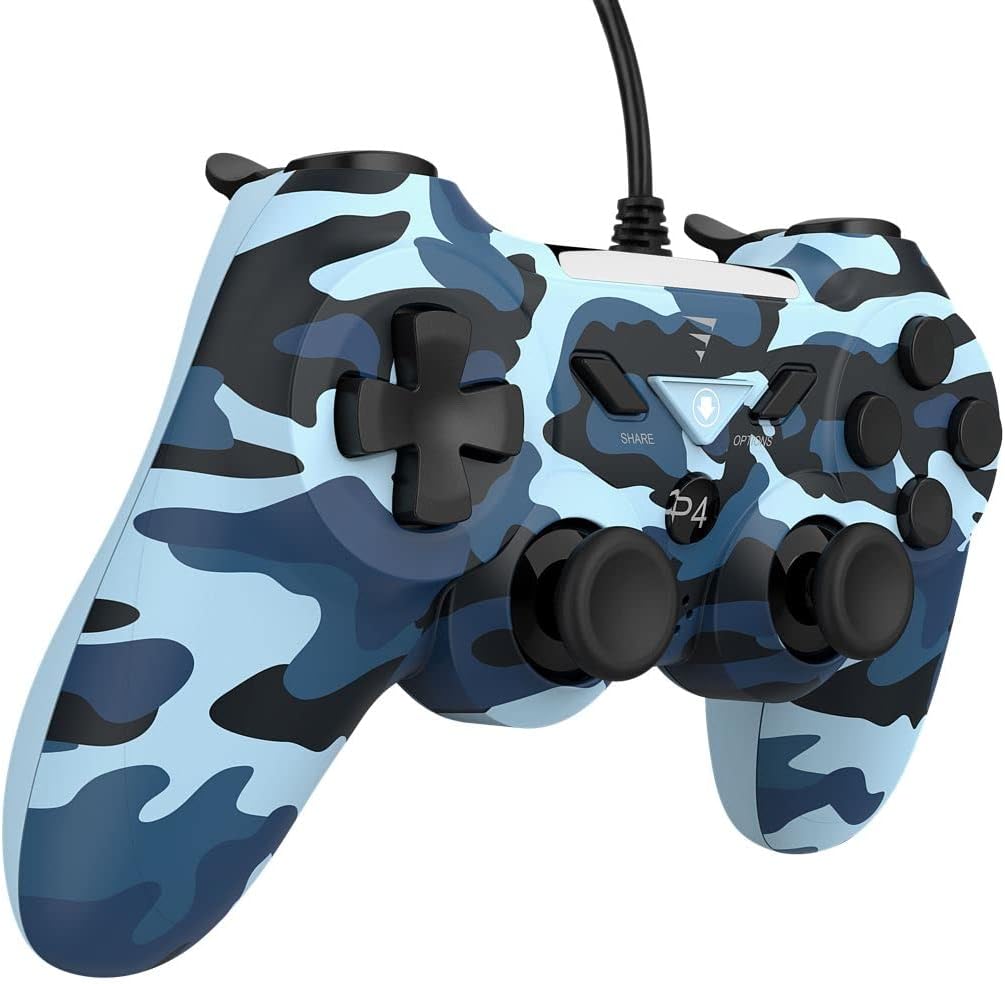
Figura 3: lateral view of the VoltEdge CX40 Controller, highlighting its ergonomic shape.
Manteniment
- Neteja: Feu servir un drap suau i sec per netejar la superfície del controlador. Per a la brutícia persistent, netegeu lleugerament.ampNetegeu el drap amb aigua. No utilitzeu productes químics agressius ni netejadors abrasius.
- Emmagatzematge: Guardeu el controlador en un lloc fresc i sec, allunyat de la llum solar directa i de temperatures extremes.
- Cura del cable: Avoid bending or twisting the cable excessively. Do not pull the controller by its cable.
- Contacte amb líquids: Keep the controller away from liquids. If liquid enters the controller, disconnect it immediately and allow it to dry completely before attempting to use it again.
Resolució de problemes
| Problema | Causa possible | Solució |
|---|---|---|
| El comandament no és reconegut per la consola/PC. | Loose USB connection, faulty USB port, driver issue (PC). |
|
| La vibració no funciona. | Game does not support vibration, vibration setting disabled, internal fault. |
|
| Buttons or analog sticks unresponsive. | Dirt/debris under buttons, physical damage, software glitch. |
|

Figura 4: A baix view of the VoltEdge CX40 Controller, showing the grip texture.
Especificacions
- Model: VoltEdge CX40 Camo Blue
- Compatibilitat: PlayStation 4 (PS4), PlayStation 3 (PS3), PC
- Connectivitat: USB per cable
- Longitud del cable: 2 metres
- Característiques: Dual Vibration, Turbo Function
- Dimensions (paquet): Aproximadament 17 x 14.5 x 6.2 cm
- Pes (paquet): Aproximadament 400 g
- ASIN: B0B4PRL244
Garantia i Suport
VoltEdge products are designed for durability and performance. For information regarding warranty coverage and terms, please refer to the warranty card included with your product or visit the official VoltEdge weblloc.
For technical support, troubleshooting assistance beyond this manual, or inquiries about replacement parts, please contact VoltEdge customer support through their official channels. Contact information can typically be found on the product packaging or the official VoltEdge weblloc.
Recursos en línia: For the latest drivers, firmware updates, and additional support resources, please visit the official VoltEdge support page.
Ask a question about this manual
Ask about setup, troubleshooting, compatibility, parts, safety, or missing instructions. Manuals+ will review the question and use this page’s manual context to help answer it.