
PARANNIC Commander v1.4
PARANNIC OBD2 K+CAN Commander 1.4 Diagnostic Scanner Tool User Manual
Model: Commander v1.4
Introducció
This manual provides detailed instructions for the PARANNIC OBD2 K+CAN Commander 1.4 diagnostic scanner tool. This device is designed for diagnostic and special functions on various VAG group vehicles (Audi, VW, Skoda, Seat) using CAN and K-line protocols. It features an original FTDI FT232RL chip for reliable communication.

Imatge: The PARANNIC OBD2 K+CAN Commander 1.4 device, illustrating its OBD2 connector and the internal circuit board components, including the FTDI chip.
Configuració i instal·lació
Requisits del sistema
- Operating System: Windows XP (32-bit) or Windows 7 (32-bit).
- The device is not compatible with Mac OS X or Windows 10.
Instal·lació de programari
- Disable Antivirus Software: Before installing the diagnostic software, temporarily disable any antivirus software on your PC. Antivirus programs may incorrectly flag the diagnostic software as a threat, preventing proper installation or operation.
- Instal·leu els controladors: Connect the K+CAN Commander 1.4 cable to your computer's USB port. Allow Windows to attempt automatic driver installation. If automatic installation fails, locate and install the FTDI FT232RL drivers manually from the provided software CD or a trusted online source.
- Install Diagnostic Software: Insert the provided software CD and follow the on-screen instructions to install the diagnostic application. If the CD is damaged or unreadable, please contact customer support for a software download link.

Imatge: A visual representation of the K+CAN Commander cable connecting to a vehicle's OBD2 port and a laptop, highlighting its compatibility with Windows 7 and XP operating systems.
Connexió del dispositiu
- Locate the OBDII diagnostic port in your vehicle. This is typically found under the dashboard on the driver's side.
- Plug the OBD2 connector of the K+CAN Commander 1.4 cable into the vehicle's OBDII port.
- Connect the USB end of the cable to an available USB port on your computer.
- Turn the vehicle's ignition to the ON position (do not start the engine). The green LED on the K+CAN Commander device should illuminate, indicating power.
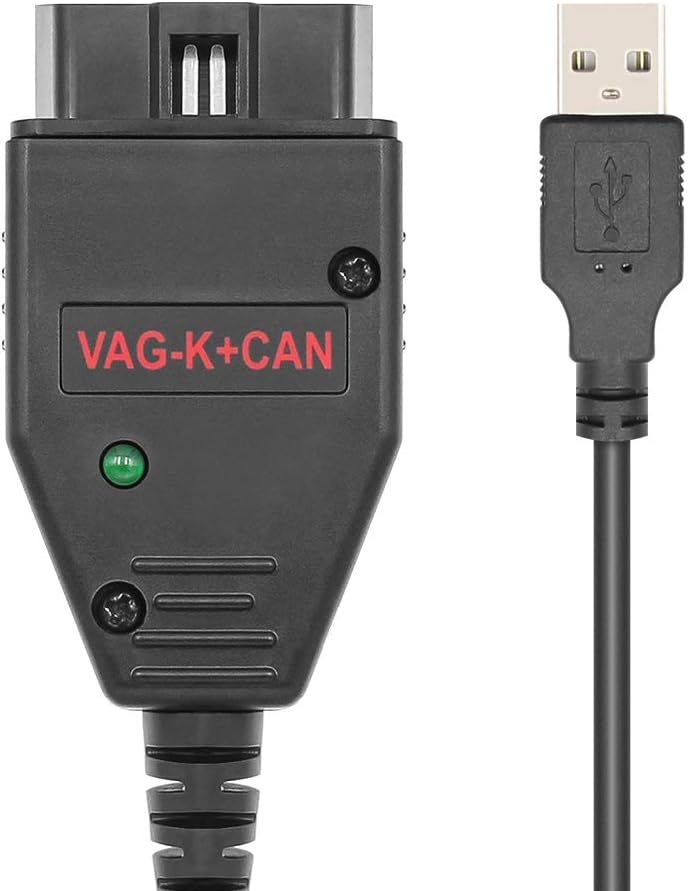
Imatge: The PARANNIC OBD2 K+CAN Commander 1.4 cable, showing both the OBD2 diagnostic connector and the USB connector for computer interface.
Instruccions de funcionament
The K+CAN Commander 1.4 tool provides diagnostic capabilities and special functions for VAG vehicles. Ensure the device is properly connected and the vehicle ignition is on before starting the software.
General Diagnostic Functions
- Diagnostic via CAN and K-line: The tool supports both CAN-BUS and K-line protocols for comprehensive vehicle communication.
- Manual Diagnostic Session Definition: Allows for manual configuration of diagnostic sessions.
- DTC Management: Read and clear Diagnostic Trouble Codes (DTCs).
- Logistic (Transport) Mode: Activate or deactivate transport mode in supported units.
- ECU Identification: Identify electronic control units (ECUs) across diagnostic addresses from 0x01 to 0x80.
- Codificació i adaptacions: Perform coding and adaptation functions for various vehicle modules under CAN-TP2.0 protocol.
Funcions especials
- Security Access Code/Login WFS: Read security access codes and WFS (Wegfahrsperre - immobilizer) login data.
- Immobilizer Data: Read and program immobilizer data.
- EEPROM Read/Write: Access and modify EEPROM data from instrument clusters and immobilizers (all supported clusters CAN/K).
- VAG MMI TV Activation: Activate TV function in VAG MMI systems.
- Key Learning: Facilitate key learning procedures, including component security authorization.
- Custom Memory Reading: Read custom memory from various units such as ECUs and EZS-Kessy.
- Flash Memory Reading: Read flash memories from EDC16x, EDC15x, ME7x, MED951, and MED751 ECUs.
- Airbag Crash Data Clear: Clear crash data in airbag control units.
Supported Vehicles (via OBDII)
The following is a partial list of vehicles supported by the K+CAN Commander 1.4 for functions via OBDII. Support for specific functions may vary by model year and protocol (CAN or K-line).
- Audi: Q7 (CAN), A2 (K), A3 (CAN up to 2007), A3 VDO/M73 (up to 2003, K), A4 VDO/M73 (K), A4 BOSCH - RB4 clusters (CRYPTO eeproms R/W by OBDII), A6 VDO (K), A6 (CAN), Allroad (K up to 2004), A8 (K) VDO93, A8 (CAN up to 2007), TT (K).
- Seient: Alhambra (K), Altea (CAN), Arosa (K), Cordoba (after 1999, K), Ibiza VDO (after 1999, K), Leon (K+CAN), Toledo (K+CAN).
- Skoda: Octavia (K), Octavia II (CAN), Superb (K), Roomster (K), Scout (CAN), Fabia (K).
- VW: Bora (K), Beetle (K), Caddy (CAN), EOS (CAN), Golf4 VDO/Motometer/BOSCH RB, Golf5 VDO (CAN), Golf5 VISETEON, Crossgolf (CAN), Individual (CAN), Jetta (K+CAN), Passat B5/B6 (K+CAN), Polo VDO/Motometer (K), Sharan (K), T4/T5 VDO (K), Touran VDO (CAN).
Manteniment
- Emmagatzematge: Guardeu el dispositiu en un lloc sec i fresc, allunyat de la llum solar directa i de temperatures extremes.
- Neteja: Use a soft, dry cloth to clean the device. Do not use harsh chemicals or abrasive cleaners.
- Cura del cable: Avoid bending or twisting the cable excessively to prevent internal wire damage.
- Actualitzacions de programari: Periodically check for software updates from the manufacturer's official channels to ensure optimal performance and compatibility with newer vehicle models or systems.
Resolució de problemes
- Software Not Launching/Functioning:
- Ensure your antivirus software is disabled. Many diagnostic tools can be incorrectly identified as threats. Re-enable it only after you have finished using the software.
- Verify that your operating system is Windows XP (32-bit) or Windows 7 (32-bit). The software is not compatible with other OS versions. - Dispositiu no reconegut per l'ordinador:
- Check USB connection. Try a different USB port.
- Ensure FTDI FT232RL drivers are correctly installed. You may need to manually install them from the provided CD or manufacturer's weblloc. - Sense comunicació amb el vehicle:
- Confirm the OBD2 connector is fully seated in the vehicle's diagnostic port.
- Ensure the vehicle's ignition is in the ON position (engine off).
- Check if the green LED on the K+CAN Commander device is illuminated.
- Verify that your vehicle model and year are within the supported list for the specific function you are attempting. - Damaged Software CD:
- If the software CD is broken or unreadable, please contact PARANNIC customer support for a digital download link.
Especificacions
| Marca | PARANNIC |
| Número de model | Commander v1.4 |
| Chipset | FTDI FT232RL |
| Connectivitat | OBD2 to USB |
| Protocols compatibles | CAN, K-line (KWP1281, KWP2000, TP-CAN BUS, NEW UDS) |
| Compatibilitat de sistemes operatius | Windows XP (32-bit), Windows 7 (32-bit) |
| Pes de l'article | 4.6 unces |
| Dimensions del paquet | 5.59 x 5 x 1.65 polzades |
Informació de la garantia
Please refer to the product packaging or your purchase documentation for specific warranty details. Standard warranty typically covers manufacturing defects for a limited period from the date of purchase. Keep your proof of purchase for any warranty claims.
Atenció al client
For technical assistance, troubleshooting, or inquiries regarding software links, please contact PARANNIC customer support through the retailer where the product was purchased or refer to the contact information provided on the product packaging.
Ask a question about this manual
Ask about setup, troubleshooting, compatibility, parts, safety, or missing instructions. Manuals+ will review the question and use this page’s manual context to help answer it.