
1. Introducció
This manual provides detailed instructions for the proper setup, operation, and maintenance of your U.S. Solid Digital Analytical Balance, Model JFDBS00059. This high-precision lab scale is designed for accurate measurements up to 2kg with a readability of 0.01g, suitable for various industrial, laboratory, agricultural, and medical applications. Please read this manual thoroughly before using the device to ensure optimal performance and safety.
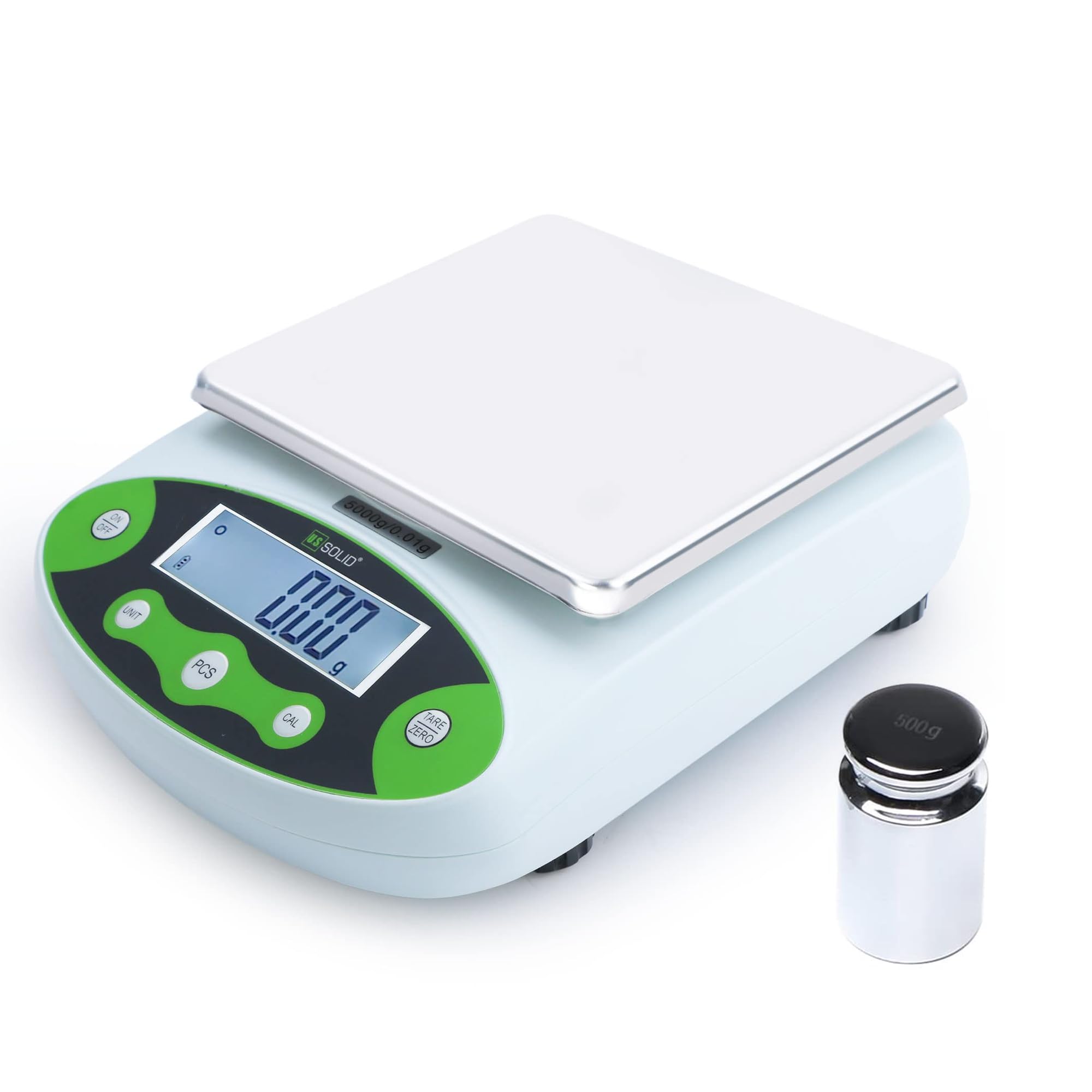
Figura 1: Frontal view of the U.S. Solid Digital Analytical Balance.
2. Informació de seguretat
Observe the following safety precautions to prevent injury and ensure the longevity of your balance:
- Place the balance on a stable, level, and vibration-free surface.
- Avoid exposing the balance to direct sunlight, extreme temperatures, or drafts.
- Do not overload the balance beyond its maximum capacity of 2kg.
- Keep the balance away from strong electromagnetic fields.
- Use only the provided power adapter or a compatible 9V DC battery.
- Do not attempt to disassemble or repair the balance yourself. Contact qualified personnel for service.
- Keep liquids away from the balance to prevent electrical shock or damage.
3. Contingut del paquet
Verifiqueu que tots els elements siguin presents i no estiguin danyats en desempaquetar-los:
- U.S. Solid Digital Analytical Balance (Main Unit)
- Plat de pesatge d'acer inoxidable
- Suport del plat de pesatge
- Adaptador de corrent altern (100-240 V)
- 500g Calibration Weight (for specific models, check your order)
- Manual d'usuari

Figure 2: Included components: balance, weighing pan, pan support, and power adapter.
4. Producte acabatview
4.1 Característiques clau
- Ampli rang de mesura: Capacity up to 2kg with 0.01g accuracy.
- Material d'alta qualitat: Durable ABS housing and stainless steel rectangular pan.
- Dual Powering Modes: Operates with 100-240VAC power or 9VDC battery.
- Simplified 5-Button Operation: Intuitive control for various functions.
- Built-in Applications: Weighing, parts counting, percentage function, tare, units conversion, fault display, manual calibration.
- Visualització: LCD with backlight for clear readability.
- Nivell: Equipped with a level bubble and adjustable leveling feet.

Figura 3: Mésview of key features including housing, pan, leveling, feet, display, units, functions, and power.
4.2 Tauler de control i pantalla
The balance features a clear LCD with backlight and a user-friendly 5-button control panel:
- ON/OFF: Encén o apaga el dispositiu.
- UNITAT: Passa ciclicament per les unitats de pesatge disponibles.
- PCS (Piece Counting): Activa la funció de recompte de peces.
- CAL (Calibration): Inicia el procés de calibratge.
- TARA/ZERO: Zeros the display or tares the current weight.

Figure 4: Control panel layout with button descriptions.
5. Configuració
5.1 Installing the Weighing Pan
- Carefully remove the balance and all components from the packaging.
- Place the weighing pan support onto the central pillar of the balance. Ensure it is seated correctly and securely.
- Place the stainless steel weighing pan on top of the pan support.
Video 1: Demonstrates the installation of the weighing pan and support onto the balance.
5.2 Leveling the Balance
Accurate measurements require the balance to be perfectly level. Use the adjustable feet and the built-in level bubble:
- Locate the level bubble, typically found near the display or on the side of the balance.
- Adjust the four leveling feet at the bottom of the balance by turning them clockwise or counter-clockwise until the air bubble is centered within the circle.

Figure 5: Detail of the level bubble and adjustable feet for horizontal adjustment.
5.3 Connexió d'alimentació
The balance can be powered by either an AC adapter or a 9V DC battery:
- Alimentació CA: Connect the provided AC adapter to the power input port on the back of the balance and then plug it into a standard 100-240V AC outlet.
- Potència de la bateria: For portable use, open the battery compartment on the underside of the balance and insert a 9V DC battery.
5.4 Temps d'escalfament
For optimal accuracy, allow the balance to warm up for at least 30 minutes after connecting power or if it has been off for an extended period. This stabilizes the internal components for precise measurements.

Figure 6: Important considerations for balance setup and accuracy.
6. Instruccions de funcionament
6.1 Pesatge bàsic
- Premeu el botó ON/OFF button to turn on the balance.
- Ensure the display shows "0.00g" before placing any item on the pan. If not, press the TARA / ZERO botó.
- Place the item to be weighed gently on the center of the weighing pan.
- Read the stable weight displayed on the LCD.
6.2 Selecció d'unitats
The balance supports 10 different weighing units. To change the unit:
- Premeu el botó UNITAT button repeatedly to cycle through the available units: g (grams), ct (carats), oz (ounces), ozt (troy ounces), lb (pounds), TOL (tola), dwt (pennyweights), MM (momme), kg (kilograms), and % (percentagi).
- The selected unit will be displayed next to the weight value.

Figure 7: Available measuring units on the balance.
Video 2: Demonstrates how to select different weighing units on the balance.
6.3 Funció de tara
La funció de tara permet restar el pes d'un recipient, de manera que només es mesura el pes net del contingut.
- Col·loqueu el recipient buit al plat de pesatge.
- Espereu que la pantalla s'estabilitzi.
- Premeu el botó TARA / ZERO button. The display will return to "0.00g".
- Add the items to be weighed into the container. The display will show only the weight of the items.
6.4 Calibració
Calibration ensures the accuracy of your balance. It is recommended to calibrate the balance regularly or if it has been moved.
6.4.1 Calibració estàndard
- Ensure the balance is on a stable surface and the pan is empty.
- Manteniu premut el botó CAL button until "CAL" appears on the display, then release.
- The display will show the required calibration weight (e.g., "2000.00g" for a 2kg balance).
- Carefully place the specified calibration weight (e.g., 2kg) onto the center of the weighing pan.
- Wait for the balance to stabilize and display "PASS" or return to normal weighing mode. Remove the weight.
Video 3: Demonstrates the standard calibration process using a single calibration weight.
6.4.2 Calibració lineal
Linear calibration uses multiple weights to ensure accuracy across the entire weighing range.
- Ensure the balance is on a stable surface and the pan is empty.
- Manteniu premut el botó CAL button for a longer duration than standard calibration until "CAL" appears, then release. The display may show a sequence of calibration points.
- Follow the on-screen prompts to place the specified calibration weights in sequence (e.g., 200g, 400g, 1000g, 2000g).
- Place each weight carefully and wait for the balance to stabilize before proceeding to the next step or removing the weight as instructed.
- Once all points are calibrated, the balance will return to normal weighing mode.
Video 4: Demonstrates the linear calibration process using multiple calibration weights.
6.5 Piece Counting Function
This function allows you to count a large number of identical items by weight.
- Col·loca comample quantity of items (e.g., 10, 20, 50, 100, 200, or 500 pieces) on the pan.
- Manteniu premut el botó PCS button until the display shows "PCS" and a number (e.g., "10 PCS").
- Utilitza el UNITAT botó per seleccionar la sampla quantitat que coincideixi amb el nombre d'elements que heu col·locat a la safata.
- Premeu el botó PCS button again to confirm. The balance is now in counting mode.
- Afegiu més elements a la safata i la pantalla mostrarà el recompte total.

Figure 8: Piece counting function with selectable samples mides.
Video 5: Demonstrates how to use the piece counting function.
6.6 per centtage Funció
El percentatgetage function allows you to measure the weight of an item as a percentage d'un pes de referència.
- Place the reference item (100% weight) on the pan.
- Premeu el botó UNITAT button repeatedly until "%" is displayed. The current weight will be set as 100%.
- Remove the reference item. The display will show 0%.
- Place other items on the pan, and their weight will be displayed as a percentage del pes de referència.
Video 6: Demonstrates how to use the percentage weighing function.
7. Especificacions
| Característica | Especificació |
|---|---|
| Marca | Sòlid dels EUA |
| Model | JFDBS00059 |
| Capacitat de pes màxim | 2000 Grams (2kg) |
| Exactitud de lectura | 0.01 grams |
| Tipus de visualització | LCD amb llum de fons |
| Font d'alimentació | AC 100-240V or DC 9V Battery |
| Tipus de material | Stainless Steel (Pan), ABS (Housing) |
| Unitats de mesura | g, ct, oz, ozt, lb, TOL, dwt, MM, kg, % |
| Característiques especials | Backlit Display, Fault Display, Manual Calibration, Overload Protection, Percentage Function, Piece Counting Function, Unit Conversion |
| Pes de l'article | 500 Grams (approximate, unit only) |
| Dimensions (aproximades) | 7.8 cm (amplada) x 10.2 cm (profunditat) x 3.1 cm (alçada) |
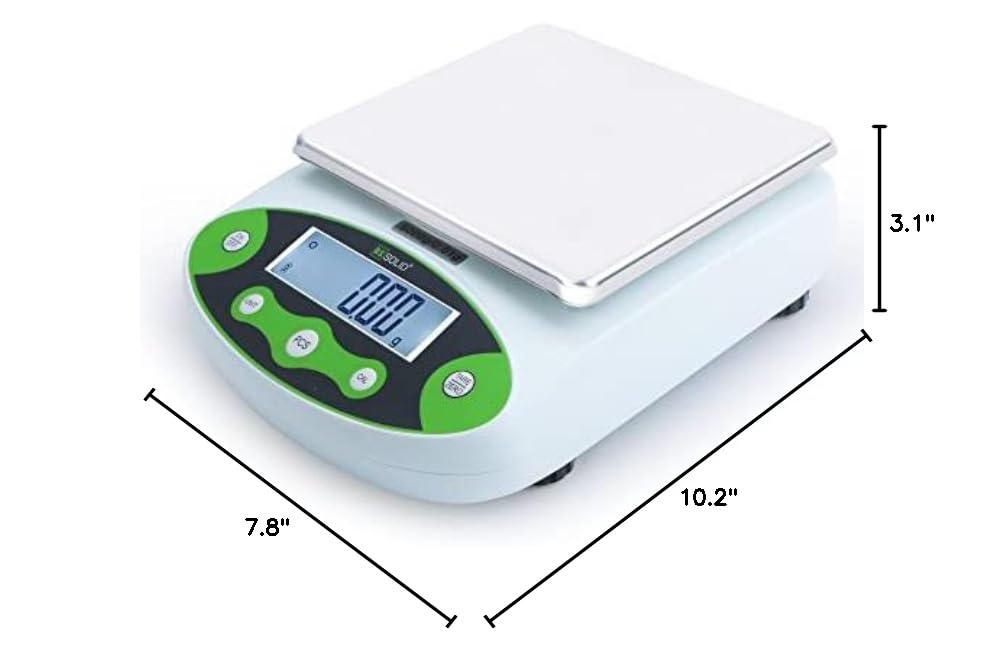
Figure 9: Approximate dimensions of the balance.
8. Manteniment
Proper maintenance ensures the longevity and accuracy of your balance:
- Neteja: Wipe the balance and weighing pan with a soft, damp drap. No utilitzeu productes de neteja abrasius ni dissolvents, ni submergiu la unitat en aigua.
- Emmagatzematge: When not in use for extended periods, store the balance in a dry, dust-free environment. Remove the battery if storing for a long time to prevent leakage.
- Calibració: Regular calibration is crucial. Refer to Section 6.4 for calibration procedures.
- Inspecció: Comproveu periòdicament si hi ha signes de dany o desgast.
9. Solució De Problemes
If you encounter issues with your balance, refer to the following common problems and solutions:
| Problema | Causa possible | Solució |
|---|---|---|
| Display shows "Err" or unstable readings | Overload, unstable surface, strong drafts, electromagnetic interference, or internal error. | Remove excess weight. Ensure balance is on a stable, level surface away from drafts and interference. Recalibrate the balance. If the problem persists, contact support. |
| Balance does not turn on | No power, dead battery, or faulty power adapter. | Check AC adapter connection and power outlet. Replace the 9V battery if using battery power. |
| Lectures inexactes | Not calibrated, not leveled, warm-up time insufficient, or environmental factors. | Perform calibration (Section 6.4). Ensure the balance is level (Section 5.2). Allow sufficient warm-up time (Section 5.4). Avoid drafts and temperature changes. |
| Piece counting is incorrect | Incorrecte sample quantity set, or items are not uniform in weight. | Assegureu-vos que el sample quantity selected matches the number of items placed on the pan. Use identical items for counting. |
10. Garantia i Suport
For technical assistance, warranty claims, or further inquiries regarding your U.S. Solid Digital Analytical Balance, please contact the seller or U.S. Solid customer support.
Venedor: The highest quality shop
Plans de protecció: Additional protection plans may be available for purchase, offering extended coverage beyond the standard warranty. Please refer to your purchase documentation for details on available 2-Year or 3-Year protection plans, or monthly Complete Protect options.
Always refer to your original purchase receipt and product packaging for specific warranty terms and contact information.