
1. Introducció
This manual provides essential instructions for the safe and efficient operation of your iDance FS400 Funky Skull portable karaoke party system. Please read this manual thoroughly before using the product and retain it for future reference.
2. Informació de seguretat
- No exposeu la unitat a la pluja ni a la humitat per evitar incendis o descàrregues elèctriques.
- No obriu la c.asing. No hi ha peces a l'interior que l'usuari pugui reparar. Demaneu totes les tasques de manteniment a personal qualificat.
- Eviteu col·locar la unitat a prop de fonts de calor com ara radiadors, registres de calor, estufes o altres aparells (inclosos amplificadors) que produeixen calor.
- Eviteu que el cable d'alimentació sigui trepitjat o pessigat, especialment als endolls, els endolls i el punt on surten de l'aparell.
- Utilitzeu només accessoris/accessoris especificats pel fabricant.
- Desendolleu aquest aparell durant les tempestes amb llamps o quan no l'utilitzeu durant llargs períodes de temps.
3. Contingut del paquet
Verifiqueu que tots els elements que s'enumeren a continuació s'inclouen al vostre paquet:
- iDance FS400 Funky Skull Karaoke Speaker
- Guia d'inici ràpid
- Cable de càrrega USB
- Micròfon per cable
- Control remot
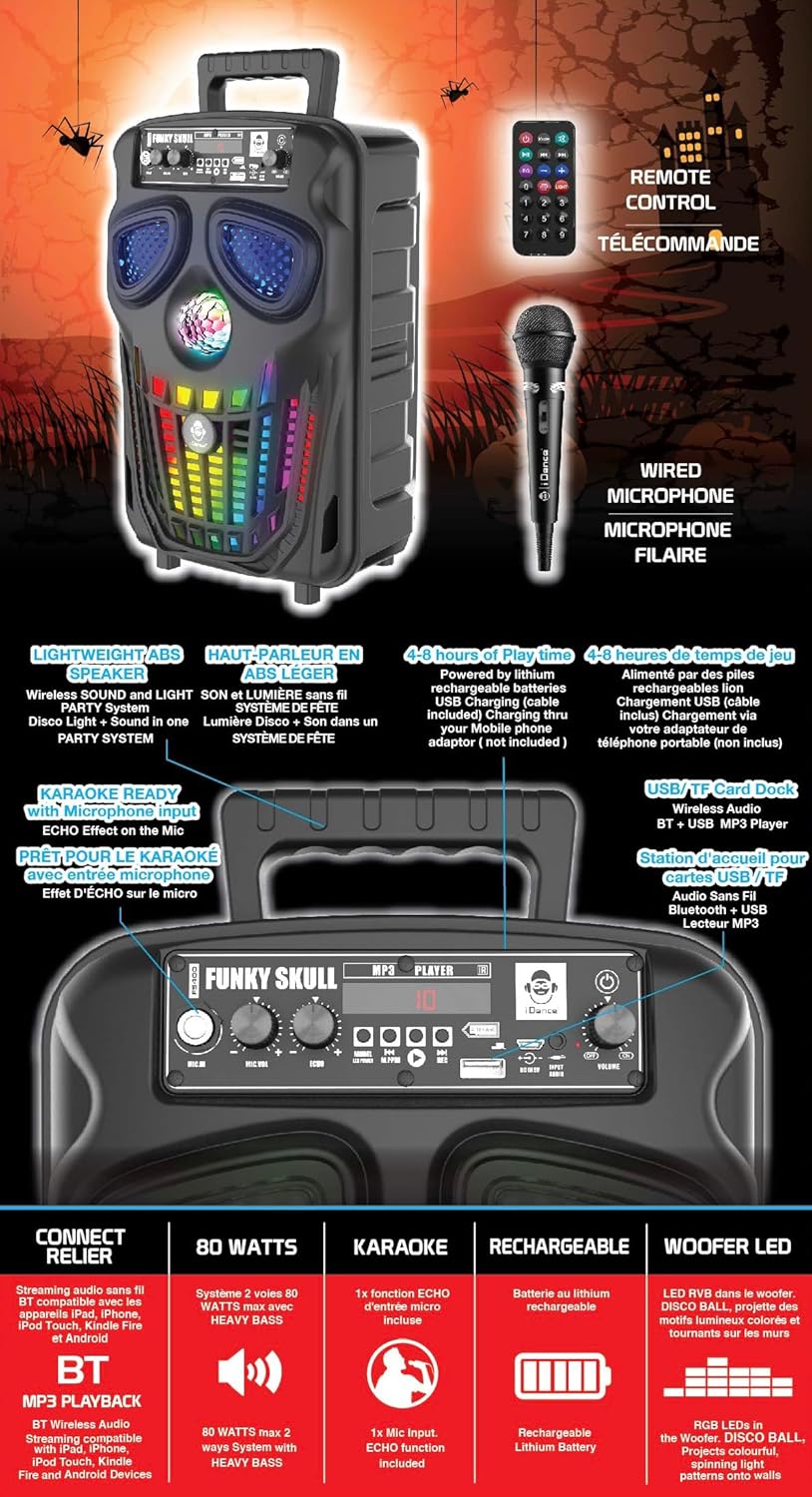
Figura 3.1: iDance FS400 Funky Skull speaker with its accessories, including the wired microphone, remote control, and USB charging cable.
4. Producte acabatview
The iDance FS400 Funky Skull is a portable karaoke party system featuring Bluetooth connectivity, integrated LED lights, and a wired microphone for karaoke functions. It is designed for ease of transport with an XXL rear handle.
4.1 Característiques clau
- Connectivitat Bluetooth: Transmet àudio sense fil des de dispositius compatibles.
- Karaoke llest: Includes a wired microphone input with echo effect.
- Il·luminació dinàmica: Features a disco ball and multi-color LED lights in the woofer.
- Disseny portàtil: Equipped with an XXL rear handle for easy carrying.
- Bateria recarregable: Provides 4 to 8 hours of playtime on a single charge.
- Reproductor mp3: Supports playback from USB drives and TF cards.
4.2 Tauler de control

Figura 4.1: Detallada view of the control panel on the iDance FS400 Funky Skull speaker.
El panell de control inclou:
- MIC.IN: Presa d'entrada de micròfon.
- MIC.VOL: Botó de control de volum del micròfon.
- ECO: Echo effect control knob for the microphone.
- Mode: Button to switch between input modes (Bluetooth, USB, TF Card).
- PLAY/PAUSE/REC: Play/Pause button for media playback, also used for recording.
- ANTERIOR/SEGUENT: Buttons for track navigation.
- Port USB: Per a la reproducció des d'una unitat USB.
- TF CARD Slot: Per a la reproducció de targetes TF.
- Entrada DC 5V: Port de càrrega.
- VOLUM: Control de volum principal.
- POTÈNCIA: Interruptor d'encesa/apagada.
5. Configuració
5.1 Càrrega inicial
Before first use, fully charge the speaker. Connect the supplied USB charging cable to the ENTRADA DC 5V port on the speaker and the other end to a compatible USB power adapter (not included). The charging indicator will illuminate during charging and turn off or change color when fully charged.
5.2 Connexió del micròfon
Insert the wired microphone's plug into the MIC.IN jack on the control panel.
6. Instruccions de funcionament
6.1 Encès/Apagat
Feu lliscar el PODER switch to the 'ON' position to turn on the speaker. Slide it to 'OFF' to power down.
6.2 Vinculació Bluetooth
- Turn on the iDance FS400 speaker. It will automatically enter Bluetooth pairing mode.
- Activa el Bluetooth al teu dispositiu mòbil (telèfon intel·ligent, tauleta, etc.).
- Cerca available devices and select "iDance FS400" from the list.
- Once connected, you will hear an audible confirmation. You can now stream audio wirelessly.
6.3 Funció de karaoke
- Ensure the wired microphone is connected to the MIC.IN jack.
- Play your desired music via Bluetooth, USB, or TF card.
- Ajusteu el volum del micròfon amb el botó MIC.VOL perilla.
- Gira el ECO botó per afegir un efecte d'eco a la teva veu.
Reproducció de targetes USB/TF de 6.4
- Inseriu una unitat USB a la Port USB or a TF card into the Ranura per a TARGETA TF.
- The speaker will automatically detect and begin playing MP3 files. Si no, premeu la tecla MODE button to switch to USB/TF mode.
- Utilitza el ANTERIOR i SEGÜENT botons per saltar pistes.
- Premeu el botó REPRODUCCIÓ/PAUSA botó per aturar o reprendre la reproducció.
6.5 llums LED
The iDance FS400 features a disco ball and multi-color LED lights in the woofer that activate automatically when the speaker is powered on and playing music, enhancing the party atmosphere.
6.6 Control remot
The included remote control allows for convenient operation of the speaker from a distance. Functions typically include power, mode selection, volume control, track navigation, and play/pause.
7. Carregant la bateria
The iDance FS400 is powered by a built-in rechargeable lithium-ion battery. To charge:
- Connect the USB charging cable to the ENTRADA DC 5V port de l'altaveu.
- Connect the other end of the USB cable to a standard USB power source (e.g., a USB wall adapter, computer USB port).
- El llum indicador de càrrega mostrarà l'estat de càrrega.
- A full charge provides approximately 4 to 8 hours of playtime, depending on usage and volume levels.
8. Manteniment
8.1 Neteja
Wipe the speaker with a soft, dry cloth. Do not use abrasive cleaners or solvents, as they may damage the finish. Ensure no liquids enter the speaker openings.
8.2 Emmagatzematge
When not in use for extended periods, store the speaker in a cool, dry place away from direct sunlight and extreme temperatures. It is recommended to charge the battery periodically to maintain its lifespan.
9. Solució De Problemes
| Problema | Causa possible | Solució |
|---|---|---|
| L'altaveu no s'encén. | La bateria està esgotada. | Connecteu l'altaveu a una font d'alimentació amb el cable de càrrega USB i deixeu que es carregui. |
| No hi ha so de l'altaveu. | El volum és massa baix o silenciat. Mode d'entrada incorrecte. | Increase the master volume. Press the MODE button to select the correct input source (Bluetooth, USB, TF). |
| El dispositiu Bluetooth no es pot emparellar. | L'altaveu no està en mode d'emparellament. El dispositiu és massa lluny. | Ensure the speaker is on and in Bluetooth mode. Move the device closer to the speaker. Restart both devices. |
| El micròfon no funciona. | Microphone not connected properly. MIC.VOL is too low. | Ensure the microphone is fully plugged into the MIC.IN jack. Increase the MIC.VOL knob. |
10. Especificacions

Figura 10.1: Dimensions of the iDance FS400 Funky Skull speaker.
| Característica | Especificació |
|---|---|
| Número de model | FS400 FUNKY SKULL |
| Dimensions (A x A x P) | 36 x 23 x 19 cm |
| Pes | 2 quilos |
| Mida de l'altaveu | 6 polzades (altaveu de greus) |
| Potència de sortida màxima | 200 watts |
| Resposta de freqüència | 2000 Hz |
| Impedància | 4 ohms |
| Tipus de bateria | Ió de liti (recarregable) |
| Hora de joc | De 4 a 8 hores |
| Connectivitat | Bluetooth |
| Mètode de control | Tàctil |
| Components inclosos | Speaker, Quick Start Guide, USB Charging Cable, Wired Microphone, Remote Control |
| Material | ABS |
11. Garantia i Suport
iDance International Limited guarantees the availability of spare parts for this product for a period of 2 anys from the date of purchase. For technical support or service inquiries, please refer to the contact information provided in your Quick Start Guide or visit the official iDance weblloc.