
Introducció
This manual provides detailed instructions for the setup, operation, and maintenance of your Amazon Basics Projection Alarm Clock. Please read this manual thoroughly before using the product to ensure proper function and to prevent damage.

Image: The Amazon Basics Projection Alarm Clock, showing its digital display and projection lens.
Instruccions de seguretat
- No exposeu la unitat a temperatures extremes, llum solar directa, pols o humitat.
- Assegureu-vos que l'adaptador de corrent sigui compatible amb la vostra font d'alimentació local.
- Mantingueu la unitat allunyada de l'aigua o altres líquids.
- No intenteu desmuntar ni modificar la unitat. Això anul·larà la garantia.
- Clean the unit only with a soft, dry cloth. Do not use liquid cleaners.
- Eliminar les bateries correctament d'acord amb la normativa local.
Contingut del paquet
- Amazon Basics Projection Alarm Clock
- Adaptador de corrent alterna
- Manual d'usuari
Característiques del producte
- Projection of time onto a wall or ceiling.
- FM Radio with automatic/manual scan and up to 15 preset stations.
- USB port for charging mobile phones or tablets.
- 7-inch high-definition LED display with adjustable brightness.
- Dual alarms for separate wake-up times.
- Snooze function with adjustable duration (2 to 60 minutes).
- Sleep timer for automatic radio shut-off (5 to 90 minutes).
- DST button for Daylight Saving Time adjustment.
- Battery backup (requires 2 AAA batteries, not included) to maintain time settings during power outages.

Imatge: Més deview of key features including sleep timer, radio presets, and snooze function.
Controls i pantalla
Familiarize yourself with the buttons and ports on your alarm clock for optimal use.

Imatge: Lateral view illustrating the location of controls, USB charging port, and projection lens.
- Botó de configuració de l'hora: S'utilitza per configurar l'hora actual.
- Botons d'alarma 1/2: S'utilitza per configurar i activar l'alarma 1 i l'alarma 2.
- Botó de posposició/regulació d'intensitat: Activates snooze during an alarm; adjusts display brightness when not alarming.
- Radio/Sleep Button: Turns FM radio on/off; sets sleep timer.
- Volume/Tune Dial: Adjusts radio volume and tunes FM frequencies.
- Projection On/Off/Flip Button: Controls the projection feature and flips the projected time.
- Projection Focus Wheel: Ajusta la claredat del temps projectat.
- Projection Angle Adjuster: Changes the angle of the projected time.
- Port de càrrega USB: Per carregar dispositius externs.
- Botó DST: Toggles Daylight Saving Time.
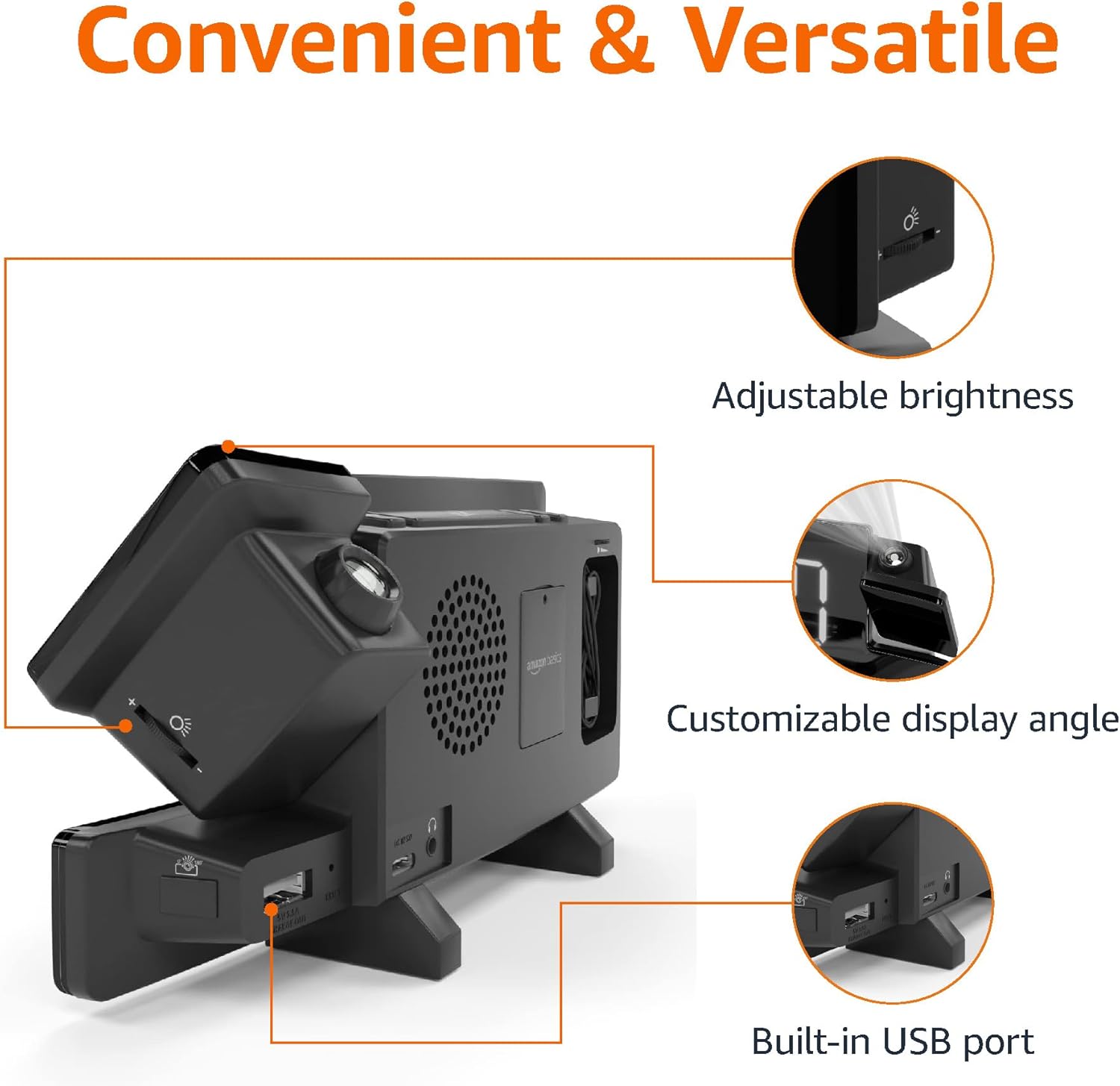
Image: Diagram highlighting the adjustable brightness, customizable projection angle, and USB charging port.
Configuració
1. Connexió d'alimentació
Connect the AC power adapter to the DC IN port on the back of the alarm clock and plug it into a standard wall outlet. The display will light up.
2. Instal·lació de bateria de seguretat
For battery backup, open the battery compartment on the bottom of the unit. Insert 2 AAA batteries (not included), ensuring correct polarity (+/-). Close the compartment. The battery backup maintains time settings during power outages but does not power the display or alarm functions.
3. Configuració inicial de l'hora
- Manteniu premut el botó Temps establert botó. Els dígits de l'hora parpellejaran.
- Utilitza el Volume/Tune Dial per ajustar l'hora. Premeu Temps establert de nou per confirmar.
- Els dígits dels minuts parpellejaran. Feu servir la tecla Volume/Tune Dial per ajustar els minuts. Premeu Temps establert de nou per confirmar.
- The time format (12H/24H) will flash. Use the Volume/Tune Dial to select your preferred format. Press Temps establert per confirmar i sortir del mode de configuració de l'hora.
4. Horari d'estiu (DST)
Premeu el botó DST button to toggle Daylight Saving Time on or off. The DST indicator will appear or disappear on the display.
Instruccions de funcionament
1. Configuració d'alarmes (alarma 1 i alarma 2)
- Manteniu premut el botó Alarma 1 or Alarma 2 botó. Els dígits de l'hora de l'alarma parpellejaran.
- Utilitza el Volume/Tune Dial to adjust the alarm hour. Press the respective Alarma botó de nou per confirmar.
- The alarm minute digits will flash. Use the Volume/Tune Dial to adjust the alarm minutes. Press the respective Alarma botó de nou per confirmar.
- The alarm source (FM radio or buzzer) will flash. Use the Volume/Tune Dial to select your preference. Press the respective Alarma button to confirm and activate the alarm. An alarm icon will appear on the display.
- To deactivate an alarm, press the respective Alarma button once. The alarm icon will disappear.
2. Using Snooze
Quan soni una alarma, premeu el botó Posposa/dimmer button to temporarily silence the alarm. The alarm will sound again after the set snooze duration. The default snooze duration is 9 minutes. To adjust the snooze duration, press and hold the Posposa/dimmer i, a continuació, utilitzeu el botó Volume/Tune Dial to select a duration between 2 and 60 minutes. Press Posposa/dimmer de nou per confirmar.
3. Funcionament de la ràdio FM
- Activar/Desactivar: Premeu el botó Radio/Sleep button to turn the FM radio on or off.
- Emissores de sintonització: Utilitza el Volume/Tune Dial to manually tune to a desired FM frequency.
- Escaneig automàtic: Manteniu premut el botó Radio/Sleep per escanejar automàticament i desar les emissores de FM disponibles com a predefinides.
- Seleccioneu presets: Once stations are saved, short press the Radio/Sleep button to cycle through the preset stations.
- Ajustar el volum: Gira el Volume/Tune Dial to adjust the radio volume.
4. Temporitzador de son
Mentre sona la ràdio FM, premeu el botó Radio/Sleep button repeatedly to set the sleep timer. Options typically range from 5 to 90 minutes. The radio will automatically turn off after the selected duration.
5. Funció de projecció

Image: The alarm clock projecting the time onto a bedroom ceiling.
- Activar/Desactivar: Premeu el botó Projection On/Off/Flip botó per activar o desactivar la projecció temporal.
- Ajust d'angle: Manually adjust the projection arm to direct the time onto your desired surface (wall or ceiling).
- Focus: Gira el Projection Focus Wheel to achieve a clear image.
- Flip Display: Premeu el botó Projection On/Off/Flip button repeatedly to rotate the projected time 180 degrees, ensuring correct orientation.

Image: The alarm clock on a nightstand, projecting the time onto a wall, demonstrating its use in a bedroom setting.
6. Càrrega USB
Connect your mobile phone or tablet's USB charging cable to the Port de càrrega USB on the back of the alarm clock. The device will begin charging. This port is for charging only and does not support data transfer.
7. Ajust de brillantor de la pantalla
Premeu el botó Posposa/dimmer button (when no alarm is sounding) to cycle through different brightness levels for the main LED display.
Manteniment
1. Neteja
Wipe the unit with a soft, dry, lint-free cloth. Do not use abrasive cleaners, waxes, or solvents as they may damage the surface.
2. Substitució de la bateria
If the battery backup is not functioning correctly (e.g., time resets after a power outage), replace the 2 AAA batteries in the battery compartment, ensuring correct polarity.
Resolució de problemes
| Problema | Causa possible | Solució |
|---|---|---|
| La pantalla està en blanc. | Sense connexió elèctrica. | Ensure the AC adapter is securely plugged into the unit and a working wall outlet. |
| L'alarma no sona. | L'alarma no està activada o el volum és massa baix. | Check if the alarm icon is visible on the display. Re-set the alarm if necessary. Increase radio volume if FM is selected as alarm source. |
| El temps projectat és borrós. | Projection focus is not adjusted. | Gira el Projection Focus Wheel fins que la imatge sigui clara. |
| Projected time is not visible. | Projection is off or room is too bright. | Premeu el botó Projection On/Off/Flip button to activate. The projection is best viewed in a dark room. |
| La recepció de la ràdio és deficient. | Posició de l'antena o interferències. | Adjust the position of the FM antenna wire. Move the unit away from other electronic devices that may cause interference. |
| La càrrega USB no funciona. | Problema amb el cable o incompatibilitat del dispositiu. | Ensure the USB cable is functional and properly connected. Try a different cable or device. |
Especificacions
- Model: MET8831-EUA
- Entrada d'alimentació: Adaptador de CA (inclòs)
- Còpia de seguretat de la bateria: 2 piles AAA (no incloses)
- Visualització: LED de 7 polzades
- Freqüència de ràdio: FM
- Sortida USB: 5V, 1A (for charging)
- Dimensions (L x A x A): 7.1 x 1.6 x 3.7 polzades (18.03 x 4.06 x 9.4 cm)
- Pes: Aproximadament 0.59 g (267.62 lliures)

Image: Product dimensions for the Amazon Basics Projection Alarm Clock.
Informació de la garantia
This product is covered by the Amazon Basics warranty. For detailed information regarding warranty terms and conditions, please refer to the official Amazon Basics weblloc o contacteu amb el servei d'atenció al client.
Atenció al client
For further assistance, troubleshooting, or product inquiries, please contact Amazon Basics customer support through the Amazon website or your purchase platform. Have your product model number (MET8831-US) and purchase details ready.