
DOOGEE S61PRO
Manual d'usuari del telèfon intel·ligent resistent DOOGEE S61 PRO
Model: S61PRO | Brand: DOOGEE
1. Introducció
Welcome to the user manual for your DOOGEE S61 PRO Rugged Smartphone. This device is engineered for durability and performance, designed to withstand harsh environments while providing a seamless Android 12 experience. It features a powerful camera system with night vision capabilities, a long-lasting battery, and versatile connectivity options. Please read this manual thoroughly to understand the full capabilities of your new smartphone and ensure its proper use and maintenance.
2. Què hi ha a la caixa
Your DOOGEE S61 PRO package includes the following items:
- 1 x DOOGEE S61 Pro rugged smartphone
- 1 x cable USB tipus C
- 1 x Charger (5V/2A)
- 1 x Protective film (pre-applied)
- 1 x Anti-explosion film
- 1 x SIM Card Pin / 1 x Wrist rope
- 1 x Packing Box / 1 x Manual / 1 x Warranty Card

Figure 2.1: Package Contents of the DOOGEE S61 PRO.
Video 2.1: Unboxing the DOOGEE S61 Rugged Smartphone.
3. Característiques clau
3.1 Design & Durability
The DOOGEE S61 PRO is built to endure. It boasts IP68/IP69K and MIL-STD-810H certifications, ensuring resistance to water, dust, and drops from up to 6 feet. A unique transparent back cover design reveals internal components, offering a distinctive aesthetic. The device also supports replaceable back covers for personalized styling.
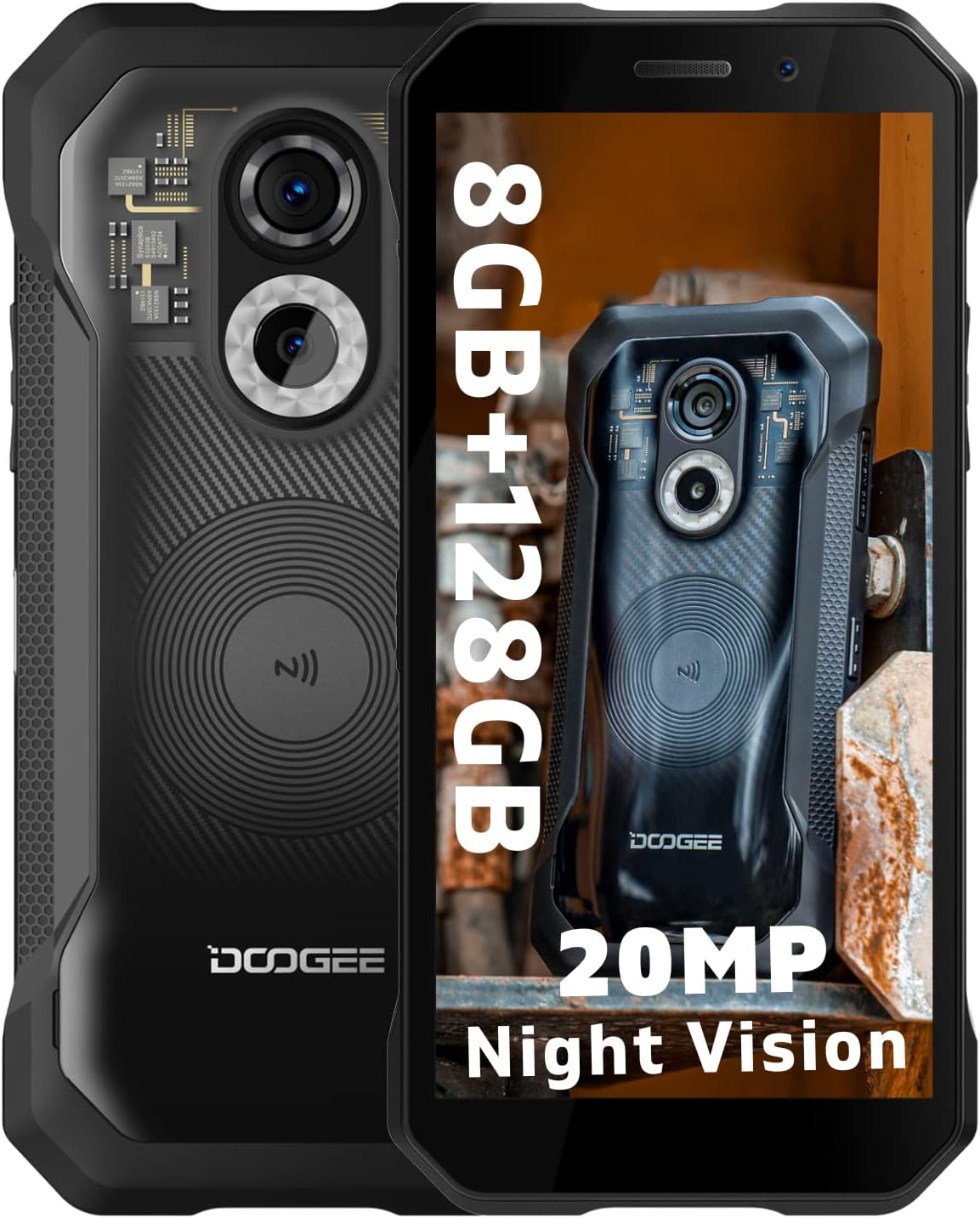
Figure 3.1: DOOGEE S61 PRO with transparent back and rugged frame.

Figure 3.2: Durability features including shock, water, and dust resistance.
Vídeo 3.1: Acabatview of DOOGEE S61 Series Design and Durability.
3.2 Pantalla
The device features a 6.0-inch IPS HD+ display with a resolution of 720 x 1440 pixels, protected by Corning Gorilla Glass. It offers crisp visuals and good outdoor visibility.

Figure 3.3: Display features of the DOOGEE S61 PRO.
3.3 Rendiment
Powered by a MediaTek Helio G35 Octa-core CPU and running on Android 12, the S61 PRO provides a smooth operating experience. It comes with 6GB of RAM and 128GB of internal storage, expandable up to 512GB via a microSD card (not included).

Figure 3.4: Performance specifications including RAM, ROM, and OS.
Video 3.2: Demonstration of DOOGEE S61 Pro's Android 12 and performance.
Sistema de 3.4 càmeres
Capture every moment with the S61 PRO's advanced camera setup. It features a 48MP AI main camera, a 20MP SONY IMX350 night vision camera with 4 infrared lights, and a 16MP front camera for high-resolution selfies.

Figura 3.5: Detallada view of the dual camera system with night vision.
3.5 Bateria
Equipped with a 5180mAh large battery, the S61 PRO provides extended usage times, offering up to 15 days on standby, 2-3 days of normal use, and 24 hours of calling.

Figure 3.6: 5180mAh battery capacity and usage times.
3.6 Connectivitat
The smartphone supports Dual SIM 4G, NFC for convenient mobile payments, and comprehensive navigation systems including GPS, Glonass, Galileo, and Beidou.

Figure 3.7: NFC for Google Pay.
4. Guia de configuració
4.1 SIM Card & TF Card Installation
To install your SIM cards and/or TF card:
- Localitza la safata de la targeta SIM al lateral del telèfon.
- Introduïu l'eina d'expulsió de la SIM proporcionada al forat petit que hi ha al costat de la safata i premeu suaument fins que la safata surti.
- Place your Nano SIM cards and/or TF card into the designated slots on the tray, ensuring correct orientation.
- Empenyeu amb cura la safata cap a dins del telèfon fins que quedi alineada amb la carcassa del dispositiu.

Figure 4.1: SIM and TF Card Tray.
4.2 Encès inicial
Press and hold the Power button (located on the side of the device) until the DOOGEE logo appears. Follow the on-screen prompts to complete the initial setup, including language selection, Wi-Fi connection, and Google account setup.
5. Instruccions de funcionament
5.1 Navegació bàsica
The DOOGEE S61 PRO runs on Android 12, offering an intuitive user interface. Use gestures like swiping up from the bottom for the app drawer, swiping down from the top for notifications and quick settings, and tapping icons to open applications.
5.2 Ús de la càmera
Open the Camera app to access various modes, including Photo, Video, and Night Vision. Tap the shutter button to capture images or start/stop video recording. Switch between the main and night vision cameras as needed.

Figure 5.1: Night Vision Camera in action.
5.3 Funcionalitat NFC
Enable NFC in Settings to use features like Google Pay for contactless payments or to quickly pair with compatible devices. Simply tap your phone to an NFC reader or device to initiate the connection.
6. Manteniment
6.1 Neteja del vostre dispositiu
Wipe the screen and body with a soft, lint-free cloth. For stubborn dirt, a slightly damp cloth with mild soap can be used, ensuring all ports are sealed. Avoid harsh chemicals or abrasive materials.
6.2 Water and Dust Protection
While your S61 PRO is IP68/IP69K rated, always ensure all port covers (USB-C, headphone jack if applicable) are securely closed before exposing the device to water or excessive dust. Do not intentionally submerge the phone in corrosive liquids or hot water.
7. Solució De Problemes
- El dispositiu no s'encén: Assegureu-vos que la bateria estigui carregada. Connecteu-la al carregador i espereu uns minuts abans d'intentar tornar-la a engegar.
- Poor signal/No network: Check if SIM cards are correctly inserted. Verify network settings and ensure you are within network coverage.
- Apps crashing/Slow performance: Close background apps. Clear app cache or reinstall problematic applications. Consider a factory reset if issues persist (backup data first).
- Problemes amb els danys causats per l'aigua: If the phone has been exposed to water, ensure all ports are dry before charging. If issues arise, contact customer support.
8. Especificacions tècniques
| Característica | Especificació |
|---|---|
| Nom del model | S61PRO |
| Sistema operatiu | Android 12.0 |
| Processador | MediaTek Helio G35 Octa-core (2.3 GHz CPU Speed) |
| RAM | 6 GB |
| Emmagatzematge intern | 128 GB (Expandable up to 512GB via Micro SD) |
| Mida de la pantalla | IPS HD+ de 6.0 polzades |
| Resolució | 720 x 1440 |
| Càmera principal | Càmera principal amb IA de 48 MP |
| Càmera de visió nocturna | 20MP SONY IMX350 with 4 Infrared Lights |
| Càmera frontal | 16MP |
| Capacitat de la bateria | 5180 mAh |
| Durabilitat | Certificació IP68/IP69K, MIL-STD-810H |
| Connectivitat | Dual SIM 4G, NFC, Bluetooth, GPS, Glonass, Galileo, Beidou |
| Pes | 9.4 unces (266 grams) |
9. Garantia i Suport
DOOGEE offers a 2-year free warranty for the S61 PRO. Additionally, a 30-day money-back guarantee is provided without reason. For any issues or inquiries, a 24/7 professional support team is available to assist you.
Please visit the official DOOGEE website or contact their customer service for detailed warranty information and support options. Ensure to keep your purchase receipt for warranty claims.
Official DOOGEE Store: DOOGEE Store on Amazon
Ask a question about this manual
Ask about setup, troubleshooting, compatibility, parts, safety, or missing instructions. Manuals+ will review the question and use this page’s manual context to help answer it.