
1. Introducció
The Ricoh M 320 is a high-productivity, low-maintenance multifunction device designed for printing, copying, and scanning in workspaces with limited space. This system offers easy monitoring and management of print history, device settings, and network protocols. Featuring a 5 GHz Wi-Fi interface, it ensures a stable wireless connection by reducing bottlenecks. Its compact design makes it suitable for various office environments. Setup and operation are designed to be straightforward. The integrated scan and copy functions facilitate easy digitization and sharing of documents. The all-in-one toner cartridge is high-capacity and simple to replace. Full support is provided for Windows, Mac, and Linux operating systems, with both 2.4 GHz and 5 GHz WLAN capabilities.
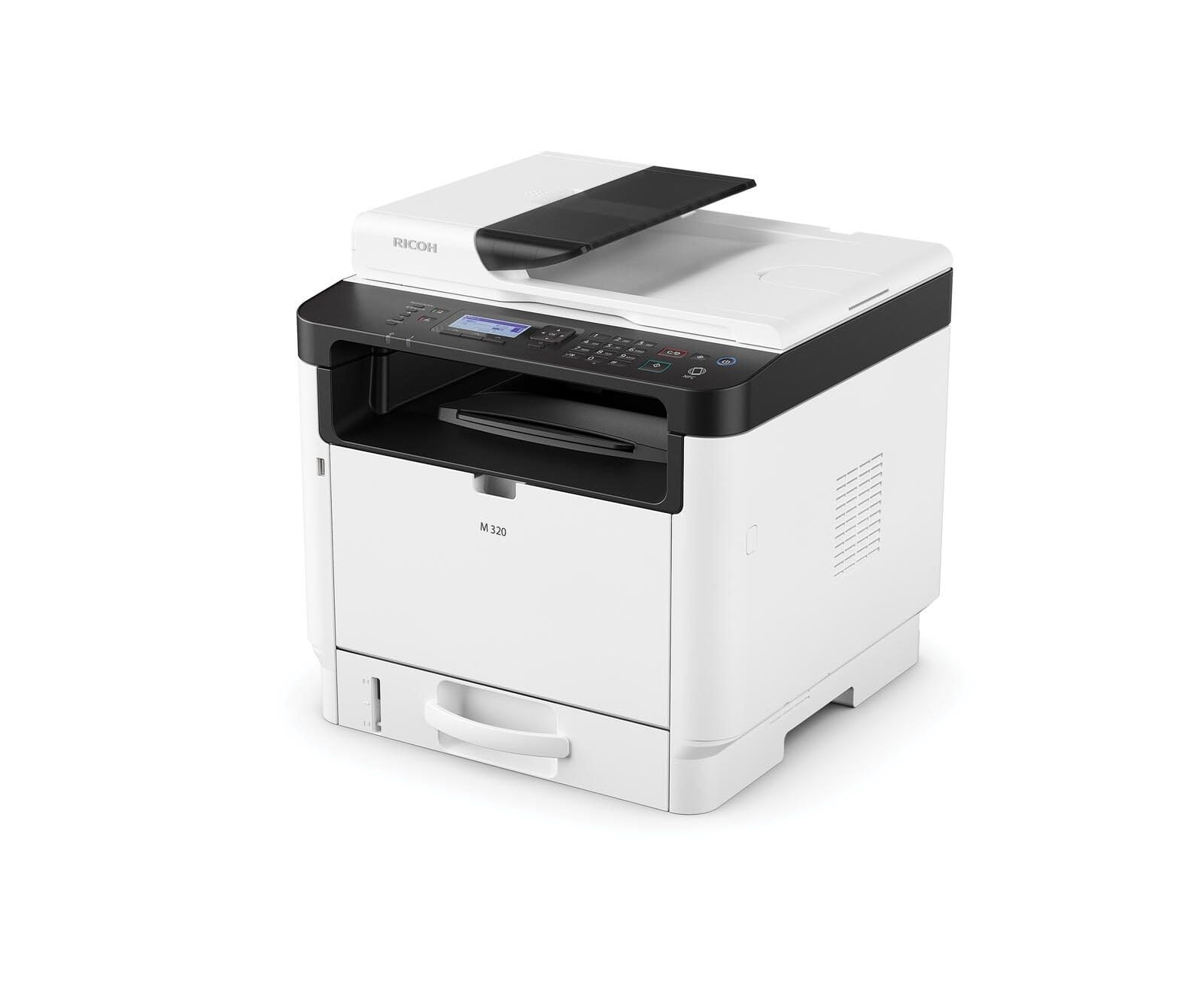
Figure 1: Ricoh M 320 Multifunction System. This image displays the compact design of the Ricoh M 320, highlighting its main components including the paper tray and control panel.
1.1 Què hi ha a la caixa
Verifiqueu que tots els elements siguin presents al paquet:
- Ricoh M 320 Multifunction System
- Cable d'alimentació
- Cartutx de tòner inicial
- Guia de configuració
- Software CD (may vary by region)
2. Configuració
2.1 Desembalatge i col·locació
- Traieu la impressora del seu embalatge.
- Traieu totes les cintes protectores i els materials d'embalatge de l'exterior i l'interior de la impressora.
- Col·loqueu la impressora sobre una superfície estable i plana amb una ventilació adequada. Assegureu-vos que hi hagi prou espai al voltant de la impressora per al seu funcionament i manteniment.
2.2 Connexió d'alimentació
- Connecteu el cable d'alimentació a l'entrada d'alimentació de la impressora.
- Connecteu l'altre extrem del cable d'alimentació a una presa de corrent amb connexió a terra.
- Premeu el botó d'engegada per encendre la impressora.
2.3 Instal·lació del cartutx de tòner
- Obriu la coberta frontal de la impressora.
- Carefully remove the new toner cartridge from its packaging and gently shake it horizontally several times to distribute the toner evenly.
- Introduïu el cartutx de tòner a la impressora fins que encaixi al seu lloc.
- Tanqueu la coberta frontal.
2.4 Càrrega de paper
- Traieu la safata de paper.
- Adjust the paper guides to match the size of the paper you are loading (up to A4).
- Carregueu la pila de paper a la safata, assegurant-vos que estigui plana i que no superi la línia d'ompliment màxim.
- Empenyeu suaument la safata de paper cap a dins de la impressora.
2.5 Connexió de xarxa
The Ricoh M 320 supports both Ethernet and Wi-Fi connectivity.
Connexió Ethernet:
- Connecteu un cable Ethernet des del vostre encaminador de xarxa o canvieu-lo al port Ethernet de la part posterior de la impressora.
- La impressora intentarà obtenir automàticament una adreça IP.
Wi-Fi Connection (2.4 GHz / 5 GHz):
- On the printer's 4-line LCD display, navigate to the Network Settings menu.
- Select "WLAN Setup" or "Wi-Fi Setup".
- Trieu la vostra xarxa Wi-Fi de la llista de xarxes disponibles.
- Enter the Wi-Fi password (WPA/WPA2 key) using the control panel.
- Confirm the settings. The printer will connect to the network.
2.6 Instal·lació de controladors i programari
To use all functions of the Ricoh M 320, install the necessary drivers and software on your computer.
- Windows/Mac/Linux: Insert the provided software CD into your computer's CD/DVD drive and follow the on-screen instructions. Alternatively, download the latest drivers and utilities from the official Ricoh support weblloc.
- Dispositius mòbils (iOS/Android): Download the Ricoh Smart Device Connector app from your device's app store to enable mobile printing and scanning. The printer supports AirPrint and Mopria.
3. Funcionament de la impressora
3.1 Impressió de documents
- Obriu el document que voleu imprimir a l'ordinador o al dispositiu mòbil.
- Seleccioneu "Imprimeix" al menú de l'aplicació (per exemple, File > Imprimeix).
- Choose "Ricoh M 320" as your printer.
- Adjust print settings such as number of copies, paper size, and duplex printing (automatic duplex is supported).
- Feu clic a "Imprimeix".
The printer offers high-quality black and white printing at 1200 x 1200 dpi. Maximum print speed for black and white is 13 pages per minute, and for color is 4.5 pages per minute.
3.2 Còpia de documents
- Place the document face-down on the scanner glass or face-up in the Automatic Document Feeder (ADF). The ADF supports up to 35 sheets.
- Al tauler de control de la impressora, seleccioneu "Còpia".
- Use the navigation buttons to adjust settings such as number of copies (up to 35 per run), copy quality, and zoom.
- Premeu el botó "Inici" per començar a copiar.
3.3 Escaneig de documents
Documents can be scanned to a computer or mobile device.
- Col·loqueu el document al vidre de l'escàner o a l'ADF.
- On your computer, open the scanning software (e.g., Ricoh Scan Utility) or use the "Scan" function from the Ricoh Smart Device Connector app on your mobile device.
- Select "Ricoh M 320" as the scanner.
- Trieu els paràmetres d'escaneig com ara la resolució (fins a 1200 x 1200 ppp), el mode de color i la carpeta de destinació.
- Inicia l'escaneig.
3.4 Mobile Printing and Scanning
The Ricoh M 320 supports mobile printing and scanning via AirPrint, Mopria, and the Ricoh Smart Device Connector app.
- AirPrint (iOS): Ensure your iOS device is connected to the same Wi-Fi network as the printer. Open the document or photo, tap the share icon, and select "Print". Choose the Ricoh M 320.
- Mopria (Android): Ensure your Android device has the Mopria Print Service installed and is connected to the same Wi-Fi network. Open the document or photo, tap the menu icon, and select "Print". Choose the Ricoh M 320.
- Ricoh Smart Device Connector App: Use the dedicated app for advanced mobile printing, scanning, and device management features.
4. Manteniment
4.1 Substitució del cartutx de tòner
When the toner level is low, a message will appear on the printer's display. Use only genuine Ricoh standard laser toner cartridges.
- Assegureu-vos que la impressora estigui engegada.
- Obriu la coberta frontal de la impressora.
- Traieu amb cura el cartutx de tòner usat.
- Desembaleu el cartutx de tòner nou i sacsegeu-lo suaument horitzontalment diverses vegades.
- Insert the new toner cartridge into the printer until it clicks into place.
- Close the front cover. The printer will calibrate the new cartridge.
4.2 Neteja de la impressora
Una neteja regular ajuda a mantenir la qualitat d'impressió i allarga la vida útil de la impressora.
- Exterior: Netegeu les superfícies exteriors amb un damp, drap sense borrissol. No utilitzeu productes de neteja abrasius ni dissolvents.
- Vidre de l'escàner: Gently clean the scanner glass with a soft, lint-free cloth moistened with glass cleaner. Ensure no residue remains.
- Interior: Periodically open the front cover and gently remove any paper dust or toner residue with a dry, lint-free cloth. Avoid touching the drum unit.
5. Solució De Problemes
This section addresses common issues you might encounter with your Ricoh M 320.
5.1 Problemes comuns i solucions
- La impressora no respon:
- Comproveu si la impressora està engegada i connectada a la presa de corrent.
- Verifiqueu la connectivitat de xarxa (cable Ethernet o senyal Wi-Fi).
- Reinicieu la impressora i l'ordinador/dispositiu mòbil.
- Assegureu-vos que el controlador d'impressora correcte estigui instal·lat i seleccionat.
- Embussos de paper:
- Apagueu la impressora i desconnecteu-la.
- Open all covers and carefully remove any jammed paper, pulling in the direction of the paper path.
- Assegureu-vos que el paper estigui carregat correctament i que no estigui arrugat ni danyat.
- Close all covers and restart the printer.
- Mala qualitat d'impressió:
- Comproveu el nivell del cartutx de tòner i substituïu-lo si és baix.
- Ensure you are using genuine Ricoh toner cartridges.
- Clean the interior of the printer, especially around the drum unit (refer to maintenance section).
- Adjust print quality settings in your printer driver.
- L'escàner no funciona:
- Ensure the printer is connected to the network and recognized by your computer/mobile device.
- Restart the scanning application and the printer.
- Verify that the scanner glass and ADF are clean.
- Problemes de connexió Wi-Fi:
- Assegureu-vos que la contrasenya del Wi-Fi s'ha introduït correctament.
- Check if the printer is within range of your Wi-Fi router.
- Restart your Wi-Fi router and the printer.
- Try connecting to the 2.4 GHz band if experiencing issues with 5 GHz, or vice-versa.
For more detailed troubleshooting, refer to the comprehensive user manual available on the Ricoh support weblloc.
6. Especificacions
| Característica | Especificació |
|---|---|
| Nom del model | M 320 (9P01749) |
| Funcions | Print, Copy, Scan (3-in-1 Multifunction) |
| Tecnologia d'impressió | Làser |
| Sortida d'impressió | Color (Note: Primarily a mono laser printer, color output refers to specific elements or capabilities) |
| Resolució màxima d'impressió (blanc i negre) | 1200 x 1200 ppp |
| Resolució màxima d'impressió (color) | 1200 x 1200 ppp |
| Max Print Speed (B&W) | 13 pàgines per minut |
| Velocitat màxima d'impressió (color) | 4.5 pàgines per minut |
| Temps de sortida de la primera pàgina | 4.62 segons |
| Impressió dúplex | Automàtic |
| Tipus d'escàner | Alimentador automàtic de documents (ADF) |
| Capacitat ADF | 35 fulls |
| Resolució de l'escàner | 1200 x 1200 ppp |
| Còpies màximes per execució | 35 |
| Connectivitat | Ethernet, Wi-Fi (2.4 GHz / 5 GHz) |
| Suport d'impressió mòbil | AirPrint, Mopria, Ricoh Smart Device Connector App |
| Sistemes operatius compatibles | Windows, Mac, Linux, iOS, Android |
| Mida màxima del paper | A4 |
| Capacitat del full d'entrada | 35 fulls |
| Capacitat de fulls de sortida | 35 fulls |
| Tipus de visualització | LCD de 4 línies |
| Cartutx compatible | Ricoh standard laser toner cartridges |
| Pes de l'article | 21 quilos |
7. Garantia i Suport
7.1 Garantia limitada
The Ricoh M 320 Multifunction System comes with a limited warranty. Please refer to the warranty documentation included with your product or visit the official Ricoh weblloc web per conèixer els termes i condicions detallats, incloent-hi el període de cobertura i els procediments de servei. Conserveu el comprovant de compra per a reclamacions de garantia.
7.2 Atenció al client
For technical assistance, product inquiries, or service requests, please contact Ricoh customer support.
- Assistència en línia: Visit the official Ricoh support website for FAQs, driver downloads, and digital manuals.
- Suport telefònic: Contact numbers for your region can be found on the Ricoh weblloc.
When contacting support, please have your product model (M 320) and serial number ready.