
1. Introducció
Gràcies per la compraasing the iDance GROOVE 119 Portable Bluetooth Speaker. This manual provides essential information for the safe and efficient operation of your device. Please read it thoroughly before use and retain it for future reference.
2. Informació de seguretat
- No exposeu l'altaveu a l'aigua, la humitat ni a temperatures extremes.
- Eviteu col·locar l'altaveu a prop de fonts de calor o sota la llum solar directa.
- No intenteu desmuntar ni modificar l'altaveu. Això anul·larà la garantia.
- Use only the specified charging adapter (if included) or a compatible 5V USB charger.
- Mantenir fora de l'abast dels nens.
- Clean the speaker with a soft, dry cloth only.
3. Contingut del paquet
Si us plau, comproveu que tots els elements siguin presents al paquet:
- iDance GROOVE 119 Portable Bluetooth Speaker
- Micròfon per cable
- Control remot
- USB Charging Cable (Type-A to Micro-USB, typically)
- Manual d'usuari (aquest document)

This image displays the iDance GROOVE 119 Portable Bluetooth Speaker, featuring a black casing with a purple illuminated speaker grille. Alongside the speaker are a black wired microphone and a compact black remote control, indicating the full package contents.
4. Producte acabatview
Familiarize yourself with the main components of your iDance GROOVE 119 speaker.

Aquesta imatge ofereix una vista frontal clara view of the iDance GROOVE 119 speaker. The top panel features controls for volume, mode selection, playback, and inputs for USB, SD card, and microphone. The main speaker grille is illuminated with a purple light, and a retractable handle is visible at the top.
Característiques del tauler de control:
- Pom de volum: Ajusta el volum mestre.
- Botó de mode: Switches between Bluetooth, USB, SD, and AUX input modes.
- Botó Reproduir/Pausa: Controla la reproducció de suports.
- Botons de pista anterior/següent: Navega per les pistes.
- Port USB: Per a la reproducció des d'una unitat flaix USB.
- Ranura per a targeta SD: Per a la reproducció amb targeta SD.
- Entrada de micròfon: Connecteu el micròfon amb cable.
- Entrada AUX: Per connectar dispositius d'àudio externs mitjançant un cable de 3.5 mm.
- Port de càrrega: Per connectar el cable de càrrega USB.
- Interruptor d'alimentació: Encén/apaga l'altaveu.
5. Configuració
5.1. Carregant l’altaveu
- Localitzeu el port de càrrega al tauler de control.
- Connecteu l'extrem petit del cable de càrrega USB al port de càrrega de l'altaveu.
- Connect the larger end of the USB cable to a compatible USB power adapter (e.g., smartphone charger, computer USB port) or a power bank.
- The charging indicator light will illuminate (color may vary) to show that the speaker is charging. It will typically turn off or change color when fully charged.
- Espereu aproximadament 3-4 hores per a una càrrega completa.
5.2. Encès / apagat
- To power on, slide the Power Switch to the "ON" position. You will hear an audible prompt.
- To power off, slide the Power Switch to the "OFF" position.
6. Instruccions de funcionament
6.1. Emparellament Bluetooth
- Ensure the speaker is powered on and in Bluetooth mode. If not, press the "Mode" button until you hear the Bluetooth prompt. The Bluetooth indicator light will flash.
- Activeu el Bluetooth al vostre telèfon intel·ligent, tauleta o altre dispositiu compatible amb Bluetooth.
- Cerca available devices. You should see "iDance GROOVE 119" (or similar) in the list.
- Select "iDance GROOVE 119" to connect. Once paired, you will hear a confirmation sound, and the Bluetooth indicator light will stop flashing.
- Ara pots reproduir àudio des del teu dispositiu a través de l'altaveu.
6.2. Reproducció des de targeta USB/SD
- Insert a USB flash drive or SD card (pre-loaded with MP3 audio files) al port/ranura corresponent del tauler de control.
- The speaker should automatically switch to USB or SD mode and begin playing the first track. If not, press the "Mode" button to select the correct input.
- Use the Play/Pause and Previous/Next Track buttons on the speaker or remote control to manage playback.
6.3. Entrada AUX
- Connecteu un extrem d'un cable d'àudio de 3.5 mm (no inclòs) al port d'entrada AUX de l'altaveu.
- Connecteu l'altre extrem del cable a la presa d'auriculars o a la sortida d'àudio del dispositiu extern.
- Press the "Mode" button until you select AUX input.
- Controla la reproducció i el volum des del teu dispositiu extern.
6.4. Ús del micròfon
- Connect the wired microphone to the Microphone Input jack on the speaker's control panel.
- Assegureu-vos que l'interruptor d'encesa/apagada del micròfon estigui en la posició "ON".
- Adjust the master volume knob on the speaker to control the microphone's output level.
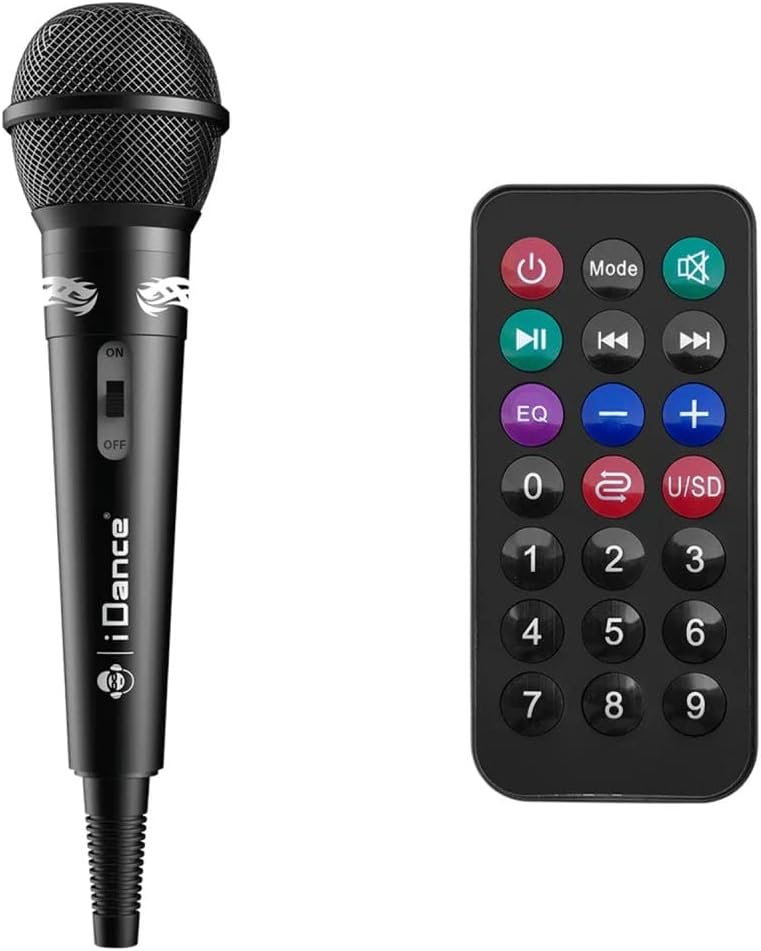
Un detallat view of the included accessories: a black wired microphone with an ON/OFF switch and an iDance logo, and a black remote control with various buttons for power, mode, playback, volume, EQ, and number selection.
6.5. Funcions de control remot
El comandament a distància inclòs proporciona un accés còmode a diverses funcions:
- Botó d'encesa: Encén/apaga l'altaveu.
- Botó de mode: Cycles through input modes (Bluetooth, USB, SD, AUX).
- Reproduir/pausa: Inicia o posa en pausa la reproducció.
- Anterior/Següent: Salta a la pista anterior o següent.
- Volum +/-: Ajusta el nivell de volum.
- EQ: Cycles through equalizer presets (if available).
- Silenciar: Silencia la sortida d'àudio.
- Botons numèrics (0-9): For direct track selection on USB/SD mode.
6.6. Modes de llum LED
The speaker features integrated LED lights. These lights typically cycle through various patterns and colors automatically. There may be a dedicated button on the control panel or remote control to change or turn off the light modes, if available.
7. Manteniment
- Neteja: Use a soft, dry, lint-free cloth to clean the speaker's exterior. Do not use abrasive cleaners, waxes, or solvents.
- Emmagatzematge: Quan no l'utilitzeu durant períodes prolongats, guardeu l'altaveu en un lloc fresc i sec, allunyat de la llum solar directa i de temperatures extremes.
- Cura de la bateria: Per allargar la durada de la bateria, eviteu descarregar-la completament amb freqüència. Carregueu l'altaveu regularment, fins i tot si no l'esteu fent servir, per mantenir la bateria en bon estat.
8. Solució De Problemes
| Problema | Causa possible | Solució |
|---|---|---|
| Sense poder | La bateria està descarregada; l'interruptor d'alimentació està en posició OFF. | Carregueu l'altaveu; assegureu-vos que l'interruptor d'alimentació estigui encès. |
| Sense so | Volume too low; Incorrect input mode; Device not paired (Bluetooth). | Increase volume; Press "Mode" button to select correct input; Re-pair Bluetooth device. |
| Bluetooth no connectat | Altaveu no en mode d'emparellament; Dispositiu massa lluny; Interferències. | Assegureu-vos que l'altaveu estigui en mode d'emparellament Bluetooth; acosteu el dispositiu; desactiveu els altres dispositius Bluetooth. |
| El micròfon no funciona | Microphone switch OFF; Not fully plugged in. | Ensure microphone switch is ON; Check connection to input jack. |
9. Especificacions
| Nom del model | GROOVE 119 |
| Marca | iDance |
| Connectivitat | Bluetooth |
| Dispositius compatibles | Smartphone, tauleta |
| Dimensions (L x A x A) | 30 x 40 x 20 cm |
| Pes | 2.57 kg |
| Color | Multi |
| Entrada de potència | 5 V CC (via USB) |
10. Garantia i Suport
iDance products are designed and manufactured to the highest quality standards. For specific warranty details and support information, please refer to the warranty card included with your product or visit the official iDance weblloc web. Conserveu el comprovant de compra per a qualsevol reclamació de garantia.
For technical assistance or customer service inquiries, please contact iDance customer support through their official channels.