
1. Producte acabatview
The Xgody X13 is an unlocked 4G dual SIM smartphone designed for everyday use. It features a 6.1-inch qHD display, runs on Android 9.0, and includes dual 5MP cameras. With a 3000mAh battery and face recognition technology, it offers essential smartphone functionalities.
Imatge: Anvers i revers view of the Xgody X13 Smartphone.
2. Què hi ha a la caixa
En obrir el paquet, comproveu que hi hagi tots els elements:
- Xgody X13 Smartphone
- Cable USB
- Funda de telèfon
- Protector de pantalla
- Manual d'usuari
- Battery (may be separate)
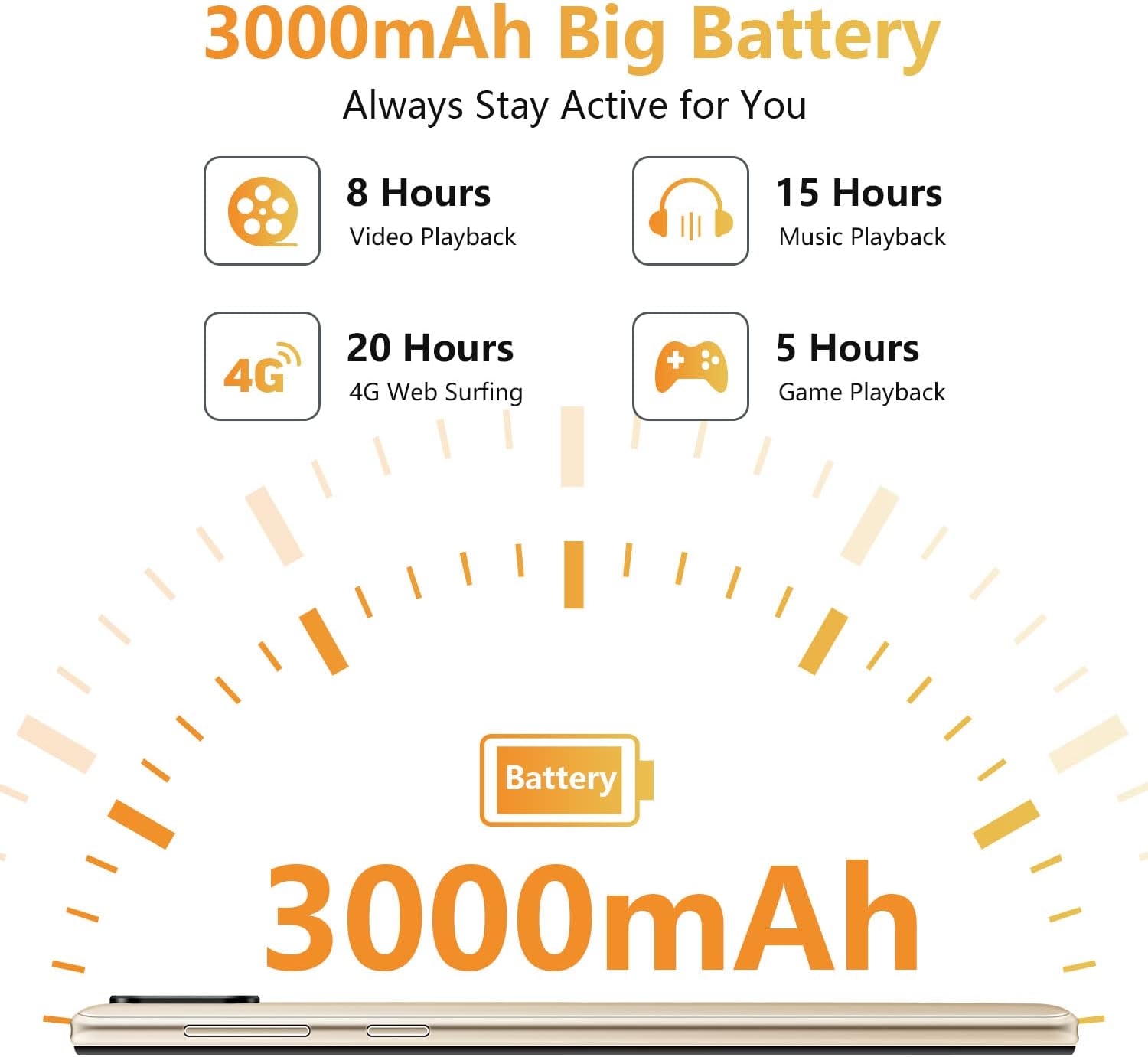
Image: All items included in the Xgody X13 retail box.
3. Configuració
3.1. Battery, SIM Card, and Micro SD Card Installation
The Xgody X13 smartphone requires the battery to be inserted before first use. It supports dual SIM cards (Micro SIM) and a Micro SD card for expandable storage up to 256GB.
- Traieu amb cura la tapa posterior del telèfon.
- Insert the provided battery into its compartment, ensuring the contacts align correctly.
- Locate the SIM card slots. Insert your Micro SIM cards into the designated slots (SIM 1 and SIM 2).
- If using expandable storage, insert a Micro SD card into the dedicated Micro SD card slot.
- Torneu a col·locar la coberta posterior, assegurant-vos que encaixi correctament al seu lloc amb un clic.

Imatge: Interna view of the phone showing battery, SIM, and Micro SD card slots.
3.2. Engegada i configuració inicials
After installing the battery, SIM cards, and Micro SD card:
- Press and hold the Power button (located on the right side of the phone) until the Xgody logo appears.
- Segueix les instruccions que apareixen a la pantalla per completar la configuració inicial, inclosa la selecció d'idioma, la connexió Wi-Fi, la configuració del compte de Google i la configuració de seguretat.
Video: Unboxing and initial setup guide for the Xgody X13 smartphone, demonstrating battery and SIM card installation, and first power-on.
4. Instruccions de funcionament
4.1. Navegació bàsica
The Xgody X13 runs on Android 9.0, offering a user-friendly interface. Navigate using touch gestures:
- Toca: Selecciona un element o obre una aplicació.
- Llisca: Desplaçar-se per pantalles o llistes.
- Pessigar: Apropa o allunya les fotos i web pàgines.
- Premsa llarga: Accediu als menús contextuals o moveu les icones de les aplicacions.
4.2. Reconeixement facial
The Xgody X13 features face recognition for quick and secure unlocking. To set up:
- Vés a Configuració > Seguretat i ubicació > Desbloqueig facial.
- Follow the on-screen instructions to register your face. Ensure good lighting and hold the phone at eye level.
- Once set up, you can unlock your phone by simply looking at the front camera.

Image: Face ID icon, indicating the face recognition unlock feature.
4.3. Ús de la càmera
The phone is equipped with dual 5MP cameras (front and rear). To take photos or videos:
- Obriu el Càmera aplicació.
- Toqueu el botó de l'obturador per fer una foto.
- Canvia entre els modes de foto i vídeo segons calgui.
- Use the front/rear camera toggle to select your desired camera.

Image: A user taking a photo with the 5MP front camera.
4.4. Gestió de la bateria
La bateria de 3000 mAh proporciona un ús prolongat. Per optimitzar la durada de la bateria:
- Ajusteu la brillantor de la pantalla.
- Tanca les aplicacions que no s'utilitzen i que s'executen en segon pla.
- Activa el mode d'estalvi de bateria quan sigui necessari.
- Charge the phone fully before first use and avoid letting the battery drain completely regularly.

Image: Battery life estimates for various activities on the Xgody X13.
5. Especificacions
Key technical specifications of the Xgody X13 Smartphone:
| Característica | Especificació |
|---|---|
| Nom del model | XGODY - X13 |
| Sistema operatiu | Android 9.0 |
| Mida de la pantalla | 6.1 polzades |
| Resolució | 2560 x 1440 |
| RAM | 2 GB |
| Capacitat d'emmagatzematge de memòria | 16 GB (Expandable up to 256GB via Micro SD) |
| Capacitat de la bateria | 3000 mAh |
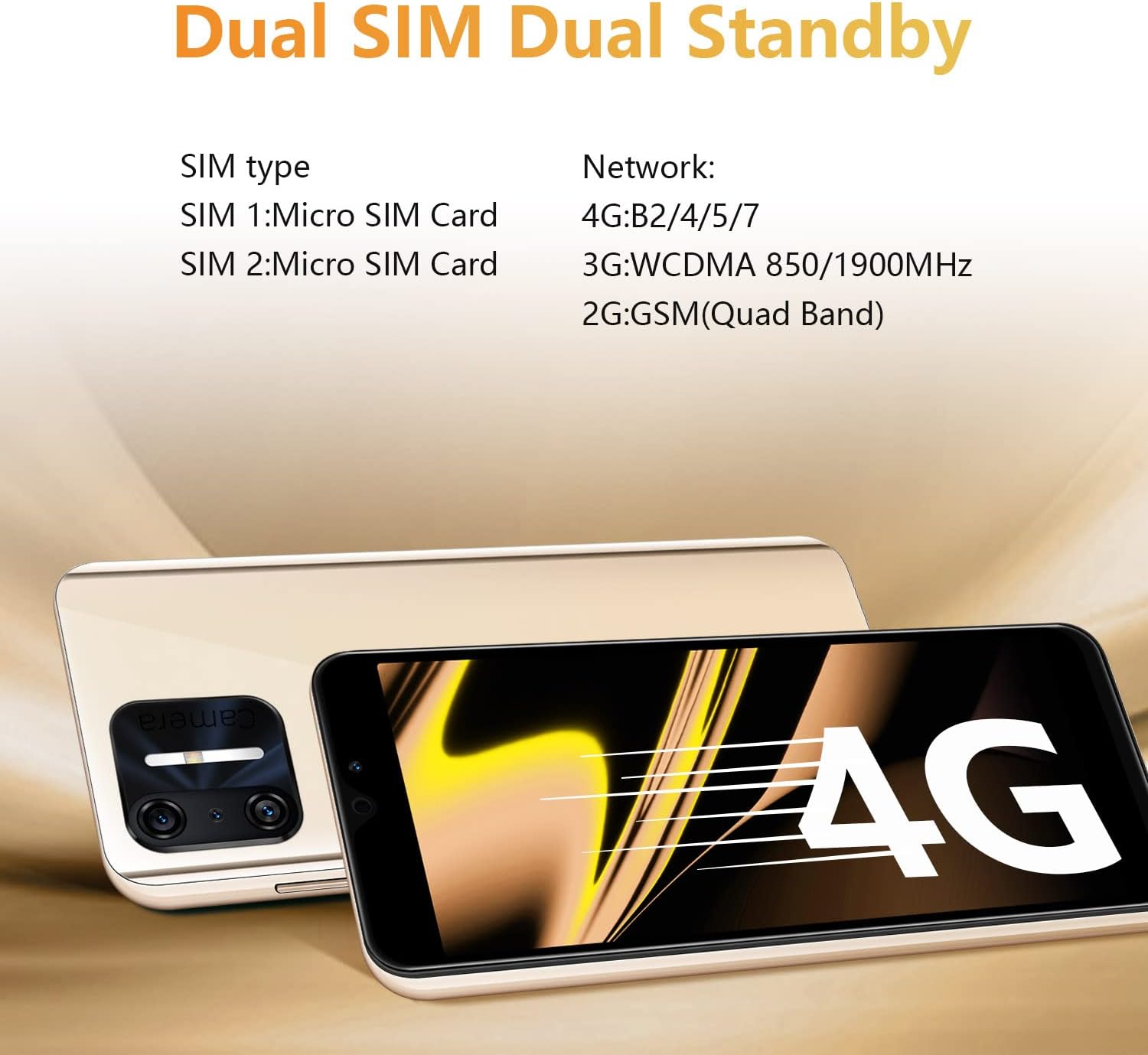
| Tecnologia cel·lular | 2G, 3G, 4G |
| Connectivitat sense fil | Bluetooth, WiFi |
| Entrada de la interfície humana | Pantalla tàctil |
| Pes de l'article | 15.2 unces |
Vídeo: Acabatview of Xgody X13 features including camera, processor, memory, face ID, battery, screen, 4G, and Android 9.0.
6. Compatibilitat de xarxa
The Xgody X13 is an unlocked 4G smartphone compatible with AT&T (except AT&T/Cricket) and T-Mobile networks, and their MVNO networks. It is no compatible with Verizon or CDMA Networks like Sprint and Boost Mobile.
Always verify compatibility with your carrier directly for their Bring Your Own Device (BYOD) program.
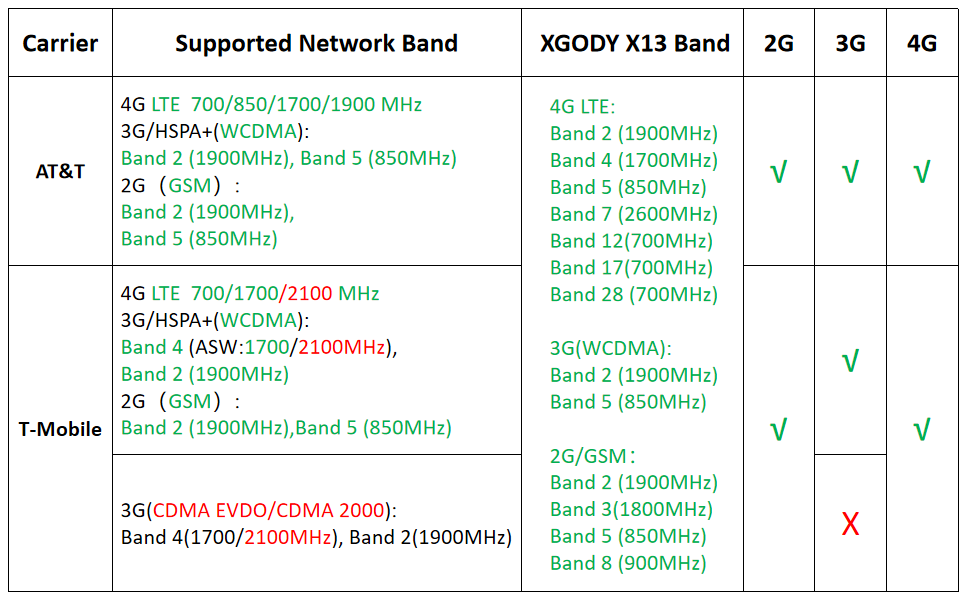
Image: Network band compatibility chart for Xgody X13 with major US carriers.
7. Solució De Problemes
7.1. El telèfon no s'encén
- Ensure the battery is correctly installed and charged. Connect the phone to a charger for at least 15 minutes before attempting to power it on.
- Premeu i manteniu premut el botó d'engegada durant 10-15 segons per forçar un reinici.
7.2. Problemes de connectivitat de xarxa
- Verify that your SIM card is correctly inserted and activated with your carrier.
- Check your phone's network settings (Configuració > Xarxa i Internet > Xarxa mòbil) to ensure mobile data is enabled and the correct APN settings are configured.
- Confirm your carrier's network bands are compatible with the Xgody X13.
- Reinicieu el telèfon.
7.3. Rendiment lent
- Tanca les aplicacions de fons innecessàries.
- Esborra la memòria cau i les dades de les aplicacions que fas servir amb freqüència.
- Ensure sufficient storage space is available (Configuració > Emmagatzematge).
- Realitzeu un restabliment de fàbrica com a últim recurs (Configuració > Sistema > Restablir opcions > Esborra totes les dades (restabliment de fàbrica)). Nota: Això eliminarà totes les dades del telèfon. Primer feu una còpia de seguretat de la informació important.
8. Manteniment
- Keep your phone clean using a soft, dry cloth. Avoid harsh chemicals.
- Protect the screen with the provided screen protector and use the phone case to prevent physical damage.
- Avoid exposing the phone to extreme temperatures or moisture.
- Feu còpies de seguretat de les vostres dades regularment per evitar pèrdues.
- Keep the software updated to the latest version available for optimal performance and security.
9. Garantia i Suport
For warranty information and technical support, please refer to the warranty card included in your product packaging or visit the official Xgody weblloc web. Conserveu el comprovant de compra per a reclamacions de garantia.