
Fanvil X3U
Manual d'usuari del telèfon VoIP Fanvil X3U Enterprise
Model: X3U
1. Introducció
This manual provides instructions for the installation, operation, and maintenance of the Fanvil X3U Enterprise VoIP Phone. The Fanvil X3U is a cost-effective Gigabit IP phone featuring a high-resolution color display and multiple SIP lines, designed to enhance communication flexibility and productivity in business environments. It supports HD audio with G.722 and Opus wideband codecs for clear voice quality.
2. Contingut del paquet
Abans de continuar amb la instal·lació, comproveu que tots els elements siguin presents al paquet:
- Fanvil X3U IP Phone Unit
- Telèfon
- Cable de l'auricular
- Cable Ethernet
- Suport de telèfon
- Guia d'instal·lació ràpida
- Note: Power adapter is not included and must be purchased separately if Power over Ethernet (PoE) is not used.
3. Sobrecàrrega físicaview
Familiarize yourself with the components of your Fanvil X3U phone.
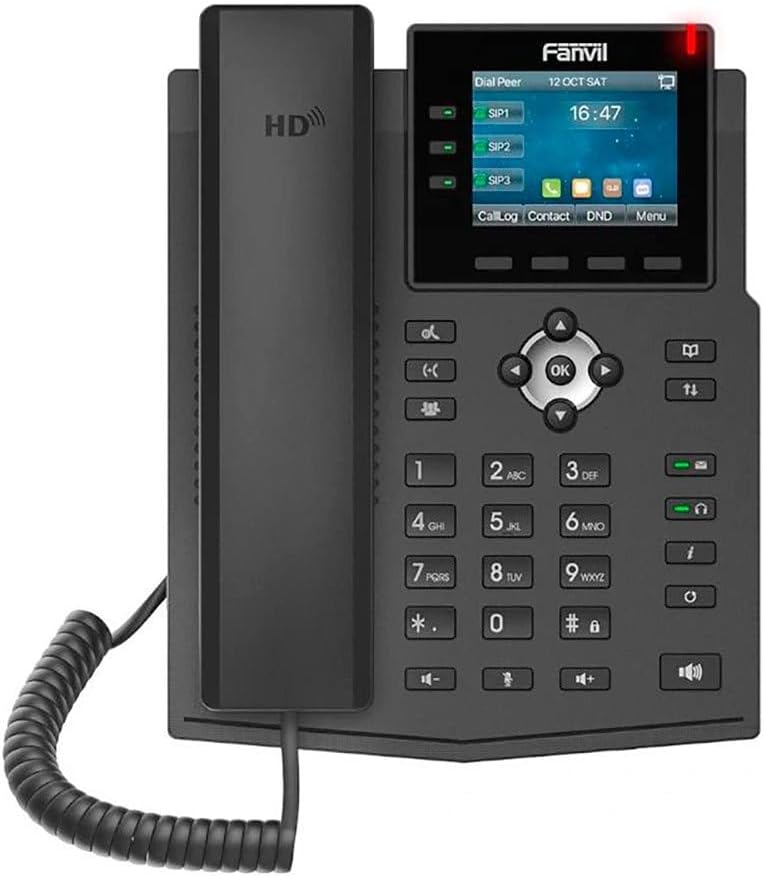
Figura 3.1: Davant view of the Fanvil X3U IP Phone, showing the display, keypad, and handset.

Figura 3.2: lateral view of the Fanvil X3U IP Phone, illustrating the ergonomic design and handset placement.

Figura 3.3: lateral view of the Fanvil X3U IP Phone with its adjustable stand, showing the optimal viewangle de ing.
3.1 Keypad Layout
- Tecles de línia: 3 programmable line keys with LED indicators for managing multiple SIP lines.
- Tecles de navegació: Up, Down, Left, Right, and OK buttons for menu navigation.
- Tecles programades: Botons sensibles al context sota la pantalla.
- Tecles de funció: Dedicated keys for features like Message, Headset, Mute, Hold, Transfer, Redial, Speakerphone, and Volume control.
- Teclat numèric: Standard 0-9, *, # keys for dialing.
4. Configuració
4.1 Assembling the Phone
- Fixeu el suport del telèfon: Align the tabs on the phone stand with the slots on the back of the phone unit and push until it clicks into place.
- Connecteu el telèfon: Plug one end of the coiled handset cord into the handset port on the phone unit and the other end into the handset.
- Connecteu el cable Ethernet: Plug one end of the Ethernet cable into the LAN port on the back of the phone and the other end into your network switch or router. If using PoE, this connection will also power the phone.
- Connecteu l'alimentació (si no feu servir PoE): If your network does not provide PoE, connect a compatible 5V/1A power adapter (not included) to the power port on the back of the phone and then to a power outlet.
- Connecteu els auriculars (opcional): If using a wired headset, plug it into the headset port on the phone. The Fanvil X3U supports EHS wireless headsets.
4.2 Configuració inicial de la xarxa
Upon first boot, the phone will attempt to obtain an IP address via DHCP. If successful, the IP address will be displayed on the screen. If not, you may need to configure network settings manually via the phone's menu or a web interfície.
4.3 SIP Account Registration
To make and receive calls, you must register at least one SIP account. This is typically done through the phone's web interface or by your system administrator. Consult your VoIP service provider or IT department for SIP account details (SIP server address, username, password).
- Accedir al telèfon web interfície introduint la seva adreça IP a a web navegador.
- Log in using the administrator credentials (default username and password can be found in the full user guide or from your administrator).
- Navigate to the SIP Account settings and enter the provided details.
- Save the settings and reboot the phone if prompted.
5. Instruccions de funcionament
5.1 Fer trucades
- Lift the Handset o premeu el botó Altaveu botó.
- Marca el número using the numeric keypad.
- Premeu el botó Marqueu soft key or wait a few seconds for the call to initiate automatically.
5.2 Contestar trucades
Quan sona el telèfon:
- Lift the Handset per respondre.
- Alternativament, premeu el botó Altaveu botó o el Respon tecla suau.
5.3 Funcions de gestió de trucades
- Manteniu: Durant una trucada activa, premeu Aguanta botó. Premeu-lo de nou per reprendre la trucada.
- Transferència: Durant una trucada activa, premeu Transferència , marqueu el número nou i, a continuació, premeu el botó Transferència again (blind transfer) or wait for the other party to answer before pressing Transferència (trasllat assistit).
- Silenciar: Premeu el botó Silenciar button to mute your microphone. The LED will illuminate. Press again to unmute.
- Conferència: Durant una trucada activa, premeu Conf soft key, dial the third party's number, and then press Conf again to establish a three-way conference.
- Correu de veu: Premeu el botó Missatge botó per accedir al correu de veu.
5.4 Pantalla i navegació de menús
The 2.8-inch color display shows call information, status, and menu options. Use the navigation keys (Up, Down, Left, Right, OK) and soft keys to browse and select options.
6. Manteniment
6.1 Neteja
- Use a soft, dry cloth to clean the phone's surface and display.
- Do not use liquid cleaners or aerosol sprays directly on the phone.
- Per a marques difícils, esbandiu lleugeramentampal drap amb aigua o un netejador suau i no abrasiu.
6.2 actualitzacions de microprogramari
Periodically check the Fanvil website or consult your system administrator for firmware updates. Firmware updates can provide new features, performance improvements, and security enhancements. Updates are typically applied via the phone's web interfície.
6.3 Consideracions ambientals
- Mantingueu el telèfon allunyat de la llum solar directa, de fonts de calor i de la humitat excessiva.
- Assegureu-vos una ventilació adequada al voltant del dispositiu.
7. Solució De Problemes
| Problema | Causa possible | Solució |
|---|---|---|
| El telèfon no s'encén. | No hi ha alimentació de PoE ni de l'adaptador de corrent. | Check Ethernet cable connection (for PoE) or power adapter connection and outlet. Ensure power adapter meets specifications (5V/1A). |
| No puc fer/rebre trucades. | SIP account not registered; Network connectivity issue. | Verify SIP account settings in the web interface. Check network cable and IP address. Contact your VoIP provider or administrator. |
| Poor audio quality (echo, static). | Network congestion; Faulty cable/handset; Environmental interference. | Check network bandwidth. Replace handset cord or Ethernet cable. Move phone away from other electronic devices. |
| La pantalla està en blanc o congelada. | Software error; Power issue. | Perform a power cycle (unplug and replug power). If issue persists, contact support. |
8. Especificacions
- Visualització: 2.8-inch (320x240 pixel) color display
- Línies SIP: 6
- Ports Ethernet: Gigabit Ethernet de dos ports
- Còdecs d'àudio: HD audio with G.722 and Opus wideband codecs
- Headset Support: EHS wireless headset support
- Protocols: IPv4, IPv6
- Dimensions (L x A x A): 11 x 9 x 3 polzades (aproximadament)
- Pes de l'article: 1.98 lliures (aproximadament)
- Font d'alimentació: Corded Electric (Power Adapter Not Included, PoE supported)
- Material: Plàstic
- Color: Negre
9. Garantia i Suport
9.1 Informació de la garantia
The Fanvil X3U Enterprise VoIP Phone typically comes with a manufacturer's limited warranty. Please refer to the warranty card included with your product or visit the official Fanvil weblloc web per obtenir informació detallada sobre els termes i condicions de la garantia. Conserveu el rebut de compra com a comprovant de compra per a reclamacions de garantia.
9.2 Suport tècnic
For technical assistance, troubleshooting beyond this manual, or inquiries regarding your device, please contact your authorized Fanvil reseller or your VoIP service provider's support team. You may also visit the official Fanvil support website for FAQs, documentation, and contact information.
Fanvil Official Weblloc: www.fanvil.com
Ask a question about this manual
Ask about setup, troubleshooting, compatibility, parts, safety, or missing instructions. Manuals+ will review the question and use this page’s manual context to help answer it.