
MeLE Quieter 3C
MeLE Quieter3C Fanless Mini PC User Manual
Model: Quieter 3C (3C-N5105-8GB-256GB)
Introducció
This manual provides detailed instructions for the setup, operation, and maintenance of your MeLE Quieter3C Fanless Mini PC. Please read this manual thoroughly before using the device to ensure proper functionality and to maximize its lifespan. The MeLE Quieter3C is a compact, fanless mini PC designed for quiet and stable performance in various applications, from home office to industrial use.
Què hi ha a la caixa
Verifiqueu que tots els elements siguin presents al paquet:
- 1x Mini PC Quieter 3C 82E
- 1x Power Adapter 12V/2A
- 1x VESA Mount
- 1x Manual d'usuari (aquest document)
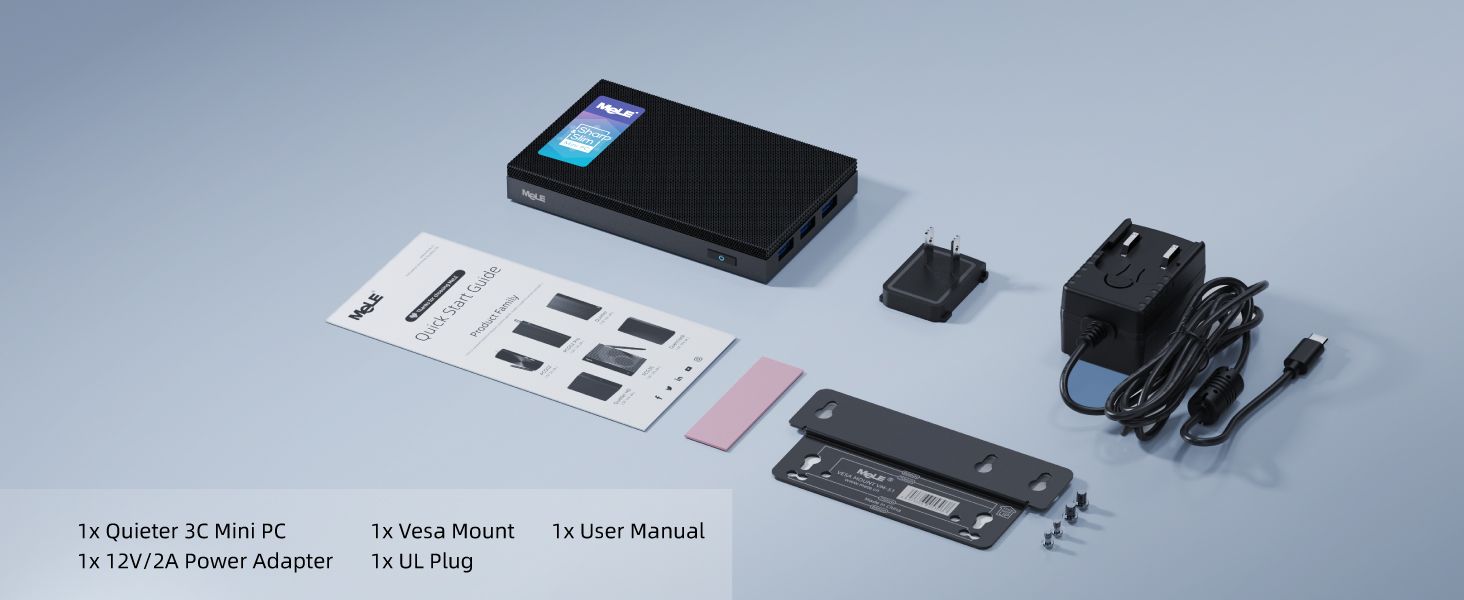
Image: Contents of the MeLE Quieter3C package, showing the mini PC, power adapter, VESA mount, and user manual.
Producte acabatview
The MeLE Quieter3C is a compact and efficient fanless mini PC. Key features include:
- Processador: Intel Celeron N5105 (2.9 GHz, 4 Cores, 4 Threads)
- Memòria: 8GB LPDDR4 RAM (2933 MHz)
- Emmagatzematge: 256GB eMMC, expandable via Micro SD (up to 1TB) and M.2 NVMe 2280 SSD (up to 4TB)
- Gràfics: Intel UHD Graphics, supporting triple 4K display output
- Connectivitat: WiFi 5 (802.11ac) with AC9560 module, Bluetooth 5.1, Gigabit Ethernet
- Ports: Full-function USB Type-C (data, charging, video), multiple USB 3.2 ports, HDMI 2.0, 3.5mm audio jack
- Refrigeració: Fanless design for silent operation and dust resistance

Imatge: De dalt a baix view of the MeLE Quieter3C Mini PC, highlighting its compact form factor and port layout.
Instruccions de configuració
- Connecta a la pantalla: Connect your monitor(s) to the Mini PC using the HDMI ports or the full-function USB Type-C port. The device supports up to three 4K displays simultaneously.
- Connecteu els perifèrics: Plug in your keyboard, mouse, and other USB devices into the available USB 3.2 ports.
- Connexió d'alimentació:
- Use the provided 12V/2A power adapter and connect it to the DC-in port.
- Alternatively, you can power the device via the PD-enabled USB Type-C port (ensure your power supply is over 24W). This port also supports data transfer and video output.
- Connexió de xarxa: Connect an Ethernet cable to the Gigabit Ethernet port for a wired network connection, or use the built-in WiFi 5 for wireless connectivity.
- Encès: Press the power button located on the device. The system will boot up.

Image: Detailed diagram illustrating the rich I/O ports of the MeLE Quieter3C, including USB-C, HDMI, USB 3.2, Micro-SD, audio jack, Ethernet, and power button.
Instruccions de funcionament
Initial Boot and Operating System
Upon first power-on, the Mini PC will typically guide you through the initial setup of the pre-installed operating system (e.g., Windows 11 Pro). Follow the on-screen prompts to configure language, region, network, and user accounts.
Connexió a xarxes
- Connexió per cable: Plug an Ethernet cable into the RJ45 port. The system should automatically detect and connect to the network.
- Connexió sense fil: Access the network settings in your operating system, select your desired Wi-Fi network, and enter the password if required. The device supports WiFi 5 (802.11ac) for stable wireless connectivity.
Configuració de la pantalla
The MeLE Quieter3C supports triple display output. You can connect monitors via the two HDMI 2.0 ports and one full-function USB Type-C port. To configure multiple displays, access your operating system's display settings (e.g., right-click on the desktop in Windows and select "Display settings").

Image: The MeLE Quieter3C Mini PC connected to three external monitors, illustrating its capability for triple 4K display output.
Ampliació d'emmagatzematge
The device comes with 256GB eMMC storage. For additional storage, you can:
- Targeta micro SD: Insert a Micro SD card into the dedicated slot. It supports up to 1TB.
- SSD M.2 NVMe: The Mini PC includes an internal M key PCIe 3.0 x2 M.2 SSD NVMe 2280 slot, supporting up to 4TB. This requires opening the device and installing an M.2 SSD (not compatible with SATA interface). Refer to the detailed installation guide for this procedure if available, or seek professional assistance.

Imatge: Una explosió view of the MeLE Quieter3C showing the internal M.2 NVMe 2280 SSD slot for storage upgrades.
Gestió tèrmica
The MeLE Quieter3C features an elegant fanless cooling design, ensuring silent operation and dust resistance. This passive cooling system prevents overheating and supports 24/7 operation. Due to the fanless nature, the surface temperature of the device may reach between 55°C to 70°C during operation. This is normal for fanless mini PCs and meets the safety standards of International Electrotechnical IEC62368-1:2018. Ensure adequate airflow around the device and avoid placing it in enclosed spaces to optimize heat dissipation.

Image: A diagram demonstrating the fanless thermal dissipation of the MeLE Quieter3C, with arrows indicating heat flow and a graph showing stable performance across various ambient temperatures.

Imatge: Una explosió view of the MeLE Quieter3C, highlighting its internal components and the absence of a fan, ensuring silent operation.
Especificacions
| Característica | Detall |
|---|---|
| Marca | MeLE |
| Sèrie | Quieter 3C |
| Número de model | Quieter 3C |
| Processador | Intel Celeron N5105 (2.9 GHz) |
| RAM | 8 GB de LPDDR4 (2933 MHz) |
| Emmagatzematge | eMMC de 256 GB |
| Emmagatzematge ampliable | Micro SD (up to 1TB), M.2 NVMe 2280 SSD (up to 4TB) |
| Coprocessador gràfic | Gràfics Intel UHD |
| Resolució de pantalla màxima | 3840 x 2160 píxels (4K) |
| Tipus sense fil | 802.11ax (WiFi 5), Bluetooth 5.1 |
| Sistema operatiu | OS (e.g., Windows 11 Pro) |
| Ports | Full-function USB Type-C (PD3.0, DP1.4), 2x USB 3.2 (10Gbps), 2x USB 3.2 (5Gbps), 2x HDMI 2.0, Gigabit Ethernet, 3.5mm Audio Jack, Micro SD Slot, Kensington Lock Slot |
| Pes de l'article | 1.08 lliures |
| Dimensions del producte | 5.12 x 3.15 x 0.79 polzades |
| Entrada de potència | 12V/2A DC or USB-C PD (over 24W) |
Resolució de problemes
- Sense energia:
- Assegureu-vos que l'adaptador de corrent estigui connectat correctament tant al Mini PC com a una presa de corrent que funcioni.
- If using USB-C PD, verify the power supply provides over 24W and the cable is fully functional.
- Proveu una presa de corrent diferent.
- Sense sortida de pantalla:
- Check all HDMI and USB-C display cables are securely connected to both the Mini PC and the monitor.
- Assegureu-vos que el monitor estigui encès i configurat a la font d'entrada correcta.
- Test with a single monitor and cable to isolate the issue.
- Sense connexió a Internet:
- For wired connections, ensure the Ethernet cable is properly connected and your router is functioning.
- For Wi-Fi, check your network settings, ensure Wi-Fi is enabled, and re-enter the password if necessary. Restart your router if other devices are also experiencing issues.
- System Slowdown/Overheating:
- While the device is fanless, ensure it is placed in a well-ventilated area and not in an enclosed space.
- Close unnecessary applications to reduce CPU load.
- Monitor ambient temperature; extreme heat can affect performance.
Manteniment
- Neteja: Use a soft, dry cloth to clean the exterior of the Mini PC. Avoid liquid cleaners directly on the device. The fanless design reduces dust accumulation internally, but external vents should be kept clear.
- Actualitzacions de programari: Actualitzeu regularment el sistema operatiu i els controladors per garantir un rendiment i una seguretat òptims.
- Gestió d'emmagatzematge: Revisa periòdicament l'ús de l'emmagatzematge i elimina els elements innecessaris files per mantenir la capacitat de resposta del sistema.
- Condicions ambientals: Operate the Mini PC within recommended temperature and humidity ranges. Avoid direct sunlight and extreme temperatures.
Garantia i Suport
MeLE offers a One Year Warranty for the Quieter3C Mini PC. For customer service and technical support, please refer to the following:
- Període de garantia: 12 mesos
- Suport per correu electrònic: service@mele.cn
- Suport telefònic: +86-0755-8636 3200
- Temps de resposta: Customer service replies typically within 24 hours.
- Compliment legal: MeLE products are manufactured in accordance with FCC, CE, UKCA, IC, and TELEC standards.
For maintenance or repair during the warranty period, please contact MeLE support.

Image: MeLE customer support details, including email address, phone number, and warranty information.
Ask a question about this manual
Ask about setup, troubleshooting, compatibility, parts, safety, or missing instructions. Manuals+ will review the question and use this page’s manual context to help answer it.