
Introducció
Thank you for choosing the LFF Atomic Clock. This device provides accurate time, date, indoor and outdoor temperature, and humidity readings. It features automatic time synchronization via the WWVB radio signal and a large, easy-to-read LCD display. Please read this manual thoroughly before use to ensure proper operation and to maximize the lifespan of your product.
Característiques del producte
- Sincronització del temps atòmic: Automatically synchronizes with the WWVB radio signal from Fort Collins, Colorado, ensuring precise time and date.
- Pantalla LCD gran: 15-inch display with 4.5-inch numbers for easy readability, suitable for various environments.
- Comprehensive Information: Displays time (12/24H), calendar (month, date, day of week), alarm status, indoor temperature (°C/°F), indoor humidity, outdoor temperature (°C/°F), and outdoor humidity.
- Sensor exterior sense fil: Transmits outdoor temperature and humidity data up to 328 feet (100 meters). The sensor has an IPX4 splash-proof rating.
- Múltiples zones horàries: Supports 8 time zones: EST, CST, MST, PST, AKT, HST, AST, NST.
- Funciona amb piles: Main clock requires 4 AA batteries, and the outdoor sensor requires 2 AAA batteries (batteries not included).
- Col·locació versàtil: Can be wall-mounted using three hanging holes or placed on a tabletop using the integrated stand.

Figura 1: Mésview of LFF Atomic Clock features.
Contingut del paquet
- 1 x LFF Atomic Clock (Model LWC100)
- 1 x Sensor exterior sense fil
- 1 x manual d'instruccions
Producte acabatview
Main Unit (Atomic Clock)

Figure 2: Rear panel of the LFF Atomic Clock.
- Caixa de la bateria: Compartment for 4 AA batteries.
- Botó SET: Enters setting mode for time, date, and other parameters.
- Botó ALARMA: Activates/deactivates the alarm and enters alarm setting mode.
- Botó amunt: Adjusts values upwards in setting mode.
- DOWN/RCC Button: Adjusts values downwards in setting mode. Press and hold to manually initiate WWVB signal reception.
- CHANNEL Button: Switches between outdoor sensor channels (if multiple sensors are used).
- Hang Holes (x3): Per muntatge a la paret.
- Suport de taula: Per a la col·locació de la taula.
Sensor exterior sense fils
The outdoor sensor is a compact unit designed to measure external temperature and humidity. It features a small LCD display for local readings and a battery compartment for 2 AAA batteries. The sensor is splash-proof (IPX4).
Configuració
1. Instal·lació de la bateria
Ensure you have 4 AA batteries for the main clock and 2 AAA batteries for the outdoor sensor (not included).
- Per al sensor exterior: Open the battery compartment cover on the back of the sensor. Insert 2 AAA batteries, observing the correct polarity (+/-). Close the cover securely.
- For the Main Clock: Open the battery compartment cover on the back of the clock. Insert 4 AA batteries, observing the correct polarity (+/-). Close the cover securely.
Upon battery insertion, the clock will power on and perform an initial self-check. The display will illuminate, and it will begin searching for the WWVB atomic time signal.
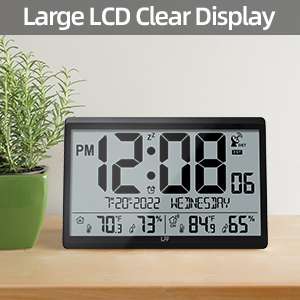
Figure 3: Battery requirements for the clock and sensor.
2. Atomic Time Synchronization (WWVB)
The clock will automatically attempt to receive the WWVB signal after battery installation. A signal tower icon will flash on the display, indicating it is searching. This process can take several minutes to several hours, depending on your location and environmental conditions. For best reception, place the clock near a window, away from electronic interference.
Once the signal is successfully received, the signal tower icon will become solid, and the clock will display the correct time and date for the default time zone (PST).

Figure 4: Atomic time synchronization via WWVB signal.
3. Manual Time Zone Setting
If the clock does not automatically set to your local time zone, or if you wish to change it:
- Manteniu premut el botó SET button for approximately 3 seconds to enter setting mode.
- The time zone will begin to flash. Use the UP or DOWN/RCC buttons to select your desired time zone (EST, CST, MST, PST, AKT, HST, AST, NST).
- Premeu SET de nou per confirmar i passar a la configuració següent.
4. Selecció de la unitat de temperatura (°C/°F)
To switch between Celsius and Fahrenheit for temperature display:
- Premeu breument DOWN/RCC button while in normal display mode. The temperature unit will toggle between °C and °F.
5. Outdoor Sensor Placement
For accurate outdoor readings, place the wireless sensor in a sheltered location that is protected from direct sunlight and rain. The transmission range is up to 328 feet (100 meters) in open air. Avoid placing it near large metal objects or other electronic devices that could interfere with the signal.

Figure 5: Wireless transmission range and sensor placement.
Instruccions de funcionament
1. Mostra informació
La gran pantalla LCD mostra la informació següent:
- Fila superior: PM indicator, Time (hours:minutes), Zz (snooze icon), DST (Daylight Saving Time) indicator, Atomic signal icon, Time Zone.
- Fila del mig: Date (month-day-year), Day of the week.
- Fila inferior: Indoor temperature, Indoor humidity, Channel indicator, Outdoor temperature, Outdoor humidity.
2. Funció d'alarma
Per configurar l'alarma:
- Manteniu premut el botó ALARMA button for 3 seconds. The alarm hour will flash.
- Utilitza el UP or DOWN/RCC botons per ajustar l'hora. Premeu ALARMA per confirmar.
- The alarm minute will flash. Use the UP or DOWN/RCC botons per ajustar els minuts. Premeu ALARMA per confirmar i sortir de la configuració de l'alarma.
Per activar/desactivar l'alarma:
- Premeu breument ALARMA button. The alarm icon will appear or disappear on the display, indicating its status.
To use the snooze function:
- Quan soni l'alarma, premeu qualsevol botó (excepte ALARMA) to activate snooze. The alarm will sound again after approximately 5 minutes.
- Per aturar l'alarma completament, premeu el botó ALARMA botó.
3. Manual Time Setting (If WWVB Signal is Unavailable)
In areas where the WWVB signal cannot be received, you can manually set the time and date:
- Manteniu premut el botó SET botó durant 3 segons per entrar al mode de configuració.
- Premeu repetidament SET to cycle through the settings (Time Zone, DST ON/OFF, 12/24H format, Hour, Minute, Year, Month, Day, Temperature Unit).
- Utilitza el UP or DOWN/RCC buttons to adjust the flashing value for each setting.
- Premeu SET to confirm each adjustment and move to the next.
- After setting the last parameter, press SET de nou per sortir del mode de configuració.
Manteniment
1. Substitució de la bateria
When the battery indicator appears on the display, it is time to replace the batteries. Replace all batteries in the main clock and/or outdoor sensor simultaneously with new ones of the same type. Do not mix old and new batteries or different battery types.
For outdoor sensors in temperatures below -4°F, lithium batteries are recommended for optimal performance.
2. Neteja
Wipe the clock and sensor with a soft, dry cloth. Do not use abrasive cleaners or solvents, as they may damage the display or casing.
Resolució de problemes
| Problema | Causa possible | Solució |
|---|---|---|
| Clock not receiving WWVB signal. | Interference, distance from transmitter, weak signal. | Relocate the clock near a window, away from electronics. Manually initiate signal search by holding DOWN/RCC button. Allow several hours for synchronization. |
| La temperatura/humitat exterior no es mostra o és inexacta. | Sensor out of range, low sensor batteries, interference, improper sensor placement. | Ensure sensor is within 100m (328ft) of the main unit. Replace sensor batteries. Relocate sensor away from direct sunlight/rain and metal objects. Press CANAL button on main unit to re-establish connection. |
| La pantalla està tènue o en blanc. | Low main unit batteries. | Replace all 4 AA batteries in the main clock. |
| Time is incorrect after initial setup. | Incorrect time zone set, temporary signal loss. | Verify time zone setting. Manually initiate WWVB signal search. If signal is consistently poor, manually set the time. |
Especificacions
| Característica | Especificació |
|---|---|
| Número de model | LWC100 |
| Tipus de visualització | LCD digital |
| Clock Dimensions | 14.2" d'amplada x 9.4" d'alçada x 1.2" de profunditat |
| Potència de la unitat principal | 4 piles AA (no incloses) |
| Potència del sensor | 2 piles AAA (no incloses) |
| Rang de temperatura interior | De 14.1 °F a 122.0 °F (-9.9 °C a 50.0 °C) |
| Interval de temperatura exterior | -58.0 °F a 158.0 °F (-50.0 °C a 70.0 °C) |
| Gamma d’humitat | 1% to 99% RH (Indoor & Outdoor) |
| Interval de transmissió sense fil | Fins a 100 metres (328 peus) en zona oberta |
| Outdoor Sensor Water Resistance | IPX4 (a prova d'esquitxades) |
| Material | Plàstic |
| Opcions de muntatge | Muntatge de paret, sobretaula |
Garantia i Suport
LFF products are designed for quality and reliability. If you encounter any quality problems with your LFF Atomic Clock, please contact our customer support team for assistance. Please refer to your purchase documentation for specific warranty terms and contact information.
For further support, visit the official LFF store on Amazon: LFF Store