
1. Introducció
Thank you for choosing the Hoco GA08 Smart Sports Bracelet. This device is designed to help you monitor your fitness activities and health metrics, providing convenient notifications and smart features directly on your wrist. Please read this manual carefully before using the product to ensure proper operation and to maximize its potential.
2. Contingut del paquet
Marqueu la casella per als elements següents:
- Hoco GA08 Smart Sports Bracelet (main unit and strap)
- Cable de càrrega USB
- Manual d'usuari
3. Producte acabatview
Familiarize yourself with the components of your Hoco GA08 Smart Sports Bracelet.

Figure 3.1: Hoco GA08 Smart Sports Bracelet and its retail packaging.
3.1 Main Unit and Strap
The main unit houses the display, sensors, and internal electronics. It is designed to be detachable from the strap for charging and maintenance.
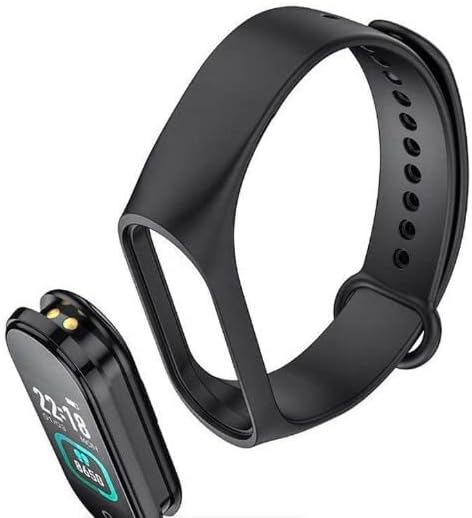
Figure 3.2: The main unit of the Hoco GA08 Smart Sports Bracelet detached from its silicone strap.
3.2 Sensors i contactes de càrrega
On the underside of the main unit, you will find the optical sensors for heart rate and blood pressure monitoring, along with the charging contacts.

Figura 3.3: posterior view of the Hoco GA08 Smart Sports Bracelet, highlighting the health sensors and charging pins.
4. Configuració
4.1 Càrrega del dispositiu
- Gently detach the main unit from the strap.
- Connect the main unit to the USB charging cable, ensuring the charging contacts align correctly.
- Connecteu l'extrem USB del cable a un adaptador de corrent USB estàndard (es recomana 5 V/1 A) o al port USB d'un ordinador.
- The bracelet display will show a charging indicator. A full charge typically takes 1-2 hours.
4.2 Baixada de l'aplicació complementària
To unlock all features and synchronize data, download the dedicated companion app on your smartphone. Cerca the app name (usually mentioned in the quick start guide or on the product packaging) in your device's app store (Google Play Store for Android or Apple App Store for iOS).
4.3 Emparellament amb el telèfon intel·ligent
- Assegureu-vos que el Bluetooth del vostre telèfon intel·ligent estigui activat.
- Obriu l'aplicació complementària al vostre telèfon intel·ligent.
- Follow the in-app instructions to search for and connect to your Hoco GA08 bracelet. The bracelet's name will typically appear as 'GA08' or 'Hoco GA08'.
- Confirm the pairing request on both your smartphone and the bracelet if prompted.
5. Instruccions de funcionament
The Hoco GA08 Smart Sports Bracelet features a touch-sensitive button or area for navigation. Tap to cycle through functions, or long-press to select/activate.
5.1 Navegació bàsica
- Toca: Short press the touch area to switch between different display screens (time, steps, heart rate, etc.) or to navigate within a menu.
- Premsa llarga: Press and hold the touch area for a few seconds to enter a function, confirm a selection, or start/stop an activity.
5.2 Vigilància de la salut
- Monitorització de la freqüència cardíaca: Navigate to the heart rate screen. The bracelet will automatically begin measuring your heart rate. Ensure the bracelet is snug on your wrist for accurate readings.
- Mesura de la pressió arterial: Navigate to the blood pressure screen. Remain still and relaxed during the measurement.
- Visualització de la temperatura: Navigate to the temperature screen to view your current body temperature.
5.3 modes esportius
The bracelet supports 6 modalitats esportives. Navigate to the sports mode section and long-press to select your desired activity. The bracelet will track relevant metrics such as duration, steps, and calories burned during your workout.
5.4 Funcions intel·ligents
- Clock, Stopwatch, Alarm, Timer, Calendar: Access these time-keeping functions directly from the bracelet. Alarms and timers can often be set via the companion app.
- Incoming Message and Call Notifications: Once paired with your smartphone, the bracelet will vibrate and display notifications for incoming calls and messages.
- Cerca de telèfon: Use this feature to make your paired smartphone ring, helping you locate it.
- Funció de recordatori: Set custom reminders through the app for hydration, movement, or other tasks.
- Visualització del temps: View current weather conditions after synchronizing with the companion app and your phone's location services.
- Captura de fotos remota: Use the bracelet as a remote shutter button for your smartphone camera. Open the camera in the app, then shake the bracelet or tap its touch area to take a photo.
6. Manteniment
- Neteja: Regularly clean the bracelet, especially the sensors and charging contacts, with a soft, dry cloth. If necessary, use a slightly damp drap i sabó suau, després assecar-lo bé.
- Eviteu productes químics: Do not use harsh chemicals, cleaning solvents, or strong detergents, as these can damage the device.
- Resistència a l'aigua: The bracelet typically has a certain level of water resistance (e.g., IP67). Avoid prolonged submersion or use in hot water/steam. Refer to product specifications for exact water resistance ratings.
- Emmagatzematge: Store the bracelet in a cool, dry place when not in use.
- Cura de la bateria: Avoid completely draining the battery frequently. Charge the device regularly to maintain battery health.
7. Solució De Problemes
If you encounter issues with your Hoco GA08 Smart Sports Bracelet, try the following solutions:
- El dispositiu no s'encén: Assegureu-vos que el dispositiu estigui completament carregat. Connecteu-lo al carregador durant almenys 30 minuts.
- No es pot emparellar amb el telèfon intel·ligent:
- Assegureu-vos que el Bluetooth estigui habilitat al vostre telèfon.
- Make sure the bracelet is charged and within Bluetooth range of your phone.
- Restart both your phone and the bracelet.
- Prova de desvincular i tornar a vincular el dispositiu a través de l'aplicació.
- Lectures de salut inexactes:
- Ensure the bracelet is worn snugly on your wrist, about one finger's width above the wrist bone.
- Keep still during measurements.
- Clean the sensor area on the back of the bracelet.
- Notificacions que no apareixen:
- Check app permissions on your smartphone to ensure the companion app has access to notifications.
- Verify that notification settings are enabled within the companion app.
- Ensure the bracelet is connected via Bluetooth.
8. Especificacions
| Característica | Descripció |
|---|---|
| Nom de marca | Hoco |
| Model | GA08 |
| Operating System (App Compatibility) | Android |
| Característiques especials | Heart Rate Monitor, Blood Pressure Measurement, 6 Sports Modes, Notifications, Remote Camera Control, Weather Display, Temperature Display |
| Forma de l'element | Oval |
| Estil | Apte per a totes les temporades |
| Color | Negre |
| Públic objectiu | Adults (Unisex) |
| Dispositius compatibles | Smartphone |
| Color de banda | Negre |
| Case Material Type | Resina |
9. Informació de seguretat
- This device is not a medical device and should not be used to diagnose or treat any medical condition. Consult a healthcare professional for medical advice.
- Mantingueu el dispositiu allunyat de temperatures extremes, llum solar directa i flames obertes.
- Do not attempt to disassemble or modify the device. This will void the warranty and may cause damage or injury.
- Mantenir fora de l'abast dels nens.
- Si experimenteu irritació o molèsties a la pell, interrompeu l'ús i consulteu un metge.
10. Garantia i Suport
For warranty information and customer support, please refer to the warranty card included in your product packaging or visit the official Hoco website. Typically, warranty covers manufacturing defects for a specified period from the date of purchase.
If you require technical assistance or have questions not covered in this manual, please contact Hoco customer service through their official channels.