
1. Introducció
This manual provides instructions for the WIWU Detachable Wireless Keyboard Case with Trackpad, designed to enhance your iPad experience by transforming it into a versatile workstation. This accessory combines a protective case with a detachable keyboard and a precision trackpad, offering multiple modes for typing, viewing, sketching, and reading.

The WIWU keyboard case offers a laptop-like experience for your iPad.
2. Compatibilitat
Aquesta funda amb teclat és compatible amb els següents models d'iPad d'Apple:
- Apple iPad Pro 11-inch (1st generation)
- Apple iPad Pro 11-inch (2nd generation)
- Apple iPad Pro 11-inch (3rd generation)
- Apple iPad Pro 11-inch (4th generation)
- Apple iPad Air (4th generation)
- Apple iPad Air (5th generation)
- Apple iPad (10th generation)
3. Contingut del paquet
El paquet inclou:
- WIWU iPad Pro 11 Inch Keyboard Case
- Cable de càrrega USB-C
- Manual d'usuari
4. Característiques del producte
- Teclat sense fil desmuntable: Easily attach or detach the keyboard from the case for flexible use.
- Integrated Trackpad: Supports multi-touch gestures for precise navigation.
- 7-Color Adjustable Backlight: Customize your typing experience with various backlight colors and brightness levels.
- Full Protection Case: Durable design provides comprehensive protection for your iPad.
- Built-in Apple Pencil Holder: Securely store and charge your Apple Pencil.
- Suport ajustable: Ofereix múltiples viewing angles (90°-135°) for comfort.
- Bateria de llarga durada: Up to 150 days standby time and 90 days of typing on a single charge.
- Adsorció magnètica: Strong magnets ensure secure attachment of the iPad and keyboard.
- Auto-sleep Mode: Conserves battery life by automatically putting the iPad to sleep when closed.

Key features of the WIWU keyboard case.

The keyboard features 7-color adjustable backlighting.
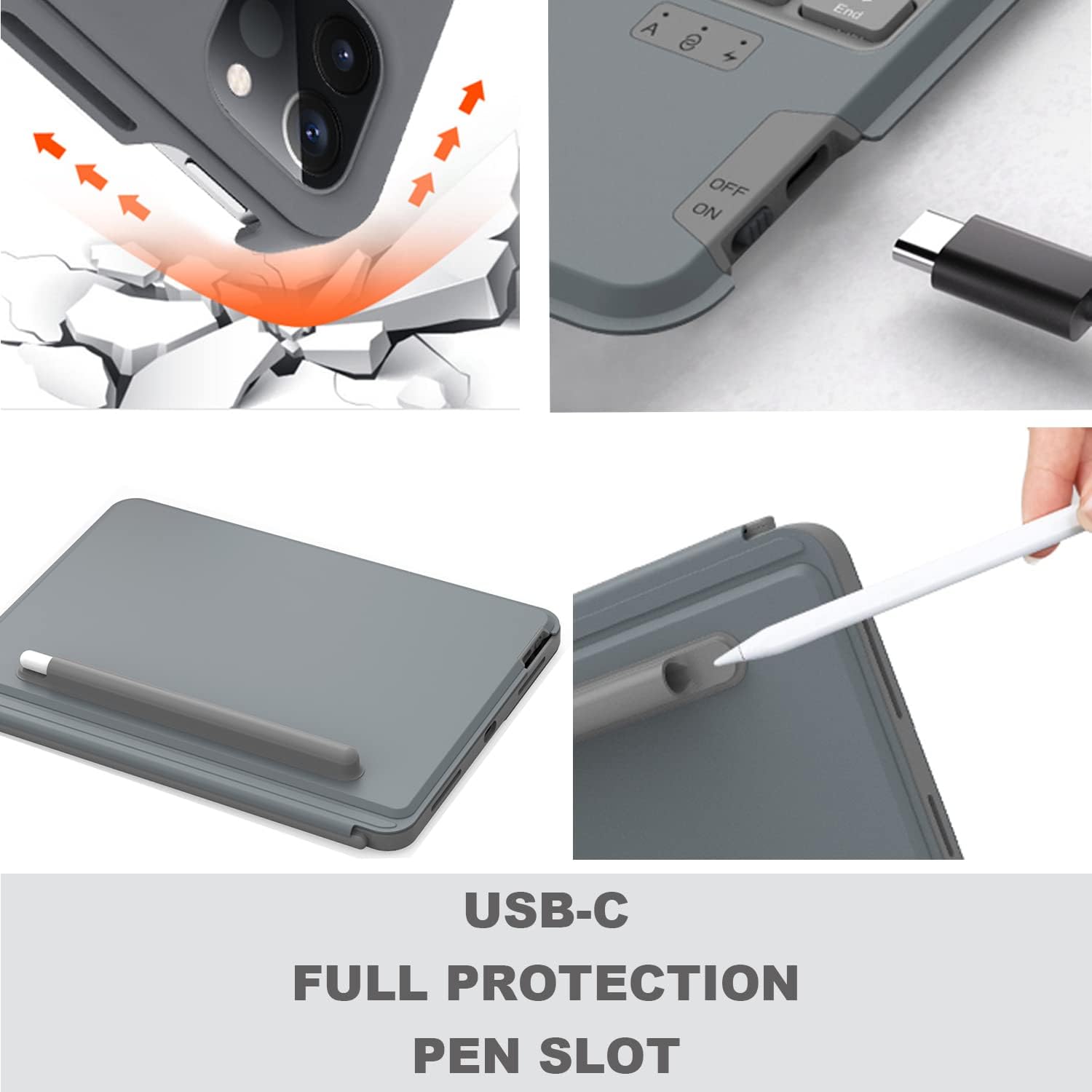
Details on USB-C charging, full protection, and the pen slot.

The keyboard offers extended battery life for prolonged use.
5. Instruccions de configuració
5.1 Càrrega del teclat
Before first use, fully charge the keyboard using the provided USB-C cable. Connect the USB-C end to the keyboard's charging port and the other end to a USB power adapter (not included).
5.2 Inserció de l'iPad
- Carefully align your iPad with the protective case.
- Gently press the iPad into the case, ensuring all edges are securely fitted.
- Ensure the camera protection cover pieces are correctly placed if applicable for your iPad model.

The keyboard magnetically attaches to the iPad case.
5.3 Vinculació Bluetooth
- Enceneu el teclat amb l'interruptor d'encesa situat al lateral.
- Premeu el botó Fn + Del keys simultaneously on the keyboard to enter Bluetooth pairing mode. The Bluetooth indicator light will flash.
- Al teu iPad, vés a Configuració > Bluetooth i activa el Bluetooth.
- Select "WIWU Keyboard" (or similar name) from the list of available devices.
- Once connected, the Bluetooth indicator light on the keyboard will stop flashing.
6. Instruccions de funcionament
6.1 Ús del teclat
The keyboard functions like a standard QWERTY keyboard. Use it for typing documents, emails, and navigating your iPad.
6.2 Trackpad Gestures
The integrated trackpad supports various multi-touch gestures for efficient navigation:
- Centre de control obert: Use one finger to move the pointer to select the status icons at the top right, then click. Alternatively, swipe up with one finger from the bottom right corner.
- View Llisca per sobre: Feu servir un dit per passar el punter més enllà de la vora dreta de la pantalla. Per ocultar Slide Over, torna a lliscar cap a la dreta.
- Desplaça't cap a l'esquerra o dreta: Feu lliscar dos dits cap a l'esquerra o cap a la dreta.

Common trackpad gestures for iPad navigation.
6.3 Ajust de la retroiluminació
To adjust the keyboard backlight color and brightness:
- Premeu el botó tecla d'icona de bombeta per canviar pels nivells de brillantor.
- Premeu Fn + Pàg or Fn + PgDn to change backlight colors.
6.4 Ajust ViewAngles
The case features an adjustable kickstand that allows you to set your iPad at various angles between 90° and 135° for optimal viewing and typing comfort.

The kickstand provides flexible viewangles d'ajust.
6.5 Multiple Usage Modes
The detachable design and adjustable kickstand allow for various modes:
- Mode d'escriptura: iPad attached to the keyboard, propped up for typing.
- ViewMode d'acció: Keyboard detached, iPad propped up for watching videos or video calls.
- Sketching/Reading Mode: Keyboard detached, iPad laid flat or held for drawing or reading.

The case supports multiple modes for different activities.

The case allows for both vertical and landscape orientations.
Official video demonstrating the WIWU Detachable Wireless Keyboard Case features and usage.
7. Manteniment
- Neteja: Utilitzeu un suau, damp cloth to clean the case and keyboard. Avoid harsh chemicals.
- Cura de la bateria: To prolong battery life, avoid fully discharging the keyboard frequently. Charge it regularly.
- Emmagatzematge: Quan no l'utilitzeu durant períodes prolongats, guardeu la funda del teclat en un lloc fresc i sec.
8. Solució De Problemes
- El teclat no es connecta per Bluetooth:
- Assegureu-vos que el teclat estigui carregat i encès.
- Verify Bluetooth is enabled on your iPad.
- Try re-pairing the keyboard by pressing Fn + Del.
- Reinicieu tant l'iPad com el teclat.
- Trackpad not responding or erratic cursor:
- Ensure the keyboard is fully charged. Low battery can affect trackpad performance.
- Desconnecteu i torneu a connectar la connexió Bluetooth.
- Clean the trackpad surface to remove any debris.
- Check iPad settings for trackpad sensitivity.
- Les tecles no responen:
- Ensure the keyboard is connected and charged.
- Test individual keys. If only some keys are affected, contact support.
9. Especificacions
| Característica | Detall |
|---|---|
| Marca | WIWU |
| Número de model | 6936686404181 |
| Tecnologia de connectivitat | Bluetooth, USB (per carregar) |
| Descripció del teclat | Ergonòmic |
| Font d'alimentació | Funciona amb bateria |
| Tipus de canvi | Interruptor de tisores |
| Disposició del teclat | QWERTY |
| Nombre de claus | 78 |
| Pes de l'article | 400 grams |
10. Garantia i Suport
For any product inquiries, technical assistance, or warranty information, please contact WIWU customer support. WIWU offers 7x24-hour online support to assist you with any issues or questions you may have regarding your keyboard case.
Please refer to your purchase documentation or the official WIWU weblloc web per conèixer els termes de garantia i les dades de contacte específiques.