
Producte acabatview
The Core Innovations Wireless Bluetooth Karaoke Microphone is a portable, handheld device designed for karaoke and entertainment. It features built-in speakers, HD recording capabilities, and Bluetooth connectivity for streaming music from your smartphone.

Image: The Core Innovations Wireless Bluetooth Karaoke Microphone in Rose Gold, showcasing el seu disseny.
Contingut del paquet
Assegureu-vos que tots els elements siguin presents al paquet:
- Core Innovations Wireless Bluetooth Karaoke Microphone
- Cable de càrrega micro-USB
- Manual d'usuari (aquest document)
Controls i Ports
Familiarize yourself with the microphone's controls and connection points:

Imatge: Detallada view of the microphone's control panel, showing buttons for Mode, Volume, Echo, Music, and power.
- Botó d'encesa: Manteniu premut per activar/desactivar.
- Botó de mode: Cycles through different operating modes (e.g., Bluetooth, MP3).
- Volume Sliders: Adjust microphone volume and music volume.
- Echo Slider: Adjust the echo effect level.
- Controls de música: Play/Pause, Previous Track, Next Track.

Imatge: Part inferior view of the microphone, highlighting the Headphone Jack, Memory Card Slot, and Micro USB Charging Port.
- Port de càrrega micro-USB: Per carregar la bateria interna.
- Ranura per a targeta de memòria: For inserting a memory card for HD recording.
- Auriculars Jack: Per a una escolta privada.
Configuració
1. Càrrega del micròfon
- Connect the Micro-USB charging cable to the microphone's charging port.
- Connect the other end of the cable to a USB power source (e.g., computer, USB wall adapter).
- The charging indicator light will illuminate. Once fully charged, the light may change color or turn off (refer to specific product behavior if indicated by manufacturer).
- Una càrrega completa normalment triga unes hores.
2. Encès / apagat
- Manteniu premut el botó Botó d'engegada for approximately 3 seconds to turn the microphone on or off.
- A voice prompt will indicate the power status.
3. Emparellament Bluetooth
- Ensure the microphone is powered on and in Bluetooth mode (indicated by a flashing blue light).
- Al telèfon intel·ligent o a un altre dispositiu amb Bluetooth, aneu a la configuració de Bluetooth.
- Cerca available devices and select "Core Innovations Mic" (or similar name).
- Once paired, a voice prompt will confirm the connection, and the blue light will stop flashing.

Image: The microphone connected wirelessly via Bluetooth to a smartphone, ready for music streaming.
Instruccions de funcionament
1. Singing with Music
- Pair your device via Bluetooth as described in the Setup section.
- Open your preferred music app on your smartphone and start playing a karaoke track or any song.
- Ajusteu el Volum de música slider on the microphone to control the background music level.
- Speak or sing into the microphone. Adjust the Volum del micròfon slider to control your voice level.
- Utilitza el Echo Slider to add a reverberation effect to your voice.
- Utilitza el Controls de música (Play/Pause, Previous Track, Next Track) to manage your music playback directly from the microphone.
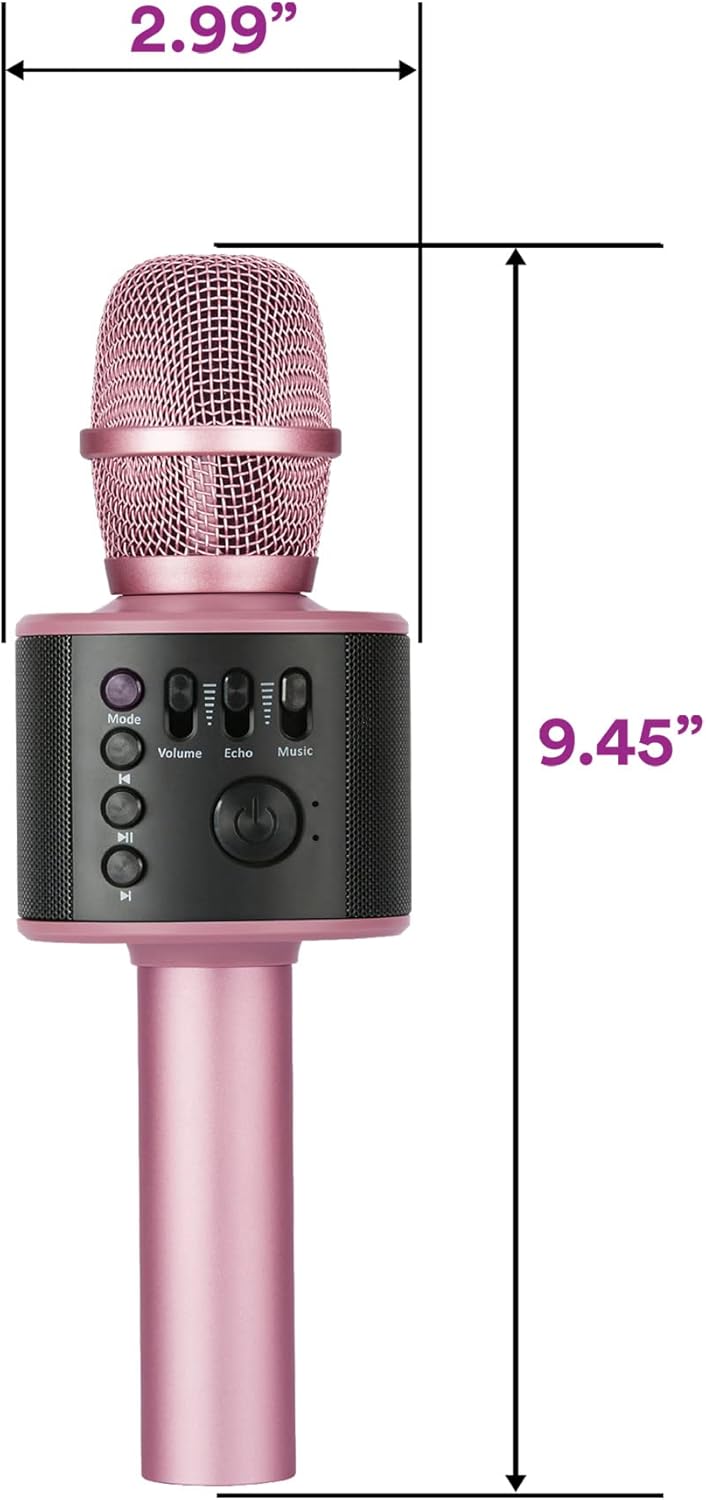
Image: A person holding the microphone, demonstrating its use for singing.
2. HD Recording
- Insert a compatible memory card into the Ranura per a targeta de memòria.
- Ensure the microphone is in the appropriate recording mode (check the Mode button functionality for recording options, if available, or use a connected smartphone app for recording).
- Begin singing or speaking into the microphone.
- Recordings are saved to the inserted memory card.
3. Using as a Standalone Speaker
- Connecta el dispositiu mitjançant Bluetooth.
- Play music from your device. The microphone's built-in speakers will play the audio.
- Ajusteu el Volum de música slider to control the playback volume.

Image: The microphone emitting sound waves from its built-in speakers.
Manteniment
- Keep the microphone dry and away from moisture.
- Netegeu l'exterior amb un drap suau i sec. No utilitzeu productes químics agressius ni netejadors abrasius.
- Emmagatzemar en un lloc fresc i sec quan no s'utilitzi.
- Avoid dropping the microphone or subjecting it to strong impacts.
Resolució de problemes
| Problema | Solució |
|---|---|
| El micròfon no s'encén. | Ensure the battery is charged. Connect to a power source using the Micro-USB cable. |
| No es pot emparellar per Bluetooth. |
|
| No hi ha so dels altaveus. |
|
| Echo effect is too strong/weak. | Ajusteu el Echo Slider al micròfon. |
Especificacions
- Número de model: KRMC101RG
- Connectivitat: Bluetooth, USB
- Font d'alimentació: Funciona amb bateria (necessita 1 bateria de ions de liti)
- Capacitat de la bateria: 1200 mAh (recarregable)
- Dimensions de l'article (L x A x A): 2.99 x 2.99 x 9.45 polzades
- Pes de l'article: 11.2 unces (0.7 lliures)
- Factor de forma del micròfon: Portàtil
- Característica especial: Control de volum
- Dispositius compatibles: Ordinador personal, Smartphone
- UPC: 810111500876

Image: Diagram showing the dimensions of the Core Innovations Wireless Bluetooth Karaoke Microphone.
Garantia i Suport
Per obtenir informació sobre la garantia i l'assistència al client, consulteu la pàgina oficial del fabricant. weblloc web o poseu-vos en contacte amb el seu departament d'atenció al client. Conserveu el rebut de compra per a reclamacions de garantia.
Fabricant: DP Audio Video
Informació important de seguretat
- No exposeu el dispositiu a temperatures extremes ni a la llum solar directa.
- No desmunteu ni intenteu reparar el dispositiu vosaltres mateixos.
- Mantenir fora de l'abast dels nens petits.
- Eliminar les bateries segons la normativa local.
Vídeos oficials de productes
Mireu aquests vídeos oficials per obtenir més orientació i demostracions:
Video: "Microphone and karaoke all in one" by Luisana Esquer. This video demonstrates the microphone's features and its use for karaoke.
Video: "UNBOXING: Core Innovations Karaoke Microphone" by TechyNerds. This video provides an unboxing experience and initial look at the microphone.