
Andoer e417fe28-cba1-49bd-8acb-ddcd73b41592
Andoer 4K Digital Video Camera User Manual
Model: e417fe28-cba1-49bd-8acb-ddcd73b41592
1. Introducció
This user manual provides detailed instructions for operating your Andoer 4K Digital Video Camera. Please read this manual thoroughly before using the camera to ensure proper operation and to maximize its performance. Keep this manual for future reference.
1.1 Contingut del paquet
En obrir el paquet, comproveu que tots els elements que s'enumeren a continuació hi són presents i que es troben en bon estat:
- 1 x Andoer 4K Digital Video Camera
- 2 x NP-40 Li-ion Battery (one pre-installed)
- 1 x cable USB
- 1 x cable de vídeo
- 1 x comandament a distància
- 1 x Camera Bag
- 1 manual d'usuari (anglès)

Image: The Andoer 4K Digital Video Camera, remote control, and two NP-40 Li-ion batteries, illustrating the main components included in the package.
2. Característiques del producte
The Andoer 4K Digital Video Camera is equipped with a range of features designed to enhance your video recording and photography experience:
- 4K Ultra HD Video Recording: Capture stunning videos at 4K/30fps and 2.7K/30fps resolutions.
- 56MP Still Image Capture: Produce high-resolution photos up to 56 megapixels (interpolation).
- 3.0 Inch IPS Touchscreen: A rotatable 270° touchscreen for intuitive control and versatile viewangles d'ajust.
- Zoom digital 18X: Bring distant subjects closer without compromising image quality.
- Visió nocturna IR: Record clear and natural footage in low-light or dark environments.
- Connectivitat WiFi: Easily connect to your smartphone or tablet via the DV-CAM APP for remote control, live view, i file transferència.
- Detecció facial i antivibració: Enhance focus and stability for clearer shots.
- Compatibilitat amb micròfon extern: Hot shoe mount for connecting an external microphone for improved audio quality.
- Standard Tripod Mount: 1/4 inch thread for mounting on a tripod or other accessories.

Image: An infographic highlighting the camera's main features including 4K 56MP resolution, 18X Digital Zoom, Face Detection, Night Vision, Dual Outputs, Digital Anti-shake, IPS Touchscreen, WiFi Connection, and Built-in Microphone.
3. Primers passos
3.1 Instal·lació i càrrega de la bateria
The camera uses NP-40 Li-ion batteries. One battery is typically pre-installed. Ensure batteries are fully charged before first use.
- Obriu la tapa del compartiment de la bateria que es troba a la part inferior de la càmera.
- Insert the NP-40 battery, ensuring the correct polarity.
- Tanqueu bé la tapa del compartiment de la bateria.
- To charge, connect the camera to a power source using the provided USB cable. The charging indicator light will illuminate.
- La càrrega s'ha completat quan s'apaga el llum indicador.
3.2 Instal·lació de la targeta SD
The camera supports SD/SDHC cards up to 128GB (Class 6 or above recommended, not included).
- Locate the SD card slot, usually on the side or bottom of the camera.
- Inseriu la targeta SD amb els contactes metàl·lics mirant en la direcció correcta (vegeu el diagrama a prop de la ranura). Empenyeu-la fins que encaixi al seu lloc.
- Per treure-la, torneu a prémer suaument la targeta fins que surti.
4. Funcionament bàsic
4.1 Encès/Apagat
- Encès: Open the LCD screen or press the Power button.
- Apagar: Close the LCD screen or press and hold the Power button.
4.2 Gravació de vídeo
- Enceneu la càmera.
- Ensure the camera is in video recording mode (indicated by an icon on the screen). If not, use the Mode button to switch.
- Press the Record button (usually a red circle) to start recording.
- Torneu a prémer el botó Grava per aturar la gravació.
4.3 Fer fotos
- Enceneu la càmera.
- Assegureu-vos que la càmera estigui en mode foto.
- Enquadra la teva foto amb la pantalla LCD.
- Press the Photo button (often a camera icon or shutter button) to take a picture.
4.4 Funció de zoom
The camera features 18X digital zoom.
- Use the T (Telephoto) button to zoom in.
- Use the W (Wide) button to zoom out.

Image: A visual demonstration of the 18X digital zoom capability, showing how the camera can magnify distant subjects.
4.5 Reproducció
- In standby mode, press the Playback button (often an arrow icon) to enter playback mode.
- Use the navigation buttons to browse through your recorded videos and photos.
- Press the OK button to play a video or view una foto a pantalla completa.
- Press the Playback button again to exit playback mode.
5. Funcions avançades
5.1 Connexió WiFi
The camera supports WiFi connectivity for remote control and file transfer via the DV-CAM APP.
- Download and install the "DV-CAM" APP on your smartphone or tablet from your device's app store.
- On the camera, navigate to the WiFi settings and enable WiFi. The camera's WiFi network name (SSID) and password will be displayed.
- On your smartphone/tablet, go to WiFi settings and connect to the camera's WiFi network using the provided password.
- Open the DV-CAM APP. You can now view viu footage, control recording, take photos, and download files directly to your mobile device.

Image: A visual representation of the camera's WiFi function, showing a smartphone connected to the camera to view viu footage or transfer files.
Visió nocturna IR 5.2
The IR Night Vision feature allows you to record in low-light conditions.
- To activate IR Night Vision, locate the IR button or setting in the camera menu.
- When activated, the camera will use infrared light to illuminate the scene, capturing clear black and white footage in darkness.

Image: A side-by-side comparison demonstrating the effectiveness of IR Night Vision, showing a scene in normal light versus the same scene captured in darkness using infrared.
5.3 3.0 Inch IPS Touchscreen
The 3.0-inch IPS touchscreen offers intuitive control and can be rotated 270 degrees for various shooting angles, including self-recording.
- Tap the screen to access menu options or focus.
- Swipe to navigate through playback or menu pages.
- Rotate the screen to face forward for vlogging or self-portraits.
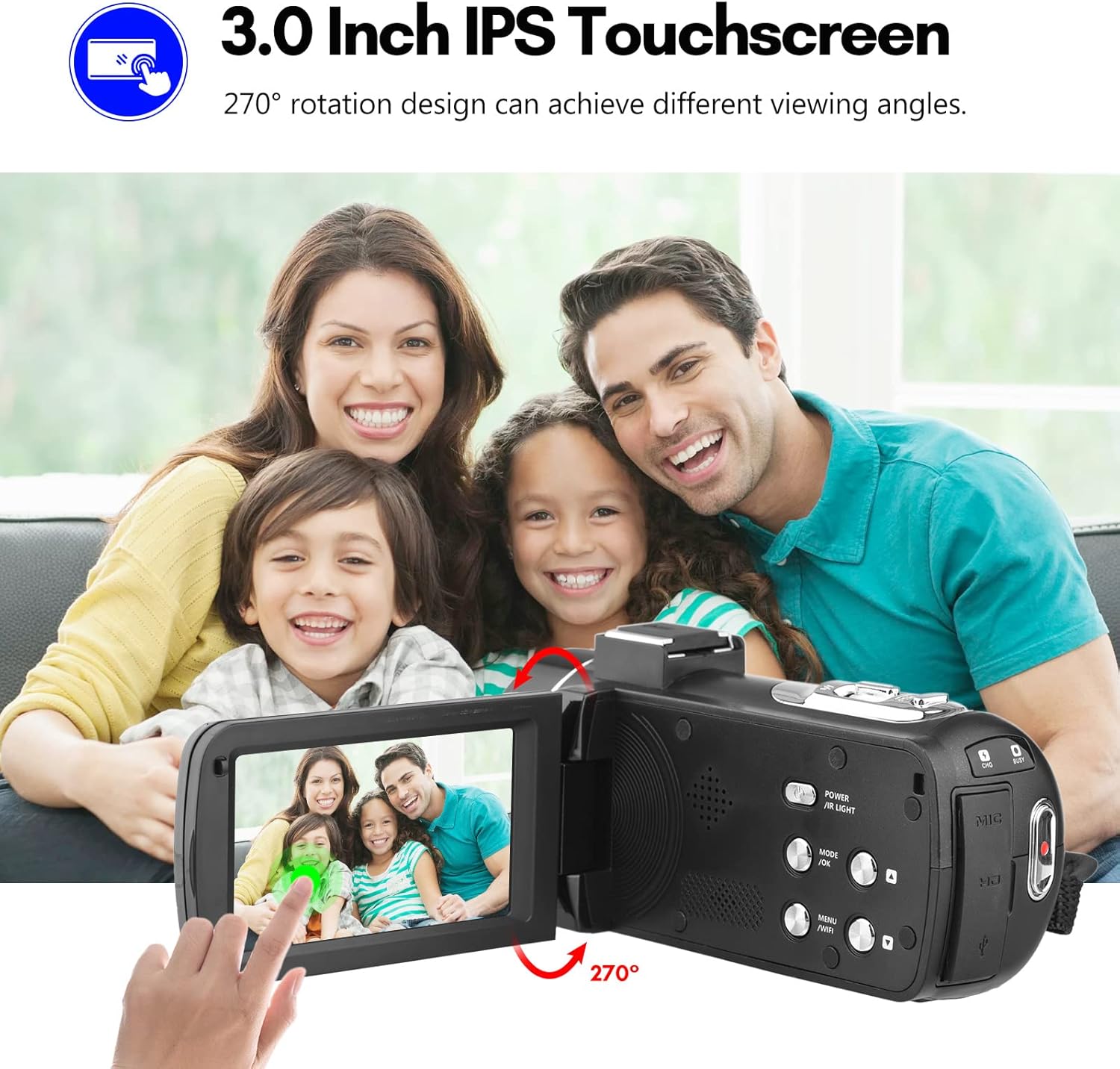
Image: The Andoer camera with its 3.0-inch IPS touchscreen rotated, demonstrating its 270-degree rotation capability for flexible viewi autoenregistrament.
5.4 Configuració del menú
Access the camera's menu to adjust various settings such as video resolution, photo resolution, white balance, exposure, self-timer, and auto power off.
- Premeu el botó MENU per entrar al menú de configuració.
- Use the navigation buttons or touchscreen to select options.
- Premeu D'acord per confirmar les seleccions.
- Premeu MENU de nou per sortir.
6. Connectivitat
The camera offers multiple connectivity options for viewing and transferring your media.
6.1 Connecting to a TV (HD Multimedia Interface)
- Assegureu-vos que la càmera estigui apagada.
- Connect one end of the HD multimedia interface cable (not explicitly listed in package contents, but mentioned in description) to the camera's HD port and the other end to an HD input on your TV.
- Turn on the TV and select the correct HD input source.
- Turn on the camera. The camera's display will be mirrored on the TV screen, allowing you to view fotos i vídeos.
6.2 Connexió a un ordinador (USB)
- Assegureu-vos que la càmera estigui apagada.
- Connecteu la càmera a l'ordinador mitjançant el cable USB proporcionat.
- Turn on the camera. It will typically enter "Mass Storage" or "PC Camera" mode. Select "Mass Storage" to access files.
- The camera will appear as a removable disk drive on your computer, allowing you to transfer files.

Image: An illustration detailing how to connect the Andoer camera to a television via HD multimedia interface and to a computer via USB for viewing and transferring media.
7. Manteniment
7.1 Neteja de la càmera
- Feu servir un drap suau i sec per netejar el cos de la càmera.
- For the lens, use a specialized lens cleaning cloth and lens cleaning solution. Avoid touching the lens with your fingers.
- Do not use strong detergents or solvents, as they may damage the camera's finish.
7.2 Emmagatzematge
- Quan no la feu servir durant períodes prolongats, traieu la bateria de la càmera.
- Guardeu la càmera en un lloc fresc i sec, allunyat de la llum solar directa i de temperatures extremes.
- Use the provided camera bag to protect it from dust and scratches.
8. Solució De Problemes
| Problema | Causa possible | Solució |
|---|---|---|
| La càmera no s'encén. | La bateria està morta o està inserida incorrectament. | Carregueu la bateria o torneu-la a inserir correctament. |
| No es poden gravar vídeos/fer fotos. | SD card is full, locked, or not inserted. | Suprimeix files, unlock the SD card, or insert an SD card. |
| Mala qualitat d'imatge/vídeo. | La lent està bruta; il·luminació insuficient; configuració incorrecta. | Clean the lens; use IR Night Vision in low light; adjust resolution/exposure settings. |
| Problemes de connexió Wi-Fi. | Incorrect password; APP not installed; distance too far. | Verify password; install DV-CAM APP; move closer to camera. |
9. Especificacions
| Característica | Detall |
|---|---|
| Sensor d'imatge | CMOS |
| ISO | Automàtic, 100, 200, 400, 800, 1600 |
| Emmagatzematge | SD/SDHC Card, max. 128GB (Class 6 or above) |
| Lent | Fixed, f/2.6, f=7.0mm |
| Distància de focus | 0.5 m a l'infinit |
| Pantalla | 3.0 Inch IPS Touchscreen (270° rotation) |
| Photo Format & Resolution | JPG, 56M/ 48M/ 30M/ 24M/ 20M/ 16M/ 12M/ 8M/ 5M |
| Video Format & Resolution | MP4, 4K/30fps, 2.7K/30fps, 1080P/60fps, 1080P/30fps, 720P/60fps, 720P/30fps |
| Zoom digital | 18X |
| Llum IR | <1.0 M |
| Balanç de blancs | Auto/ Daylight/ Cloudy/ Tungsten/ Fluorescent |
| Exposició | ± 3.0EV |
| Autònom | OFF/2s/ 5s/ 10s |
| Apagat automàtic | OFF/ 1min/3min/ 5min/ 10min |
| Micròfon | Built-in, supports external microphone |
| Font d'alimentació | 1 x NP-40 Li-ion Battery |
| Bateria de control remot | 2 piles AAA (no incloses) |
| Mida de la càmera | 12.6 x 5.8 x 5.9cm / 5 x 2.3 x 2.3 in |
| Pes de la càmera | 318 g / 11.2 oz |
10. Garantia i Suport
For warranty information and technical support, please refer to the official Andoer weblloc web o poseu-vos en contacte amb el seu servei d'atenció al client. Conserveu el rebut de compra com a comprovant de compra.
You can visit the official Andoer store on Amazon for more information: Andoer Store
11. Informació de seguretat
Si us plau, observeu les següents precaucions de seguretat per evitar lesions o danys al producte:
- Do not expose the camera to extreme temperatures, direct sunlight, or high humidity.
- Mantingueu la càmera allunyada de l'aigua i altres líquids.
- No intenteu desmuntar ni modificar la càmera. Les reparacions només les ha de realitzar personal de servei autoritzat.
- Keep plastic bags and packaging materials away from babies and children to avoid suffocation hazards.

Image: A multi-language warning label emphasizing the importance of keeping plastic bags away from children to prevent suffocation.
Ask a question about this manual
Ask about setup, troubleshooting, compatibility, parts, safety, or missing instructions. Manuals+ will review the question and use this page’s manual context to help answer it.